
1. Introduction
Thank you for choosing the Decofy 55" Sideboard Buffet Cabinet. This manual provides essential information for the safe assembly, operation, and maintenance of your new furniture. Please read these instructions carefully before beginning assembly and retain them for future reference.
2. Safety Information
- Always secure the cabinet to the wall using the anti-tipping device to prevent tipping forward. This is crucial for safety, especially in households with children or pets.
- Do not overload the cabinet beyond its weight capacity of 110 pounds (50 kg). Distribute weight evenly across shelves.
- Ensure all screws and fasteners are tightened securely during assembly. Periodically check and re-tighten as needed.
- Keep small parts and packaging materials away from children during assembly to prevent choking hazards.
- Assemble the cabinet on a soft, clean surface to prevent scratches.
3. Package Contents
Before assembly, verify that all components listed below are present and undamaged. If any parts are missing or damaged, please contact customer support.
- Storage Cabinet components
- Screws Bags
- Hardware Bags
- User Manual (this document)
4. Assembly Instructions
The Decofy Sideboard Buffet Cabinet is designed for single-person assembly with detailed, step-by-step instructions, including tool usage and fitting labels. For a visual guide, please refer to the official assembly video below.
Video Description: Official assembly guide for the Decofy 55" Sideboard Buffet Cabinet. This video provides a step-by-step visual demonstration of the assembly process, from unpacking components to final installation, including securing the anti-tipping device.
Key Assembly Steps and Features:
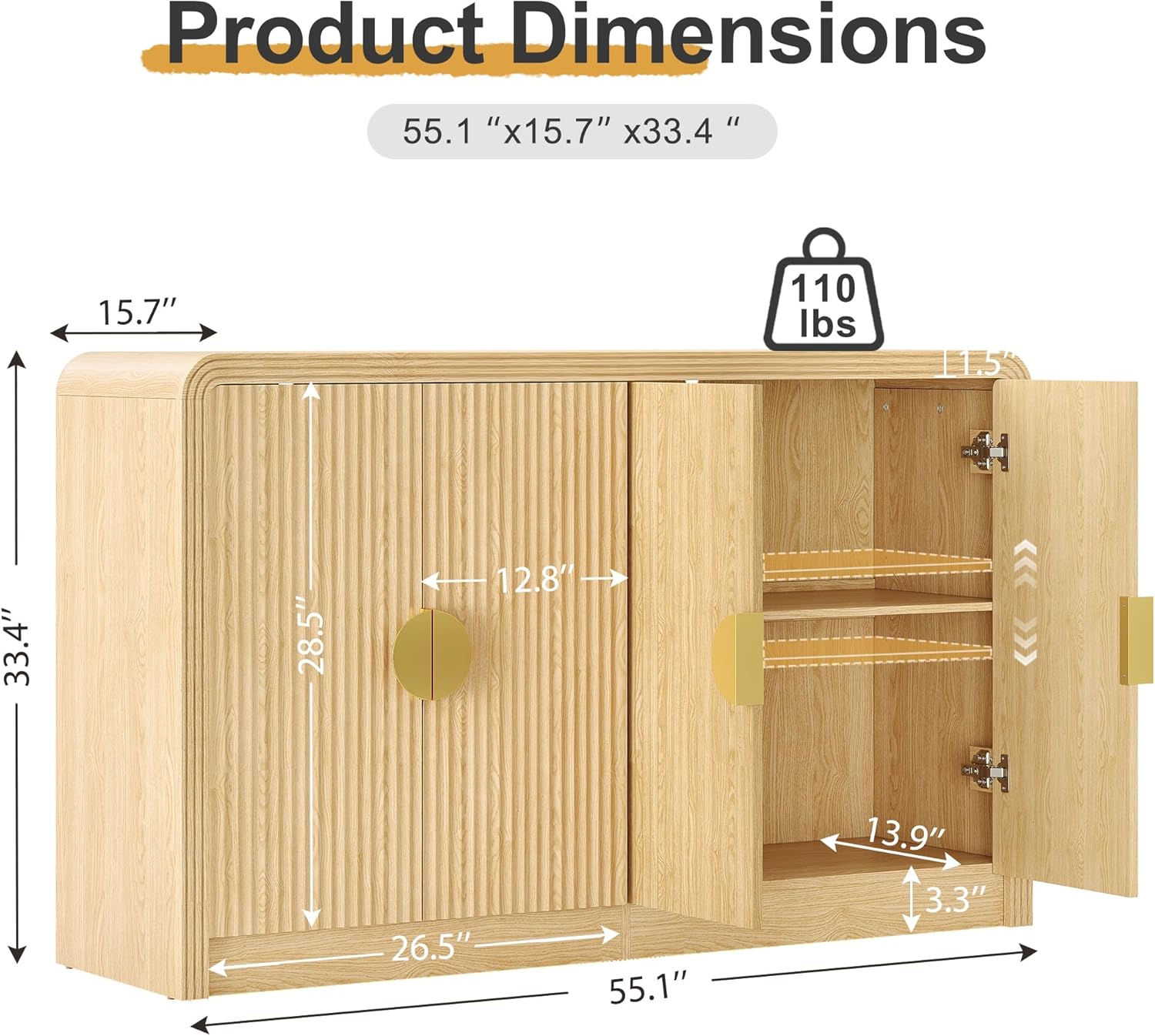
Image Description: This image illustrates the overall dimensions of the cabinet: 55" W x 15.7" D x 33.5" H, along with internal measurements for shelves and compartments.

Image Description: A detailed view highlighting the arc-shaped edges for safety and elegance, the D-shaped metal handles for easy use, and the premium fluted panel design on the doors.

Image Description: This image demonstrates the adjustable shelf feature, showing how shelves can be moved to different heights to accommodate various item sizes.

Image Description: A close-up showing the anti-tipping device securely installed, emphasizing its role in preventing the cabinet from tilting forward and ensuring stability.
5. Features and Usage (Operating)
The Decofy Sideboard Buffet Cabinet offers versatile storage solutions for various rooms and purposes:
- Multifunctional Design: Can be used as a kitchen cabinet, dining room buffet, living room media cabinet, entryway console, or coffee bar cabinet.
- Adjustable Shelves: Customize storage space with adjustable and removable dividers to organize dishes, books, collectibles, or daily sundries.
- Wavy Grain Doors: Features elegant wavy grain doors that soften the aesthetic and contribute to a mid-century modern style.
- Rounded Corners: Designed with rounded corners to enhance safety and prevent accidental bumps and injuries.
6. Maintenance
To ensure the longevity and appearance of your Decofy Sideboard Buffet Cabinet, follow these maintenance guidelines:
- Cleaning: Wipe surfaces with a soft, damp cloth. Avoid abrasive cleaners or harsh chemicals that may damage the finish.
- Spills: Clean spills immediately to prevent staining or water damage.
- Sunlight: Avoid prolonged exposure to direct sunlight to prevent fading or discoloration of the wood finish.
- Heat and Moisture: Keep the cabinet away from direct heat sources and excessive moisture. Use coasters under hot or wet items.
- Hardware: Periodically check all hardware (screws, hinges, handles) and tighten if necessary to maintain stability.
7. Troubleshooting
If you encounter any issues with your cabinet, refer to the following common troubleshooting tips:
- Wobbly Cabinet: Ensure all assembly screws are fully tightened. Check that the cabinet is on a level surface. Adjust leg levelers if applicable.
- Doors Not Aligning: Adjust the hinges on the doors. Most hinges allow for minor adjustments to align doors properly. Refer to the hinge manufacturer's instructions if specific adjustments are needed.
- Missing Parts: Double-check the packaging and all compartments. If parts are genuinely missing, contact Decofy customer support with your purchase details.
- Damage During Assembly: If a component is damaged during assembly, stop and contact customer support for replacement parts.
8. Specifications
| Feature | Detail |
|---|---|
| Brand | Decofy |
| Model Number | DC-CBG01 |
| Color | Natural Oak |
| Material | Engineered Wood |
| Product Dimensions (D x W x H) | 15.7"D x 55"W x 33.5"H |
| Item Weight | 95.5 Pounds |
| Weight Capacity Maximum | 110 Pounds |
| Number of Doors | 2 |
| Number of Shelves | 2 |
| Additional Features | Adjustable Shelf, Anti-Tipping, Arc Shaped Edge, Heavy Duty, Removable Shelf |
| Required Assembly | Yes |
| Installation Type | Freestanding |
9. Warranty and Support
Decofy products are manufactured with quality and care. This product comes with a standard manufacturer's warranty covering defects in materials and workmanship. For specific warranty details, claims, or technical support, please refer to the warranty card included in your package or contact Decofy customer service directly.
Please have your model number (DC-CBG01) and purchase information ready when contacting support.


