
1. Product Overview
This manual provides detailed instructions for the assembly, operation, and maintenance of your Loomie 5-Drawer Dresser. This versatile furniture piece features five spacious drawers, a built-in charging station, adjustable LED lighting, and convenient side storage racks, designed to enhance organization and functionality in your living space.
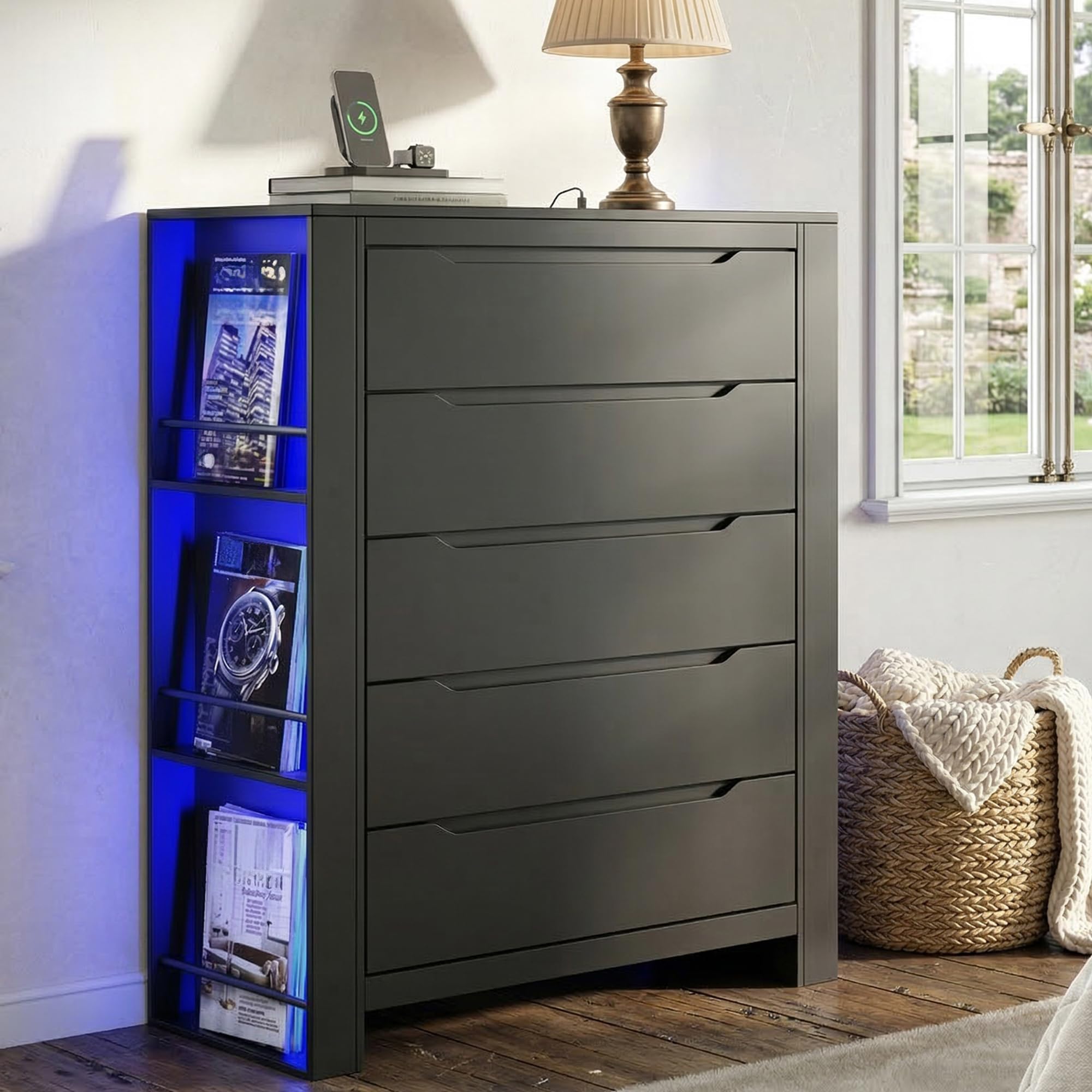
Image 1.1: The Loomie 5-Drawer Dresser, featuring its sleek design and integrated features.
2. Safety Information
- Anti-Tipping Device: Always install the included anti-tipping device to prevent accidental tipping, especially in households with children or pets. Securely fasten the dresser to the wall as instructed.
- Weight Distribution: Distribute weight evenly across drawers and shelves. Avoid placing excessively heavy items on the top surface or in a single drawer.
- Electrical Safety: The built-in charging station is for indoor use only. Do not expose it to moisture. Ensure the power cord is not pinched or damaged.
- Assembly: Two-person assembly is recommended for safety and ease of installation.

Image 2.1: Illustration of the anti-tipping design, showing proper installation to secure the dresser to a wall.
3. Package Contents
Before beginning assembly, verify that all components listed in the packing list are present and undamaged. If any parts are missing or damaged, please contact customer support.
Note: The exact number of screws and small parts may vary slightly. Refer to the detailed assembly video for visual guidance on parts and their usage.
4. Assembly Instructions
Follow these steps carefully for proper assembly. An electric screwdriver is recommended to save time and effort. Lay out all numbered boards before starting.
4.1. Drawer Assembly
- Assemble the drawer sides (parts 20, 21, 22, 23) using screws (part F).
- Slide the drawer bottom (part 24) into the grooves.
- Attach the drawer front (part 19) using screws (part A) and cam locks (part B).
- Install the drawer slides (DL, DR) onto the assembled drawer using screws (part N). Repeat for all five drawers.
4.2. Frame Assembly
- Attach the side support bars (parts 15, 16, 17) to the bottom panel (part 9) using screws (part B) and dowels (part 18).
- Secure the top panel (part 8) to the side support bars using screws (part B).
- Attach the main side panels (parts 2, 3) to the base structure using screws (part A) and dowels (part D).
- Install the internal support bars (parts 4, 5) using screws (part B).
- Attach the back panels (parts 13, 14) to the frame using screws (part D).
- Secure the top board (part 1) to the main frame using screws (part A) and dowels (part D).
4.3. LED Light and Charging Station Installation
- Carefully route the LED light strips (part K) along the designated channels on the side storage racks.
- Secure the LED strips using the provided clips (parts M, J).
- Insert the charging station unit (part I) into the pre-cut opening on the top surface of the dresser. Secure it with screws (part J).
4.4. Final Steps
- Slide the assembled drawers into their respective slots.
- Install the anti-tipping device to the back of the dresser and secure it to a wall stud.
Video 4.1: Official installation video for the Tall Dresser, demonstrating step-by-step assembly.
Video 4.2: Official installation video focusing on the 5-drawers assembly process.
5. Operating Instructions
5.1. Using the Charging Station
The built-in charging station is located on the top surface of the dresser. It includes two AC outlets (125V/12A) and two USB ports (5V/2A). Plug the dresser's 4.9-foot power cord into a wall outlet. You can then connect your laptops, smartphones, tablets, and other small devices directly to the charging station.

Image 5.1: Close-up of the built-in charging station on the dresser's top surface.
5.2. Controlling the LED Lights
The dresser features two multi-color RGB LED light strips. These lights can be controlled via a dedicated mobile application. Download the app (details typically found in a separate leaflet or QR code on the product packaging) to adjust colors, brightness, and dynamic modes to suit your preference.

Image 5.2: The dresser illuminated by its adjustable LED light strip, demonstrating app control capabilities.
5.3. Drawer Usage
The dresser is equipped with five drawers featuring integrated cut-out handles and smooth metal slides for effortless opening and closing. The side storage racks provide additional open shelving for books, magazines, or decorative items.

Image 5.3: Details of the 3-tier side storage rack, handless drawer design, and smooth metal drawer slides.
6. Maintenance
- Cleaning: The dresser is crafted from durable MDF with a finely polished surface. To clean, simply wipe with a damp cloth. Avoid harsh chemicals or abrasive cleaners.
- Dusting: Regularly dust the surfaces with a soft, dry cloth to prevent buildup.
- Spills: Wipe up spills immediately to prevent staining or damage to the engineered wood.
- Drawer Slides: Periodically check drawer slides for smooth operation. If needed, a small amount of silicone lubricant can be applied.
7. Troubleshooting
- Drawers not sliding smoothly: Ensure the metal slides are correctly installed and aligned. Check for any obstructions in the tracks. A review mentioned issues with hole marks for drawer rails; double-check alignment during assembly.
- LED lights not working: Verify that the power cord for the dresser is securely plugged into a working outlet. Check the connection of the LED strips to the power source. Ensure the control app is correctly paired and functioning.
- Charging station not providing power: Confirm the dresser's power cord is plugged in. Test the outlets/USB ports with different devices to rule out device-specific issues.
- Dresser feels unstable: Re-check all screw connections to ensure they are tight. Confirm the anti-tipping device is properly installed and secured to a wall stud.
8. Specifications
| Brand | Loomie |
| Model Name | 101598A2 |
| Material | Engineered Wood |
| Product Dimensions (D x W x H) | 15.75" x 43.58" x 31.5" (40cm x 110cm x 80cm) |
| Number of Drawers | 5 |
| Item Weight | 84.88 Pounds |
| Charging Station | 2 AC Outlets (125V/12A), 2 USB Ports (5V/2A) |
| LED Lights | Multi-color RGB, App Control |

Image 8.1: Detailed product size and drawer dimensions.
9. Warranty and Support
For warranty information or technical support, please refer to the contact details provided with your purchase or visit the official Loomie website. Keep your purchase receipt for warranty claims.