
1. Product Overview
The kzzutzs XT-606MAX Drone Mechanical Arm is engineered for enhanced drone functionality, enabling aerial delivery, picking, and other specialized tasks. Constructed from high-strength, lightweight material, this arm ensures flexible rotation and stable clamping performance without significantly impacting drone flight balance.
Key features include:
- High-strength durable structure: Provides flexible rotation and stable, reliable grasping performance.
- Lightweight design: Minimizes additional load, preserving drone flight balance.
- Easy installation and control: Offers wide compatibility with various drone payload systems.
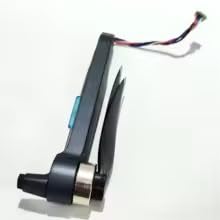
Figure 1.1: kzzutzs XT-606MAX Drone Mechanical Arm. This image shows the compact design of the mechanical arm, highlighting its attachment points and gripper mechanism.
2. Setup Instructions
Follow these steps to properly attach the mechanical arm to your compatible drone:
- Prepare the Drone: Ensure your drone is powered off and the battery is disconnected before beginning installation.
- Identify Mounting Points: Locate the designated mounting points on your drone for external accessories. Refer to your drone's specific user manual for guidance.
- Attach the Arm: Carefully align the mechanical arm with the drone's mounting points. Use the provided screws or quick-release mechanisms to secure the arm firmly. Do not overtighten.
- Connect Cables: Connect any necessary control or power cables from the mechanical arm to the drone's accessory ports. Ensure connections are secure and correctly oriented.
- Perform Pre-Flight Check: After installation, gently test the arm's movement by hand to ensure it is securely attached and moves freely without obstruction.
3. Operating the Mechanical Arm
The XT-606MAX mechanical arm is controlled via your drone's remote control or companion application. Specific control methods may vary depending on your drone model.
- Power On: Power on your drone and remote control as per your drone's standard operating procedures.
- Connect to Drone: Ensure the remote control or app is successfully connected to the drone.
- Activate Arm Control: Access the drone's accessory control interface on your remote or app. This may be a dedicated button, a menu option, or a specific joystick combination.
- Test Movement: Before flight, gently test the arm's full range of motion and gripper function while the drone is on the ground. Observe for any abnormal sounds or movements.
- In-Flight Operation: During flight, use the designated controls to manipulate the arm for tasks such as picking up or dropping objects. Operate smoothly to maintain drone stability.
4. Maintenance and Care
Proper maintenance ensures the longevity and reliable performance of your mechanical arm.
- Cleaning: Regularly clean the arm's exterior with a soft, dry cloth. Avoid using harsh chemicals or abrasive materials that could damage the finish or internal components.
- Inspection: Periodically inspect all moving parts, joints, and cable connections for wear, damage, or looseness. Tighten any loose screws.
- Storage: When not in use, store the mechanical arm in a clean, dry environment, away from direct sunlight and extreme temperatures. If detached from the drone, store it in its original packaging or a protective case.
- Avoid Overloading: Do not attempt to lift objects heavier than the arm's specified maximum payload capacity.
5. Troubleshooting Guide
If you encounter issues with your XT-606MAX mechanical arm, refer to the following common problems and solutions:
| Problem | Possible Cause | Solution |
|---|---|---|
| Arm not responding to controls | Loose cable connection; Arm not activated; Drone/remote control issue. | Check all cable connections between the arm and the drone. Ensure the arm control function is activated on your remote/app. Restart the drone and remote control. |
| Unstable grip or dropping objects | Gripper mechanism obstruction; Object too heavy; Damaged gripper. | Inspect the gripper for any debris or obstructions. Ensure the object's weight is within the arm's capacity. If damaged, contact support for replacement parts. |
| Arm movement is jerky or restricted | Obstruction in arm's path; Loose mounting; Internal mechanism issue. | Check for any physical obstructions preventing smooth movement. Verify the arm is securely mounted to the drone. If the issue persists, discontinue use and seek professional assistance. |
6. Product Specifications
The following are the technical specifications for the kzzutzs XT-606MAX Drone Mechanical Arm:
- Brand: kzzutzs
- Model Name: kzzutzs (Associated with XT-606MAX Drone)
- Color: One Color
- Material: Acrylic
- Number of Items: 1
- Unit Count: 1 Count
- ASIN: B0GTV91PC1
7. Warranty and Customer Support
Specific warranty information for the kzzutzs XT-606MAX Drone Mechanical Arm is not provided in this manual. For details regarding warranty coverage, returns, or technical support, please contact the manufacturer, kzzutzs, or your point of purchase directly.
When contacting support, please have your product model (XT-606MAX) and ASIN (B0GTV91PC1) available for quicker assistance.