
1. Introduction
This manual provides essential information for the safe and efficient operation, installation, and maintenance of your VEVOR Commercial Ice Maker Machine, Model 300LBS/24H-GS. Please read all instructions carefully before use and retain this manual for future reference.
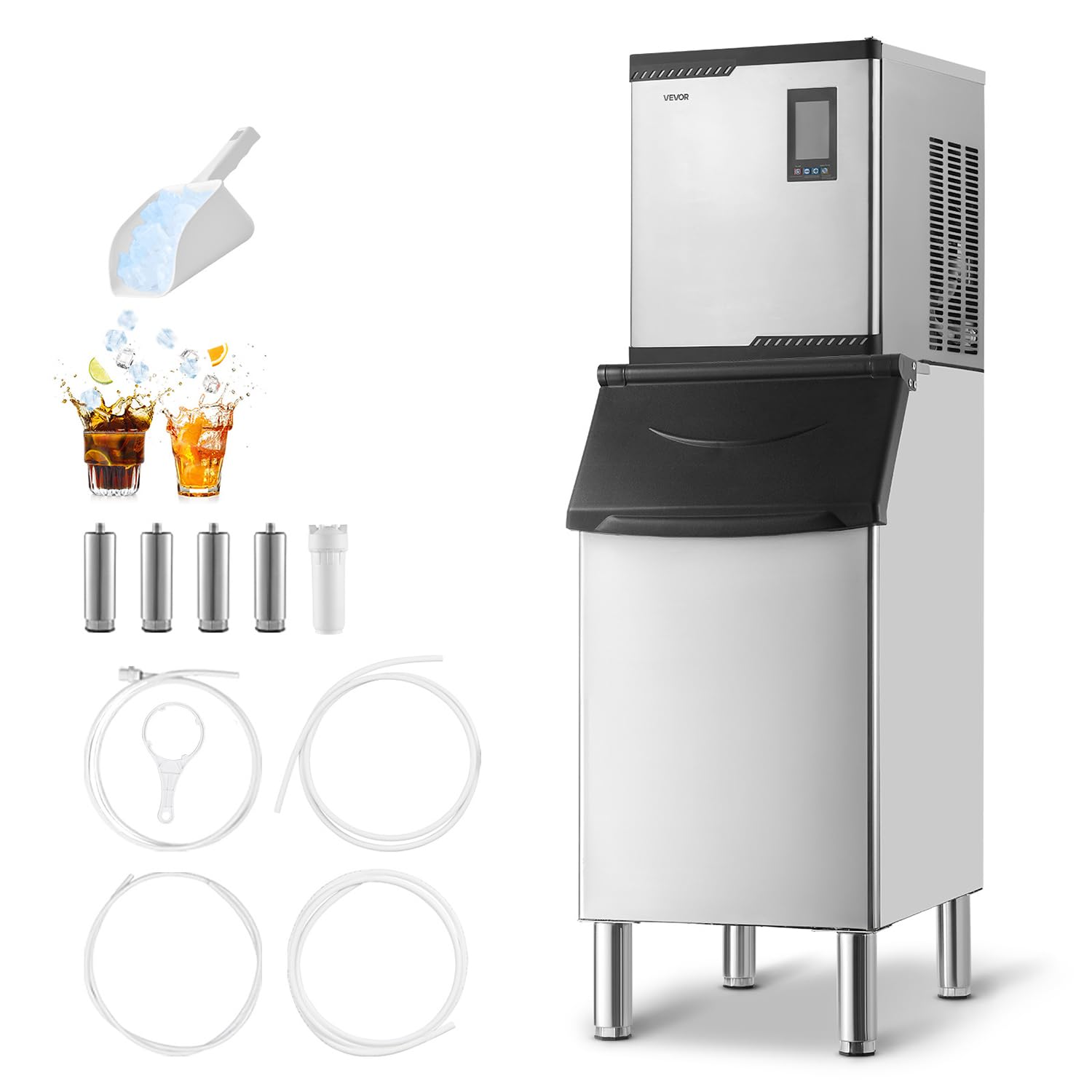
Image 1.1: VEVOR Commercial Ice Maker Machine 300LBS/24H-GS.
2. Safety Instructions
To prevent injury to users or damage to the appliance, always observe the following safety precautions:
- Ensure the unit is properly grounded before operation.
- Do not operate the machine with a damaged power cord or plug.
- Keep hands and foreign objects out of the ice storage bin during operation.
- Do not use flammable sprays or liquids near the ice maker.
- Disconnect power before performing any maintenance or cleaning.
- This appliance is intended for commercial use only.
3. Product Components
The VEVOR Commercial Ice Maker Machine 300LBS/24H-GS includes the following main components and accessories:
- Head Unit (Ice Making Mechanism)
- Ice Storage Bin (300 lbs capacity)
- Water Inlet Hose (2 m)
- Water Outlet Hose (2 m)
- Ice Scoop
- Water Filter
- Adjustable Anti-slip Feet

Image 3.1: Components included in the package, showing the head unit, ice storage bin, hoses, and accessories.
4. Setup and Installation
Follow these steps for proper installation of your ice maker:
- Install Ice Bin Feet: Attach the adjustable anti-slip feet to the bottom of the ice storage bin. Adjust them to ensure the unit is level and stable.
- Connect Drainage Pipe: Connect the drainage pipe to the ice storage bin.
- Place Head Unit: Carefully place the ice maker head unit onto the ice storage bin.
- Connect Water Inlet: Connect the water inlet hose to the designated 'Water Intake' port on the ice maker and to a potable water supply. It is recommended to use the included water filter.
- Connect Water Outlet: Connect the water outlet hose to the 'Water Outlet' port and route it to a suitable drain.
- Install Buffer Door: Securely install the flip-top buffer door onto the ice storage bin opening.

Image 4.1: Visual guide for the 3-step installation process, including connecting pipes and placing the head unit.

Image 4.2: Detail of the adjustable anti-slip feet, showing their function for stability.
Video 4.1: An official VEVOR video demonstrating the installation process and key features of the ice maker.
5. Operating Instructions
The VEVOR Commercial Ice Maker features an intelligent touchscreen for easy control.
5.1 Initial Startup
- Ensure all connections (water inlet, outlet, power) are secure.
- Plug the unit into a grounded power outlet.
- Press the 'ON/OFF' button on the touchscreen to power on the machine.
5.2 Ice Making Process
The machine will automatically begin the ice-making cycle. Ice production can occur within 12-15 minutes per cycle.

Image 5.1: Illustration of the rapid ice-making process, producing ice within 15 minutes.
5.3 Adjustable Ice Thickness
Use the intelligent touchscreen to adjust the ice thickness according to your needs. Options typically include thin, medium, and thick ice, with varying production times.

Image 5.2: Examples of adjustable ice thickness (thin, medium, thick) and their applications.
5.4 Scheduled Ice Making
The touchscreen allows you to set a timer for scheduled ice production, optimizing ice availability for peak demand periods.

Image 5.3: Visual representation of the scheduled ice making function, allowing users to set optimal production times.
5.5 Intelligent Display
The 5.5-inch intelligent display provides real-time status updates, including ice tray temperature, condenser temperature, ice thickness settings, and error warnings.

Image 5.4: Close-up of the intelligent touchscreen display, showing various indicators and control options.
6. Maintenance
Regular maintenance ensures optimal performance and longevity of your ice maker.
6.1 Automatic Self-Cleaning
The machine features a one-touch self-cleaning function. Activate this function regularly to maintain a clean and healthy ice-making environment.

Image 6.1: Diagram illustrating the clean and healthy ice-making environment facilitated by the self-cleaning function and water filter.
6.2 Recommended Cleaning Schedule
- Water Supply System: Clean with citric acid every 10-15 days.
- Pump, Pipe, Evaporator, Water Level Sensor: Clean every 2 months.
6.3 Ice Storage Bin Insulation
The ice storage bin features insulation cotton and a galvanized sheet casing, providing 6-8 hours of insulation to keep ice cubes cool even during power outages.

Image 6.2: The 300 lbs ice storage bin, designed for storing large quantities of ice for immediate use.

Image 6.3: Cross-section view highlighting the 8-hour insulation feature with integrated cyclopentane foaming and heavy-duty stainless steel shell.
7. Troubleshooting
Refer to the following table for common issues and their solutions:
| Problem | Possible Cause | Solution |
|---|---|---|
| No ice production | No water supply, power off, clogged filter. | Check water connection, ensure power is on, clean/replace water filter. |
| Ice cubes are too thin/thick | Incorrect ice thickness setting. | Adjust ice thickness via the touchscreen control panel. |
| Machine not cleaning | Self-cleaning function not activated. | Press the 'CLEAN' button on the touchscreen to initiate the self-cleaning cycle. |
| Error message on display | Specific sensor issue (e.g., water lack, high temperature). | Refer to the display for the specific error code and consult the full manual or VEVOR support. |
8. Specifications
| Feature | Detail |
|---|---|
| Brand | VEVOR |
| Model Name | Commercial Ice Maker Machine |
| Product Dimensions | 30.7"D x 20.47"W x 65.74"H |
| Ice Production Capacity | 300 LBS/24H |
| Ice Storage Capacity | 300 LBS |
| Voltage | 110 Volts |
| Item Weight | 141.75 Pounds |
| Ice Tray Quantity | 132 pcs |
| Main Material | Stainless Steel + PP |
9. Warranty and Support
VEVOR products are designed for durability and performance. For warranty information, product registration, or technical support, please refer to the official VEVOR website or contact their customer service directly. Keep your purchase receipt as proof of purchase for any warranty claims.
Customer Service: For assistance, please visit the VEVOR official website or contact their support team.