TRN Caravel Hybrid In-Ear Monitor Earphones User Manual
Model: Caravel
Introduction
Thank you for choosing the TRN Caravel Hybrid In-Ear Monitor Earphones. This manual provides essential information for the proper setup, operation, maintenance, and troubleshooting of your earphones to ensure optimal performance and longevity.
The TRN Caravel is an original product from the TRN brand. Products purchased from an official TRN store are covered by a 12-month warranty for repair support.
Key Features and Technology
The TRN Caravel earphones integrate advanced audio technologies for a high-fidelity listening experience.
Hybrid Driver System
The Caravel utilizes a dual acoustic matrix analysis system, combining a 10mm glass dome dynamic driver and a 6mm planar diaphragm unit. This design aims to deliver a balanced frequency response and detailed sound reproduction across the audio spectrum.
Image: An exploded view illustrating the internal components and dual driver configuration of the TRN Caravel earphones.
10mm Dual Magnetic Circuit Glass Diaphragm Dynamic Driver
The 10mm dynamic driver features a dual magnetic circuit and a glass dome diaphragm with a PU surround. The glass diaphragm's rigidity and lightweight properties contribute to low distortion and precise sound reproduction, particularly in the bass frequencies. This design helps suppress unwanted vibrations, resulting in a balanced sound without harshness.
Image: A detailed view of the 10mm dual magnetic circuit dynamic driver with its glass diaphragm.
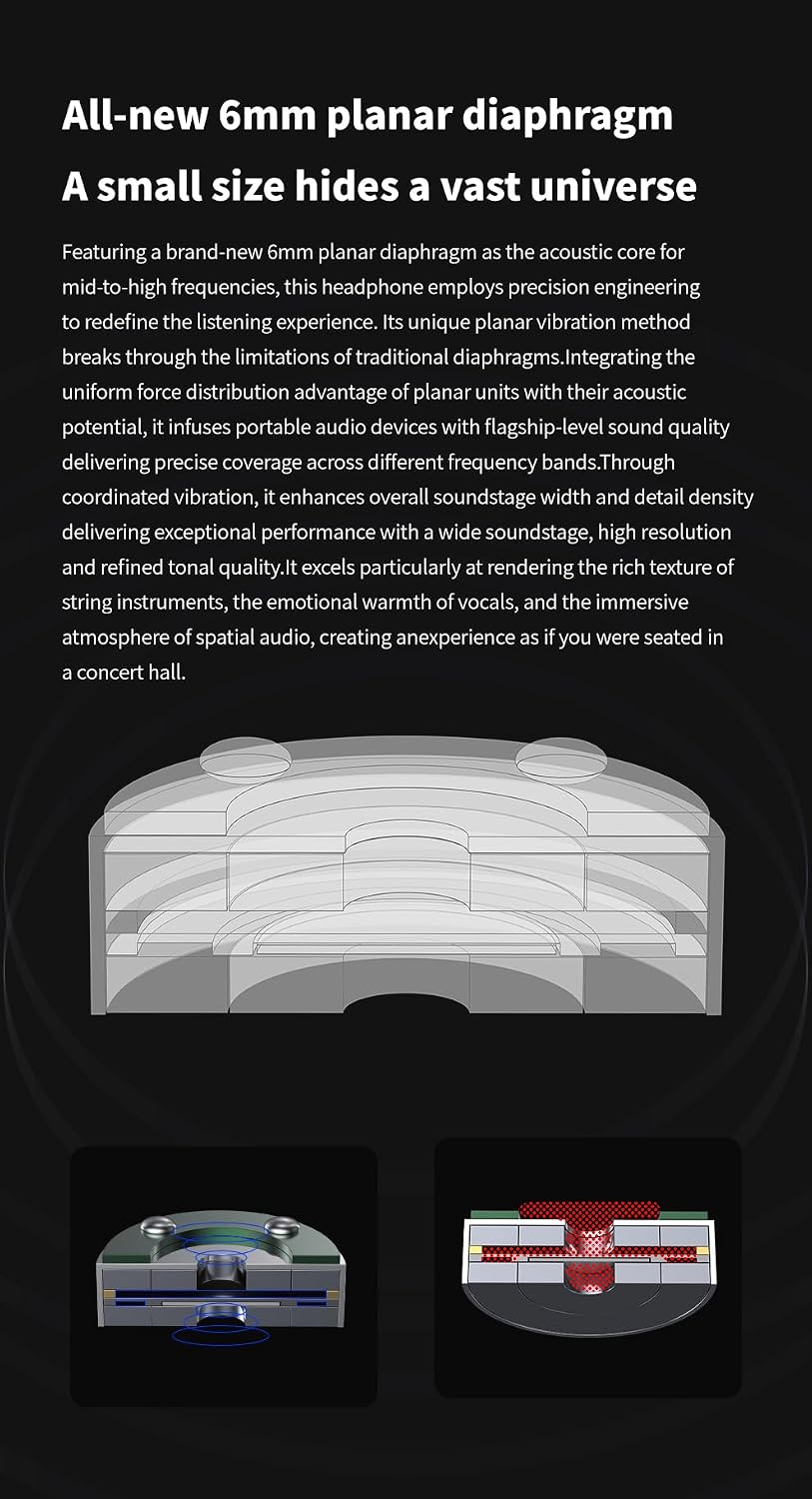
6mm Planar Magnetic Driver
The 6mm planar magnetic driver is specifically designed for accurate reproduction of mid-to-high frequencies. This driver type offers uniform force distribution, contributing to a wide soundstage, high resolution, and detailed tonal quality.
Image: A diagram illustrating the structure of the 6mm planar diaphragm, highlighting its compact size.
Professional DAC Digital Decoding Chip (Type-C Version)
The optional Type-C plug features a built-in high-performance professional DAC (Digital-to-Analog Converter) digital decoding chip. This DAC enhances audio quality by processing digital signals with greater precision, delivering a richer and more vivid sound experience compared to standard analog connections.
Setup
1. Attaching the Cable
The TRN Caravel uses a 2-pin detachable cable. Identify the left (L) and right (R) earpieces and cable connectors. Align the pins on the cable with the sockets on the earpieces and gently push until they are securely connected. Ensure the cable is oriented correctly to avoid damage.
Image: TRN Caravel earphones connected to the 2-pin detachable cable, illustrating the connection point.
2. Selecting and Installing Ear Tips
The package includes 12 pairs of ear tips in various styles and sizes (S/M/L) to ensure a comfortable fit and optimal sound isolation. Experiment with different ear tip sizes and materials to find the best fit for your ears. A proper seal is crucial for bass response and overall sound quality.
Gently remove the pre-installed ear tips by pulling them off the nozzle.
Select your preferred ear tip size and material.
Push the new ear tip onto the earphone nozzle until it is firmly seated.
Image: Included accessories for TRN Caravel, showing the variety of ear tips available for customization.
3. Attaching the Interchangeable Plug
The TRN Caravel cable features interchangeable plugs (3.5mm, 4.4mm, and Type-C) for compatibility with various devices. To change the plug:
Hold the cable connector firmly.
Gently pull the currently attached plug straight out. Do not twist.
Align the desired plug (3.5mm, 4.4mm, or Type-C) with the cable connector and push it in until it clicks securely into place.
Ensure the plug is fully inserted to prevent intermittent audio or connection issues.
4. Wearing the Earphones
The TRN Caravel earphones are designed to be worn with the cable over the ear (ear hook style) for a secure and comfortable fit. This also helps reduce microphonics (cable noise).
Insert the earpiece into your ear canal.
Loop the cable over the top of your ear, guiding it downwards behind your ear.
Adjust the earpiece and cable for a snug and comfortable fit.
Operating Instructions
1. Connecting to an Audio Source
Once the cable and desired plug are attached, connect the plug to the appropriate audio output port of your device (e.g., smartphone, digital audio player, computer).
2. Volume Control
Adjust the volume directly from your connected audio source. Start with a low volume and gradually increase it to a comfortable listening level to prevent hearing damage.
Maintenance
1. Cleaning the Earphones
Earpieces: Gently wipe the earpieces with a soft, dry, lint-free cloth. Do not use harsh chemicals or abrasive materials.
Ear Tips: Remove ear tips and clean them with a mild soap solution and water. Rinse thoroughly and allow them to dry completely before reattaching.
Nozzles: Use a small, soft brush or a cotton swab to carefully remove any earwax or debris from the earphone nozzles. Ensure no moisture enters the earpiece.
2. Cable Care
Avoid sharp bends or excessive pulling on the cable.
When disconnecting the cable or plugs, always grasp the connector housing, not the cable itself.
Store the cable neatly coiled to prevent tangling and damage.
3. Storage
When not in use, store your TRN Caravel earphones in the provided storage pouch to protect them from dust, dirt, and physical damage.
Troubleshooting
Problem
Possible Cause
Solution
No sound or intermittent sound
Loose cable connection
Incorrect plug attached
Audio source volume too low or muted
Faulty audio source
Ensure 2-pin connectors are fully inserted.
Verify the correct interchangeable plug (3.5mm, 4.4mm, or Type-C) is securely attached and compatible with your device.
Increase volume on your audio source and check if it's muted.
Note: Actual product specifications may vary. All features, functionality, and other product specifications are subject to change without notice or obligation.
Warranty and Support
The TRN Caravel earphones come with a 12-month product warranty (repair support) from the date of purchase when bought from an official TRN store.
If you encounter any issues or have questions regarding your product, please contact the seller or TRN customer support. Provide your purchase details for efficient assistance.
Ask about setup, troubleshooting, compatibility, parts, safety, or missing instructions. Manuals+ will review the question and use this page’s manual context to help answer it.