
Introduction
This manual provides essential instructions for setting up, operating, and maintaining your fixwink 1.83" Smart Watch Fitness Tracker. Please read this guide thoroughly before use to ensure proper functionality and to maximize your device's potential.
What's in the Box
Verify that all items are present in your package:
- fixwink 1.83" Smart Watch
- Charging Cable
- User Manual (this document)
Setup
1. Charging the Device
Before first use, fully charge your smartwatch. Connect the provided charging cable to the charging contacts on the back of the watch and to a USB power adapter (not included).

Image: The smartwatch displaying a full battery charge, illustrating the charging process.
2. App Installation
Scan the QR code in the quick start guide or search for the companion app (e.g., 'FitCloudPro' or similar, check packaging for exact name) on your smartphone's app store (Apple App Store for iOS, Google Play Store for Android).
3. Device Pairing
Open the installed app on your smartphone. Follow the on-screen instructions to create an account and pair your smartwatch via Bluetooth. Ensure Bluetooth is enabled on your phone.

Image: The smartwatch displaying an incoming call, demonstrating its Bluetooth call functionality and compatibility with both iPhone and Android devices.
Operating Instructions
Basic Navigation
- Swipe Up/Down: Scroll through menus and notifications.
- Swipe Left/Right: Access quick widgets or different functions.
- Tap: Select an item or confirm an action.
- Side Button: Press to return to the home screen or wake the device.
Bluetooth Calls
Once paired, you can make and answer calls directly from your wrist. Ensure the watch is connected to your phone via Bluetooth.
Smart Notifications
Receive notifications for calls, texts, and various apps directly on your smartwatch. Manage notification settings through the companion app.
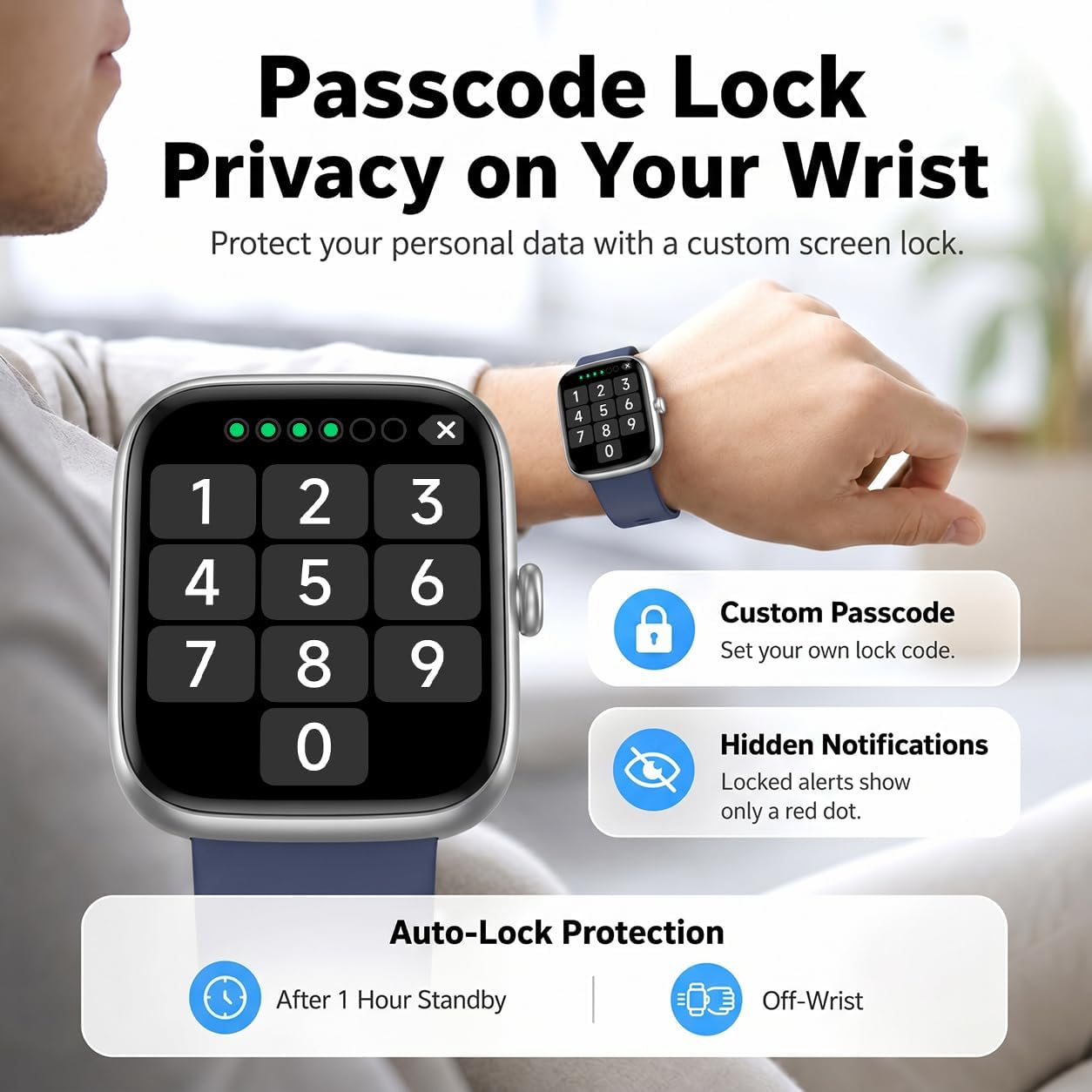
Image: The smartwatch showing various notifications and reminders, including messages from social media and a hydration alert.
Health Monitoring
The smartwatch provides comprehensive health tracking features.
Heart Rate Monitoring
Continuously monitors your heart rate throughout the day. View real-time data on the watch or detailed trends in the app.
Blood Oxygen (SpO2)
Measures your blood oxygen saturation levels. Regular monitoring can provide insights into your respiratory health.
Stress Level Tracking
Assesses your stress levels and provides insights into your mental well-being.
Sleep Tracking
Monitors your sleep stages (Awake, REM, Light Sleep, Deep Sleep) and provides a sleep quality analysis to help you develop healthier sleep habits.

Image: A visual representation of the smartwatch's health monitoring capabilities, showing SpO2, stress, and heart rate readings on both the watch and a connected smartphone app.

Image: The smartwatch monitoring sleep, displaying heart rate, stress, and respiratory quality, with a detailed sleep analysis graph.
Fitness Tracking & Sports Modes
The smartwatch is equipped with over 120 sports modes to track your physical activities.
Activity Tracking
Records steps, calories burned, distance covered, and active time throughout your day.
120+ Sports Modes
Select from a wide range of activities such as walking, running, cycling, and more. The watch will record specific metrics for each sport, helping you monitor your performance and progress.

Image: Individuals engaged in exercise, with the smartwatch showing real-time fitness data such as training time, calories, heart rate, and steps.
Customization & Smart Tools
Watch Faces
Choose from over 110 exquisite watch faces or upload your own photos to create a personalized look for your smartwatch.
Passcode Lock
Enhance your privacy by setting a custom screen lock passcode. This feature also allows for hidden notifications, showing only a red dot when locked.
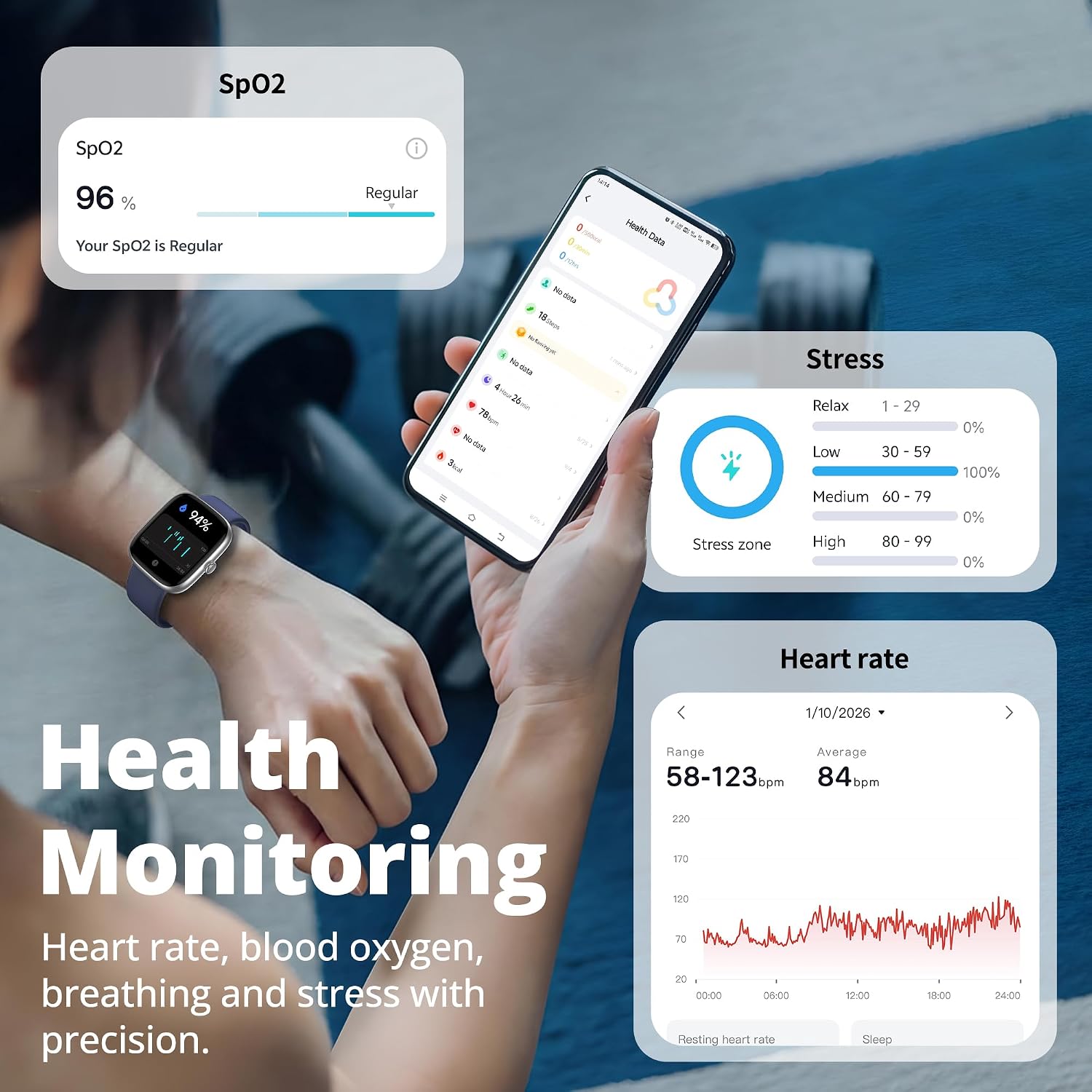
Image: The smartwatch screen showing a passcode entry interface, highlighting privacy features like custom passcodes and hidden notifications.
Integrated Smart Tools
Access various convenient tools directly from your wrist:
- Alarm Clock: Set alarms for reminders.
- Breathing Exercises: Guided breathing for relaxation.
- Find Phone: Locate your paired smartphone.
- Flashlight: Use the screen as a light source.
- Weather: View current weather conditions.

Image: A display of the smartwatch's smart tools, including weather updates, phone finder, and media controls.
Battery Life & Water Resistance
Battery Performance
The smartwatch offers up to 7 days of typical usage and approximately 30 days on standby. A full charge takes about 2 hours.
IP67 Water Resistance
The device is IP67 rated, meaning it is resistant to splashes, rain, and sweat. It can withstand hand washing but is not suitable for swimming or showering with hot water.
Image: The smartwatch under running water, illustrating its water resistance, with battery life details.
Maintenance
To ensure the longevity and optimal performance of your smartwatch, follow these maintenance guidelines:
- Cleaning: Regularly wipe the watch screen and strap with a soft, dry cloth. If necessary, use a slightly damp cloth with mild soap, then dry thoroughly.
- Avoid Chemicals: Do not use harsh chemicals, cleaning solvents, or strong detergents, as these can damage the watch's finish and seals.
- Charging Contacts: Keep the charging contacts on the back of the watch clean and dry to ensure efficient charging.
- Storage: Store the watch in a cool, dry place when not in use. Avoid extreme temperatures.
Troubleshooting
If you encounter issues with your smartwatch, refer to the following common solutions:
| Problem | Solution |
|---|---|
| Watch does not turn on | Ensure the watch is fully charged. Connect it to the charging cable and a power source for at least 30 minutes. |
| Cannot pair with smartphone | 1. Ensure Bluetooth is enabled on your phone. 2. Make sure the watch is within range of your phone. 3. Restart both the watch and your phone. 4. Try unpairing and re-pairing through the app. |
| Notifications not received | 1. Check notification permissions in your phone's settings for the companion app. 2. Ensure the app is running in the background. 3. Verify notification settings within the smartwatch app. |
| Inaccurate health data | Ensure the watch is worn snugly on your wrist, about one finger's width above the wrist bone. Clean the sensor on the back of the watch. |
| Short battery life | Reduce screen brightness, disable continuous heart rate monitoring if not needed, and limit excessive notifications. Ensure background app usage is optimized on your phone. |
Specifications
| Feature | Detail |
|---|---|
| Brand | fixwink |
| Model | B0GTT15P4F |
| Screen Size | 1.83 inches |
| Operating System | RTOS |
| Connectivity Technology | Bluetooth |
| Special Features | Activity Tracker, Bluetooth Calls, Health Monitoring (Heart Rate, SpO2, Stress, Sleep) |
| Battery Cell Composition | Lithium Polymer |
| GPS | GPS Via Smartphone |
| Water Resistance | IP67 |
| Human Interface Input | Touchscreen |
Warranty Information
This fixwink Smart Watch comes with a 1-year warranty from the date of purchase. The warranty covers manufacturing defects and malfunctions under normal use. It does not cover damage caused by misuse, accidents, unauthorized modifications, or failure to follow the instructions in this manual.
Please retain your proof of purchase for warranty claims.
Support
For further assistance, technical support, or warranty inquiries, please refer to the contact information provided on the product packaging or the official fixwink website. You may also consult the FAQ section within the companion app for common questions.
Online Resources: Visit the official fixwink website for updated manuals, software, and support resources.