
1. Introduction
This manual provides detailed instructions for the installation, operation, and maintenance of your KSPIV 12.1 Inch T-Style Android Car Stereo Head Unit, Model KSP-F632. This unit is specifically designed for Ford Mustang models from 2010 to 2014 (GT, Shelby GT500, and V6 variants). It integrates advanced features such as Wireless CarPlay, Android Auto, A/C display, and touchscreen climate control, enhancing your vehicle's infotainment system.
Please read this manual thoroughly before installation and use to ensure proper function and to prevent damage.
2. Safety Information
- Professional Installation Recommended: Due to the complexity of vehicle electronics, professional installation is highly recommended to avoid damage to the unit or your vehicle.
- Disconnect Battery: Always disconnect the vehicle's battery before beginning any electrical installation to prevent short circuits and electrical damage.
- Wiring: Ensure all wiring connections are secure and properly insulated to prevent electrical hazards.
- Operating Temperature: Do not expose the unit to extreme temperatures or direct sunlight for prolonged periods.
- Driving Safety: Do not operate the unit's advanced features or watch videos while driving. Always prioritize road safety.
- Cleaning: Use a soft, dry cloth for cleaning the screen. Avoid abrasive cleaners or solvents.
3. Package Contents
Verify that all items listed below are included in your package:
- 12.1 Inch Car Radio Head Unit
- Power Cable
- USB Cable
- Audio Adapter Cable
- GPS Antenna Cable
- OBD Adapter
- RCA Cable
- Microphone
- Installation Tool (Crowbar)
- User Manual (This document)

Figure 1: Complete Accessories Included
4. Product Overview
The KSPIV KSP-F632 is a 12.1-inch T-style Android car stereo head unit designed to seamlessly integrate into Ford Mustang models from 2010-2014. It offers a significant upgrade to your vehicle's infotainment system with a large vertical touchscreen and advanced connectivity features.
Key Features:
- 12.1-Inch Vertical Touchscreen: Provides a larger display for navigation, media, and applications.
- Wireless CarPlay & Android Auto: Seamless smartphone integration for navigation, calls, messages, and music.
- A/C Display & Touchscreen Climate Control: View and adjust climate settings directly on the screen.
- Retains OEM Features: Supports existing steering wheel controls and backup camera input.
- Vehicle Information Display: Shows door status, speed, and mileage information.
- Built-in GPS Navigation: For reliable route guidance.
- High Performance: Equipped with 4GB RAM and 64GB ROM for smooth operation.
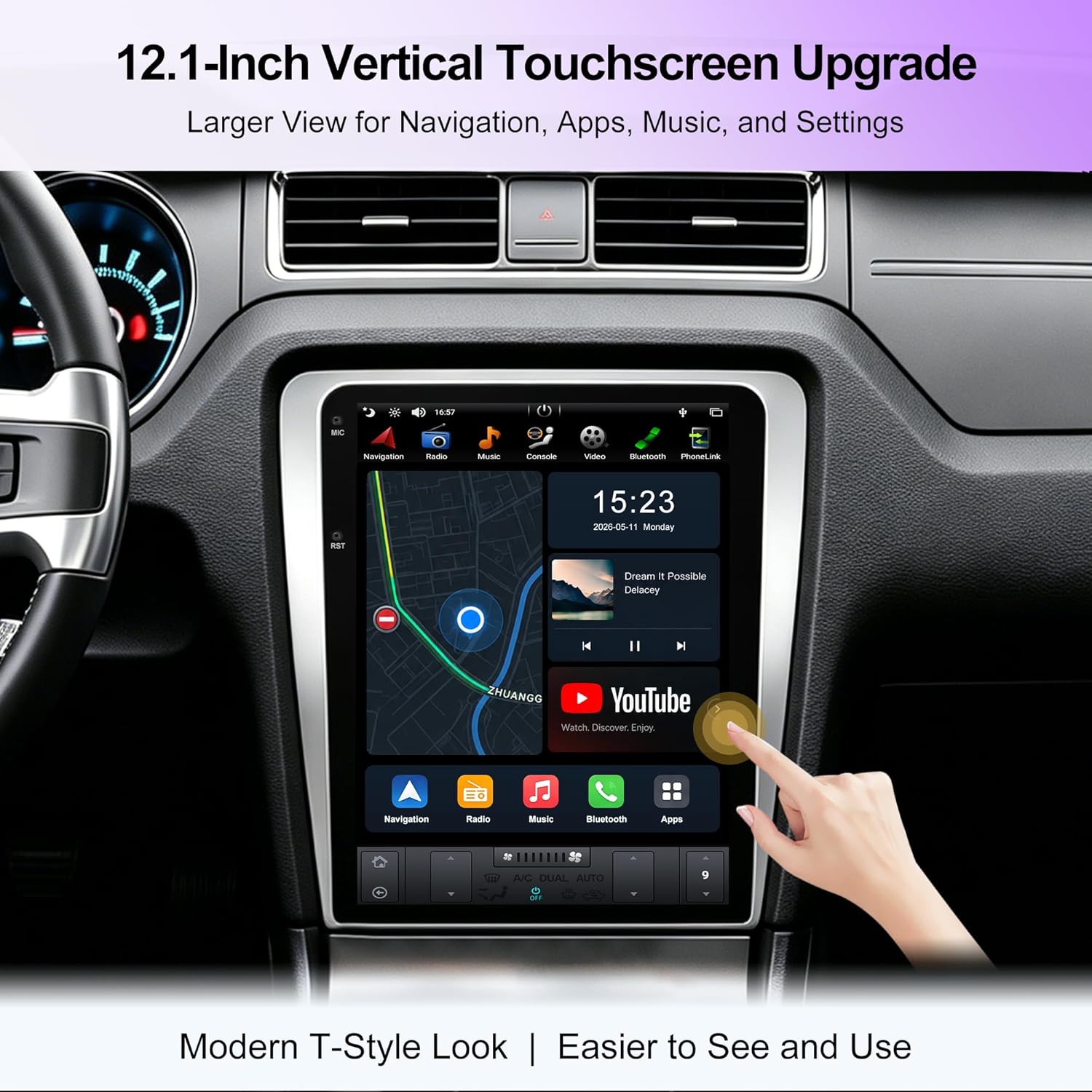
Figure 2: 12.1-Inch Vertical Touchscreen Display

Figure 3: Enhanced Vehicle Information Display
5. Setup and Installation
This unit is designed for OEM plug-and-play installation in compatible Ford Mustang models (2010-2014 GT/Shelby GT500/V6). While designed for ease of installation, professional assistance is recommended.
Compatibility Check:
Before installation, compare your vehicle's original dashboard with the images provided to ensure compatibility. This unit is not compatible with vehicles that have a factory navigation screen.
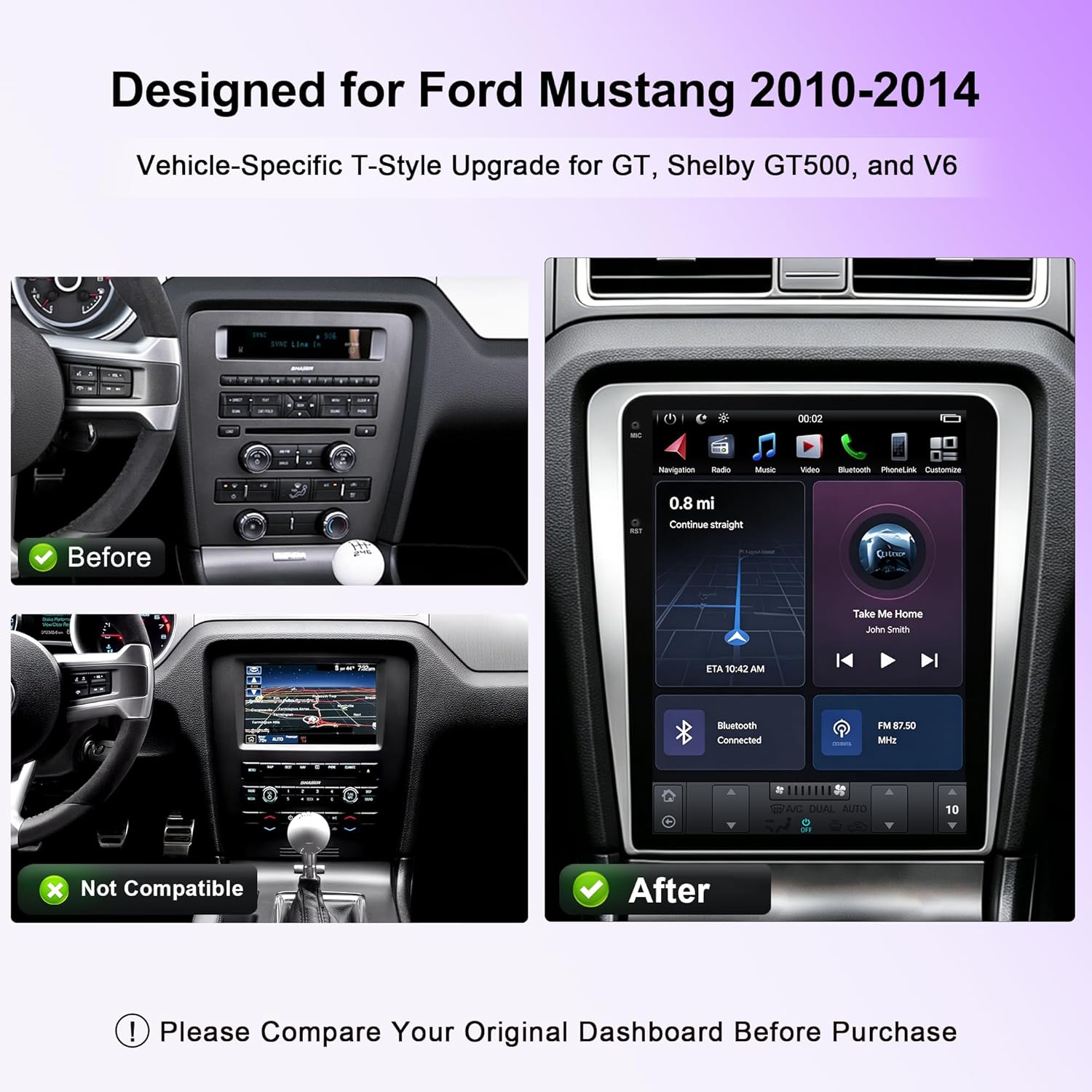
Figure 4: Dashboard Compatibility Reference
Installation Steps (General Overview):
- Disconnect Battery: Ensure the vehicle's battery is disconnected before starting.
- Remove Original Head Unit: Carefully remove the existing factory radio and trim panels using appropriate tools.
- Connect Wiring Harness: Connect the provided vehicle-specific wiring harness to the new head unit and the vehicle's existing connectors. Ensure all connections are secure.
- Install GPS Antenna: Mount the GPS antenna in a location with a clear view of the sky, typically on the dashboard or under the windshield.
- Install Microphone: Connect and position the external microphone for optimal voice clarity during calls.
- Test Connections: Before fully reassembling the dashboard, reconnect the battery and power on the unit to test basic functions (power, audio, touchscreen response).
- Secure Head Unit: Mount the new head unit securely into the dashboard opening.
- Reassemble Dashboard: Reinstall all trim panels and components removed earlier.
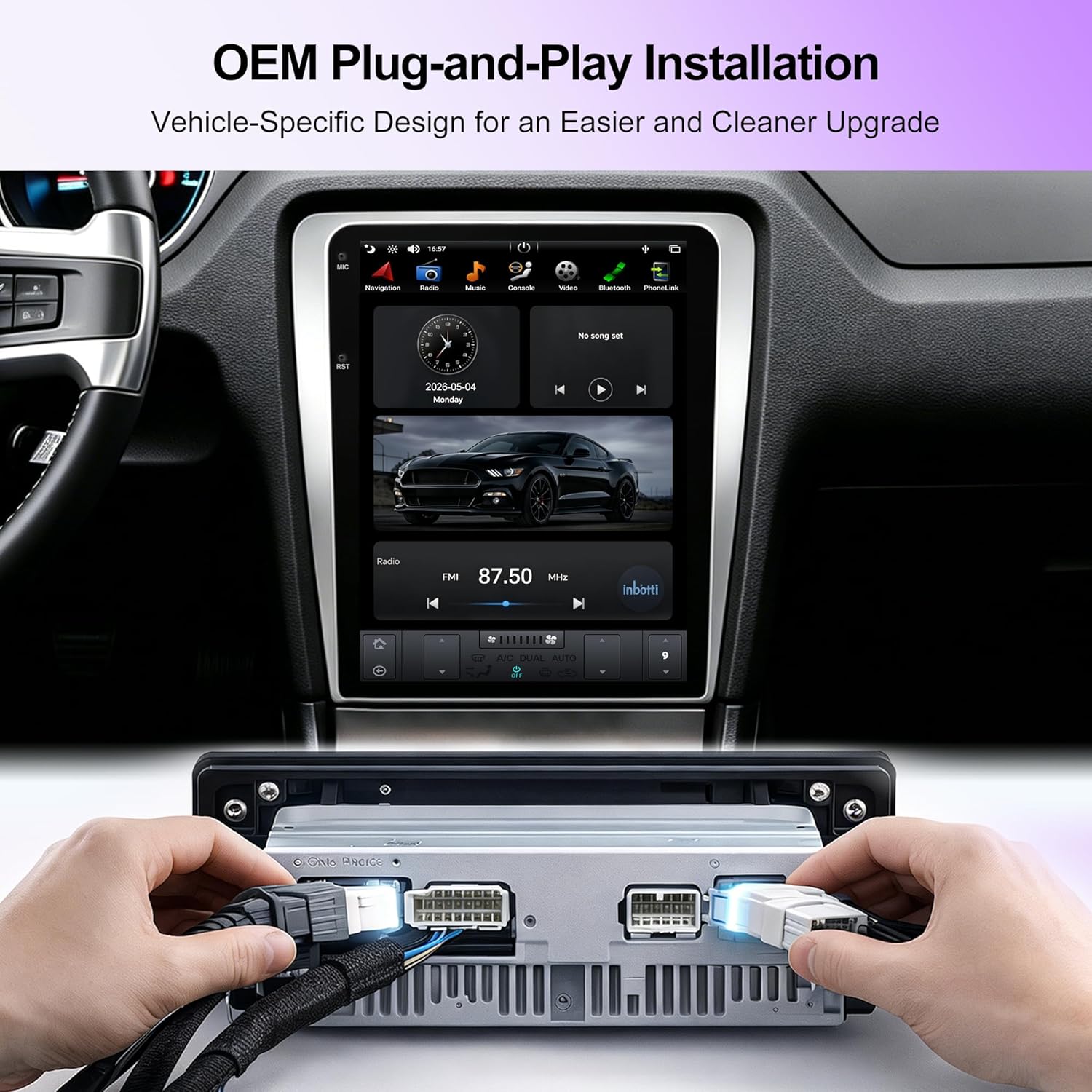
Figure 5: OEM Plug-and-Play Wiring Connection
6. Operating Instructions
Basic Operation:
- Power On/Off: The unit typically powers on with the vehicle's ignition. A power button may also be present for manual control.
- Touchscreen Interface: Navigate through menus and applications by touching the screen. Swipe gestures are used for scrolling.
- Volume Control: Adjust volume using the on-screen controls or the vehicle's steering wheel controls.
Wireless CarPlay & Android Auto:
Connect your compatible smartphone wirelessly to access navigation, music, calls, and messages through the head unit's interface.
- Ensure Bluetooth and Wi-Fi are enabled on your smartphone.
- On the head unit, select the CarPlay or Android Auto application.
- Follow the on-screen prompts to pair your device.
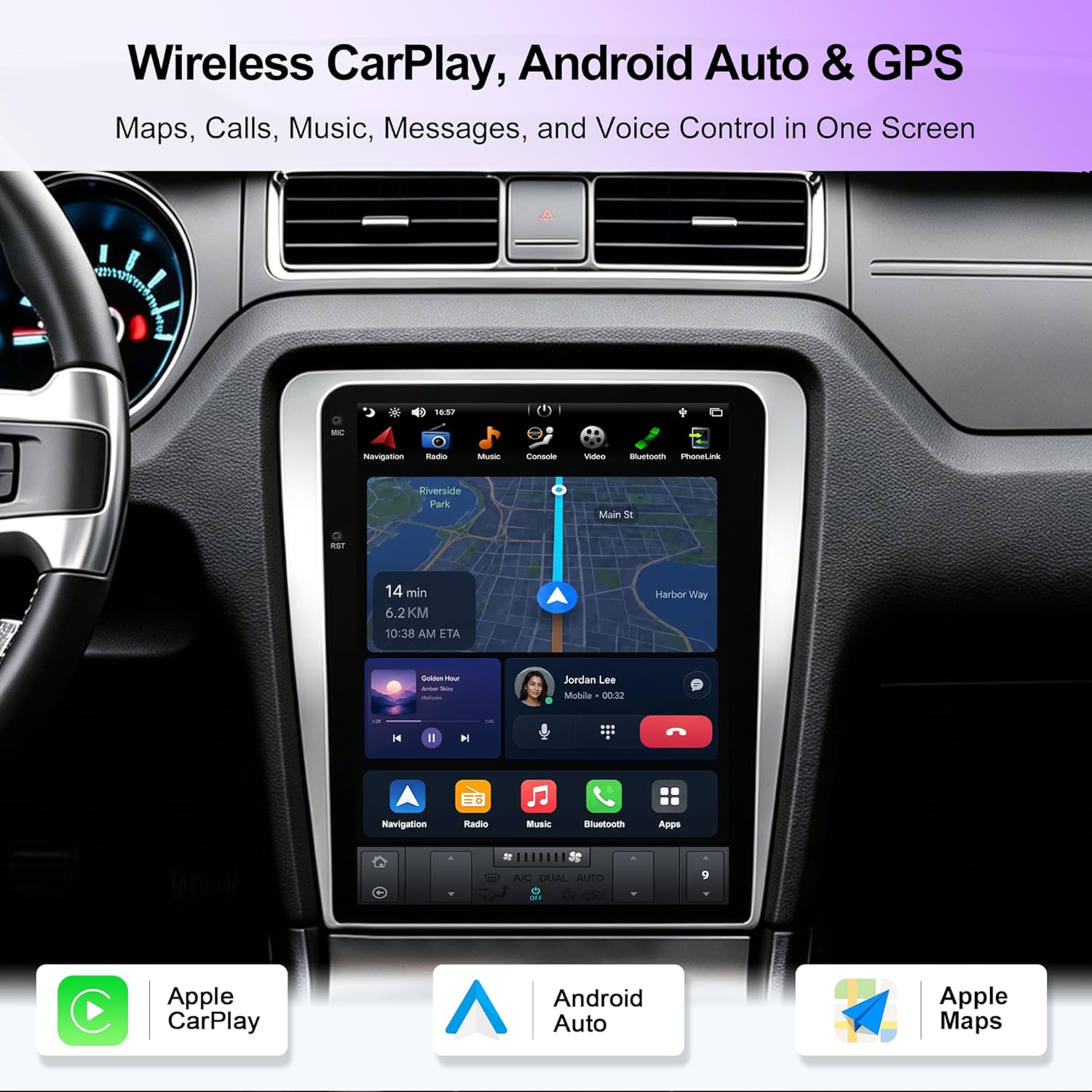
Figure 6: Wireless CarPlay and Android Auto Interface
A/C Display & Touchscreen Climate Control:
The unit integrates your vehicle's climate control system, allowing you to view A/C information and adjust settings directly from the touchscreen.
- Access the climate control interface from the main menu or a dedicated icon.
- Adjust temperature, fan speed, and air direction using the on-screen controls.

Figure 7: A/C Display and Touchscreen Climate Control
Retained OEM Features:
The head unit is designed to retain important factory functions.
- Steering Wheel Controls: Your vehicle's existing steering wheel controls for audio and calls will function with the new unit.
- Backup Camera Support: If your vehicle has a factory backup camera, it will display on the new screen when reversing.

Figure 8: Retained OEM Features
GPS Navigation:
The unit includes built-in GPS navigation. Access the navigation application from the main menu. Ensure the GPS antenna is properly installed for optimal signal reception.

Figure 9: GPS Navigation Interface
7. Maintenance
- Screen Cleaning: Use a soft, lint-free cloth to gently wipe the touchscreen. For stubborn smudges, slightly dampen the cloth with water. Avoid using harsh chemicals, alcohol, or abrasive materials, as these can damage the screen coating.
- Software Updates: Periodically check the manufacturer's website or the unit's settings for available software updates. Keeping the software updated ensures optimal performance and access to new features.
- General Care: Avoid placing heavy objects on the unit or exposing it to excessive moisture or direct sunlight for extended periods.
8. Troubleshooting
| Problem | Possible Cause | Solution |
|---|---|---|
| Unit does not power on. | Loose power connection, blown fuse, vehicle battery disconnected. | Check power cable connections. Inspect vehicle fuses. Ensure vehicle battery is connected. |
| No audio output. | Volume too low, incorrect audio source selected, loose speaker wires. | Increase volume. Select correct audio source. Check speaker wire connections. |
| Touchscreen unresponsive. | Software glitch, screen calibration issue. | Restart the unit (turn vehicle off and on). If issue persists, consult support. |
| CarPlay/Android Auto not connecting. | Bluetooth/Wi-Fi off on phone, incorrect pairing, phone not compatible. | Ensure phone's Bluetooth/Wi-Fi is on. Re-attempt pairing. Verify phone compatibility. |
| GPS signal weak or inaccurate. | GPS antenna obstructed or improperly installed. | Ensure GPS antenna has a clear view of the sky and is securely connected. |
If you encounter issues not listed here or if the suggested solutions do not resolve the problem, please contact customer support.
9. Specifications
| Model Name | KSP-F632 T-Style |
| Screen Size | 12.1 Inches |
| Operating System | Android |
| Memory (RAM) | 4 GB |
| Storage (ROM) | 64 GB |
| Connectivity | Android Auto, Bluetooth, GPS, Wireless CarPlay, USB, Wi-Fi |
| Compatible Vehicle Type | Ford Mustang 2010-2014 GT/Shelby GT500/V6 |
| Product Dimensions | 31 x 24 x 36 cm |
| Item Weight | 3.5 kg |
| Manufacturer | KSPIV |
| UPC | 768274977892 |
10. Warranty and Support
Warranty Information:
This KSPIV product comes with a 1-year warranty from the date of purchase. This warranty covers manufacturing defects and malfunctions under normal use. It does not cover damage caused by improper installation, misuse, accidents, or unauthorized modifications.
Please retain your proof of purchase for warranty claims.
Customer Support:
For technical assistance, troubleshooting, or warranty inquiries, please contact KSPIV customer support:
- Email: support@kspiv.com
When contacting support, please provide your product model number (KSP-F632) and a detailed description of the issue.