
Introduction
This manual provides detailed instructions for the assembly, operation, and maintenance of your Decofy Kids Desk and Chair Set (Model DC-ADC01). Designed for children aged 3-12, this height-adjustable study set offers a comfortable and functional workspace. Please read this manual thoroughly before use to ensure proper setup and safe operation.
Important Safety Information
WARNING: Always supervise young children when using this product. Ensure all components are securely fastened before use. Keep the LED lamp at a safe distance from the eyes and adjust the brightness level according to the child's needs to prevent eye strain. Do not allow children to climb on the desk or chair. Regularly check for loose screws or damaged parts and address them immediately.
Package Contents
Before assembly, verify that all the following components are present:
- Desk
- Chair
- LED Lamp
- Book Stand
- Storage Drawer
- Cup Holder
- Pencil Case
- Handy Hook
- Anti-Slip Footpads
- Screw Bag (containing all necessary fasteners)
- User Manual (this document)

Figure 1: Included accessories and features such as the book stand, storage drawer, cup holder, pencil case, handy hook, and anti-slip footpads.
Setup and Assembly
Assembly is straightforward. Follow these general steps. Refer to the included screw bag and diagrams for specific fastener identification.
- Unpack Components: Carefully remove all parts from the packaging and lay them out on a clean, soft surface to prevent scratches.
- Assemble Desk Frame: Attach the desk legs to the main desk frame using the provided screws. Ensure all connections are tight.
- Assemble Chair Frame: Attach the chair legs and backrest to the chair seat using the provided screws.
- Attach Footpads: Secure the anti-slip footpads to the bottom of both the desk and chair legs.
- Install Drawer: Slide the storage drawer into its designated slot under the desk.
- Attach Accessories: Install the book stand, cup holder, pencil case, and handy hook in their respective positions as shown in the diagrams.
- Connect LED Lamp: Secure the LED lamp to the desk. Ensure it is properly connected and stable.
- Final Check: Before first use, double-check all screws and connections to ensure they are secure and stable.

Figure 2: Product dimensions and anti-tipping design for stability.
Operating Instructions
Height Adjustment (Desk and Chair)
The desk and chair are designed to be height-adjustable to accommodate children as they grow. The desk adjusts from 20.86 inches to 28.74 inches, and the chair from 12.20 inches to 16.93 inches.
- Unlock Adjustment Mechanism: Locate the adjustment knobs or levers on the legs of the desk and chair. Loosen or unlock them as per the design.
- Adjust Height: Carefully raise or lower the desk/chair to the desired height. Ensure the child's feet are flat on the floor and their arms are comfortable when seated at the desk.
- Lock Adjustment Mechanism: Securely tighten or lock the adjustment knobs/levers to fix the height in place. Verify stability before use.
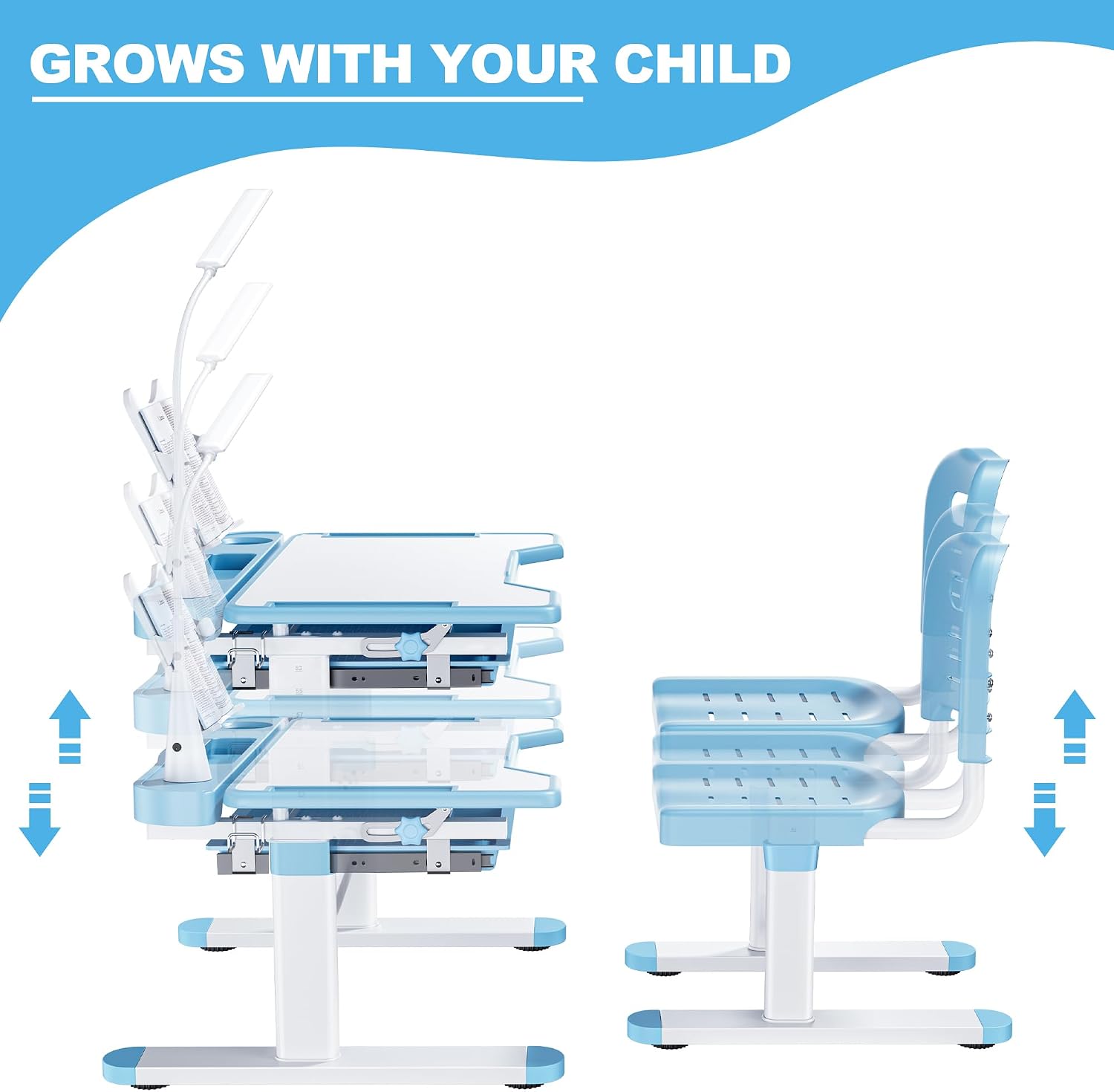
Figure 3: Height adjustment for desk and chair, designed to grow with your child.
Tiltable Desktop
The desktop can be tilted from 0° to 55° to provide an ergonomic angle for various activities.
- 0-15° for Writing: A slight incline is suitable for comfortable writing.
- 15-30° for Reading: An increased angle helps reduce neck strain during reading.
- 30-55° for Drawing: A steeper angle is ideal for artistic activities like drawing or painting.
- Adjust Angle: Locate the adjustable knob or lever on the side of the desktop. Loosen it to allow the desktop to tilt.
- Set Desired Angle: Carefully adjust the desktop to the preferred angle.
- Secure Desktop: Tighten the knob or lever to lock the desktop firmly in position.

Figure 4: Tiltable desktop with adjustable knob for various activities.
LED Lamp Operation
The detachable LED lamp provides adjustable lighting for different tasks.
- Power On/Off: Press the power button on the lamp base to turn it on or off.
- Brightness Adjustment: Use the brightness control button (often labeled with a sun or light icon) to cycle through multiple brightness levels.
- Color Temperature Adjustment: Use the color temperature button (often labeled 'M' or a color spectrum icon) to switch between cool light, natural light, and warm light modes.
- Rotation: The lamp head can be rotated 360° to direct light precisely where needed.

Figure 5: LED Eye Protection Lamp with adjustable brightness and color modes.
Storage Features
- Storage Drawer: Utilize the built-in drawer for organizing books, pencils, and other school supplies.
- Book Stand: Place books or tablets on the adjustable book stand for hands-free reading.
- Cup Holder: Use the integrated cup holder to keep beverages secure and prevent spills.
- Handy Hook: Hang backpacks, headphones, or other accessories on the side hook to keep the workspace tidy.
Maintenance and Care
- Cleaning: Wipe the desk and chair surfaces with a soft, damp cloth. Avoid abrasive cleaners or harsh chemicals that could damage the finish.
- Regular Checks: Periodically inspect all screws and fasteners to ensure they remain tight. Re-tighten if necessary to maintain stability and safety.
- Lamp Care: Keep the LED lamp clean and free of dust. Do not attempt to disassemble the lamp.
- Avoid Overloading: Do not place excessive weight on the desk or chair beyond their intended capacity.
- Environmental Conditions: Avoid exposing the product to extreme temperatures or high humidity, which can affect material integrity.
Troubleshooting
- Desk/Chair is wobbly:
- Ensure all assembly screws are securely tightened. Check that the height adjustment mechanisms are fully locked. Verify that the anti-slip footpads are properly installed and making full contact with the floor.
- Desktop does not tilt smoothly or stay in place:
- Check the adjustable knob/lever on the side of the desktop. Ensure it is loosened for adjustment and fully tightened to secure the desired angle.
- LED Lamp is not working:
- Ensure the lamp is properly connected to its power source. Check if the power button has been pressed. If the issue persists, ensure the power outlet is functional.
- Drawer is difficult to slide:
- Ensure the drawer is correctly aligned within its tracks. Check for any obstructions or debris in the drawer slides. A small amount of silicone lubricant can be applied to the slides if needed.
Product Specifications
| Feature | Detail |
|---|---|
| Brand | Decofy |
| Model Number | DC-ADC01 |
| Color | Blue |
| Material Type | Engineered Wood Desktop, Steel Legs |
| Desk Height Adjustment | 20.86" to 28.74" (53cm to 73cm) |
| Chair Height Adjustment | 12.20" to 16.93" (31cm to 43cm) |
| Desktop Tilt Angle | 0° to 55° |
| Item Dimensions (Desk) | 27.5 x 19.6 x 27.1 inches (L x W x H, max height) |
| Item Weight | 28 pounds |
| Included Components | Desk, Chair, LED Lamp, Book Stand, Storage Drawer, Cup Holder, Pencil Case, Handy Hook, Anti-Slip Footpads, Screw Bag, User Manual |
Warranty and Customer Support
For warranty information, technical support, or assistance with parts, please contact Decofy customer service through the retailer where the product was purchased. Please have your model number (DC-ADC01) and purchase date available when contacting support.