
Product Overview
The CAMECHO 5-Channel Dash Cam provides comprehensive vehicle surveillance with a 1080P front camera and four 480P side cameras. It features a 3.16-inch IPS display for real-time monitoring, enhanced night vision, loop recording, and motion detection. This system is designed to capture a full view around your vehicle, enhancing safety and recording incidents.

Figure 1: CAMECHO 5-Channel Dash Cam Product Features Overview.
Package Contents
Verify that all items are present in the package:
- 1 x DVR Unit (Main Dash Cam)
- 1 x Car Charger
- 1 x User Manual (this document)
- 1 x Mounting Stand
- 1 x Rear View Camera
- 1 x Rear View Camera Cable
Setup and Installation
Installing the Main Unit
Attach the main unit to the mounting stand.

Figure 2: Main Unit Installation Steps.
Fix the mounting stand to the front windshield.
- Toggle the lock switch on the suction cup to the "ON" position.
- Attach the base of the suction cup to the car glass.
- Toggle the lock switch on the suction cup to the "OFF" position to complete vacuum adsorption.
Route the 3.4m power cable along the ceiling and A-pillar down to the console.
Connect the car charger to the vehicle's power outlet and the dash cam. Power on the device and verify startup.
Installing the Rear Camera
Mount the rear camera above the license plate holder, facing the road.

Figure 3: Rear Camera Installation Steps.
Route the 5.5m rear camera cable along the car body's crevices to the front main unit.
Connect the rear camera cable to the designated interface on the main unit.
Adjust the lens angle of all cameras to achieve a clear and desired view.
Memory Card Installation
The device supports a TF (microSD) card up to 64GB (Class 10 recommended). Insert the memory card into the card slot with the contacts facing the correct direction. The first time you insert a memory card, it may need to be formatted through the device's menu.
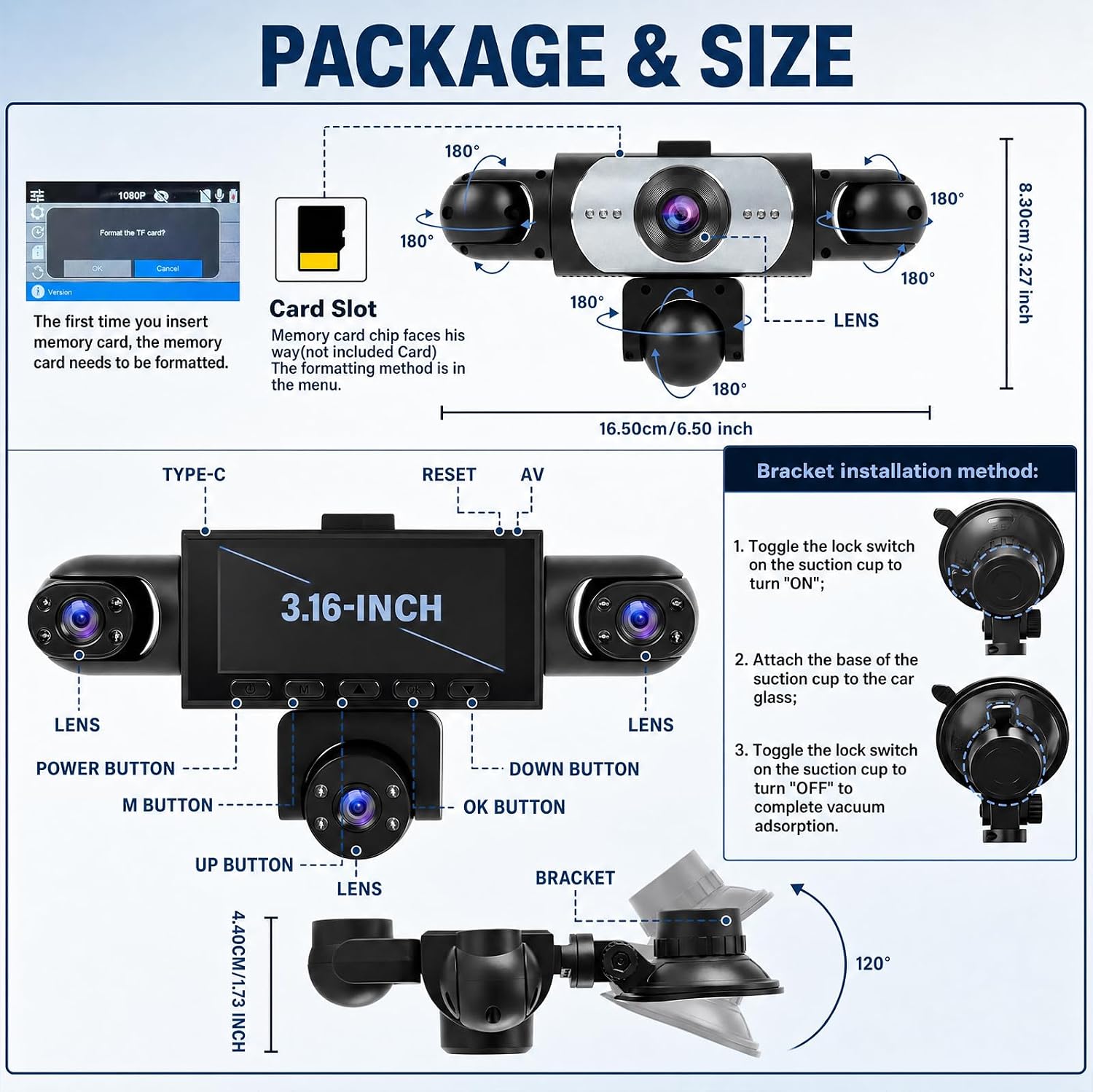
Figure 4: Device Diagram and Memory Card Slot.
Operating Instructions
Basic Operation
- Power On/Off: The device automatically powers on when the vehicle starts and powers off when the vehicle is turned off. You can also manually power it on/off using the Power Button.
- Recording: Once powered on, the dash cam automatically begins recording. Video files are saved to the inserted memory card.
- Display Modes: The 3.16-inch IPS touchscreen allows you to view real-time footage. You can manually switch between front, rear, side, or split-screen views for comprehensive monitoring.
- Menu Navigation: Use the "M" button to access the menu, and the "Up" and "Down" buttons to navigate. The "OK" button confirms selections.
Key Features
- Loop Recording: When the memory card is full, the system automatically overwrites the oldest unlocked video files to continue recording.
- Motion Detection: When enabled, the dash cam will automatically start recording if it detects movement near the stationary vehicle. This feature is useful for parking surveillance.
- G-Sensor: The built-in G-sensor detects sudden impacts or collisions. In such an event, the current video footage is automatically locked to prevent it from being overwritten by loop recording.
- Night Vision: Equipped with 8 infrared LEDs and light compensation, the dash cam provides clear video recording even in low-light conditions or at night.
- Wide Viewing Angle: The front camera offers a 150-degree viewing angle, while the side and rear cameras provide 120-degree coverage, minimizing blind spots.

Figure 5: Enhanced Night Vision and Wide Angle Coverage.

Figure 6: Super Night Vision Capability.

Figure 7: 24-Hour Parking Surveillance, G-Sensor, and Loop Recording.
Maintenance
- Cleaning: Use a soft, dry cloth to clean the camera lenses and screen. Avoid using abrasive cleaners or solvents.
- Memory Card: Regularly format the memory card (e.g., once a month) to ensure optimal performance and prevent data corruption. Back up important files before formatting.
- Firmware Updates: Check the manufacturer's website periodically for firmware updates to improve performance and add new features.
- Cable Management: Ensure all cables are securely routed and not interfering with vehicle operation or safety systems.
Troubleshooting
| Problem | Possible Cause | Solution |
|---|---|---|
| Device does not power on. | No power supply; faulty car charger; loose connection. | Check car charger connection and vehicle's power outlet. Ensure the car charger is functional. |
| Recording stops unexpectedly. | Memory card full; faulty memory card; low power. | Format the memory card. Replace with a new Class 10 TF card (max 64GB). Ensure continuous power supply. |
| Video footage is blurry or unclear. | Dirty lens; protective film still on lens; incorrect lens angle. | Clean lenses with a soft cloth. Remove any protective film. Adjust lens angles for optimal view. |
| Motion detection not working. | Feature is disabled; sensitivity setting too low. | Enable motion detection in the settings menu. Adjust sensitivity as needed. |
| Device freezes or crashes. | Software issue; memory card error. | Press the Reset button (refer to Figure 4). Format or replace the memory card. |
Specifications
| Feature | Detail |
|---|---|
| Model Number | 5-Kanal Dashcam |
| Installation Type | Universal (suitable for all vehicles) |
| Screen Size | 3.16 Inches IPS Display |
| Camera Sensor | 1080P (Front) |
| Video Resolution | 1080P (Front) + 4*480P (Side/Rear) |
| Video Format | AVI |
| Photo Format | JPG |
| Frames Per Second | 30 |
| Viewing Angle | 150° (Front), 120° (Side/Rear) |
| Memory Card Support | TF Card, Max 64GB (Class 10 recommended) |
| Audio Output Mode | Built-in Stereo |
| Special Features | 5 Cameras, Loop Recording, Exposure Compensation, Motion Detection, Night Vision, Reversing Aid, G-Sensor, Parking Surveillance |
| OSD Languages | English, Simplified Chinese, Traditional Chinese, Japanese, Korean, Russian, French, German, Spanish, Polish, Dutch, Turkish, Thai |
| Weight | 600 Grams |
Warranty and Support
Warranty Information
This CAMECHO product comes with a 2-year warranty from the date of purchase. In case of any issues, please contact customer support. The manufacturer commits to a 24-hour response time for inquiries and offers a 30-day return policy.
Customer Support
For technical assistance, troubleshooting, or warranty claims, please refer to the contact information provided with your purchase or visit the official CAMECHO website. Please have your model number (5-Kanal Dashcam) and purchase details ready when contacting support.