
1. Introduction
Thank you for choosing the VilroCaz Full Size Loft Bed. This multifunctional furniture piece is designed to optimize space, providing a comfortable sleeping area, a dedicated workstation, and ample storage. This manual provides essential information for safe assembly, operation, maintenance, and troubleshooting to ensure long-lasting enjoyment of your product.
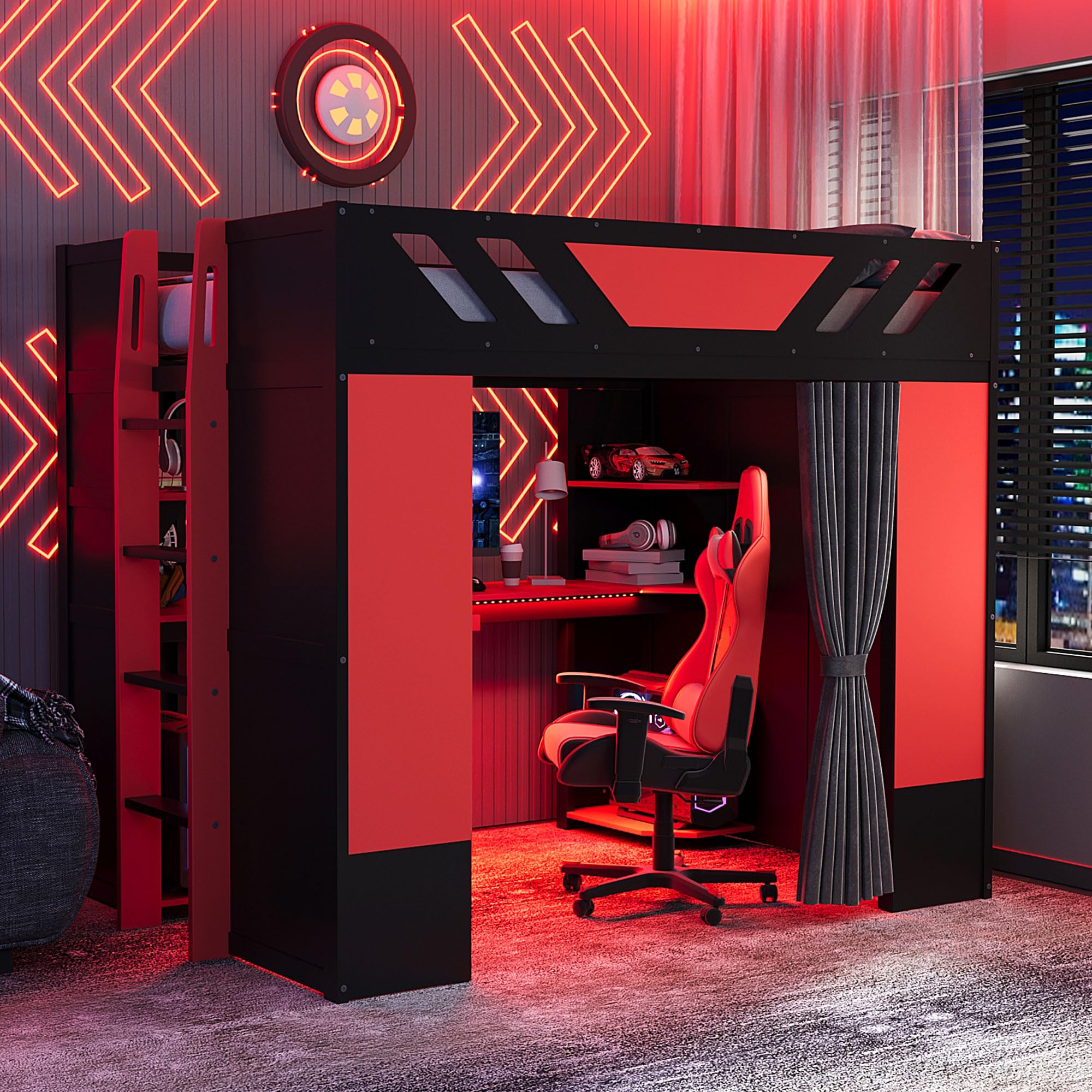
Image 1.1: Overview of the VilroCaz Full Size Loft Bed, showcasing its integrated desk, storage shelves, and blackout curtains. Dimensions are indicated as 80.7 inches length, 59.1 inches width, and 67.5 inches height.
2. Safety Information
Please read and understand all safety warnings and instructions before assembly and use. Failure to follow these instructions may result in serious injury.
- Weight Capacity: The loft bed has a maximum weight capacity of 600 lbs. Do not exceed this limit.
- Mattress Thickness: Use a mattress with a recommended thickness of 6-8 inches.
- Age Recommendation: This loft bed is recommended for users aged 6 years and older.
- Fall Hazard: Always use the ladder for access to and from the bed. Do not jump on the bed.
- Assembly: Ensure all bolts, screws, and connectors are securely tightened before use. Periodically check and retighten as necessary.
- Ventilation: Ensure adequate ventilation, especially when using the blackout curtains for extended periods.
- Electrical Safety: The integrated USB outlet and light strip should only be used with compatible devices and power sources. Avoid overloading the USB port.
- Placement: Place the bed on a level surface. Do not place near windows where cords or curtains could pose a strangulation hazard to young children.
3. Package Contents
Verify that all components are present before beginning assembly. This product ships in two separate packages.
| Component | Quantity | Description |
|---|---|---|
| Bed Frame Parts | 1 Set | Wooden panels, slats, and support beams for the loft bed structure. |
| Desk Components | 1 Set | Desk surface, keyboard tray, and mounting hardware. |
| Storage Shelves | Multiple | Various shelves for integrated storage. |
| Blackout Curtains | 1 Set | Fabric curtains with hanging mechanism. |
| Light Strip | 1 | APP-controlled LED light strip. |
| USB Outlet | 1 | Integrated USB charging port. |
| Hardware Pack | 1 | Screws, bolts, nuts, and assembly tools. |
| Instruction Manual | 1 | This document. |
4. Setup and Assembly
Assembly is required for this product. Clear instructions and necessary tools are provided in the package. It is recommended that two adults assemble the loft bed.
4.1 Preparation
- Clear a spacious area for assembly.
- Unpack all components and lay them out, comparing them with the parts list.
- Keep children and pets away from the assembly area.
4.2 Assembly Steps (General Guide)
- Assemble the Main Frame: Begin by connecting the main vertical and horizontal support beams according to the detailed diagrams in your included assembly guide. Ensure all connections are finger-tightened initially.
- Install Bed Slats: Secure the bed slats onto the designated supports. Ensure even spacing and firm attachment for mattress support.
- Attach Ladder and Side Panels: Mount the ladder securely to the bed frame. Attach the side panels that form the desk and storage areas.
- Assemble Desk and Shelves: Install the desk surface, keyboard tray, and storage shelves in their respective positions.
- Integrate Electrical Components: Carefully install the USB outlet and light strip. Follow the specific wiring instructions provided in the assembly guide.
- Hang Blackout Curtains: Attach the curtain rods and hang the blackout curtains.
- Final Tightening: Once all components are in place, systematically tighten all bolts and screws using the provided tools. Do not overtighten.

Image 4.1: Side view of the loft bed, illustrating the integrated ladder for bed access and the multi-tiered shelving unit.

Image 4.2: Detailed view of the workstation area under the loft bed, showing the desk surface and adjacent storage shelves.
5. Operating Instructions
5.1 Using the Desk and USB Outlet
The spacious desk provides a dedicated area for work, study, or gaming. The integrated keyboard tray can be pulled out for convenience. The built-in USB outlet allows you to charge your electronic devices directly from the desk.
- USB Charging: Connect your device's USB cable to the port. Ensure the bed's power supply is connected to a wall outlet.
- Keyboard Tray: Gently pull the tray outwards to extend it for use, and push it back in for storage.

Image 5.1: Close-up of the desk area, highlighting the pull-out keyboard tray and the integrated USB charging port.
5.2 APP-Controlled Light Strip
The light strip above the desk is APP-controlled, allowing you to customize the ambiance of your workstation.
- Download App: Scan the QR code provided in the light strip's separate manual or search for the specified app in your device's app store.
- Connect: Follow the in-app instructions to pair your device with the light strip via Bluetooth or Wi-Fi.
- Control: Use the app to change colors, brightness, lighting modes, and set schedules.
5.3 Blackout Curtains
The blackout curtains provide privacy and help reduce distractions, creating a focused environment for work or an immersive experience for gaming.
- Opening/Closing: Gently slide the curtains along their track to open or close them.
- Securing: Use the tie-backs to hold the curtains open when not in use.

Image 5.2: Front view of the loft bed with the blackout curtains fully closed, demonstrating the privacy feature.
6. Maintenance
Regular maintenance will help prolong the life and appearance of your loft bed.
- Cleaning the Frame: Wipe the wooden surfaces with a soft, damp cloth. Avoid harsh chemicals or abrasive cleaners.
- Curtain Care: The blackout curtains can be spot cleaned with a mild detergent. For deeper cleaning, refer to the fabric care label.
- Hardware Check: Periodically check all bolts, screws, and connections to ensure they remain tight. Retighten as needed to maintain structural integrity.
- Electrical Components: Keep the USB port and light strip free from dust and debris. Do not attempt to repair electrical components yourself.
7. Troubleshooting
If you encounter any issues with your VilroCaz Loft Bed, refer to the following common problems and solutions.
| Problem | Possible Cause | Solution |
|---|---|---|
| Bed feels wobbly or unstable. | Loose hardware. | Check and tighten all bolts and screws. Ensure the bed is on a level surface. |
| USB port not charging devices. | Not plugged in; faulty cable; device incompatibility. | Ensure the bed's power cord is securely plugged into a working wall outlet. Try a different USB cable or device. |
| Light strip not turning on or responding to app. | Power issue; app not connected; faulty strip. | Check power connection to the light strip. Restart the app and re-pair with the light strip. Ensure Bluetooth/Wi-Fi is enabled on your device. |
| Keyboard tray sticks or is difficult to slide. | Debris in tracks; misaligned. | Clean the tracks of the keyboard tray. Check for any obstructions or misalignment during assembly. |
If the problem persists after attempting these solutions, please contact customer support.
8. Specifications
| Feature | Detail |
|---|---|
| Product Type | Loft Bed |
| Size | Full |
| Color | Red+curtain |
| Overall Product Dimensions | 80.7"L x 59.1"W x 67.5"H |
| Material | MDF + Wood (Engineered Wood, Wood) |
| Weight Capacity | 600 LBS |
| Recommended Mattress Thickness | 6-8 inches |
| Number of Packages | 2 |
| Assembly Required | Yes |
| Special Features | Integrated Desk, Storage Shelves, Blackout Curtains, Light Strip (APP-controlled), USB Outlet |
9. Warranty and Support
For any questions, missing parts, or assistance with assembly or operation, please contact VilroCaz customer support. Please have your product model number (Wood Gaming Loft Bed) and purchase information ready when contacting support.
While specific warranty details are not provided in this manual, standard consumer rights and return policies apply. Refer to your purchase receipt or the retailer's website for detailed warranty information.