
1. Introduction
Thank you for choosing the YHYWJHY Industrial Digital Crane Scale. This electronic hanging scale is designed for accurate and reliable weighing in industrial and commercial environments, offering a maximum capacity of 2000kg (4000 Lb). It features a clear LED display, remote control operation, and a robust aluminum alloy construction. This manual provides essential information for the safe and efficient operation, maintenance, and troubleshooting of your crane scale.
2. Safety Information
- Always ensure the scale is securely attached before lifting any load.
- Do not exceed the maximum weighing capacity of 2000kg (4000 Lb). The safe overload limit is 120% F.S.
- Avoid sudden impacts or dropping the scale.
- Keep the scale away from strong magnetic fields and corrosive substances.
- Ensure the rechargeable battery is charged using the provided charger only.
- Do not attempt to disassemble or repair the scale yourself. Contact qualified personnel for service.
- Operate the remote control within the specified range (10-15 meters) and ensure a clear line of sight.
3. Package Contents
Verify that all items are present in the package:
- YHYWJHY Industrial Digital Crane Scale (Main Unit)
- Remote Control
- Rechargeable Battery (pre-installed or separate)
- Power Adapter/Charger
- User Manual (this document)
4. Setup
- Initial Charging: Before first use, fully charge the scale's internal rechargeable battery. Connect the power adapter to the scale's charging port and plug it into a suitable power outlet. The charging indicator will show the charging status. A full charge typically takes approximately 3 hours.
- Remote Control Battery: Ensure the remote control has working batteries installed.
- Mounting: Securely attach the top shackle of the crane scale to a suitable lifting device (e.g., crane hook, hoist). Ensure the attachment point is rated for the maximum load capacity of the scale.
- Lower Hook: The lower hook is designed to attach to the item being weighed. Ensure it is properly secured before lifting. The upgraded hook features an automatic locking plate for enhanced safety.
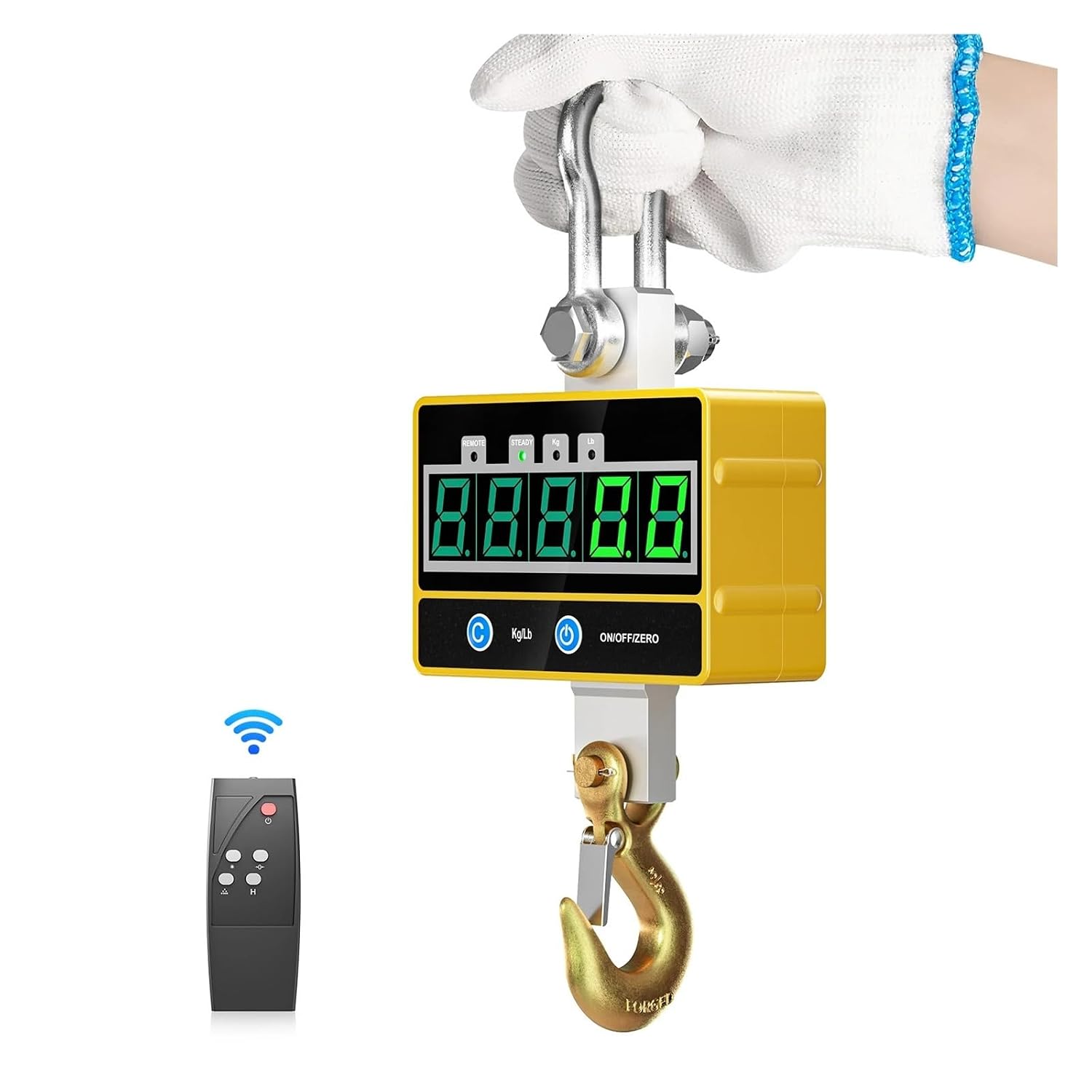
Image: The YHYWJHY Industrial Digital Crane Scale with its remote control, ready for setup.
5. Operating Instructions
- Power On/Off: Press the ON/OFF/ZERO button on the scale or the remote control to turn the scale on or off. The green LED display will illuminate.
- Zeroing the Scale: Before weighing, ensure no load is on the hook. Press the ON/OFF/ZERO button to set the display to zero. This compensates for any minor weight variations.
- Weighing a Load: Securely attach the item to be weighed to the lower hook. Slowly lift the load. The weight will be displayed on the LED screen.
- Remote Control Operation: The remote control allows for convenient operation from a distance of 10-15 meters, especially useful in industrial settings.

Image: The crane scale being operated in a warehouse environment, demonstrating remote control usage.
6. Functions
The YHYWJHY crane scale offers several useful functions:
- Zero: Resets the display to zero. Used to clear the current weight or to zero the scale before weighing.
- Tare: Used to subtract the weight of a container or packaging. Place the empty container on the hook, press the TARE button (if available, otherwise use Zero after placing container), then add the item to be weighed. The display will show only the net weight of the item.
- Hold: Press the HOLD button to freeze the displayed weight. This is useful for recording readings when the load might be unstable or difficult to read directly. Press again to release.
- Overload Alarm/Record: If the load exceeds 120% of the maximum capacity, an alarm will sound, and the display may indicate an overload warning. Remove the excess load immediately to prevent damage.
- Auto Power-off: The scale is equipped with an auto power-off feature to conserve battery life. It will automatically turn off after a period of inactivity.
- Unit Switch (Kg/Lb): Press the Kg/Lb button on the scale or remote control to switch between kilograms (kg) and pounds (lb) units.

Image: Visual representation of the scale's functions including Zero, Weight Lock, KG/LB Switch, Remote Control, Overload Display, and Automatic Shutdown.

Image: Demonstration of the Kg/Lb unit switching function using the remote control, showing the display changing between units.
7. Maintenance
- Cleaning: Wipe the scale with a soft, damp cloth. Do not use abrasive cleaners or immerse the scale in water.
- Battery Care: Recharge the battery when the low battery indicator appears. Avoid completely draining the battery frequently to prolong its lifespan. If storing for an extended period, charge the battery periodically.
- Storage: Store the scale in a dry, cool place, away from direct sunlight and extreme temperatures.
- Inspection: Regularly inspect the hooks, shackles, and housing for any signs of wear, damage, or corrosion. Replace damaged components immediately.
8. Troubleshooting
| Problem | Possible Cause | Solution |
|---|---|---|
| Scale does not turn on | Low battery; Power button not pressed correctly | Charge the battery; Press the ON/OFF/ZERO button firmly. |
| Inaccurate readings | Scale not zeroed; Overload; Unstable load; Environmental factors (wind) | Zero the scale before weighing; Do not exceed capacity; Ensure load is stable; Use in a stable environment. |
| Remote control not working | Dead batteries; Out of range; Obstruction | Replace remote control batteries; Operate within 10-15m range; Ensure clear line of sight. |
| Overload alarm | Load exceeds maximum capacity | Immediately remove excess load. |
9. Specifications
| Model | 565789775 |
| Max. Capacity | 2000 kg (4000 Lb) |
| Min. Capacity | 10 kg |
| Division | 0.5 kg |
| Safe Overload | 120% F.S. |
| Power Supply | Rechargeable Battery |
| Charging Time | Approx. 3 hours |
| Standby Time | Approx. 60 hours |
| Operating Temperature | -10°C to 40°C |
| Material | Aluminum Alloy (Shell), Cr, CrMo (Hooks) |
| Display | Large Green LED Digital Display |
| Remote Control Range | 10-15 meters |
| Product Dimensions (Approx.) | 10.8cm (4.3in) x 16cm (6.3in) (Scale Body), 38cm (15in) (Total Height) |

Image: Detailed product dimensions of the crane scale.
10. Warranty and Support
For warranty information, technical support, or service inquiries, please refer to the purchase documentation or contact your retailer. Keep your purchase receipt as proof of purchase.
For further assistance, please visit the YHYWJHY official website or contact customer support through the platform where the product was purchased.


