
1. Introduction
The REIGY 5MP WiFi Surveillance Kit provides a comprehensive security solution for your home or business. This system includes 8 high-definition 5MP cameras and a Network Video Recorder (NVR) with a pre-installed 3TB hard drive for continuous recording. Designed for both indoor and outdoor use, the cameras feature two-way audio, advanced night vision modes, and IP66 weather resistance. This manual will guide you through the setup, operation, and maintenance of your surveillance system.
2. What's in the Box
Carefully unpack your REIGY 5MP WiFi Surveillance Kit and ensure all components are present:
- 1 x 16-Channel NVR Recorder (with 3TB Hard Drive pre-installed)
- 8 x 5MP WiFi Cameras
- 1 x 12V 3A 1.5M Power Supply (for NVR recorder)
- 8 x 12V 1A 3.0M Power Supplies (for cameras)
- 1 x User Manual
- 1 x Wired USB Mouse
- 1 x 1M HDMI Cable
- 1 x 1M Ethernet Cable
- 1 x WiFi Extension Antenna
- Warning Stickers
- Screw Set for mounting
- Waterproof Connector Caps
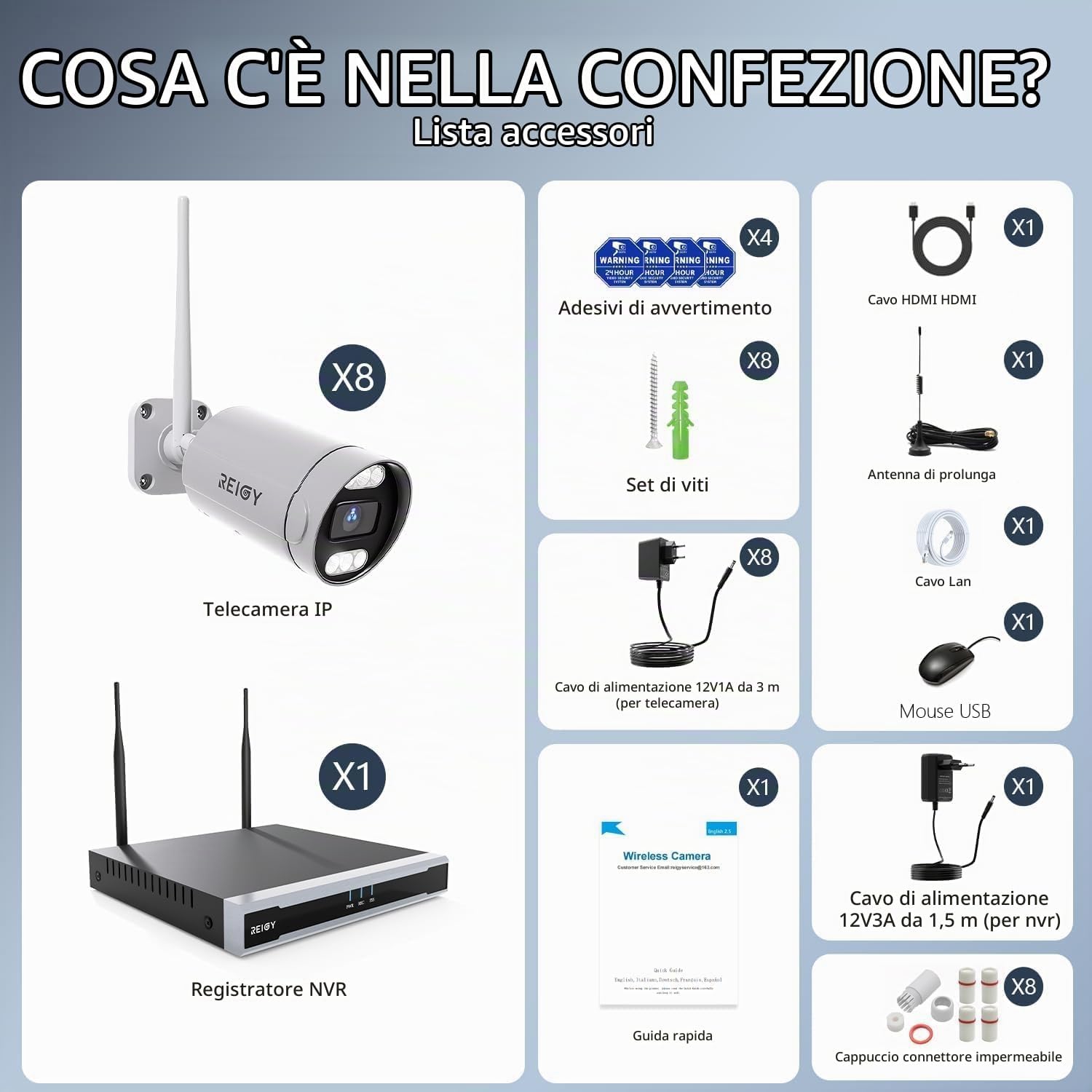
Image: All components included in the REIGY 5MP WiFi Surveillance Kit, such as the NVR, 8 cameras, power adapters, cables, mouse, and mounting accessories.
3. Setup Instructions
Follow these steps for a quick and easy setup of your REIGY surveillance system:
- Connect the NVR: Connect the NVR to your router using the Ethernet cable. Connect the NVR to a monitor or TV using the HDMI cable (or VGA). Plug the 12V 3A power supply into the NVR and then into a power outlet.
- Power On Cameras: Connect each 5MP WiFi camera to its respective 12V 1A power supply and plug them into power outlets. The cameras will automatically connect to the NVR within 60 seconds.
- Initial Access: When prompted on the monitor, there is no initial password. You can proceed directly to the operating page. It is recommended to set a strong password immediately after initial access for security.
- Remote Viewing Setup: Download the dedicated app on your smartphone or tablet. Follow the in-app instructions to add your NVR system for remote monitoring.

Image: A visual guide demonstrating the simple 3-step setup process: connecting camera and NVR power, connecting NVR to WiFi or network cable, and viewing live video via the app.

Image: A REIGY WiFi camera mounted on a wall, connected to power, and an NVR unit with antennas, illustrating the plug-and-play stable WiFi connection.
4. Operating Instructions
4.1. Live View and Playback
Once the system is set up, you can view live footage from all 8 cameras on your connected monitor or TV. Use the included USB mouse to navigate the NVR interface. For remote viewing, open the dedicated app on your smartphone or tablet to access live streams and review recorded footage from anywhere.
4.2. Night Vision Modes
The cameras offer three distinct night vision modes to ensure clear visibility in low-light conditions:
- Infrared Mode: Utilizes built-in IR LEDs for black and white video in complete darkness, with a range of up to 20 meters.
- Spotlight Mode: Activates integrated spotlights to provide full-color night vision and deter intruders.
- Smart Mode: Automatically switches between infrared and spotlight modes based on detected motion, providing color vision when needed.
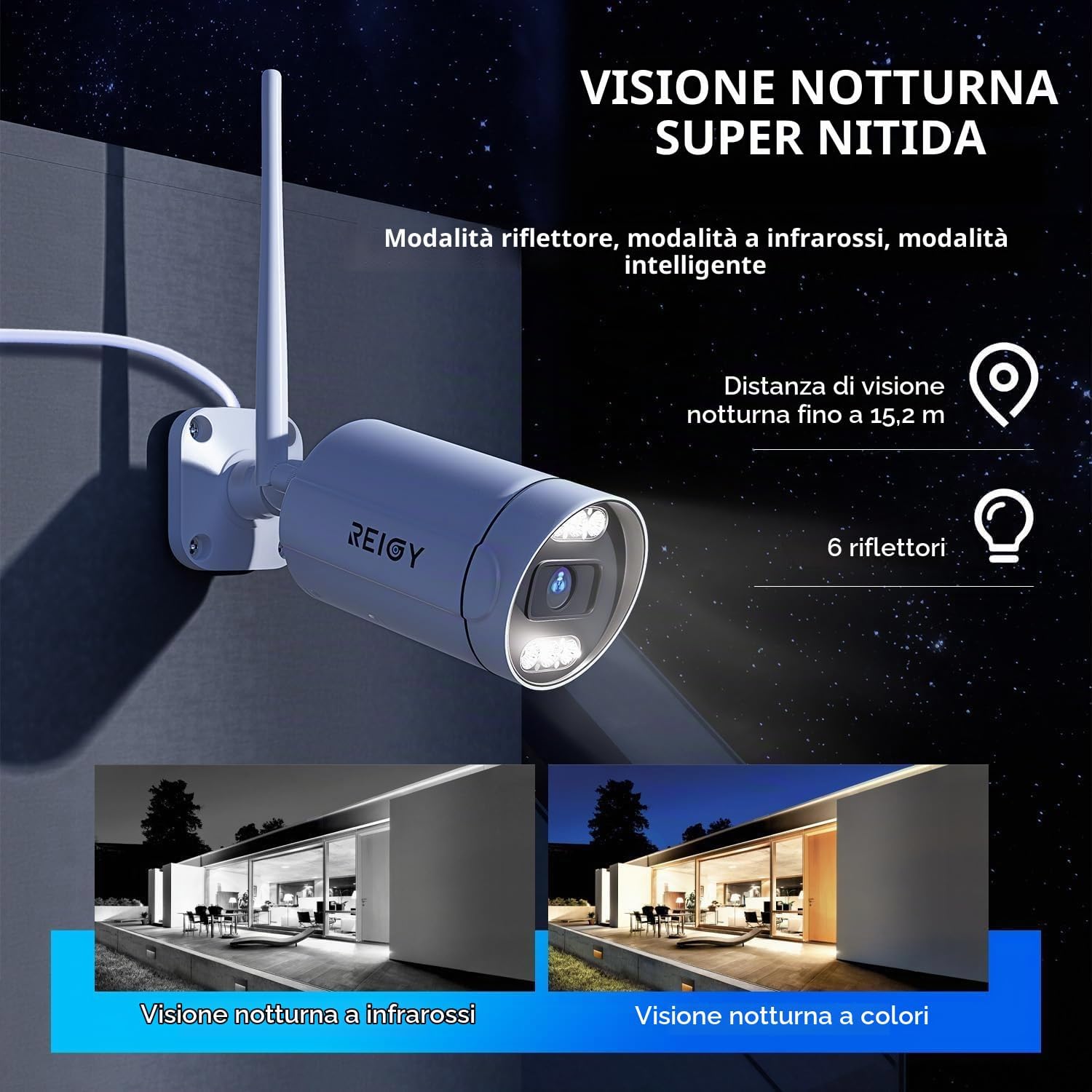
Image: A REIGY camera demonstrating its super clear night vision capabilities, showing a comparison between infrared (black and white) and full-color night vision.
4.3. Two-Way Audio
Each camera is equipped with a built-in microphone and speaker, enabling two-way audio communication. This allows you to listen to what's happening around the camera and speak through the camera to visitors or potential intruders directly from your smartphone app.
4.4. Motion Detection and Alerts
The cameras feature intelligent motion detection. When unexpected movement is detected, the system can send immediate notifications to your smartphone app and/or email. This ensures you are promptly informed of any activity. The system automatically records a short video clip and captures a photo of the event.

Image: A smartphone screen showing an intelligent motion detection notification from the REIGY system, with a visual of a person triggering an alert near a door.
4.5. 16-Channel System Expansion
The NVR supports up to 16 channels, allowing you to add more REIGY cameras (including indoor, outdoor, battery-powered, and PTZ cameras) to expand your surveillance coverage as needed. This provides a flexible solution for monitoring your entire property.
4.6. Local Storage and No Monthly Fees
The NVR comes with a pre-installed 3TB hard drive, providing ample storage for continuous recordings without the need for cloud subscriptions or monthly fees. All recordings are stored locally, ensuring data privacy.
4.7. Offline Operation
Even if your home internet connection is lost, the REIGY NVR will continue to record and display real-time monitoring via HDMI or VGA display. Note that remote viewing via the app will not be available without an internet connection.
4.8. Long-Range WiFi Coverage
Equipped with a 5dBi external antenna, the system ensures wide, fast, and stable WiFi transmission between the cameras and the NVR, minimizing signal loss and maximizing coverage.
5. Maintenance
To ensure optimal performance and longevity of your REIGY surveillance system, follow these maintenance guidelines:
- Camera Cleaning: Regularly clean the camera lenses with a soft, damp cloth to remove dust, dirt, or smudges that may obstruct the view. Avoid using harsh chemicals.
- Weather Resistance: The cameras are rated IP66 waterproof, meaning they are protected against dust and powerful water jets. While designed for outdoor use in various weather conditions (rain, sun, snow), ensure the waterproof connector caps are securely in place for all cable connections.
- Power Connections: Periodically check all power connections to ensure they are secure and free from damage.
- NVR Placement: Place the NVR in a well-ventilated area to prevent overheating. Keep it away from direct sunlight, moisture, and extreme temperatures.

Image: A REIGY camera shown in three different weather conditions (snow, rain, and sun) to illustrate its IP66 weather resistance, ensuring continuous operation.
6. Troubleshooting
If you encounter any issues with your REIGY surveillance system, refer to the following common problems and solutions:
| Problem | Possible Cause | Solution |
|---|---|---|
| No video displayed on monitor/TV | Loose cable connections, NVR not powered, monitor input incorrect. | Check HDMI/VGA cable connection to NVR and monitor. Ensure NVR power supply is connected and NVR is powered on. Select correct input source on your monitor/TV. |
| Cameras not showing video | Camera not powered, out of WiFi range, camera not paired. | Ensure camera power supplies are connected and working. Check WiFi signal strength. If a camera is new or reset, it should automatically pair; if not, refer to the NVR manual for manual pairing. |
| Cannot access system remotely via app | NVR not connected to internet, incorrect app settings, firewall issues. | Verify NVR is connected to your router via Ethernet and has internet access. Check app settings for correct NVR ID/QR code. Ensure your router's firewall is not blocking the NVR's connection. |
| Motion detection alerts not received | Motion detection disabled, sensitivity too low, notification settings incorrect. | Access NVR settings (or app settings) to enable motion detection for desired cameras. Adjust sensitivity levels. Verify app notification permissions and email settings. |
| Initial login requires password | User attempting to log in with a default password. | For initial access, there is no password. Simply proceed to the operating page. It is strongly recommended to set a new, strong password immediately after first login. |
7. Specifications
| Feature | Specification |
|---|---|
| Brand | REIGY |
| Model Name | RG-310M-4121W-8C |
| Camera Resolution | 5MP (2560x1920P) |
| NVR Channels | 16 Channels |
| Hard Drive | 3TB (pre-installed) |
| Connectivity Protocol | Wi-Fi |
| Power Source | Corded Electric |
| Indoor/Outdoor Use | Outdoor, Indoor |
| Water Resistance Level | Waterproof (IP66) |
| Night Vision Range | Up to 15-20 meters |
| Night Vision Type | Infrared, Spotlight, Color Night Vision |
| Control Method | App |
| Video Capture Resolution | 1920p |
| Optical Sensor Technology | CMOS |
| Item Dimensions | 12 x 8 x 15 cm |
8. Warranty and Support
For warranty information, technical support, or any questions regarding your REIGY 5MP WiFi Surveillance Kit, please contact REIGY customer service. Refer to the contact details provided in the packaging or on the official REIGY website.