
1. Introduction
This manual provides essential instructions for the safe operation and maintenance of your Tec Wurenju V918 MAX GPS Drone. Please read this manual thoroughly before operating the drone to ensure proper usage and to prevent damage or injury.
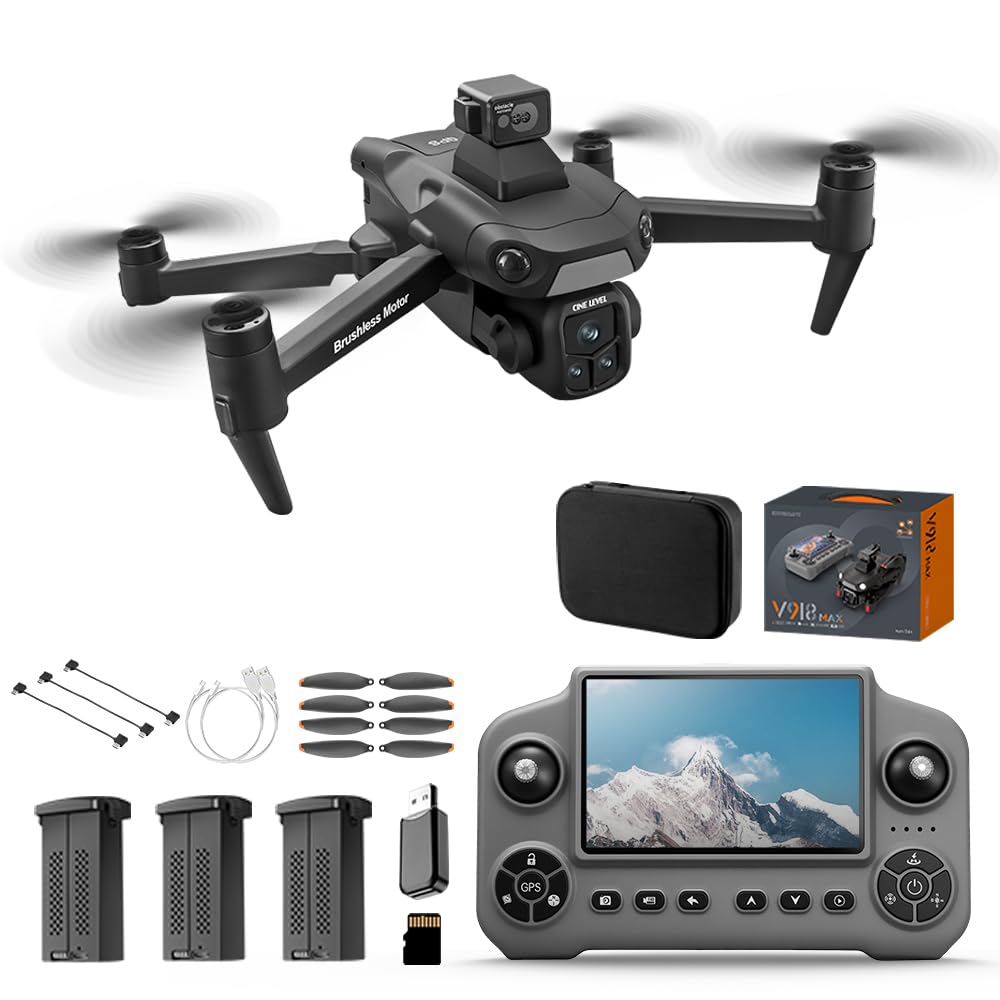
Image: The Tec Wurenju V918 MAX Drone, showcasing its sleek design and camera.
2. What's in the Box
Verify that all components are present upon unboxing:
- Drone Body
- Remote Control with 5-inch HD Screen
- 3 x 7.4V 3000mAh Intelligent Batteries
- 8K Camera
- Propellers (spare set included)
- Micro-USB Cable
- SD Card
- Card Reader
- Screwdriver
- User Manual
- Carrying Case

Image: All included components of the V918 MAX Drone package.
3. Setup
3.1 Charging the Batteries
Before first use, fully charge the drone batteries and the remote control. Use the provided Micro-USB cable.
- Drone Battery: Connect the drone battery to the charging cable. The red indicator light will be on during charging and turn off when fully charged.
- Remote Control: Connect the charging cable to the remote control's charging port.
Video: Instructions on how to charge the drone battery and remote control.
3.2 Propeller Installation
Ensure propellers are securely attached to the correct motor arms. Match the propeller type (A or B) to the corresponding motor arm as indicated in the quick start guide.
3.3 Unfolding the Drone
Carefully unfold the drone arms until they click into place. Ensure all arms are fully extended before flight.

Image: The V918 MAX Drone in its folded, portable state.
4. Operating Instructions
4.1 Pre-Flight Checklist
- Ensure batteries are fully charged.
- Check propellers for damage and ensure they are securely fastened.
- Select an open area free from obstacles, people, and animals.
- Power on the remote control, then the drone.
- Wait for GPS signal acquisition (indicated on the remote's HD screen).
4.2 Basic Flight Controls
- One-Key Takeoff/Landing: Press the designated button on the remote for automatic takeoff or landing.
- Headless Mode: Activates a mode where the drone's orientation is irrelevant to control inputs, simplifying flight for beginners.
- Adjustable Speeds: Cycle through different speed settings for varied flight experiences.
4.3 Advanced Flight Features
- GPS Auto Return: The drone automatically returns to its takeoff point if the signal is lost, battery is low, or upon manual activation.
- Follow Me: The drone will automatically follow the remote control or a designated subject.
- Waypoint Flight: Plan a flight path by setting multiple waypoints on the map, and the drone will follow it.
- Circle Fly: The drone will orbit around a designated point or subject.

Image: The V918 MAX Drone and remote control, illustrating GPS protection features like auto-return.
4.4 Obstacle Avoidance
The V918 MAX drone features 360° obstacle avoidance, automatically detecting and navigating around obstacles during flight to reduce collision risks.

Image: The V918 MAX Drone highlighting its 360° intelligent obstacle avoidance system.
4.5 Camera Operation
The drone is equipped with an 8K camera, featuring a 90° adjustable lens and a 120° wide-angle lens for versatile aerial photography and videography. The 5GHz FPV transmission provides stable, real-time video feedback on the remote's 5-inch HD screen.

Image: Close-up of the V918 MAX Drone's 8K camera and adjustable lens.
5. Maintenance
5.1 General Care
- Keep the drone clean and free from dust and debris. Use a soft, dry cloth for cleaning.
- Avoid exposing the drone to extreme temperatures or moisture.
- Store the drone and remote control in the provided carrying case when not in use.
5.2 Battery Care
- Do not overcharge or over-discharge the batteries.
- Store batteries in a cool, dry place away from direct sunlight.
- If storing for extended periods, charge batteries to approximately 50-60% capacity.
6. Troubleshooting
| Problem | Possible Cause | Solution |
|---|---|---|
| Drone does not power on | Low battery; Incorrect battery installation | Charge the battery; Reinstall battery correctly |
| Drone drifts during flight | Uncalibrated gyroscope; Windy conditions | Perform gyroscope calibration; Fly in calmer conditions |
| Poor video transmission | Weak Wi-Fi signal; Interference | Ensure drone is within range; Avoid areas with strong interference |
| Remote control display blacks out | Software glitch; Hardware issue | Restart the remote control; Contact support if issue persists |
| GPS Auto Return not functioning | Weak GPS signal; Feature not activated | Ensure strong GPS signal (wait for indicator); Activate feature via remote |
7. Specifications
| Feature | Detail |
|---|---|
| Brand | Tec Wurenju |
| Model Name | V918 MAX Drone |
| Video Capture Resolution | 8K |
| Flight Time | Up to 90 minutes (with 3 batteries, approx. 30 mins per battery) |
| Control Range | Up to 9,842 feet (3KM) |
| Obstacle Avoidance | 360° |
| Remote Control Screen | 5-inch HD Display |
| Battery Capacity | 3000 Milliamp Hours (per battery) |
| Item Weight | 226 Grams (Under 249g, no FAA registration required) |
| Connectivity Technology | USB, Wi-Fi (5G FPV transmission) |
| Motor Type | Brushless Motor |
| Material | ABS |

Image: Illustration of the drone's brushless motor, emphasizing enhanced stability and wind resistance.
8. Warranty Information
Specific warranty details for the Tec Wurenju V918 MAX Drone may vary. Please refer to the warranty card included in your product packaging or contact the manufacturer directly for comprehensive warranty terms and conditions.
9. Support
For technical assistance, troubleshooting not covered in this manual, or inquiries regarding your Tec Wurenju V918 MAX Drone, please contact the manufacturer or seller through their official support channels. Refer to the contact information provided in your product packaging or on the official Tec Wurenju website.
Video: An overview of the V918 GPS Drone with EIS 8K Camera, demonstrating key features and operation.