
Introduction
This manual provides instructions for the assembly, operation, and maintenance of your MAHANCRIS File Cabinet and Podium Stand Bundle. Please read these instructions carefully before assembly and use to ensure safe and correct operation.
Safety Information
- Keep all small parts and packaging materials away from children.
- Ensure all connections are secure before use.
- Do not exceed the maximum weight capacities specified for each component.
- Use on a level surface to prevent tipping.
- Avoid exposing the product to excessive moisture or direct sunlight.
Package Contents
Before beginning assembly, verify that all parts are present and undamaged. Each part is labeled for easy identification. Tools required for assembly are included in the package.
- File Cabinet components
- Podium Stand components
- Assembly hardware (screws, bolts, etc.)
- Assembly tools
- Instruction manual
Assembly Instructions
General Assembly Notes:
- Follow the numbered steps in the order provided.
- Do not overtighten screws unless specified.
- If you encounter any issues, refer to the troubleshooting section or contact support.
File Cabinet Assembly:
- Unpack all file cabinet components and lay them out on a clean, soft surface to prevent scratches.
- Attach the side frames to the bottom and top panels using the provided hardware.
- Install the back panel into the frame.
- Assemble the fabric drawers according to their individual instructions and insert them into the designated slots.
- Attach the adjustable hanging rods for file organization.
- Secure the caster wheels to the base of the cabinet. Ensure two of the wheels are lockable and positioned correctly for easy access.

Image: The MAHANCRIS File Cabinet, fully assembled, positioned next to a desk in an office environment. It features a rustic brown top surface, black metal frame, and two types of fabric drawers. A printer is placed on its top shelf.
Podium Stand Assembly:
- Unpack all podium stand components and identify each part.
- Attach the main support columns to the base frame.
- Secure the various storage shelves at their designated heights.
- Attach the angled top surface, ensuring the retaining lip is correctly oriented.
- Install the caster wheels to the base of the podium stand. Ensure two of the wheels are lockable.

Image: The MAHANCRIS Podium Stand, fully assembled, in a classroom. A person is standing behind it, presenting from a book placed on the angled top surface. The stand has multiple shelves for storage.
Operating Instructions
Using the File Cabinet:
- Storage: Utilize the three fabric drawers for organizing A4 or letter-sized documents and other office essentials. The adjustable hanging rods support file folders.
- Open Shelves: The two open shelves are suitable for placing printers, scanners, or other office equipment.
- Mobility: The cabinet is equipped with universal wheels for easy movement. To secure the cabinet in place, engage the locks on the two lockable wheels.

Image: A close-up view of the lockable universal wheels on the file cabinet, demonstrating their 360-degree movement and the locking mechanism.
Using the Podium Stand:
- Angled Writing Surface: Place your laptop, notes, or tablet on the angled top surface for a comfortable viewing and working angle. The integrated lip prevents items from sliding off.
- Storage Shelves: Use the four open shelves to store books, water bottles, bags, folders, and other presentation materials.
- Mobility: The podium stand features smooth-rolling casters for easy repositioning. To keep the podium stationary during use, engage the brakes on the casters.

Image: A composite image highlighting the key features of the podium stand: the angled writing surface for better viewing, the desktop lip to keep belongings in place, and the casters with brakes for smooth movement and firm positioning.

Image: A diagram illustrating the four open shelves of the podium stand, numbered 1 through 4, and examples of items that can be stored on each: notes, laptop, tablet, water bottle, bags, and folders.
Maintenance
- Cleaning: The smooth finish of both the file cabinet and podium stand can be easily cleaned with a soft, damp cloth. Avoid abrasive cleaners or harsh chemicals.
- Inspection: Periodically check all screws and connections to ensure they remain tight. Retighten if necessary.
- Drawer Care: For the fabric drawers, spot clean as needed. Do not machine wash.
Troubleshooting
- Wobbly Unit: Ensure all screws are fully tightened. Check that the unit is on a level surface. Adjust leg levelers if applicable (not explicitly mentioned, but a common solution).
- Wheels Not Rolling Smoothly: Check for debris caught in the casters. Ensure the wheel locks are disengaged.
- Drawers Sticking: Ensure drawers are assembled correctly and not overloaded. Check for any obstructions in the drawer slides.
- Missing Parts: If any parts are missing or damaged upon arrival, please contact customer support immediately.
Specifications
File Cabinet (Model: FCHR98E01):
- Overall Dimensions: Approximately 24.4 inches (W) x 15 inches (D) x 28.5 inches (H)
- Top Surface Weight Capacity: 80 lbs
- Drawer Weight Capacity: 22 lbs per drawer (fabric drawers)
- Drawer Sizes: Large: 15 inches (W) x 11 inches (H); Small: 8.3 inches (W) x 5.4 inches (H)
- Material: Engineered wood, metal frame, non-woven fabric drawers

Image: A diagram illustrating the detailed dimensions and top weight capacity of the MAHANCRIS File Cabinet.
Podium Stand (Model: LPHR6001):
- Overall Dimensions: Approximately 23.6 inches (W) x 15.7 inches (D) x 59 inches (H)
- Top Surface Weight Capacity: 66 lbs (30 kg)
- Material: Engineered wood, metal frame
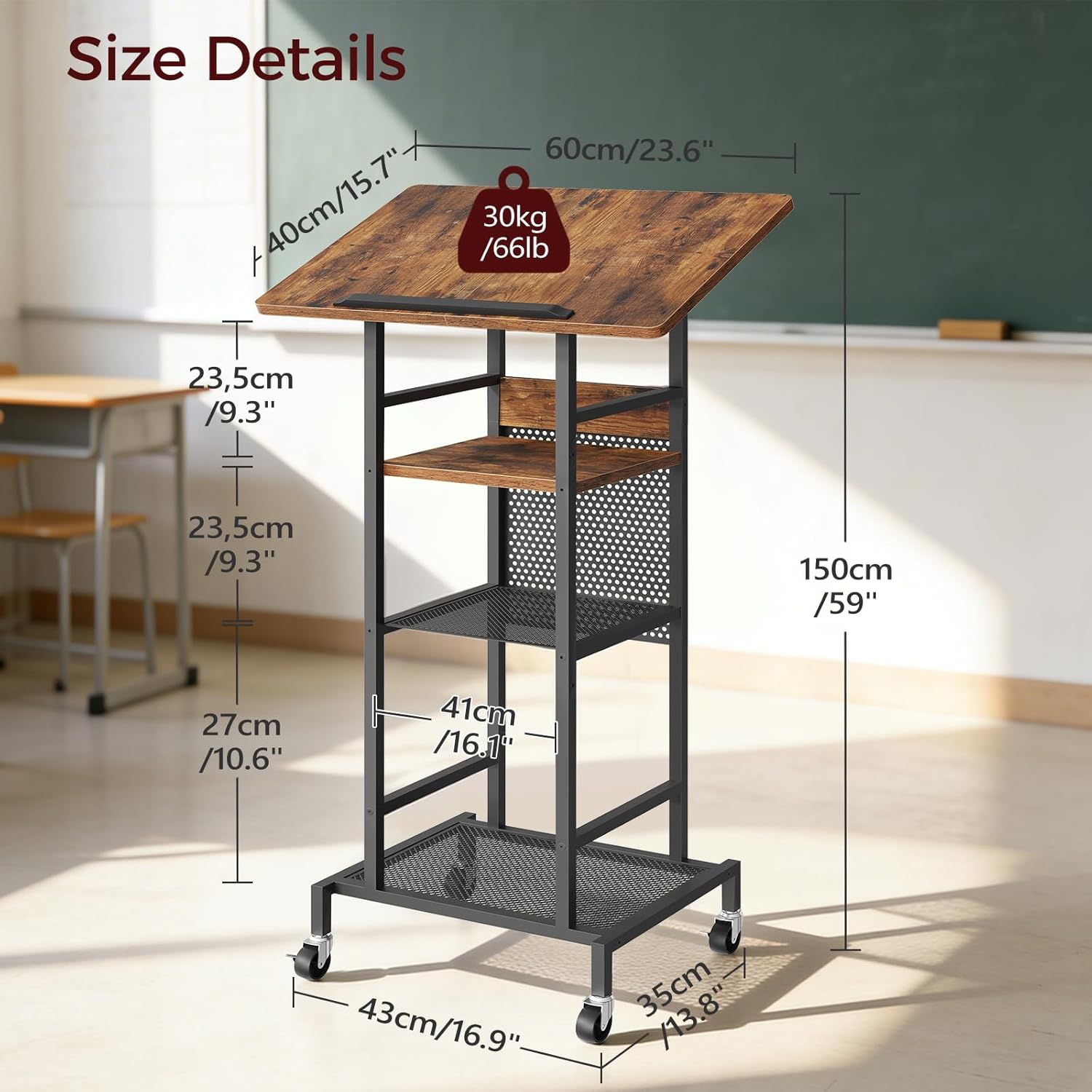
Image: A diagram illustrating the detailed dimensions and top weight capacity of the MAHANCRIS Podium Stand.
Warranty and Support
MAHANCRIS products are designed for durability and functionality. For warranty information, missing parts, or technical assistance, please refer to the contact information provided with your purchase or visit the official MAHANCRIS website.