
Introduction
This manual provides detailed instructions for the assembly, operation, and maintenance of your DurayLoly L-Shaped Office Desk. Please read all instructions carefully before beginning assembly and retain this manual for future reference.
Safety Information
- Always assemble the desk on a soft, clean surface to prevent scratches.
- Ensure all screws and fasteners are tightened securely before use.
- Do not overload the desk or shelves beyond their stated weight capacity.
- Keep small parts away from children during assembly.
- Use caution when handling electrical components (LED lights, power outlet).
Package Contents
Before assembly, verify that all parts are present and undamaged. A detailed parts list with labels is typically provided in the physical manual. For a visual overview of the components, please refer to the beginning of the assembly video in the 'Setup and Assembly' section.
Setup and Assembly
Follow these steps to assemble your DurayLoly L-Shaped Office Desk. It is recommended to have two people for assembly.
Assembly Video Guide
Video: A step-by-step installation guide for the DurayLoly L-Shaped Office Desk, demonstrating how to connect various components and secure them.
Step-by-Step Instructions
- Prepare the Base Frames: Attach the adjustable feet (Part A) to the bottom of the metal frame sections (Parts 9, 10, 11).
- Assemble the Side Frame: Connect the crossbar (Part 20) to the side frame (Part 8) using screws (Part C). Ensure the side with shorter hole spacing is connected correctly.
- Attach Horizontal Bars: Connect the horizontal bars (Parts 13, 14) to the assembled side frame (Part 8) using screws (Part C). Pay attention to the orientation of parts 13 and 14, ensuring the special-shaped holes face forward.
- Assemble the Second Side Frame: Repeat the process for the other side frame (Parts 10, 11, 12) using screws (Part C).
- Install PC Tower Stand: Secure the mesh PC tower stand (Part 5) to the bottom of one of the assembled side frames using screws (Part C). Ensure the special-shaped holes face inward.
- Attach Top Panel for Storage Unit: Place the top panel (Part 2) onto the frame where the PC tower stand is located, securing it with screws (Part C).
- Assemble Shelf Unit: Connect the wooden shelf panels (Parts 4, 6) to form the internal structure of the shelving unit using screws (Part E).
- Attach Shelf Frame: Secure the metal frames (Parts 7) to the assembled wooden shelf unit using screws (Part E).
- Mount Shelf Unit to Desk: Carefully place the assembled shelf unit onto the top panel (Part 2) and secure it using screws (Part C).
- Connect Main Desk Panel: Use wooden dowels (Part J) to align and connect the main desk panel (Part 1) to the top panel (Part 2) of the storage unit. Secure with screws (Part C) from underneath.
- Install Support Bars: Attach the diagonal support bars (Part 16) to the main desk frame (Parts 9, 8) using screws (Part D) and plastic inserts (Part K).
- Install Power Outlet: Insert the power charging station (Part M) into the designated cutout on the desk surface and secure it with screws (Part G).
- Assemble Fabric Drawers: Fold the fabric drawers (Part 17) into shape, insert the bottom panel, and attach the handles (Part L) using screws (Part F).
- Insert Drawers: Place the assembled fabric drawers (Parts 17, 18) into their respective slots in the storage unit.
- Cover Screw Holes: Use the provided wood grain stickers (Part P) to cover any visible screw holes for a finished look.

Image: A fully assembled DurayLoly L-Shaped Office Desk in a gaming setup, showcasing the LED lights, shelves, and drawers.
Operating Instructions
Reversible L-Shaped Configuration
The desk is designed with a reversible L-shape, allowing you to configure the longer and shorter sides to fit your room layout. This flexibility enables placement in various corners or even combining two desks for a larger workstation. Refer to the assembly instructions for guidance on reversing the orientation during setup.

Image: Diagram showing the product dimensions and the reversible nature of the L-shaped desk, allowing the shelf unit to be placed on either side.
Using the LED Lights
Your desk is equipped with built-in RGB LED lights. Use the provided remote control to power the lights on/off, change colors, adjust brightness, and select various dynamic lighting modes. Ensure the LED strip is properly connected to the power source.

Image: A gaming desk setup highlighting the integrated LED lighting strip along the back edge of the desk.
Power Charging Station
The integrated power charging station features 2 AC outlets and 2 USB ports. Plug the desk's main power cord into a wall outlet. You can then connect your devices directly to the desk for convenient charging and power supply. This helps keep your workspace tidy by reducing cable clutter.
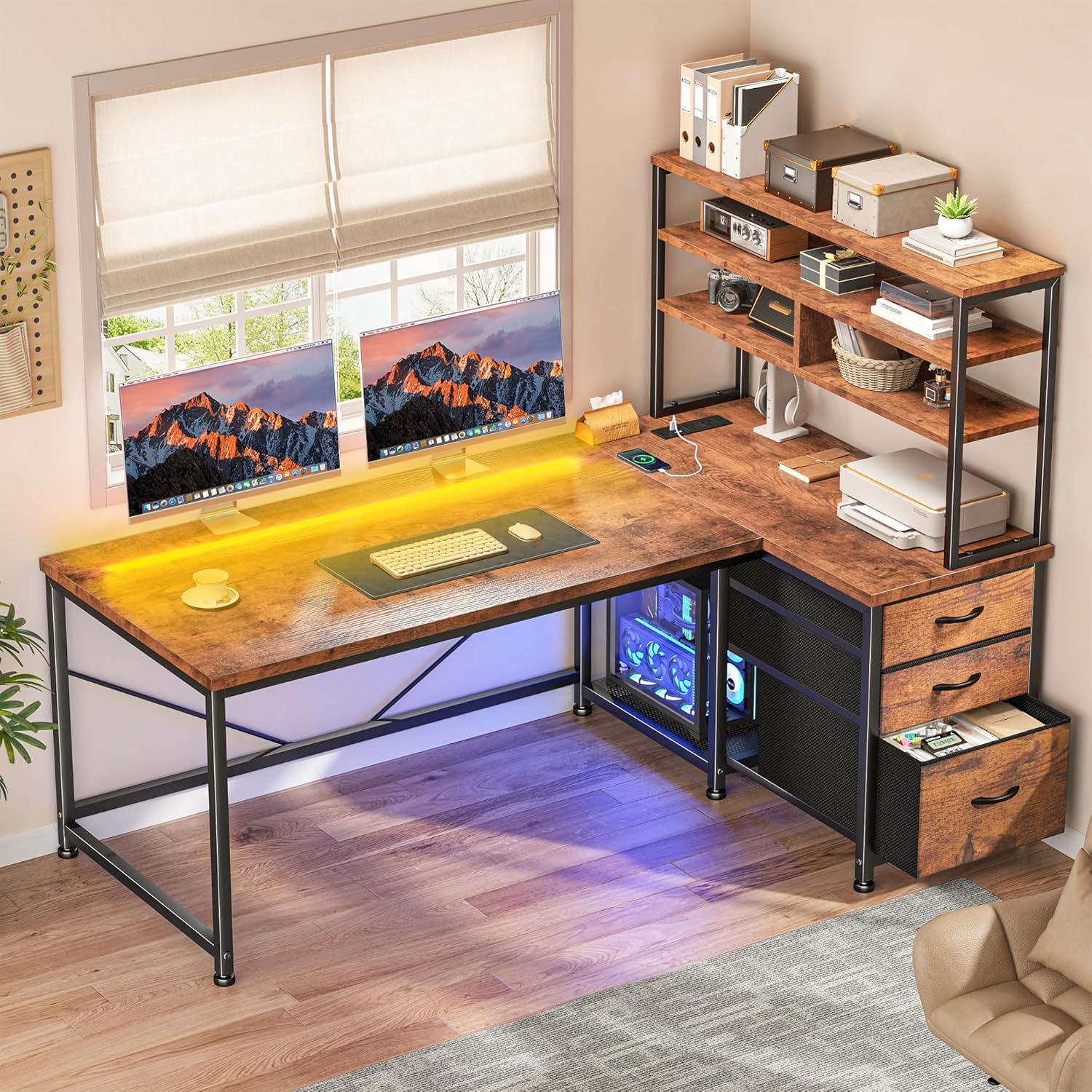
Image: A close-up view of the UL Certified built-in power charging station, showing two USB ports and two AC outlets, with a phone charging wirelessly nearby.
Storage Features
- Fabric Drawers: The desk includes three fabric drawers for organized storage of office supplies, documents, or personal items.
- Open Shelves: The multi-tier shelving unit provides open storage for books, decor, or frequently accessed items.
- Mesh PC Tower Stand: A dedicated mesh stand is provided to keep your computer tower off the floor, promoting better airflow and protecting it from dust.

Image: A detailed view of the desk's storage features, including the three fabric drawers, open shelves, and the mesh PC tower stand.
Maintenance
- Cleaning: Wipe surfaces with a soft, damp cloth. Avoid harsh chemicals or abrasive cleaners that may damage the finish.
- Dusting: Regularly dust the desk and shelves to prevent buildup.
- Tightening Fasteners: Periodically check all screws and fasteners and tighten them as needed to maintain stability.
- Spills: Clean up spills immediately to prevent staining or damage to the wood surface.
- Heat Protection: Use coasters or protective pads under hot items to prevent heat damage.
Troubleshooting
| Problem | Possible Cause | Solution |
|---|---|---|
| Desk is wobbly or unstable. | Loose screws; uneven floor; adjustable feet not properly adjusted. | Check and tighten all screws. Adjust the leveling feet on the bottom of the desk to compensate for uneven surfaces. |
| LED lights are not working. | Power connection issue; remote control battery dead; LED strip damaged. | Ensure the LED strip is securely plugged into the power outlet. Check the remote control battery. If issues persist, contact customer support. |
| Power outlet not providing power. | Desk's main power cord unplugged; circuit breaker tripped; faulty outlet. | Verify the desk's main power cord is securely plugged into a working wall outlet. Check your home's circuit breaker. Test the wall outlet with another device. |
| Drawers do not slide smoothly. | Drawer not assembled correctly; obstruction in the drawer slot. | Ensure the fabric drawers are fully expanded and correctly inserted. Check for any obstructions in the drawer slots. |
Specifications
- Brand: DurayLoly
- Model: L-Shaped Office Desk
- Product Dimensions: 18.9"D x 47.2"W x 59"H
- Color: Brown
- Style: Modern
- Top Material Type: Wood
- Frame Material Type: Steel
- Number of Drawers: 3 (Fabric)
- Number of Shelves: 1 (Multi-tier shelving unit)
- Special Features: Reversible L-shape, Built-in RGB LED Lights, Integrated Power Charging Station (2 AC outlets, 2 USB ports), Mesh PC Tower Stand, Adjustable Leveling Feet.
- Assembly Required: Yes
Warranty and Support
This DurayLoly L-Shaped Office Desk comes with a Limited Warranty. For specific warranty details, claims, or technical support, please contact DurayLoly customer service through the retailer where the product was purchased or visit the official DurayLoly website.
Manufacturer: DurayLoly
For additional information or assistance, please refer to the DurayLoly Store.