
1. Introduction
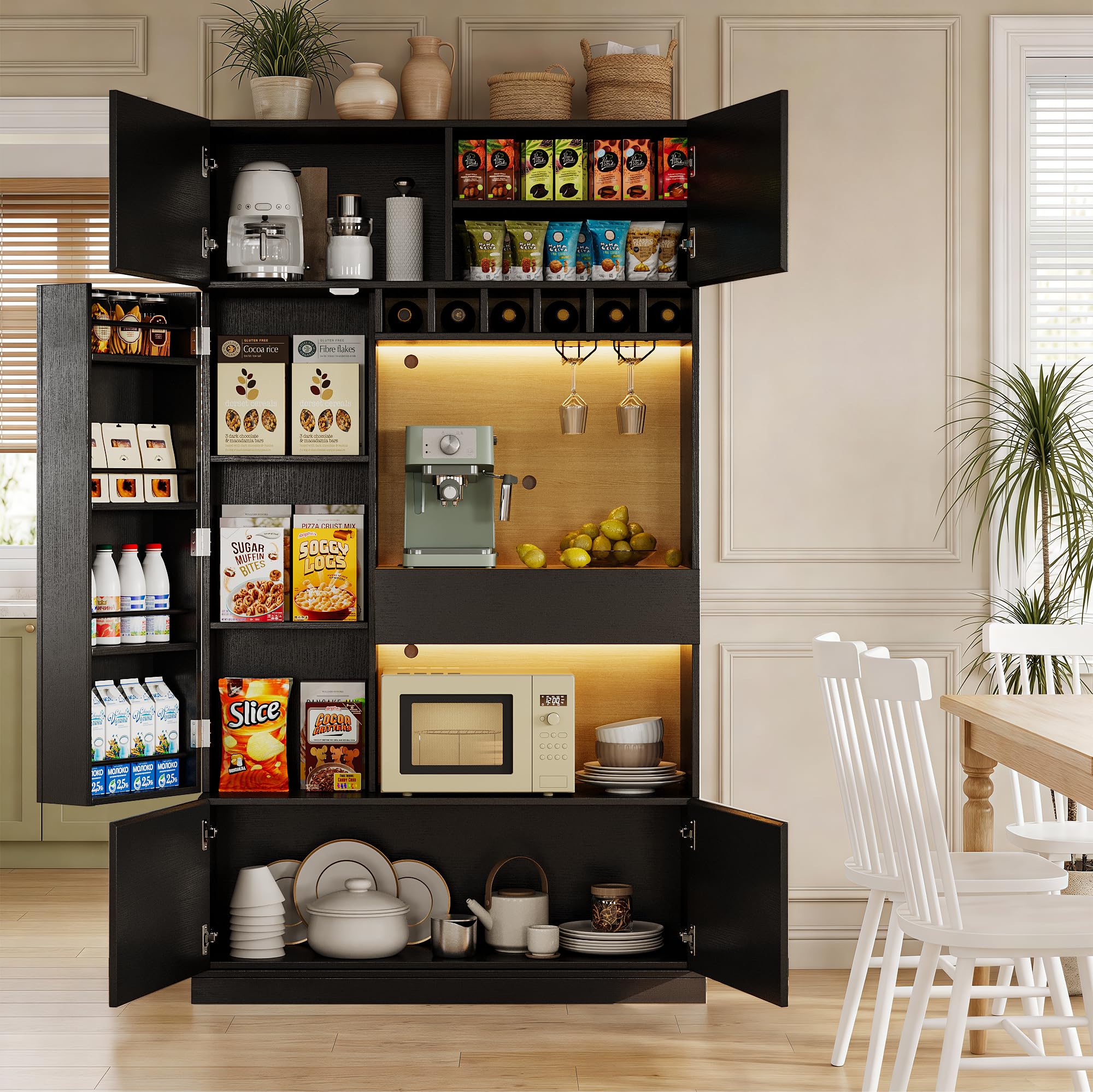
Thank you for purchasing the Einhomn 69" Kitchen Pantry Cabinet. This versatile storage solution is designed to enhance your kitchen, dining room, or living room with its smart features and ample storage. This manual provides detailed instructions for assembly, operation, maintenance, and troubleshooting to ensure safe and efficient use of your new cabinet.

2. Safety Information
Please read all safety warnings and instructions carefully before assembling and using this product. Failure to follow these instructions may result in injury or product damage.
- Anti-Tip Connectors: Always install the provided anti-tip connectors to secure the cabinet to a wall. This prevents accidental tipping, especially in households with children or pets.
- Weight Distribution: Distribute weight evenly across shelves and compartments. Avoid placing heavy items on upper shelves to maintain stability.
- Electrical Safety: The integrated charging station is designed for indoor use only. Do not overload the outlets. Ensure all connections are secure and avoid contact with water.
- Assembly: Assemble the cabinet on a soft, clean surface to prevent scratches. Two people are recommended for assembly.
- Ventilation: Ensure adequate ventilation around the cabinet, especially if placing heat-generating appliances on the countertop.
3. Setup and Assembly
Follow these steps for proper assembly of your Einhomn Kitchen Pantry Cabinet. All necessary tools and hardware are included in the assembly kit.
3.1. Unpacking and Preparation
- Carefully unpack all components and hardware.
- Verify that all parts listed in the parts list are present. If any parts are missing or damaged, contact customer support.
- Lay out all components on a clean, soft surface (e.g., a carpet or blanket) to prevent scratches during assembly.
3.2. Assembly Video Guide
For a visual guide, please watch the official assembly video:
3.3. Step-by-Step Assembly (Refer to included diagrams for part numbers)
- Assemble the base frame using the designated panels and connectors. Ensure all screws are tightened securely.
- Attach the side panels to the base, aligning the pre-drilled holes.
- Install the central back panel and internal shelves.
- Assemble the drawer components, including the drawer slides.
- Attach the hinges to the cabinet doors and then mount the doors to the main cabinet structure.
- Install the LED light strips in the designated areas. Connect the power supply for the charging station.
- Secure the anti-tip connectors to the top rear of the cabinet and to a wall stud using appropriate hardware (not included).

4. Operating Instructions
4.1. LED Lights
The cabinet features built-in 7-color adjustable RGB LED lights. Use the included switch control or a compatible app (if applicable) to change colors and adjust brightness. The lights are designed to create ambient lighting for various occasions.

4.2. Charging Station
The integrated charging station provides convenient power access. It includes 2 AC outlets (110V/12A) and 2 USB ports (5V/2A). Plug the cabinet's power cord into a standard wall outlet. Use the outlets and USB ports to charge your electronic devices.

4.3. Adjustable Shelves
The cabinet features adjustable shelves to accommodate items of various heights. To adjust a shelf, remove the shelf pins, reposition the shelf to the desired height, and reinsert the pins securely.

5. Maintenance and Care
- Cleaning: Wipe surfaces with a soft, damp cloth. Avoid harsh chemicals or abrasive cleaners that may damage the finish.
- Spills: Clean up spills immediately to prevent staining or damage to the wood material.
- Hardware: Periodically check all screws and connectors to ensure they remain tight. Retighten if necessary.
- LED Lights: If LED lights malfunction, check the power connection. Do not attempt to repair electrical components yourself. Contact customer support.
6. Troubleshooting
| Problem | Possible Cause | Solution |
|---|---|---|
| Cabinet feels unstable | Anti-tip connectors not installed or loose; uneven weight distribution. | Ensure anti-tip connectors are securely installed. Redistribute items evenly. |
| LED lights not working | Power cable disconnected; faulty switch/app connection. | Check power cable connection. Ensure switch/app is correctly paired and functioning. |
| Drawer does not slide smoothly | Drawer slides misaligned or damaged; debris in tracks. | Check alignment of drawer slides. Clear any debris from tracks. Lubricate if necessary. |
| Doors do not close properly | Hinges loose or misaligned. | Adjust or tighten door hinges. |
7. Specifications
- Brand: Einhomn
- Model Name: Kitchen Pantry Cabinet with LED Light
- Model Number: I870101047A1
- Color: Black
- Material: Engineered Wood (MDF panels)
- Product Dimensions (D x W x H): 14.17" x 40.16" x 69.09"
- Item Weight: 138.89 Pounds
- Number of Doors: 5
- Number of Drawers: 1
- Number of Shelves: 7 (adjustable)
- Additional Features: Ambient RGB LED Lights, Wine Rack, Glass Holders, Built-In Charging Station (2 AC outlets, 2 USB ports), 4-Tier Side Door Shelf.
- Assembly Required: Yes (Self-Assembly)
8. Warranty and Support
For warranty information, missing parts, or technical support, please contact Einhomn customer service. Refer to your purchase documentation for specific warranty terms and contact details. Keep your proof of purchase for warranty claims.
Contact Information: Please refer to the contact details provided with your product packaging or visit the official Einhomn website.