
1. Introduction
The FTVOGUE Water Level Controller is an automatic liquid level management device designed for various applications, including water tanks and pump systems. It monitors liquid levels and activates or deactivates a water pump to maintain desired levels. This controller features adjustable sensitivity and is constructed from durable ABS material for reliable performance.
2. Safety Information
- Ensure the power supply is disconnected before installation or maintenance to prevent electric shock.
- Installation should be performed by qualified personnel or under professional supervision.
- Do not expose the controller to extreme temperatures or corrosive environments beyond its specified operating range.
- Verify all wiring connections are secure and correct according to the provided diagram to avoid damage to the unit or connected equipment.
- This device is designed for liquid level control. Do not use it for purposes other than its intended function.
3. Product Features
- Automatic Control: Monitors liquid levels and activates the water pump to maintain the optimal level.
- Adjustable Sensitivity: Customize sensitivity settings for precise level detection.
- Durable Construction: Made from ABS material for long-lasting performance.
- Wide Compatibility: Suitable for various applications including oil tanks and water storage.
- Easy Installation: Quick setup with options for screw positioning or electric box track mounting.
4. Package Contents
Please check the package contents upon receipt:
- 1 x FTVOGUE Water Level Controller
- 1 x Small Screwdriver (for sensitivity adjustment)

Image: The FTVOGUE Water Level Controller shown with a small screwdriver, which is included for adjustments.
5. Specifications
| Item Type | Water Level Controller |
| Material | ABS |
| Input Voltage | AC100V-260V, 50/60Hz |
| Working Current | Working current ≤ 110mA, static current consumption ≤ 20mA |
| Load Power (Resistive) | < 1.6KW (Note: Overload or three-phase load requires additional AC contactor) |
| Load Power (Inductive) | < 1KW (Note: Overload or three-phase load requires additional AC contactor. Inductive load refers to loads with inductive coils, such as motors, electromagnets, solenoid valves, etc.) |
| Alarm Output | 800W (resistive load) normally open, normally closed output |
| Output Mode | Normally open, normally closed output |
| Input Signal | Induction signal input |
| Sensing Head Interface Voltage | DC12V |
| Working Temperature | -20 to 105 ℃ |
| Overall Size | Approx. 115 x 90 x 40mm / 4.53 x 3.54 x 1.57in |
| Model Number | FTVOGUElin8szu9v5 |
| Country Of Origin | China |
6. Setup and Installation
The FTVOGUE Water Level Controller offers flexible installation options, including screw positioning or mounting on an electric box track. Proper wiring is crucial for correct operation.
6.1 Wiring Diagram
Refer to the following diagram for correct wiring connections. Ensure all connections are secure before applying power.
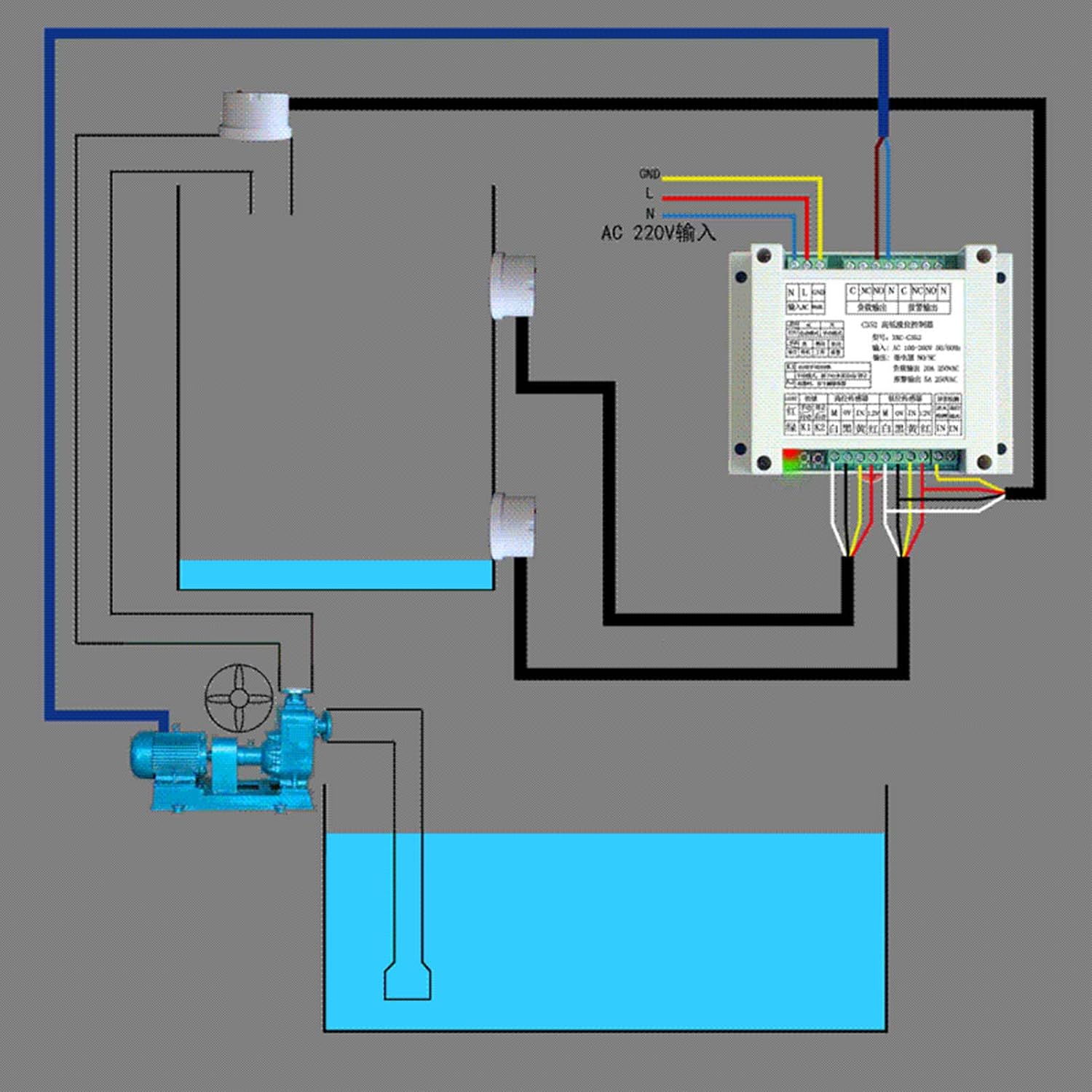
Image: A detailed wiring diagram illustrating connections for the FTVOGUE Water Level Controller with a pump and water tanks. It shows input power (AC 220V), sensor connections (K1, K2, M), and output connections (N.O., N.C., N).
6.2 Mounting
Mount the controller in a dry, protected location using screws or by attaching it to a compatible electric box track. Ensure adequate ventilation around the unit.
6.3 Sensor Placement
Position the liquid level sensors at the desired high and low points within your tank or reservoir. Ensure sensors are securely fixed and free from obstructions that might interfere with accurate level detection.
7. Operating Instructions
Once installed and wired correctly, the controller will automatically monitor liquid levels and operate the connected pump as configured.
7.1 Automatic Level Control
The controller will activate the pump when the liquid level drops below the lower sensor and deactivate it when the level reaches the upper sensor, maintaining the liquid within the set range.
7.2 Adjusting Sensitivity
The sensitivity of the controller can be adjusted to suit different liquid types or environmental conditions. Use the provided small screwdriver for this adjustment.
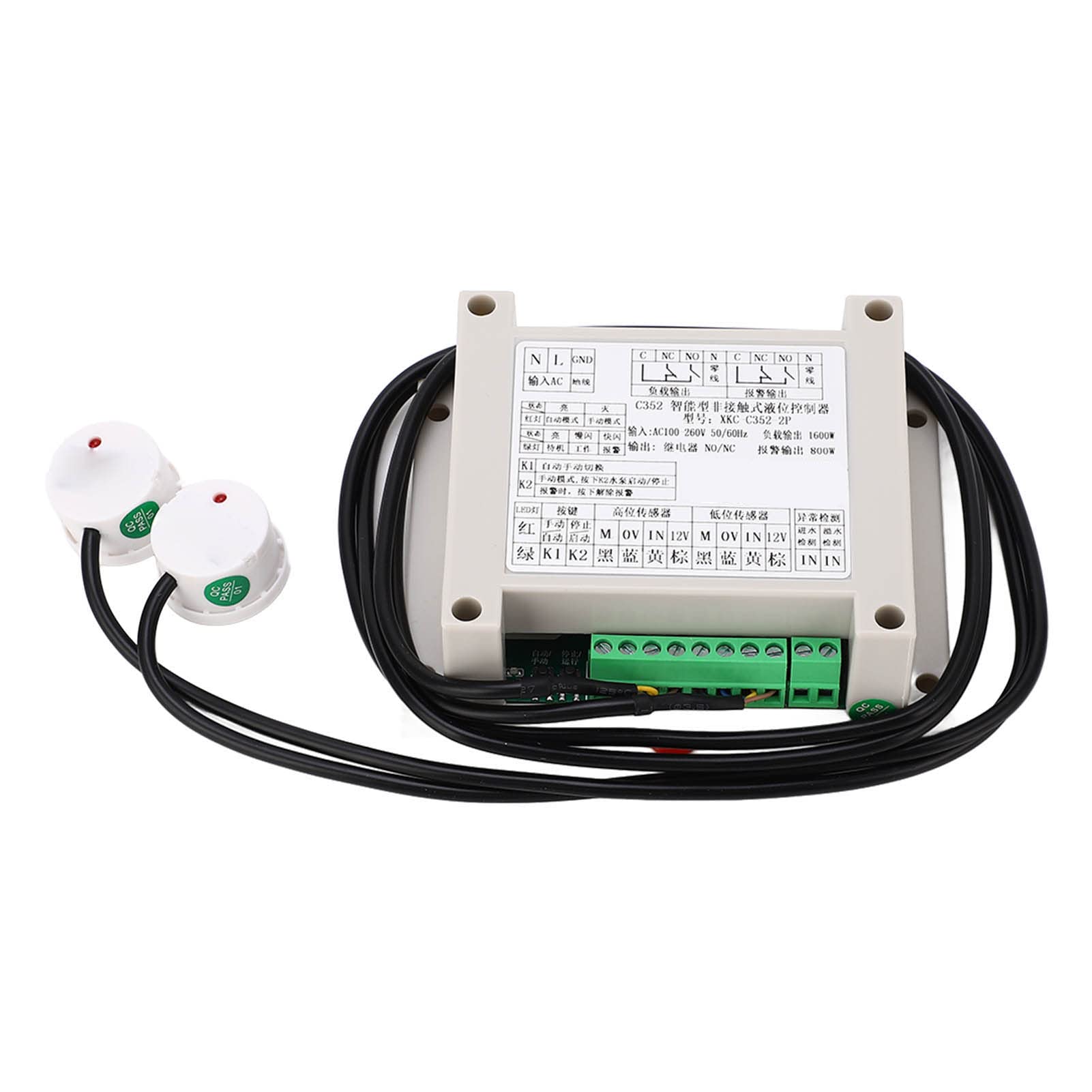
Image: A close-up view of the FTVOGUE Water Level Controller with instructions on how to adjust sensitivity. To adjust, remove the plastic cover, locate the small screw, turn clockwise to reduce sensitivity, and counterclockwise to increase sensitivity.
- Remove the plastic cover of the controller.
- Locate the very small screw inside the unit.
- Turn the screw clockwise to reduce sensitivity.
- Turn the screw counterclockwise to increase sensitivity.
8. Maintenance
- Regularly inspect the controller and sensors for any signs of damage or wear.
- Keep the controller unit clean and free from dust and moisture.
- Periodically check all wiring connections to ensure they remain tight and secure.
- Clean the liquid level sensors as needed to prevent buildup that could affect accuracy.
9. Troubleshooting
- Controller not powering on: Check the input voltage supply and ensure all power connections are correct and secure.
- Pump not activating/deactivating: Verify sensor placement and cleanliness. Check wiring to the pump and ensure the load power specifications are not exceeded. Adjust sensitivity if necessary.
- Inaccurate level detection: Clean the sensors thoroughly. Ensure sensors are not obstructed and are placed correctly at the desired levels. Adjust sensitivity.
- Overload issues: If using an inductive load (motor, solenoid valve) or a three-phase load, ensure an additional AC contactor is used as specified in the specifications.
10. Warranty and Support
For warranty information or technical support, please refer to the product packaging or contact your retailer. Keep your purchase receipt as proof of purchase.