
1. Introduction
This manual provides essential information for the safe and efficient operation, maintenance, and troubleshooting of your TTGO Z3 electric bicycle. Please read this manual thoroughly before your first ride and keep it for future reference. The TTGO Z3 is designed for daily commuting, short distances, and recreational rides, offering a blend of power, range, and comfort.
Safety Guidelines
- Always wear a helmet and appropriate safety gear when riding.
- Familiarize yourself with local traffic laws and regulations.
- Perform a pre-ride safety check before each use, including brakes, tires, and battery.
- Do not ride under the influence of alcohol or drugs.
- Avoid riding in adverse weather conditions or on excessively rough terrain.
2. Product Overview
The TTGO Z3 electric bicycle features a robust aluminum alloy frame, a powerful rear hub motor, and a long-lasting removable battery. It is equipped with a 7-speed gear system, hydraulic disc brakes, and an intuitive LCD display for an enhanced riding experience.

Figure 2.1: The TTGO Z3 electric bicycle in use. This image illustrates the overall design and appearance of the bicycle.
Key Components
- Motor: 250W brushless rear hub motor with 70 Nm torque.
- Battery: Removable 48V 15Ah (720 Wh) Lithium-ion battery.
- Frame: Lightweight 6061 aluminum alloy step-through frame.
- Gears: 7-speed gear system.
- Brakes: Hydraulic disc brakes (front and rear).
- Wheels: 27.5-inch wheels with 2.4-inch CST tires.
- Suspension: Front suspension fork and cushioned seat post.
- Display: LCD display showing speed, battery level, assist level, and odometer.
- Lighting: Integrated LED headlight and taillight.
3. Setup
Your TTGO Z3 electric bicycle arrives 85% pre-assembled. Follow these steps to complete the assembly and prepare for your first ride.
3.1 Unpacking and Initial Inspection
- Carefully remove the bicycle from its packaging.
- Inspect all components for any signs of damage during transit. Contact customer support immediately if you find any issues.
- Retain the original packaging for potential future service or returns.
3.2 Assembly Instructions
The remaining assembly typically involves attaching the front wheel, handlebars, pedals, and seat post.
- Front Wheel: Secure the front wheel into the fork dropouts. Ensure the quick-release skewer or axle nuts are tightened correctly.
- Handlebars: Insert the handlebar stem into the fork steerer tube and tighten the bolts. Ensure the handlebars are straight and secure.
- Pedals: Identify the left (L) and right (R) pedals. The left pedal tightens counter-clockwise, and the right pedal tightens clockwise. Apply a small amount of grease to the threads before installation.
- Seat Post: Insert the seat post into the frame's seat tube. Adjust the height for comfortable riding and secure it with the quick-release lever or bolt.
3.3 Battery Installation and Initial Charging
The TTGO Z3 features a removable, integrated battery.

Figure 3.1: Integrated 48V 15Ah battery. The battery is designed to be removable for convenient charging.
- Locate the battery compartment within the frame.
- Insert the battery securely until it clicks into place. Use the provided key to lock the battery if applicable.
- Before your first ride, fully charge the battery. Connect the charger to the battery charging port and then to a power outlet. The charging time is approximately 8 hours.
- The charger indicator light will change when charging is complete. Disconnect the charger once fully charged.
4. Operating Instructions
Understand how to operate your TTGO Z3 electric bicycle's various functions for a safe and enjoyable ride.
4.1 Powering On/Off and LCD Display
The LCD display provides crucial riding information.
- Power On: Press and hold the power button on the LCD display for a few seconds.
- Power Off: Press and hold the power button again until the display turns off.
- Display Information: The LCD shows current speed, battery level, pedal assist level, and odometer/trip distance.
4.2 Pedal Assist Levels
The TTGO Z3 offers 5 levels of pedal assistance.
- Use the '+' and '-' buttons on the display control panel to adjust the assist level.
- Level 0: No electric assistance (pure pedal power).
- Level 1-5: Increasing levels of motor assistance. Higher levels provide more power and easier pedaling.
- The maximum speed with assistance is 25 km/h.
4.3 Gear Shifting
The 7-speed gear system allows you to adapt to various terrains and riding conditions.

Figure 4.1: Shimano 7-speed gear system and hydraulic disc brake. This system ensures smooth gear changes and reliable stopping power.
- Use the shifter on the handlebars to change gears.
- Shift to lower gears (larger cogs) for easier pedaling on inclines.
- Shift to higher gears (smaller cogs) for faster speeds on flat terrain.
- Always ease pressure on the pedals slightly when shifting to ensure smooth transitions.
4.4 Braking System
The TTGO Z3 is equipped with hydraulic disc brakes for reliable stopping power.
- The left lever controls the rear brake, and the right lever controls the front brake.
- Apply both brakes simultaneously and smoothly for effective stopping. Avoid sudden, hard braking, especially with the front brake, to prevent skidding.
- Regularly check brake pads for wear and ensure brake levers have proper tension.
4.5 Lighting System
The integrated LED lights enhance visibility and safety.
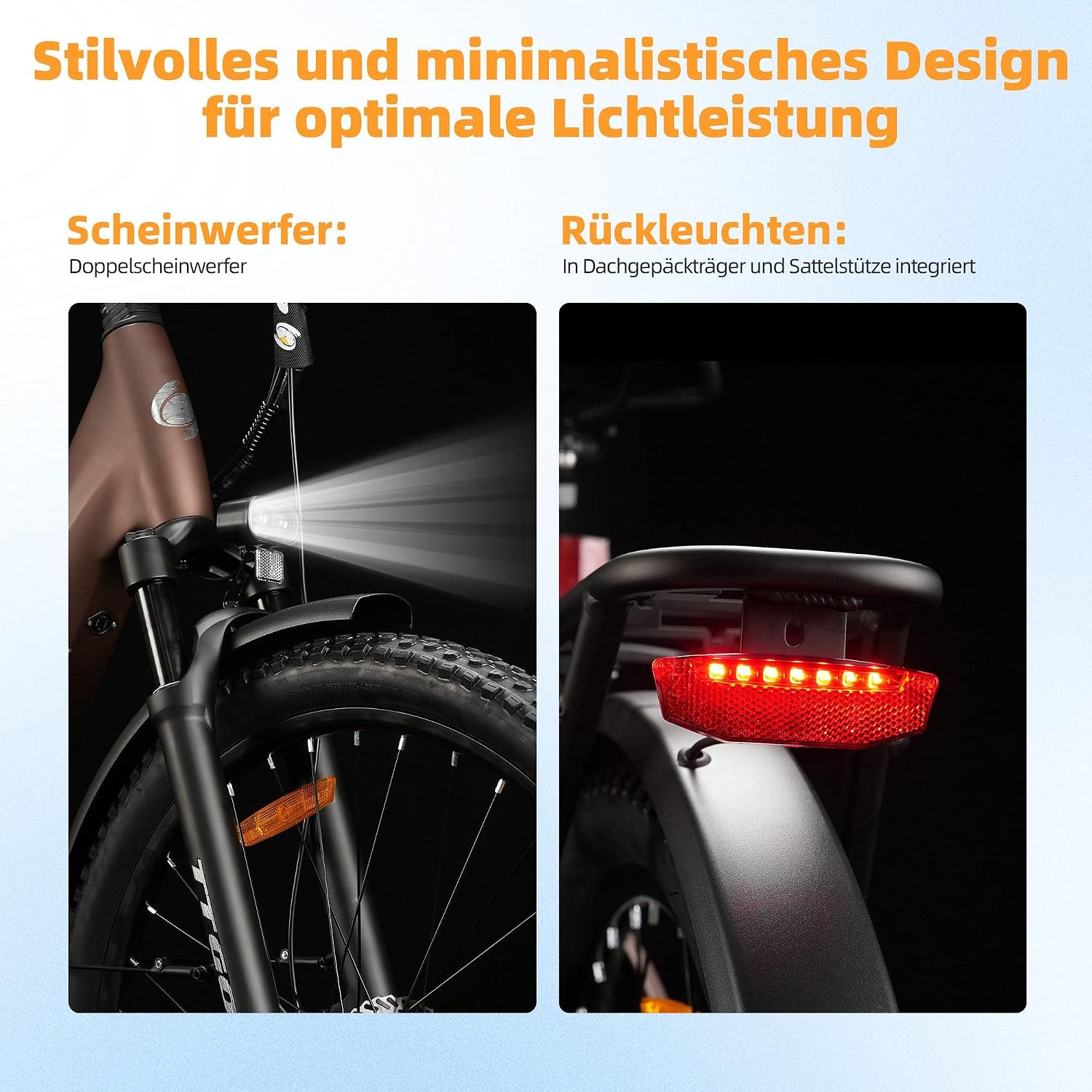
Figure 4.2: Integrated LED headlight and taillight. These lights improve visibility during low-light conditions.
- Turn on the lights using the dedicated button on the control panel (if available) or through the LCD display settings.
- Ensure lights are functional before riding in low-light conditions.
- Reflectors are also present on the front, rear, pedals, and spokes for added visibility.
5. Battery Usage and Charging
Proper battery care ensures optimal performance and longevity.
5.1 Charging Procedure
- Always use the original charger provided with your TTGO Z3.
- The battery can be charged while installed on the bike or removed.
- Connect the charger to the battery's charging port, then plug the charger into a standard wall outlet.
- The charging indicator on the charger will show the charging status. It typically turns green when fully charged.
- Do not overcharge the battery. Disconnect the charger once charging is complete.
5.2 Battery Care and Maintenance
- Store the battery in a cool, dry place, away from direct sunlight and extreme temperatures.
- If storing for an extended period, charge the battery to 50-70% every 1-2 months to maintain its health.
- Avoid completely draining the battery regularly, as this can reduce its lifespan.
- The battery has an IPX5 waterproof rating, but avoid submerging it in water or exposing it to heavy rain for prolonged periods.
5.3 Range Information
The TTGO Z3 battery provides a range of 80-120 km on a single charge.
- Actual range may vary based on factors such as terrain, rider weight, pedal assist level used, tire pressure, wind conditions, and temperature.
- Using higher assist levels or riding uphill will consume battery power faster.
6. Maintenance
Regular maintenance is crucial for the safety, performance, and longevity of your electric bicycle.
6.1 Regular Checks
- Tires: Check tire pressure before each ride. The recommended pressure is typically indicated on the tire sidewall. Inspect for wear, cuts, or punctures.
- Brakes: Ensure brake levers are firm and responsive. Check brake pads for wear and replace if necessary.
- Chain: Keep the chain clean and lubricated. Check for excessive slack or rust.
- Bolts and Fasteners: Periodically check all bolts, nuts, and quick-release levers for tightness.
- Electrical Connections: Ensure all electrical cables and connectors are secure and free from damage.
6.2 Cleaning and Storage
- Clean your bicycle regularly with a damp cloth and mild soap. Avoid using high-pressure washers directly on electrical components.
- Dry the bicycle thoroughly after cleaning.
- Store the bicycle in a dry, secure location, preferably indoors, to protect it from weather elements and theft.
7. Troubleshooting
This section addresses common issues you might encounter with your TTGO Z3 electric bicycle.
| Problem | Possible Cause | Solution |
|---|---|---|
| Motor not assisting | Battery low or off; assist level 0; loose connection. | Charge battery; turn on battery; increase assist level; check connections. |
| Display not turning on | Battery off or drained; loose display cable. | Ensure battery is on and charged; check display cable connection. |
| Brakes feel spongy | Air in hydraulic line; worn brake pads. | Bleed brakes (professional service recommended); replace brake pads. |
| Gears not shifting smoothly | Derailleur out of adjustment; dirty/dry chain. | Adjust derailleur (professional service recommended); clean and lubricate chain. |
| Reduced battery range | High assist level usage; low tire pressure; cold weather. | Use lower assist levels; maintain proper tire pressure; battery performance is reduced in cold. |
If you encounter issues not listed here or require further assistance, please contact customer support.
8. Specifications
Detailed technical specifications for the TTGO Z3 electric bicycle.

Figure 8.1: TTGO Z3 Electric Bicycle Dimensions. All measurements are in millimeters.
| Feature | Specification |
|---|---|
| Model | Z3 |
| Bike Type | Commuting Electric Bicycle |
| Motor | 250W Brushless Rear Hub Motor, 48V, 70 Nm Torque |
| Max Speed (Assisted) | 25 km/h |
| Battery | 48V 15Ah (720 Wh) Removable Lithium-ion |
| Charging Time | Approx. 8 hours |
| Range | 80-120 km (depending on riding conditions) |
| Frame Material | 6061 Aluminum Alloy |
| Wheel Size | 27.5 inches |
| Tire Width | 2.4 inches (CST brand) |
| Gears | 7-Speed |
| Brakes | Hydraulic Disc Brakes (Front & Rear) |
| Suspension | Front Suspension Fork, Cushioned Seat Post |
| Display | LCD (Speed, Battery, Assist Level, Odometer) |
| Lights | Integrated LED Headlight & Taillight |
| Max Load Capacity | 125 kg |
| Bicycle Weight | 27 kg |
| Recommended Rider Height | 165-195 cm |
| Included Components | Kickstand |
9. Warranty and Support
For warranty information and customer support, please refer to the documentation provided at the time of purchase or contact your retailer.
- Keep your proof of purchase for warranty claims.
- For technical assistance, spare parts, or service inquiries, please reach out to the official TTGO support channels or the seller.


