
Introduction
Thank you for purchasing the YOMILUVE Farmhouse L-Shaped Desk. This manual provides essential information for the safe assembly, operation, and maintenance of your new desk. Please read these instructions carefully before beginning assembly and retain them for future reference.
Safety Information
- Always assemble the desk on a clean, soft surface to prevent scratches.
- Ensure all parts are securely fastened before use. Periodically check and tighten all connections.
- Do not overload the desk or shelves. Refer to specifications for weight limits.
- Keep small parts and packaging materials away from children and pets to avoid choking hazards.
- Use the built-in power outlet responsibly. Do not exceed the rated electrical capacity.
- Avoid placing hot items directly on the desk surface without protection.
Package Contents
Before assembly, verify that all components listed below are present and undamaged. If any parts are missing or damaged, please contact customer support.
- Desk Panels (Desktop, Side Panels, Back Panels)
- 3 Wooden Drawers
- Storage Cabinet with Adjustable Shelves
- Printer Stand
- Monitor Stand
- Built-in Power Strip (2 AC Outlets, 1 USB Port, 1 Type-C Port)
- Assembly Hardware (Screws, Bolts, Dowels, Drawer Slides, Handles)
- Assembly Tool (Basic screwdriver may be included, but a personal screwdriver is recommended)
Setup and Assembly Instructions
Follow these steps carefully for proper assembly. It is recommended to have two people for assembly.
- Unpack and Identify Parts: Lay out all components and hardware. Refer to the included parts list to ensure everything is present.
- Assemble Legs: Attach the desk legs to the main desktop panels using the provided screws. Tighten securely with the appropriate tool.
- Connect Desktop Sections: Join the L-shaped desktop sections using the designated bolts and connectors. Ensure a flush and stable connection.
- Install Drawer Slides: Insert the drawer slides into the side panels of the drawer unit. Pay attention to the orientation of the slides.
- Assemble Drawers: Construct the three wooden drawers and attach the handles. Insert the assembled drawers into the installed slides.
- Assemble Storage Cabinet and Shelves: Follow the provided diagram to assemble the storage cabinet. Insert the adjustable shelves into the desired positions.
- Attach Monitor Stand: Secure the monitor stand to the main desktop surface.
- Integrate Power Strip: Place the built-in power strip into its designated slot on the desktop. Ensure the power cable is routed safely.
- Final Check: Verify that all screws, bolts, and connections are tight and secure.

Figure 1: Product Dimensions. This diagram illustrates the overall size and key measurements of the desk and its components.

Figure 2: Storage Drawers. The image demonstrates the capacity and design of the three storage drawers, suitable for various document sizes.

Figure 3: Monitor Stand Ergonomics. This image highlights the ergonomic benefits of the elevated monitor stand, promoting better posture.
Operating Instructions
Using the Built-in Power Outlet
The YOMILUVE L-Shaped Desk includes a convenient built-in power strip for your electronic devices.
- AC Outlets: Two 125V/12A AC outlets are provided for standard electronics like monitors, lamps, or laptops.
- USB Port: One 5V/2A USB-A port is available for charging smartphones, tablets, and other USB-powered devices.
- Type-C Port: One 5V/2A Type-C port is included for charging compatible devices.
- Safety: Ensure the desk's power cord is plugged into a grounded wall outlet. Do not exceed the maximum load capacity of the power strip.
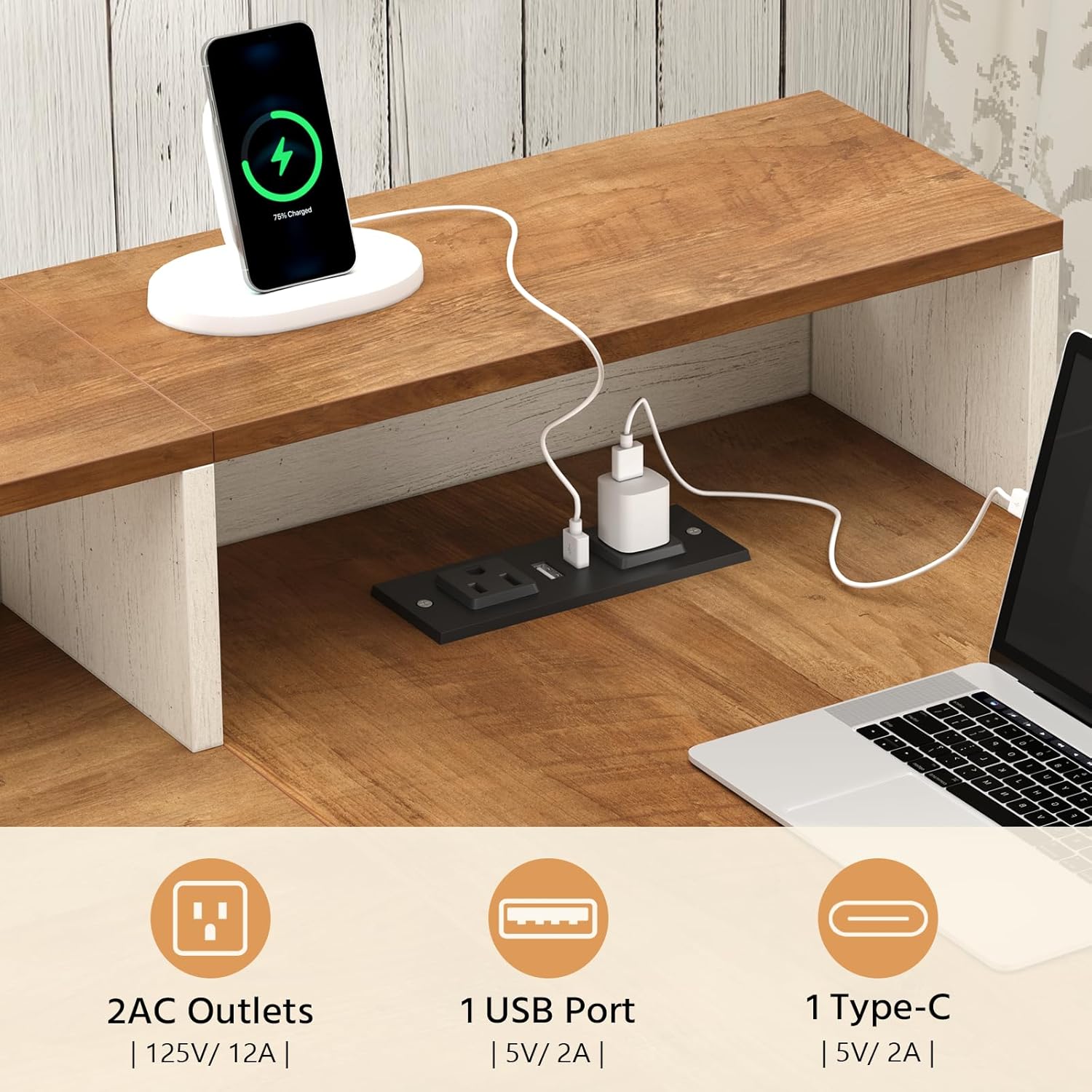
Figure 4: Integrated Power Outlet. This image details the power strip with its various ports for convenient device charging.
Utilizing Storage Features
The desk offers multiple storage solutions to keep your workspace organized.
- Drawers: Use the three wooden drawers for files, stationery, and personal items. The bottom drawer is designed for letter and A4 size documents.
- Storage Cabinet: The cabinet features adjustable shelves, allowing you to customize the space for larger items like books, binders, or a small CPU.
- Monitor Stand: The elevated monitor stand provides additional space underneath for keyboards, mice, or small accessories when not in use.
- Printer Shelf: A dedicated shelf is provided for a printer or other office equipment.

Figure 5: Ample Storage Space. This image illustrates the various storage compartments, including open shelves and drawers, designed for organization.
Maintenance
- Cleaning: Wipe surfaces with a soft, damp cloth. Avoid harsh chemicals or abrasive cleaners that could damage the finish.
- Spills: Clean up spills immediately to prevent staining or damage to the engineered wood.
- Hardware: Periodically check all screws and bolts to ensure they remain tight. Re-tighten as necessary to maintain stability.
- Avoid Direct Sunlight: Prolonged exposure to direct sunlight can cause fading or warping.
- Heat Protection: Use coasters or protective pads under hot items to prevent heat damage.
Troubleshooting
| Problem | Possible Cause | Solution |
|---|---|---|
| Desk is wobbly. | Loose screws or uneven floor. | Check and tighten all assembly screws. Ensure the desk is on a level surface; use shims if necessary. |
| Drawers do not slide smoothly. | Improperly installed slides or obstruction. | Verify drawer slide installation. Check for any obstructions in the tracks. Apply a silicone-based lubricant if needed. |
| Power outlets are not working. | Desk not plugged in, circuit breaker tripped, or faulty connection. | Ensure the desk's main power cord is securely plugged into a functional wall outlet. Check your home's circuit breaker. If issues persist, contact customer support. |
| Parts do not fit during assembly. | Incorrect orientation or manufacturing defect. | Double-check the assembly instructions and diagrams for correct part orientation. Do not force parts. If a defect is suspected, contact customer support. |
Specifications
| Feature | Detail |
|---|---|
| Brand | YOMILUVE |
| Model | Farmhouse L-Shaped Desk |
| Product Dimensions (D x W x H) | 39"D x 61"W x 29.5"H |
| Color | Brown and White |
| Material | Engineered Wood |
| Number of Drawers | 3 |
| Number of Shelves | 2 (open), 1 (enclosed cabinet) |
| Special Features | Built-In Power Strip (2 AC Outlets, 1 USB Port, 1 Type-C Port), Monitor Stand, Printer Shelf |
| Assembly Required | Yes |
Warranty Information
Specific warranty details for the YOMILUVE Farmhouse L-Shaped Desk may vary. Please refer to the documentation included with your purchase or contact the seller/manufacturer directly for information regarding warranty coverage, terms, and conditions.
Customer Support
If you have any questions, require assistance with assembly, or encounter any issues with your YOMILUVE Farmhouse L-Shaped Desk, please do not hesitate to contact our customer support team. We are committed to providing prompt and helpful service.
- Contact Method: Please refer to your purchase documentation or the YOMILUVE brand store on Amazon for the most current contact information.
- When contacting, please provide: Your order number, the product model (B0GS9BTZS8), and a detailed description of your issue.
Visit the official YOMILUVE Store: YOMILUVE Store