
1. Product Overview
The ZGOOD 18L Drying Function Autoclave Sterilizer is a tabletop Class N high-pressure steam sterilizer designed for efficient and reliable sterilization of instruments in various professional settings such as tattoo studios, beauty salons, and laboratories. It features a digital control panel, durable stainless steel chamber, automatic pressure release, and a drying function to ensure optimal sterilization and equipment longevity.
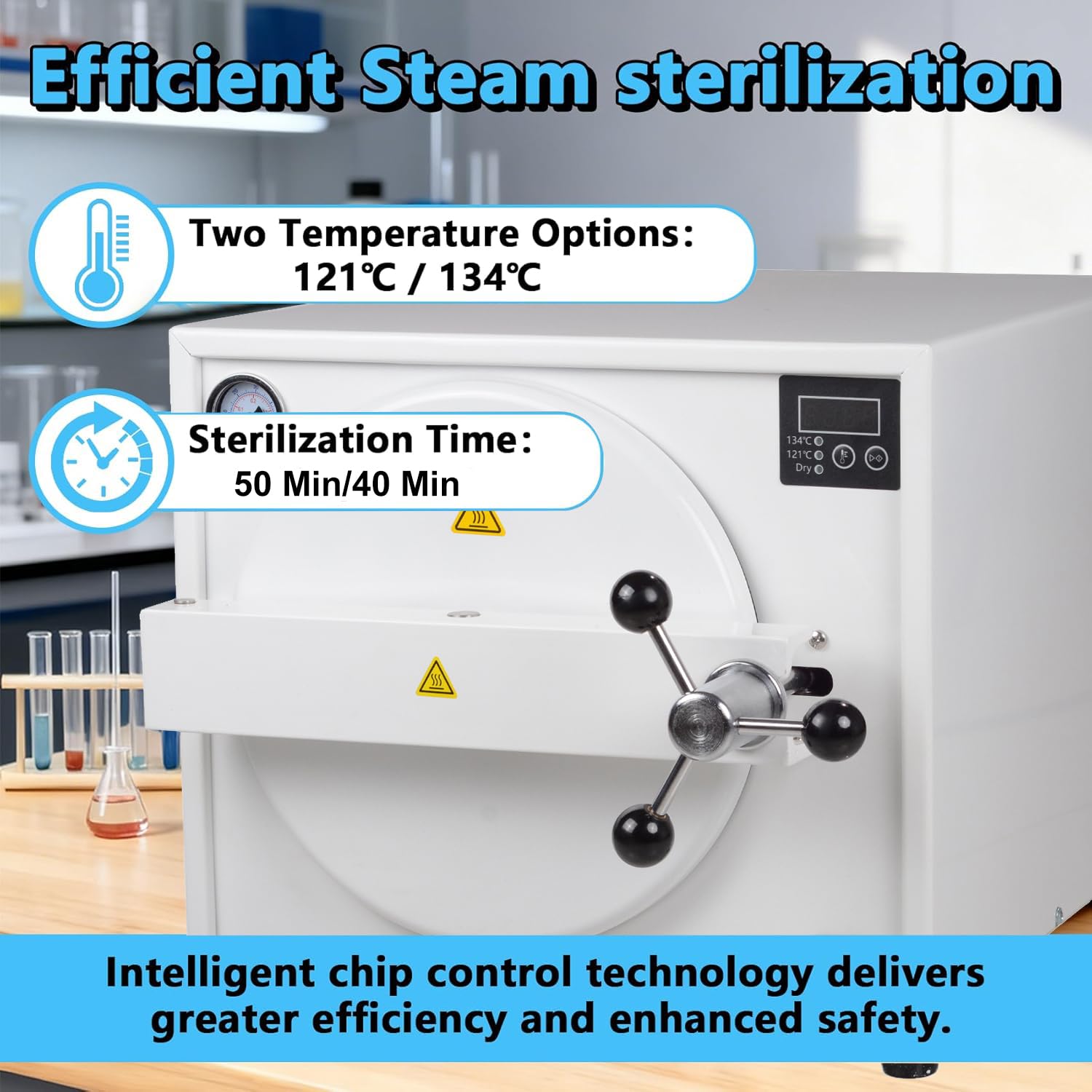
Image 1.1: Front view of the ZGOOD 18L Autoclave Sterilizer, highlighting the digital display and control panel. The display shows temperature options (121°C / 134°C) and sterilization times (50 min / 40 min), indicating intelligent chip control for efficiency and safety.
2. Safety Instructions
Read all instructions carefully before operating the autoclave. Failure to follow safety guidelines may result in injury or damage to the equipment.
- Ensure the unit is placed on a stable, level surface.
- Use only distilled water for operation to prevent mineral buildup and damage.
- Do not open the door until the pressure has completely dropped and the "End" indicator is displayed.
- Avoid stacking items excessively inside the chamber to ensure proper steam circulation.
- Always use heat-resistant gloves or the provided plastic handle when removing sterilized items to prevent burns.
- Regularly inspect the door seal and safety valves for wear or damage.
- Disconnect power before cleaning or maintenance.
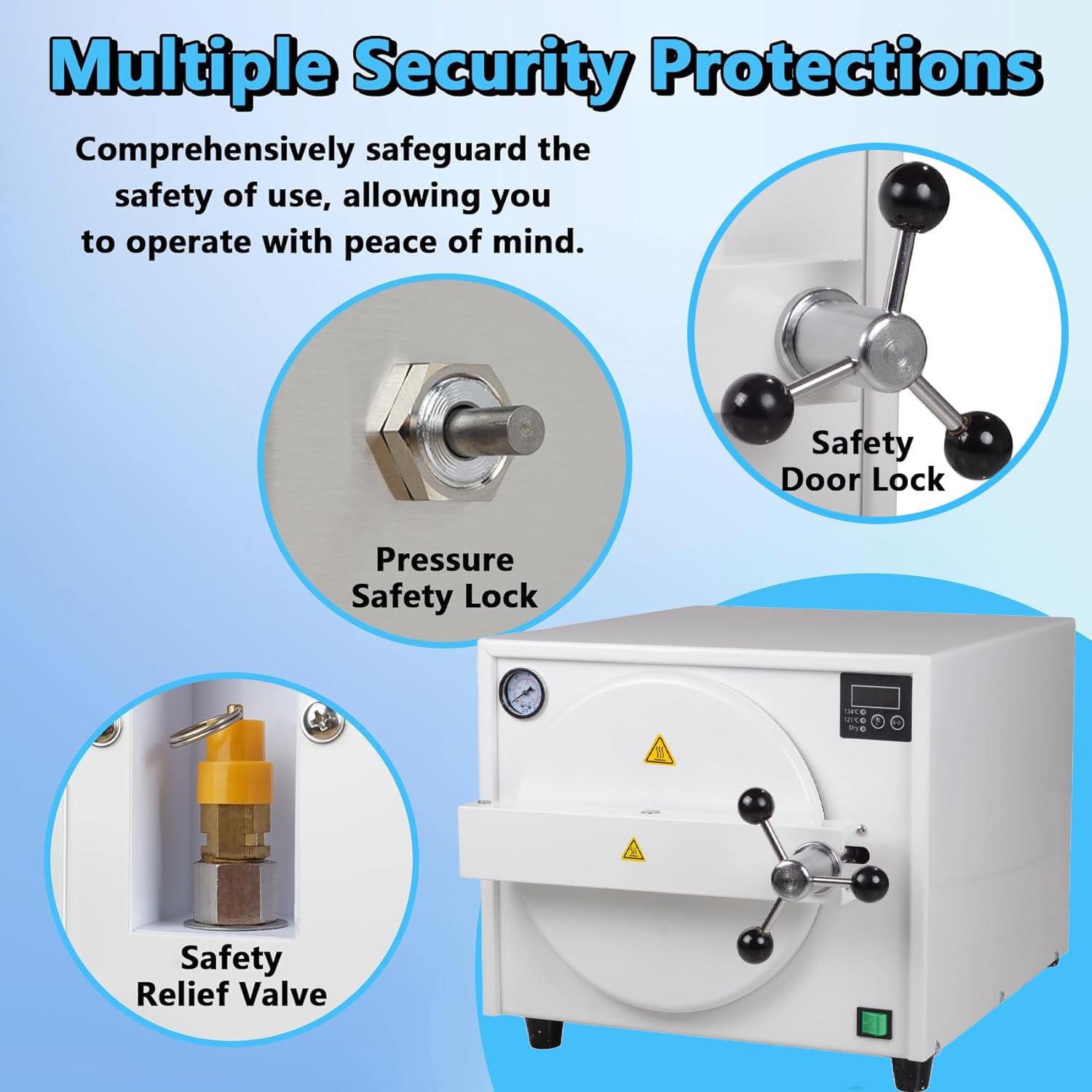
Image 2.1: Illustration of the autoclave's multiple security protections, including the pressure safety lock, safety door lock, and safety relief valve. These features are designed to safeguard users and ensure safe operation.
3. Setup and Installation
- Unpacking: Carefully remove the autoclave and all accessories from the packaging. Inspect for any shipping damage.
- Placement: Place the unit on a sturdy, level surface with adequate ventilation. Ensure there is enough space around the unit for heat dissipation.
- Water Drainage: The unit features adjustable base height. Tilt the machine slightly to facilitate water release from the drainage port.
- Power Connection: Connect the power cord to the autoclave and then to a grounded electrical outlet (110-230 VAC, 1700W).
- Initial Cleaning: Before first use, wipe the interior of the chamber and accessories with a damp cloth.

Image 3.1: Close-up of the LED display screen and control buttons. The display shows temperature settings (134°C, 121°C) and a 'Dry' function. Buttons for temperature selection and pause/start are clearly visible.

Image 3.2: Demonstrates adjusting the base height of the autoclave. Tilting the machine facilitates easier water release from the drainage port after a cycle.

Image 3.3: Shows the main machine along with included accessories: an instruction manual, plastic handle, exhaust tube, power cord, and instrument tray rack.
4. Operating Instructions
- Power On: Turn on the main power switch located on the front of the unit.
- Add Distilled Water: Open the door and add the appropriate amount of distilled water to the chamber. Refer to the water level indicator inside.
- Load Instruments: Place instruments onto the instrument rack. Ensure items are not excessively stacked to allow for proper steam penetration. Items can be wrapped in sterilized cloth if required.
- Close and Secure Door: Close the door firmly and tighten the door handle until it is securely locked.
- Select Temperature: Use the temperature selection button on the digital control panel to choose between 121°C (50 min) or 134°C (40 min).
- Start Cycle: Press the Start button to begin the sterilization cycle. The display will show the current temperature and pressure.
- Cycle Completion: Once the cycle is complete, the display will show "End". Wait for the pressure to drop completely before attempting to open the door.
- Remove Items: Carefully open the door. Use the provided plastic handle or heat-resistant gloves to remove the sterilized items and the instrument rack.
Video 4.1: This video demonstrates the basic operation of the ZGOOD 18L Autoclave Sterilizer, including powering on, adding water, loading instruments, closing the door, selecting temperature, starting the cycle, and safely opening the door after completion. This video is provided by ALKITA (Seller).
Video 4.2: This video provides a quick overview of the ZGOOD 18L Autoclave Sterilizer's operation, showing the process from powering on to completing a sterilization cycle. This video is provided by ALKITA (Seller).

Image 4.1: The ZGOOD Autoclave Sterilizer with its door open, revealing the stainless steel chamber and the multi-level instrument rack inside. This image illustrates the capacity and how instruments are placed for sterilization.
5. Maintenance
- Daily Cleaning: After each use, wipe the interior of the chamber and the instrument rack to remove any residue.
- Water Drainage: Regularly drain any remaining water from the reservoir using the drainage port.
- Door Seal: Inspect the door seal for cracks or damage. Clean it with a soft cloth and mild detergent if necessary. Replace if worn to ensure a proper seal.
- Safety Valve: Periodically check the safety relief valve for proper function.
- Exterior Cleaning: Clean the exterior of the unit with a soft, damp cloth. Do not use abrasive cleaners.
6. Troubleshooting
| Problem | Possible Cause | Solution |
|---|---|---|
| Unit does not power on. | Power cord not connected, power switch off, or power outage. | Check power connection, ensure switch is on, verify power supply. |
| Steam leakage from door. | Door not properly closed, door seal damaged or dirty. | Ensure door is securely tightened. Clean or replace door seal. |
| Sterilization cycle not completing. | Insufficient water, sensor malfunction. | Add distilled water. Contact customer support if issue persists. |
| "LD" error on display. | Low water level. | Add distilled water to the appropriate level. |
7. Specifications
| Feature | Detail |
|---|---|
| Product Name | 18L Autoclave Sterilizer |
| Electrical Supply | 110 ~ 230 VAC |
| Chamber Dimensions (diameter/depth) | Ø247×340 mm |
| Power | 1700W |
| Working Temperature | 121 °C / 134 °C |
| Overall Dimensions (length x width x height) | 568 x 419 x 336 mm |
| Net Weight | 25.9 KG |
| Working Time | 121 °C / 50 min; 134 °C / 40 min |
8. Warranty and Support
For warranty information and technical support, please refer to the contact details provided in your purchase documentation or contact the manufacturer directly. Keep your proof of purchase for warranty claims.
Manufacturer: ZGOOD
ASIN: B0GS8PNG6Q