
Introduction
Thank you for purchasing the Haewon Makeup Vanity Desk with Lighted Mirror and Chair Set. This manual provides essential information for the safe assembly, setup, operation, and maintenance of your new vanity desk. Please read these instructions carefully before beginning assembly and retain them for future reference.

Image: The complete Haewon Makeup Vanity Desk with Lighted Mirror and Chair Set in a white finish.
Safety Information
General safety precautions apply. Please refer to the included assembly instructions for specific guidelines. Exercise caution with sharp edges, heavy lifting during assembly, and when handling electrical components. Ensure all connections are secure before use. Do not overload the power outlets.
Package Contents
Verify that all components are present before beginning assembly. The package should include:
- Vanity Desk Components (panels, drawers)
- Lighted Mirror Unit
- Vanity Stool Components
- Hardware Pack (screws, cam locks, dowels, etc.)
- Power Cord
- Assembly Instructions Manual

Image: An overview of the vanity desk highlighting its lighted mirror, open shelves, wide desktop, two large drawers, and padded storage chair.
Assembly Instructions
Detailed, step-by-step assembly instructions are included in your package. Please follow these instructions carefully. It is recommended to assemble the vanity desk on a soft, clean surface to prevent scratches. Two people may be required for certain steps, especially when attaching the mirror unit.
For a visual guide, please refer to the official product video below:
Video: Official Haewon Home video demonstrating the features and possibly assembly of the Haewon Vanity Desk with LED Mirror.
Setup
- Placement: Choose a stable, level surface for the vanity desk. Ensure there is adequate space for the chair and access to a power outlet.
- Mirror Connection: After assembly, ensure the LED mirror's power cable is securely connected to the vanity's integrated power station.
- Power Connection: Plug the vanity's main power cord into a standard wall outlet.

Image: Detail of the built-in power station featuring one AC outlet and two USB ports, with devices plugged in.
Operating Instructions
LED Vanity Mirror
The mirror is equipped with 10 LED bulbs offering three adjustable light settings and brightness control:
- Power On/Off: Press the touch sensor on the mirror to turn the lights on or off.
- Change Light Mode: Tap the touch sensor repeatedly to cycle through the three light modes: Cool White, Warm White, and Warm Yellow.
- Adjust Brightness: Press and hold the touch sensor to dim or brighten the lights to your desired level.
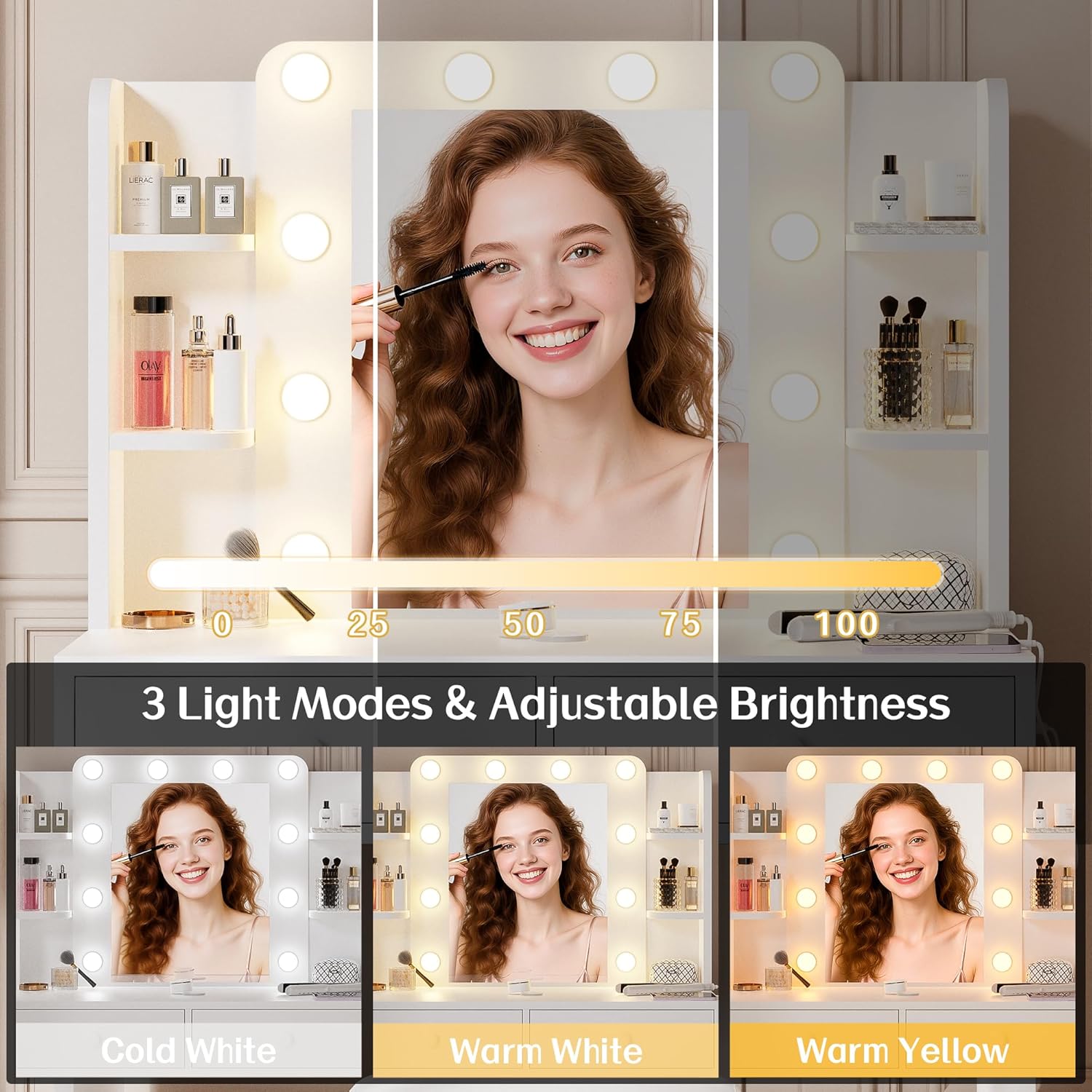
Image: Demonstration of the three light modes (Cool White, Warm White, Warm Yellow) and the adjustable brightness slider for the LED mirror.
Built-in Power Outlet
The vanity desk includes a built-in power station for convenience:
- AC Outlet: Use the 1 standard AC outlet (120V/12A) to power hair tools or other small appliances.
- USB Ports: Use the 2 USB ports (5V/2A) to charge mobile devices or other USB-powered accessories.
Maintenance
- Cleaning: Wipe the vanity desk and mirror surfaces with a dry, soft cloth. Avoid abrasive cleaners or harsh chemicals that may damage the finish or mirror coating.
- Dusting: Regularly dust the open shelves and desktop to maintain cleanliness.
- Drawer Care: Ensure drawers slide smoothly. If they become stiff, check for obstructions or apply a small amount of silicone lubricant to the runners if necessary.
Troubleshooting
| Problem | Possible Cause | Solution |
|---|---|---|
| LED mirror lights do not turn on. | Power cord not plugged in; mirror cable loose; power outage. | Ensure the main power cord is securely plugged into a wall outlet. Check the connection between the mirror unit and the vanity's power station. Verify the wall outlet is functional. |
| Lights are dim or flickering. | Brightness setting too low; unstable power supply. | Press and hold the touch sensor to increase brightness. Ensure the vanity is plugged into a stable power source. |
| Power outlets (AC/USB) are not working. | Vanity not powered; device not compatible; overloaded circuit. | Confirm the vanity is plugged in and the mirror lights are functional. Ensure the device you are trying to power/charge is compatible and not drawing excessive power. Avoid overloading the outlets. |
| Drawers are difficult to open/close. | Obstruction; misaligned runners; loose hardware. | Check for items blocking the drawer. Inspect drawer runners for proper alignment. Tighten any loose screws on the drawer slides. |
Specifications
| Feature | Detail |
|---|---|
| Brand | Haewon |
| Model Number | 024 |
| Color | White |
| Material | Engineered Wood (Frame), Faux Leather (Seat) |
| Product Dimensions (D x W x H) | 15.7"D x 31.5"W x 51.2"H |
| Item Weight | 37 pounds |
| Number of Drawers | 2 |
| LED Mirror Light Settings | 3 (Cool White, Warm White, Warm Yellow) with adjustable brightness |
| Power Outlet | 1 AC Outlet (120V/12A), 2 USB Ports (5V/2A) |
| Included Components | Mirror, Vanity Stool |

Image: Diagram showing the precise measurements of the vanity desk and the accompanying stool.
Warranty and Support
For warranty information or technical support, please refer to the documentation included with your purchase or contact Haewon customer service directly. Keep your purchase receipt for warranty claims.