
Introduction
This manual provides essential instructions for the assembly, operation, and maintenance of your Giantex 6FT Conference Table with Power Outlets. This table is designed to enhance your meeting space with its spacious surface, integrated power hub, and durable construction. Please read this manual thoroughly before assembly and use to ensure proper setup and safe operation.

Image: The Giantex 6FT Conference Table set up in a modern office environment, illustrating its capacity for multiple users and devices.
Safety Information
Important Safety Warnings:
- Assembly should be performed by two people to prevent injury due to the weight of components.
- Do not exceed the maximum weight capacity of 310 lbs (140 kg) to maintain stability and prevent damage.
- Always ensure the table is fully and correctly assembled, and all fasteners are tightened before use.
- Place the table on a flat, stable surface.
- Keep liquids away from the power outlets to prevent electrical hazards.
- Do not attempt to modify the power outlets or any other components of the table.
Package Contents
Before beginning assembly, verify that all parts listed below are present and undamaged. If any parts are missing or damaged, please contact customer support.
- 1 x Conference Room Table (Tabletop and Frame Components)
- 1 x User Manual (This document)
- Hardware Pack (Screws, bolts, tools as required for assembly)
Setup and Assembly
Detailed, step-by-step instructions are provided for assembly. It is strongly recommended that assembly be performed by two people due to the heavy table boards and metal frame. Tools recommended for assembly include a screwdriver (not always included, but good to have). Ensure you have adequate space for assembly.
Assembly Steps Overview:
- Unpack Components: Carefully remove all parts from the packaging and lay them out on a clean, soft surface to prevent scratches. Identify each component using the provided parts list.
- Assemble Frame: Connect the metal frame components according to the diagrams. Ensure all screws are finger-tightened initially. The frame features triangle structures and cross-shaped bracing for enhanced stability.
- Attach Tabletop: Carefully place the tabletop onto the assembled frame. Align the pre-drilled holes on the tabletop with the frame. Secure the tabletop to the frame using the provided screws.
- Install Power Hub: Integrate the built-in charging station into its designated slot on the tabletop. Connect any necessary wiring as per the instructions.
- Adjust Foot Pads: The table includes adjustable foot pads. Once the table is upright, adjust these pads to ensure the table is level and stable on uneven ground.
- Final Tightening: Once all components are in place and aligned, fully tighten all screws and bolts using the provided tools. Do not overtighten.
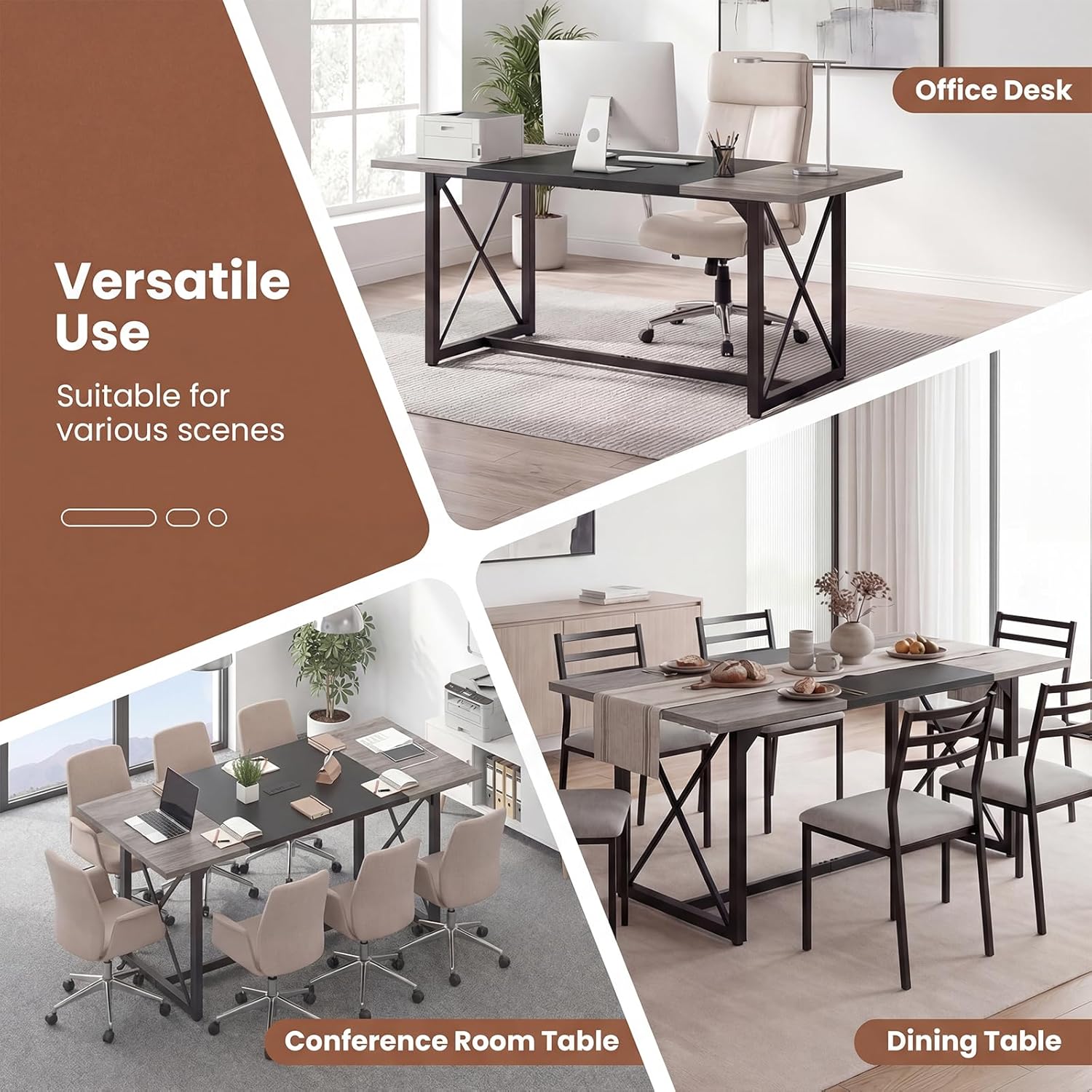
Image: Illustration of the table's robust metal frame construction, highlighting triangle structures, cross-shaped bracing, and adjustable foot pads for stability.

Image: Dimensional diagram of the conference table, showing overall length, width, height, leg spacing, weight capacity, and seating arrangement for 6-8 individuals.
Operating Instructions
The Giantex Conference Table features a built-in power hub for convenient device charging and power access.
Using the Integrated Power Hub:
- Connect to Power: Plug the table's power cord (4.9 ft length) into a standard 125V/12A wall outlet.
- AC Outlets: The power hub includes 2 standard AC outlets. Plug your devices requiring AC power directly into these outlets.
- USB and Type-C Ports: The hub also provides a USB port and a Type-C port, offering 5V/2.4A, 12W Max output. Use these ports to charge compatible smartphones, tablets, and other USB-powered devices.
- Cable Management: Route device cables neatly to avoid clutter and tripping hazards.
Note: Ensure the total power draw of all connected devices does not exceed the hub's maximum capacity.
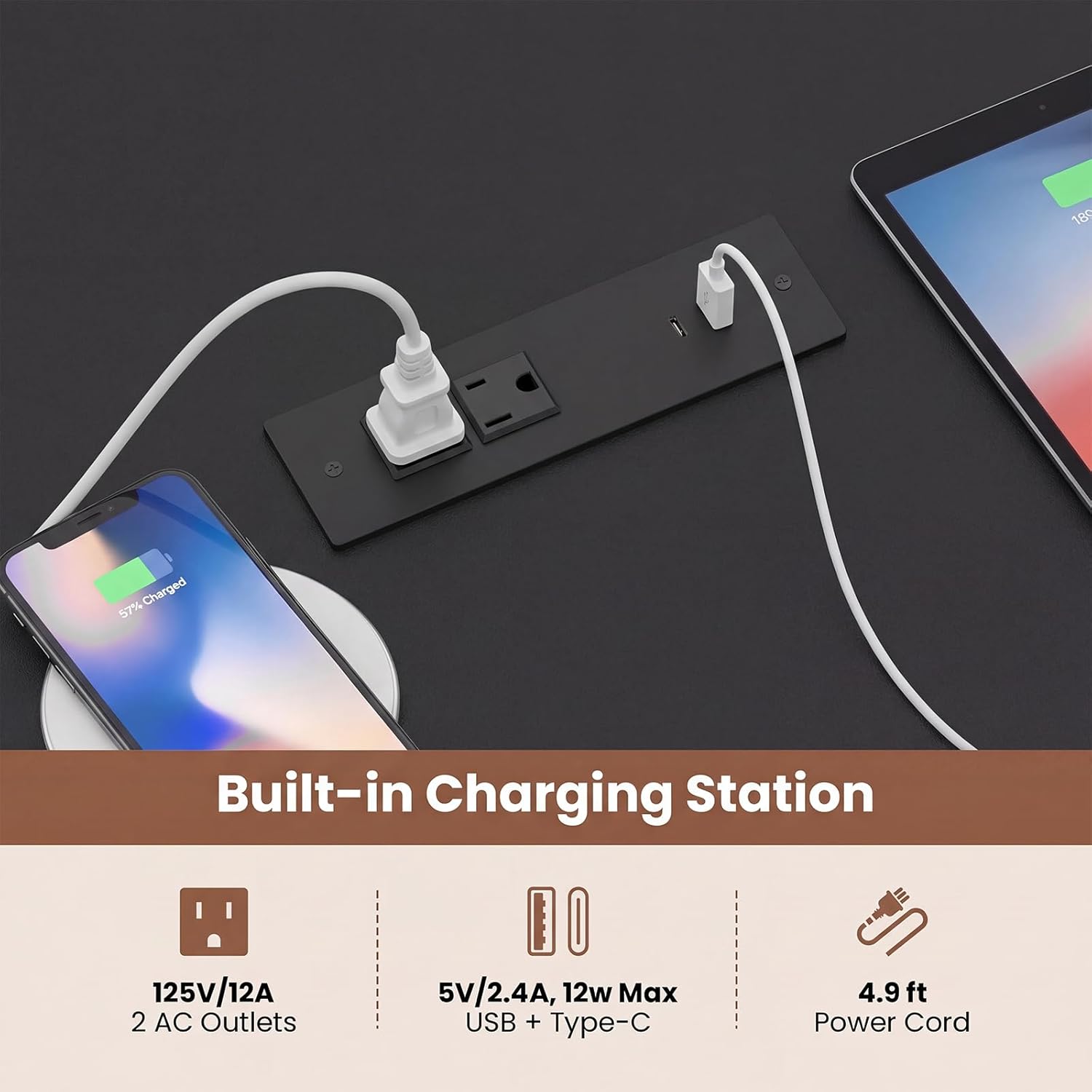
Image: Detailed view of the integrated power hub, illustrating its 2 AC outlets, USB port, and Type-C port in use for charging various electronic devices.
Maintenance
Regular maintenance will help prolong the life and appearance of your conference table.
- Cleaning: The tabletop features an easy-to-clean surface. Wipe spills immediately with a soft, damp cloth. For general cleaning, use a mild, non-abrasive cleaner. Avoid harsh chemicals that may damage the finish.
- Frame Care: The metal frame can be wiped clean with a damp cloth.
- Fastener Check: Periodically check all screws and bolts to ensure they remain tight. Retighten if necessary to maintain stability.
- Avoid Overloading: Do not place excessively heavy items on the table, staying within the 310 lbs weight capacity.
- Environmental Conditions: Avoid exposing the table to extreme temperatures or humidity, as this may affect the engineered wood components.

Image: Demonstration of the table's easy-to-clean surface and a close-up view of the 1.2-inch thickened tabletop, indicating durability.
Troubleshooting
If you encounter any issues with your conference table, refer to the following common problems and solutions:
| Problem | Possible Cause | Solution |
|---|---|---|
| Table is wobbly or unstable. | Loose fasteners; uneven floor; adjustable foot pads not properly set. | Ensure all assembly screws and bolts are securely tightened. Adjust the foot pads on the bottom of the legs until the table is level and stable. |
| Power outlets are not working. | Table's power cord not plugged in; wall outlet not functioning; overloaded circuit. | Verify the table's power cord is securely plugged into a live wall outlet. Test the wall outlet with another device. Reduce the number of devices plugged into the power hub if overloaded. |
| Scratches or damage to tabletop. | Sharp objects; abrasive cleaning materials. | Use coasters or protective mats for items. Avoid dragging objects across the surface. Use only soft cloths and mild cleaners for maintenance. |
Specifications
| Model Number | GX-12198US-VJ |
| Brand | Giantex |
| Overall Dimensions (L x W x H) | 71" x 31.5" x 30" (180.3 cm x 80 cm x 76.2 cm) |
| Tabletop Thickness | 1.2 inches (3 cm) |
| Material | Engineered Wood, Metal |
| Weight Capacity | 310 lbs (140 kg) |
| Net Weight | 64 lbs (29 kg) |
| AC Outlet Specification | 125V/12A (2 outlets) |
| USB + Type-C Output | 5V/2.4A, 12W Max |
| Power Cord Length | 4.9 ft (1.5 m) |
| Seating Capacity | 6-8 people |
| Color | Black (Current Variant) |
Warranty and Support
For warranty information or customer support, please refer to the contact details provided at the point of purchase or visit the official Giantex website. Protection plans may be available for purchase separately to extend coverage beyond the standard manufacturer's warranty.
Giantex Official Store: Visit the Giantex Store on Amazon


