1. Important Safety Instructions
Please read all instructions carefully before using the Crompton Infraserve Infrared Cooktop. Retain this manual for future reference.
- Electrical Safety: Ensure the cooktop is connected to a grounded power outlet with the correct voltage. Do not use if the power cord or plug is damaged.
- Overheat Protection: The cooktop is equipped with overheat protection. If the temperature exceeds safe limits, the unit will automatically shut off.
- Stable Placement: Always place the cooktop on a stable, flat, and heat-resistant surface to prevent tipping.
- Ventilation: Do not block the ventilation openings of the cooktop. Ensure adequate space around the unit for proper airflow.
- Water and Moisture: Do not immerse the cooktop in water or any other liquid. Avoid operating with wet hands.
- Children and Pets: Keep the appliance out of reach of children and pets during operation and while cooling down.
- Hot Surface: The cooking surface remains hot after use. Allow it to cool completely before cleaning or moving.
- Intended Use: Use the cooktop only for its intended purpose of cooking food. Do not use for heating rooms or other non-food items.
2. Product Overview
The Crompton Infraserve Infrared Cooktop is a 2000-watt appliance designed for efficient and versatile cooking. It features a durable crystal glass surface and intuitive touch panel controls.
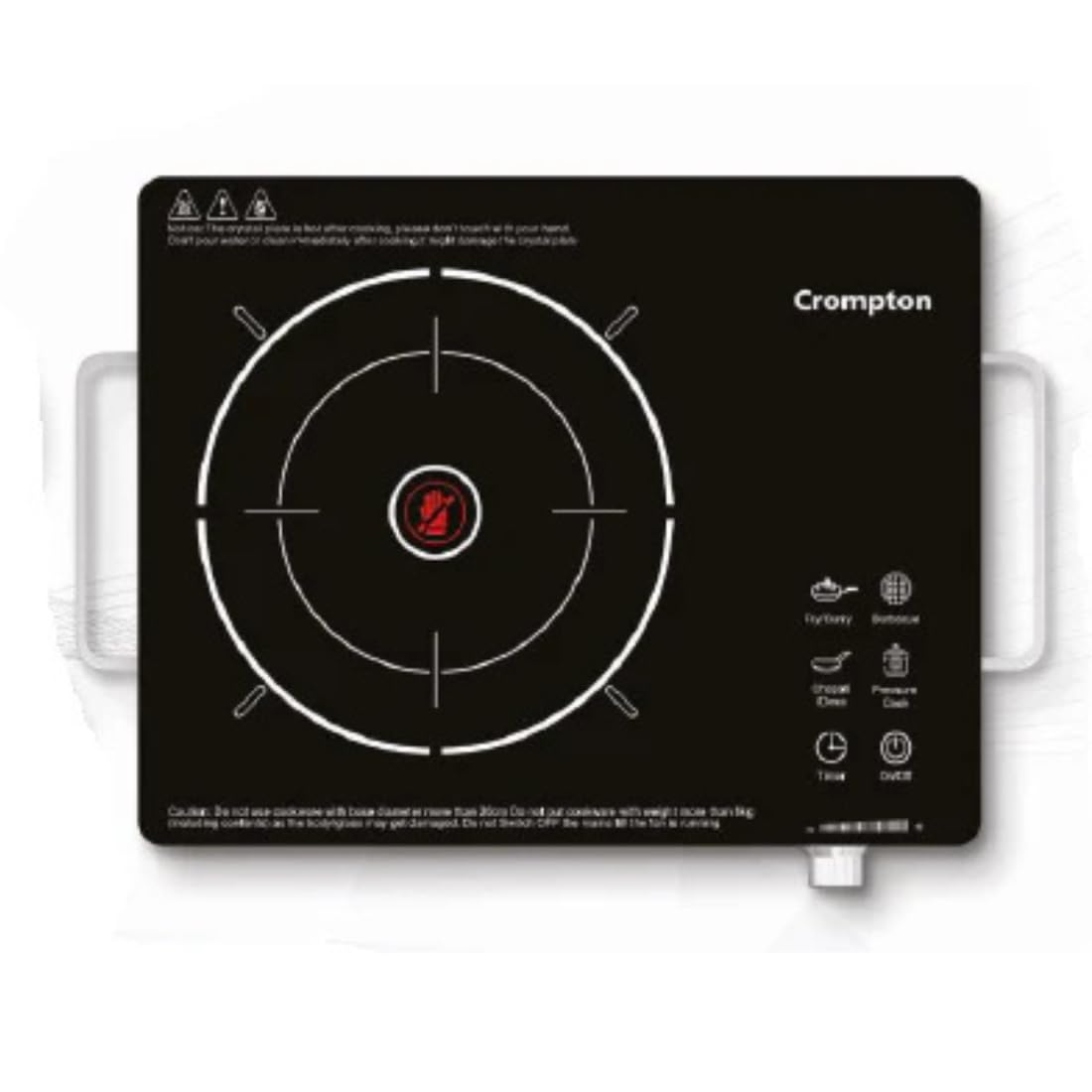
Figure 1: Crompton Infraserve Infrared Cooktop. This image displays the cooktop's sleek black crystal glass surface, the central infrared heating zone, and the touch control panel with various function icons.
Key Components:
- Crystal Glass Surface: The primary cooking area, durable and heat-resistant.
- Infrared Heating Element: Located beneath the glass, provides even heat distribution.
- Touch Panel Controls: User-friendly interface for power, temperature, and preset functions.
- Ventilation Openings: Located on the sides or bottom for cooling.
- Power Cord: For connecting to an electrical outlet.
3. Setup and First Use
Unpacking:
- Carefully remove the cooktop and all accessories from the packaging.
- Check for any damage during transit. If damaged, do not use and contact customer support.
- Ensure all included components are present: 1 Infrared cooktop, 1 BBQ Grill, 2 Pcs skewer, 1 Warranty Card.
- Dispose of packaging materials responsibly.
Placement:
- Place the cooktop on a dry, stable, and heat-resistant surface.
- Ensure there is at least 10-15 cm of clear space around all sides of the cooktop for proper ventilation.
- Do not place the cooktop near water sources, flammable materials, or heat-sensitive surfaces.
Power Connection:
- Plug the power cord into a standard, grounded 220-240V AC electrical outlet.
- Ensure the outlet is capable of handling a 2000-watt appliance.
4. Operating Instructions
Cookware Compatibility:
The Crompton Infraserve Infrared Cooktop is compatible with a wide range of cookware materials due to its infrared heating technology. This includes:
- Glass cookware
- Ceramic cookware
- Aluminum cookware
- Stainless steel cookware
- Iron utensils
Ensure the bottom of the cookware is flat and covers the heating zone adequately for optimal performance.
Basic Operation:
- Power On: Place suitable cookware on the center of the cooking zone. Press the "On/Off" button on the touch panel. The display will illuminate.
- Select Function: Choose a cooking mode from the preset options (e.g., Boil, Fry, Simmer, Grill) or manually adjust the power/temperature.
- Adjust Settings: Use the "+" and "-" buttons or the rotary knob (if present) to adjust the power level or temperature as desired. The cooktop offers multiple power and temperature settings.
- Keep Warm Function: To keep food warm after cooking, select the "Keep Warm" function. This maintains a low temperature to prevent food from cooling.
- Timer Function: Use the "Timer" button to set a cooking duration. The cooktop will automatically shut off once the timer expires.
- Power Off: After cooking, press the "On/Off" button to turn off the cooktop. The fan may continue to run for a short period to cool down internal components.
The cooktop provides even heat distribution for consistent cooking results across various styles.
5. Maintenance and Cleaning
Regular cleaning and maintenance will ensure the longevity and optimal performance of your Crompton Infraserve Infrared Cooktop.
- Before Cleaning: Always unplug the cooktop from the power outlet and allow it to cool completely before cleaning.
- Glass Surface: Wipe the crystal glass surface with a soft, damp cloth and a mild detergent. For stubborn stains, use a non-abrasive cleaner specifically designed for glass cooktops. Rinse with a clean, damp cloth and dry thoroughly.
- Control Panel: Wipe the touch control panel with a soft, dry cloth. Do not use excessive water or abrasive cleaners.
- Exterior: Clean the exterior housing with a soft, damp cloth.
- Do Not Immerse: Never immerse the cooktop in water or any other liquid.
- Avoid Abrasives: Do not use abrasive pads, harsh chemicals, or steel wool, as these can scratch or damage the surface.
- Ventilation Openings: Keep the ventilation openings clear of dust and debris to ensure proper airflow. Use a soft brush or vacuum cleaner to gently clean them.
6. Troubleshooting Guide
If you encounter issues with your cooktop, refer to the following common problems and solutions:
| Problem | Possible Cause | Solution |
|---|---|---|
| Cooktop does not power on. | No power supply; power cord not plugged in; faulty outlet. | Check if the power cord is securely plugged into a working outlet. Check the circuit breaker. |
| Cooktop powers on but does not heat. | Incorrect cookware; cookware not centered; overheat protection activated. | Ensure compatible cookware is used and centered on the heating zone. Allow the unit to cool if it has overheated. |
| Display shows an error code. | Internal malfunction; sensor issue. | Refer to the specific error code in the full manual (if available) or contact customer support. Try unplugging and re-plugging the unit. |
| Uneven heating. | Cookware not flat; cookware too small/large for heating zone. | Use cookware with a flat bottom that matches the size of the heating zone. |
If the problem persists after trying these solutions, please contact Crompton customer support.
7. Product Specifications
| Feature | Detail |
|---|---|
| Brand | Crompton |
| Model | LYAB2YE200600 |
| Burner Type | Infrared |
| Number of Heating Elements | 1 |
| Colour | Black |
| Fuel Type | Electric |
| Material | Glass |
| Power Source | Corded Electric |
| Item Weight | 2 kg 300 g |
| Item Dimensions (LxWxH) | 43.6 x 9 x 35 Centimeters |
| Manufacturer | Crompton Greaves Consumer Electricals Limited |
8. What's in the Box
Upon opening the package, you should find the following items:
- 1 x Crompton Infraserve Infrared Cooktop
- 1 x BBQ Grill
- 2 x Skewers
- 1 x Warranty Card
9. Warranty and Customer Support
For warranty information, please refer to the included Warranty Card. Keep your purchase receipt as proof of purchase for any warranty claims.
If you have any questions, require technical assistance, or need to report a problem, please contact Crompton customer support. Contact details can typically be found on the Warranty Card or the official Crompton website.


