
Introduction
Thank you for choosing the Fitkit PowerRun96Auto BLDC Treadmill. This manual provides essential information for the safe and efficient use, assembly, operation, and maintenance of your new fitness equipment. Please read this manual thoroughly before initial use and retain it for future reference.
Important Safety Information
Before operating the treadmill, please observe the following safety precautions:
- Consult a physician before starting any new exercise program.
- Ensure the treadmill is placed on a flat, stable surface with adequate clearance around it.
- Keep children and pets away from the treadmill during operation.
- Always use the safety key during workouts.
- Wear appropriate athletic footwear.
- Do not use the treadmill if you feel dizzy, faint, or experience any pain.
- The maximum user weight capacity is 120 kg. Do not exceed this limit.
- Ensure the power source is between 220-240V and use a 1000 VA stabilizer for optimal performance and warranty validity.
What's in the Box
Upon unpacking, verify that all components are present:
- Treadmill Unit
- Tool Kit
- User Manual (this document)
- Warranty Card
Setup and Assembly
Assembly is required for this treadmill. Please follow the instructions below carefully. It is recommended to have two people for assembly.
1. Unpacking
Carefully remove all components from the packaging. Place them on a clear, flat surface. Retain packaging materials until assembly is complete.
2. Base Assembly
Unfold the main frame of the treadmill. Secure any pre-attached bolts or pins as indicated in the quick start guide (if provided separately).
3. Console and Upright Installation
Attach the uprights to the base, ensuring they are firmly seated. Connect the console to the uprights, carefully routing any cables to avoid pinching. Use the provided tool kit to tighten all screws and bolts securely.
4. Final Checks
Before plugging in, ensure all connections are secure and the treadmill is stable. Verify that the safety key slot is accessible.
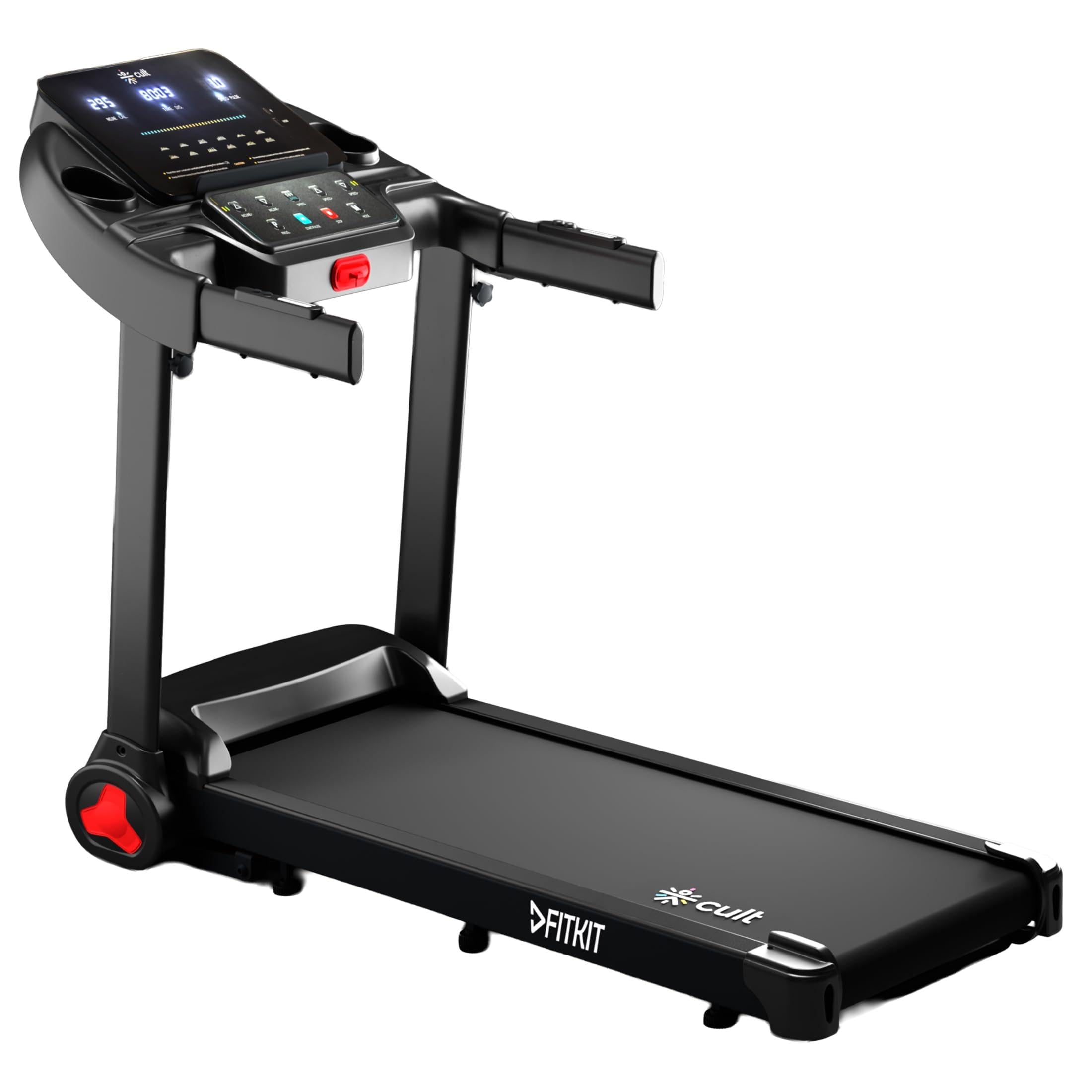
Image: The Fitkit PowerRun96Auto Treadmill, showcasing its overall design and compact form factor.
Operating Instructions
This section details how to operate your Fitkit PowerRun96Auto Treadmill.
1. Powering On
Plug the power cord into a grounded outlet. Ensure the safety key is in place on the console. The LED display will illuminate.
2. Starting a Workout
Press the 'START' button. The belt will begin moving at a low speed. You can adjust the speed and incline during your workout.
3. Adjusting Speed and Incline
Use the '+' and '-' buttons on the console to increase or decrease the speed (up to 14 km/hr) and adjust the auto incline (up to 15 levels). Quick speed and incline buttons may also be available for rapid adjustments.
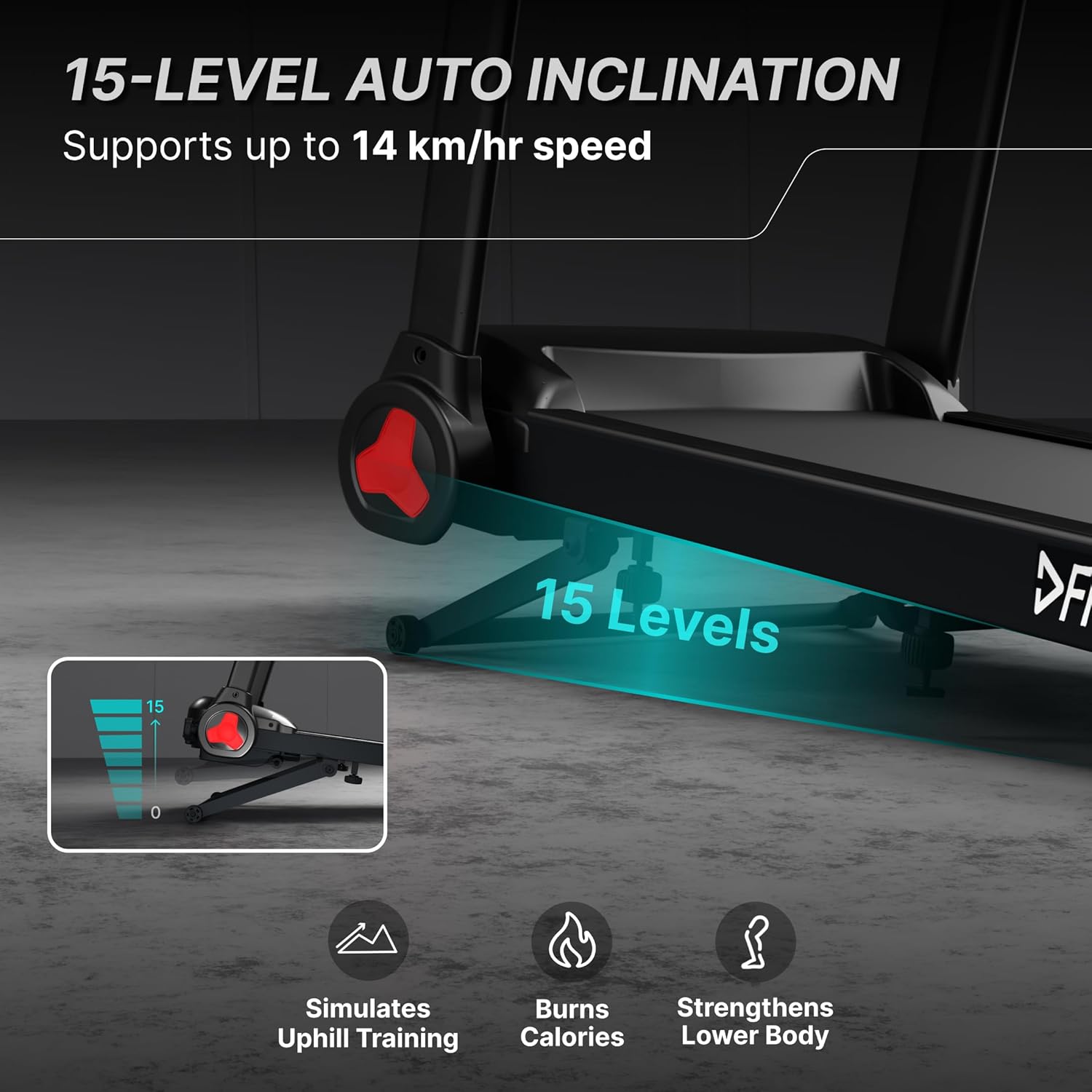
Image: Illustration of the treadmill's 15-level auto incline mechanism, demonstrating how the running deck elevates to simulate uphill training.
4. Using Preset Programs
The treadmill features 12 preset workout programs. Select a program using the 'PROGRAM' button and press 'START' to begin. Each program offers varied speed and incline profiles.
5. Monitoring Your Workout
The LED display shows key metrics such as time, speed, distance, calories burned, and heart rate (via pulse sensors on the handlebars). A tablet holder and USB/Type-C charging port are available for convenience.

Image: Close-up of the treadmill's smart LED display, showing workout parameters, 12 program options, and integrated pulse sensors for heart rate monitoring.
6. Stopping a Workout
Press the 'STOP' button to gradually slow down and stop the treadmill. Alternatively, pull the safety key to immediately stop the belt in an emergency.
7. Folding and Storage
The treadmill features an easy-move wheels and a space-saving knob folding mechanism. Lift the running deck until it locks into the upright position. Use the transport wheels to move the treadmill for storage.
Video: A user demonstrating running on the Fitkit PowerRun96Auto Treadmill at various speeds (6 mins/km, 5 mins/km, 4.28 mins/km), highlighting its operational stability and performance.
Maintenance
Regular maintenance ensures the longevity and optimal performance of your treadmill.
1. Cleaning
Wipe down the treadmill after each use with a damp cloth to remove sweat and dust. Avoid using abrasive cleaners or solvents.
2. Lubrication
The running belt requires periodic manual lubrication to ensure smooth operation and reduce wear. Refer to the detailed lubrication instructions in the full user manual (if provided separately) for frequency and method.
3. Belt Adjustment
Over time, the running belt may become misaligned or loose. Adjust the belt tension and centering as needed, following the instructions in the comprehensive manual. Proper belt tension is crucial for safety and performance.

Image: View of the treadmill's spacious running belt (105x39 cm), emphasizing the area available for comfortable use.
Troubleshooting
If you encounter issues with your treadmill, refer to the following common problems and solutions:
- Treadmill does not power on: Check if the power cord is securely plugged in and the safety key is correctly placed. Ensure the power switch is in the 'ON' position.
- Running belt stops or slips: The belt may require tension adjustment or lubrication. Refer to the maintenance section.
- Unusual noise: Inspect for loose parts or foreign objects under the belt. Lubricate the belt if squeaking occurs.
- Display not working correctly: Ensure all console cables are securely connected. Try restarting the treadmill.
For persistent issues, please contact customer support.
Specifications
| Feature | Detail |
|---|---|
| Brand | Fitkit |
| Model Name | PowerRun96Auto |
| Motor | 5.5 HP Peak BLDC Motor |
| Maximum Weight Recommendation | 120 Kilograms |
| Maximum Speed | 14 Kilometers per Hour |
| Maximum Incline Percentage | 15 Levels (Auto Incline) |
| Display Type | LED |
| Number of Programs | 12 Preset Programs |
| Metrics Measured | Calories Burned, Distance, Heart Rate, Speed, Time |
| Product Dimensions (D x W x H) | 129D x 62W x 106H Centimeters |
| Item Weight | 31 Kilograms |
| Frame Material | Alloy Steel |
| Power Source | Corded Electric |
| Country Of Origin | China |

Image: Detailed diagram illustrating the internal components of the durable and noiseless BLDC motor, highlighting its 5.5 HP peak power and energy efficiency.

Image: Visual representation of the treadmill's double shock absorption system, featuring two soft cushions and a 5-layer running belt for enhanced comfort and joint protection.
Warranty and Support
Warranty Information
Your Fitkit PowerRun96Auto Treadmill comes with the following warranty:
- 1 Year Warranty: Covers motor and manufacturing defects.
- 3 Years Warranty: Covers the frame.
Note: Warranty against manufacturing defects and electronic parts is valid only if the treadmill is used with a stabilizer (1000 VA recommended). It is recommended that the rated voltage be between 220 - 240V.
Contact Information
For any support, service, or warranty claims, please contact:
CULTSPORT PRIVATE LIMITED
NO 17 AND 17C BDA SECTOR 3 HSR LAYOUT
BANGALORE KARNATAKA 560102 INDIA