
1. Important Safety Instructions
Please read all instructions carefully before using this appliance. Failure to follow these instructions may result in electric shock, fire, or serious injury.
- Always connect to a properly grounded outlet. See grounding instructions.
- Do not immerse the appliance in water or other liquids.
- Do not use with a damaged cord or plug. If the appliance is not working as it should, has been dropped, damaged, left outdoors, or dropped into water, return it to a service center.
- Do not allow children to operate this machine. Keep children and pets away from the appliance during operation.
- Use only STARRYBOT recommended cleaning solutions.
- Exercise extra care when cleaning on stairs.
- Do not pick up anything that is burning or smoking, such as cigarettes, matches, or hot ashes.
- Turn off all controls before unplugging.
2. Product Overview
The STARRYBOT Portable Carpet Cleaner Machine is designed for effective spot and stain removal on carpets, rugs, upholstery, and stairs. It features powerful 18Kpa suction, steam, and heating technology for enhanced cleaning performance.
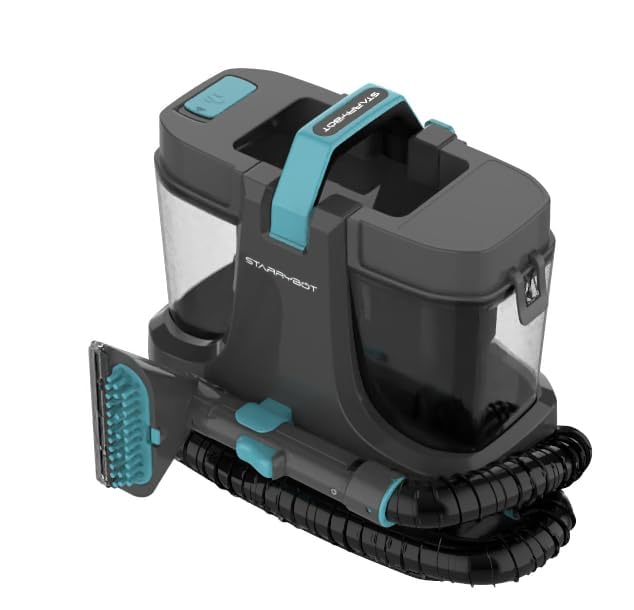
Image 2.1: STARRYBOT Portable Carpet Cleaner Machine. This image displays the compact design of the carpet cleaner, highlighting its main body, handle, and hose attachment, ready for use.
Included Components:
- Main Carpet Cleaner Unit
- Flexible Cleaning Hose
- Upholstery/Stain Tool
- Clean Water Tank
- Dirty Water Tank
- Power Cord
3. Setup
3.1 Unpacking
- Carefully remove all components from the packaging.
- Remove any packing materials, plastic bags, or protective films.
- Ensure all listed components are present.
3.2 Filling the Clean Water Tank
- Remove the clean water tank from the main unit.
- Unscrew the cap and fill the tank with warm tap water (not exceeding 140°F / 60°C).
- Add the recommended amount of STARRYBOT cleaning solution as per the solution's instructions. Do not overfill.
- Securely replace the cap and reinsert the tank into the unit until it clicks into place.
3.3 Attaching the Hose and Tool
- Connect the flexible cleaning hose to the designated port on the main unit. Ensure it is securely latched.
- Attach the desired cleaning tool (e.g., upholstery tool) to the end of the hose until it locks.
4. Operating Instructions
4.1 Preparing the Area
- Vacuum the area to be cleaned to remove loose dirt and debris.
- Test a small, inconspicuous area of the material for colorfastness before full application.
4.2 Powering On and Pre-heating
- Plug the power cord into a grounded electrical outlet.
- Press the Power button to turn on the machine.
- Allow the machine a few minutes to pre-heat if using the heating or steam function. The indicator light will signal when ready.
4.3 Cleaning Procedure
- Hold the cleaning tool firmly against the surface to be cleaned.
- Press the trigger on the tool to spray cleaning solution and steam onto the stain.
- Slowly pull the tool over the stained area, allowing the powerful suction to extract the dirty solution.
- Release the trigger and continue to pull the tool over the area to remove excess moisture.
- Repeat as necessary until the stain is removed and the extracted water appears clean.
- For heavily soiled areas, allow the solution to soak for a few minutes before extracting.
4.4 Emptying the Dirty Water Tank
- When the dirty water tank is full, or cleaning is complete, turn off and unplug the machine.
- Remove the dirty water tank from the unit.
- Carefully empty the dirty water into a sink or drain.
- Rinse the tank thoroughly with clean water and allow it to air dry before reattaching.
5. Maintenance
5.1 Cleaning Tanks and Tools
- After each use, empty and rinse both the clean and dirty water tanks.
- Clean the cleaning tool by rinsing it under running water. Remove any debris or hair from the nozzle.
- Ensure all parts are dry before storing to prevent mold or mildew.
5.2 Storage
- Store the machine in a dry, cool place.
- Wrap the power cord neatly around the designated cord wraps.
- Keep the hose and tools attached or stored securely with the unit.
6. Troubleshooting
6.1 No Suction
- Check Tank: Ensure the dirty water tank is not full and is properly seated.
- Check Hose/Tool: Verify the hose and cleaning tool are securely attached and not clogged.
- Check for Blockages: Inspect the suction nozzle for any obstructions.
6.2 No Spray/Steam
- Check Clean Water Tank: Ensure the clean water tank is not empty and is properly seated.
- Check for Clogs: The spray nozzle might be clogged. Clean it with a small brush or pin.
- Pre-heating: Allow sufficient time for the machine to heat up for steam function.
6.3 Leaking
- Check Tanks: Ensure both clean and dirty water tanks are properly seated and their caps are securely tightened.
- Hose Connections: Verify all hose connections are tight.
- Overfilling: Do not overfill the clean water tank.
7. Specifications
| Feature | Specification |
|---|---|
| Brand | STARRYBOT |
| Model Name | C-AC2502 |
| Model Number | C-AC2502 |
| ASIN | B0GS152B9N |
| Color | Gray |
| Style | Modern |
| Suction Power | 18Kpa |
| Technology | Steam and Heating |
| Included Components | Carpet Cleaner Machine |
| Unit Count | 1.0 Count |
8. Warranty and Support
This STARRYBOT product is covered by a manufacturer's warranty. Please refer to the warranty card included in your product packaging for specific terms and conditions, including warranty duration and coverage details.
For technical support, troubleshooting assistance, or to inquire about replacement parts, please contact STARRYBOT customer service. Contact information can typically be found on the official STARRYBOT website or on the product packaging.
Please have your model number (C-AC2502) and purchase date ready when contacting support.