
1. Introduction
Thank you for choosing the GOWENIC Rhinestone Handheld Fan. This portable fan is designed to provide powerful and customizable airflow, featuring a stylish rhinestone-decorated exterior and a long-lasting rechargeable battery. This manual provides essential information for the safe and efficient use of your fan.

Image: GOWENIC Rhinestone Handheld Fan (Silver and Colorful variants)
2. Safety Information
- Read all instructions before using the fan.
- Keep the fan away from water and moisture. Do not immerse in liquids.
- Do not insert fingers or foreign objects into the fan grille.
- Keep out of reach of children. This is not a toy.
- Use only the provided USB cable for charging.
- Do not disassemble, repair, or modify the fan yourself. Contact qualified service personnel.
- Avoid exposing the fan to extreme temperatures or direct sunlight for prolonged periods.
- Dispose of the battery according to local regulations. Do not dispose of in fire.
3. Package Contents
Please check the package for the following items:
- 1 x GOWENIC Rhinestone Handheld Fan
- 1 x USB Charging Cable
- 1 x User Manual (this document)
- 1 x Lanyard

Image: Package Contents (Fan, USB Cable, Lanyard)
4. Product Features
- Customized Airflow: Offers 199 distinct speed levels for precise personal cooling.
- Digital Display: Clear digital screen for easy monitoring of fan speed.
- Powerful Cooling: Equipped with a high-speed motor for robust airflow, ideal for outdoor use.
- Elegant Design: Adorned with beautiful rhinestone decorations for a stylish appearance.
- Quiet Performance: Operates with low noise, suitable for various environments.
- Long-Lasting Battery: Features a built-in 2000mAh lithium battery for extended use.
- Portable Design: Compact and lightweight, perfect for travel, vacation, and outdoor activities.
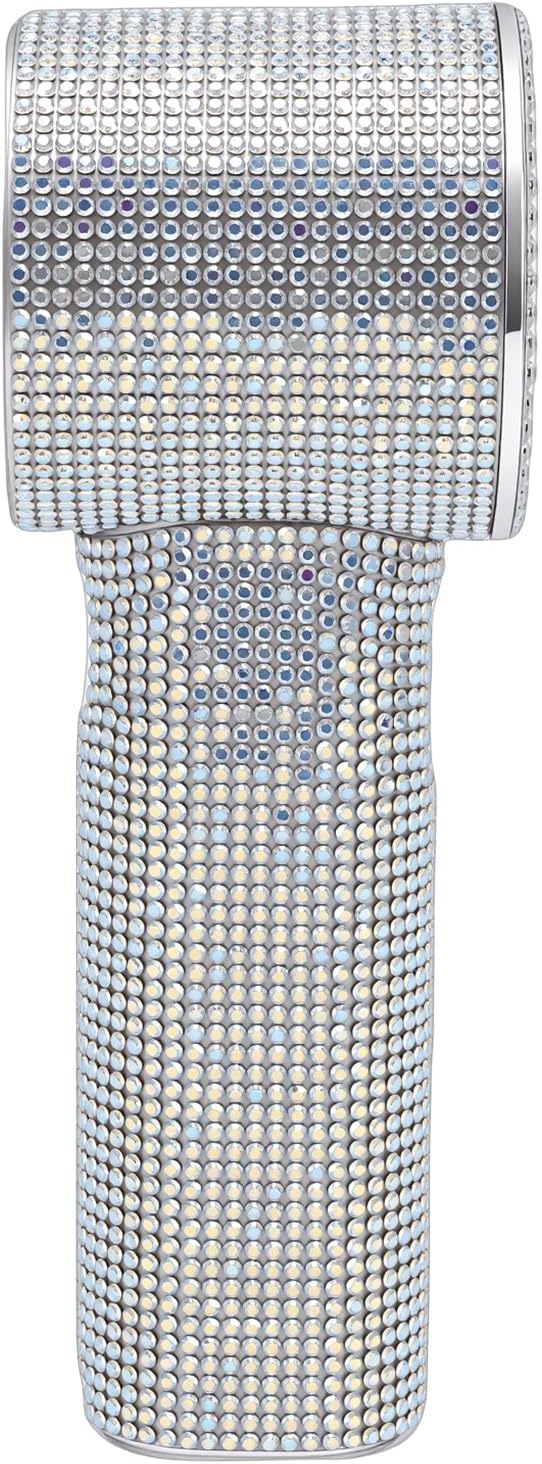
Image: Close-up of Rhinestone Detailing
5. Setup
5.1 Initial Charging
Before first use, fully charge the fan. Connect the provided USB charging cable to the fan's charging port and plug the other end into a USB power source (e.g., computer, wall adapter). The digital display may indicate charging status. A full charge typically takes 1 to 3 hours.
5.2 Attaching the Lanyard
If desired, attach the included lanyard to the designated loop on the fan for convenient carrying.
6. Operating Instructions
The fan features a rotating knob operation method with a digital display showing the current speed level.

Image: Fan Controls (Digital Display and Buttons)
6.1 Power On/Off
To turn the fan on or off, press and hold the power button (often integrated with the rotating knob or a separate button near the knob) for a few seconds. The digital display will illuminate when the fan is on.
6.2 Adjusting Fan Speed (199 Levels)
- Increasing Speed:
- Press the + button to increase the level in increments (e.g., 40, 80, 120, 160, 199).
- Hold the + button to continuously increase the level from 1 to 199.
- Decreasing Speed:
- Press the - button to decrease the level in increments (e.g., 199, 160, 120, 80, 40).
- Hold the - button to continuously decrease the level from 199 to 1.
The current fan speed will be displayed on the digital screen.

Image: Fan in use outdoors
7. Maintenance
7.1 Cleaning
- Ensure the fan is turned off and unplugged before cleaning.
- Wipe the exterior of the fan with a soft, dry, or slightly damp cloth.
- Do not use abrasive cleaners, solvents, or harsh chemicals, as these may damage the finish or rhinestones.
- Use a soft brush or cotton swab to gently clean dust from the fan grille if necessary.
7.2 Storage
- Store the fan in a cool, dry place away from direct sunlight and extreme temperatures.
- If storing for an extended period, charge the battery periodically (e.g., every 3 months) to maintain battery health.
8. Troubleshooting
| Problem | Possible Cause | Solution |
|---|---|---|
| Fan does not turn on. | Battery is depleted. | Charge the fan using the provided USB cable. |
| Fan does not turn on. | Power button not pressed correctly. | Press and hold the power button for a few seconds. |
| Low airflow. | Fan speed is set too low. | Increase the fan speed using the + button. |
| Low airflow. | Fan grille is obstructed. | Clean any dust or debris from the fan grille. |
| Fan is not charging. | USB cable or power source issue. | Ensure the USB cable is securely connected. Try a different USB port or power adapter. |
9. Specifications
| Brand | GOWENIC |
| Model Name | GOWENIC4jp2ew06oa-12 |
| Item Type | Rhinestone Handheld Fan |
| Material | ABS |
| Product Size | Approx. 155x55x55mm / 6.1x2.17x2.17in |
| Weight | Approx. 260.00g / 9.17oz |
| Battery | 2000mAh Lithium Battery (Built-in) |
| Battery Life | 1 to 3 Hours (depending on speed setting) |
| Fan Speed Levels | 199 levels (Digital Display) |
| Noise Level | Below 36dB(A) |
| Charging Support | Yes (USB) |
| Application | Travel, Vacation, Beach, Outdoor Activities |
10. Warranty & Support
GOWENIC products are manufactured to high-quality standards. For any questions, technical support, or warranty claims, please contact the retailer or GOWENIC customer service through the official channels. Please retain your proof of purchase for warranty purposes.
For further assistance, please visit the GOWENIC Store on Amazon.