
1. Product Overview
The SOLPERK 10W 12V Solar Panel Kit is designed to efficiently charge and maintain 12V rechargeable batteries. This kit features an intelligent MPPT charge controller and a durable, waterproof solar panel, making it suitable for various applications including boats, cars, RVs, motorcycles, and more.
Key Features:
- Upgrade MPPT Controller: Generates 30% more power and provides comprehensive protection against over-charge, over-discharge, over-voltage, over-current, over-load, short circuit, reverse polarity, and over-temperature.
- Built-in Smart Controller: Ensures high charging efficiency and protects the battery from over-charging without consuming battery power. Features three indicator lights for clear charging status.
- 360° Adjustable Bracket: Allows for secure mounting on various surfaces and optimal sun exposure.
- Wide Application: Compatible with most 12V rechargeable batteries including LiFePO₄, Lithium Ion, AGM, SLA, GEL, EFB, MF. Ideal for maintaining batteries in trailers, tractors, trucks, boats, RVs, cars, lawn mowers, water pumps, gate openers, and electric fences.
- Unmatched Durability: Constructed with low-iron tempered glass and a corrosion-resistant aluminum frame. 100% waterproof and rustproof, designed to withstand harsh weather conditions like sandstorms, thunderstorms, blizzards, and hail, with a lifespan of up to 25 years.

Image 1.1: The SOLPERK 10W Solar Panel Kit, suitable for various vehicle and marine applications.

Image 1.2: Diagram illustrating the layers of the great A+ monocrystalline solar panel, including low-iron tempered glass, EVA film, monocrystalline solar cell, rust-proof aluminum frame, and TPT backsheet, contributing to 30% conversion efficiency.
2. Safety Instructions
Please read all safety instructions carefully before installing or operating the SOLPERK Solar Panel Kit. Failure to follow these instructions may result in electric shock, fire, or serious injury.
- Always wear appropriate personal protective equipment (PPE) such as safety glasses and gloves during installation.
- Ensure all connections are secure and correctly polarized (positive to positive, negative to negative). Incorrect wiring can damage the system and battery.
- Do not attempt to disassemble or modify the solar panel or controller. Refer all servicing to qualified personnel.
- Avoid touching the solar panel surface with sharp objects to prevent damage.
- Keep the solar panel and controller away from flammable materials and sources of heat.
- Ensure the installation area is well-ventilated.
- When connecting to a battery, connect the controller to the battery first, then the solar panel to the controller. Disconnect in the reverse order (solar panel first, then battery).
- Do not connect the solar panel directly to a battery without the charge controller.
3. Package Contents
Verify that all components are present in your SOLPERK 10W 12V Solar Panel Kit package:
- 1x Solar Panel
- 1x 360° Adjustable Bracket (pre-attached or assembly required)
- 1x Alligator Clip Cable
- 1 set of Mounting Pieces (screws, nuts, etc.)

Image 3.1: The SOLPERK 10W Solar Panel Kit components, including the solar panel, controller, and connection cables.

Image 3.2: Detailed dimensions of the 10W solar panel (13.4 x 9.8 inches), controller (11.4 inches cable length), and connection cables (20 inches for alligator clips and ring terminals, 100 inches for solar panel cable).
4. Setup Instructions
Follow these steps to set up your SOLPERK Solar Panel Kit:
4.1 Mounting the Solar Panel
- Choose a location that receives maximum direct sunlight throughout the day.
- Use the 360° adjustable mounting bracket to securely position the solar panel. The bracket allows for flexible placement on the ground, wall, or roof.
- Angle the panel to face the sun for optimal charging efficiency.

Image 4.1: The SOLPERK solar panel mounted on a car roof, demonstrating a typical installation for vehicle battery maintenance.
4.2 Connecting the System
The intelligent MPPT charge controller is integrated into the solar panel's wiring. Ensure proper connection sequence:
- Connect to Battery: Using the provided alligator clip cable or ring terminal cable, connect the controller's battery output terminals to your 12V battery. Ensure the red clip/terminal connects to the battery's positive (+) terminal and the black clip/terminal connects to the battery's negative (-) terminal.
- Connect Solar Panel: Connect the solar panel's output cable to the controller's solar input. The controller will automatically detect the solar panel and begin charging if sufficient sunlight is available.
The kit is compatible with various 12V battery types, including LiFePO₄, Lithium Ion, AGM, SLA, GEL, EFB, and MF batteries.

Image 4.2: The SOLPERK solar panel kit is compatible with a range of 12V battery types, including LiFePO4, AGM, EFB, GEL, SLA, and Lithium-ion batteries.
5. Operating Instructions
Once properly connected, the SOLPERK Solar Panel Kit operates automatically to charge and maintain your 12V battery.
5.1 MPPT Controller Functionality
The intelligent MPPT (Maximum Power Point Tracking) charge controller optimizes the power output from the solar panel to maximize charging efficiency. It continuously adjusts its operating point to extract the most power available from the solar panel under varying sunlight conditions.
5.2 LED Indicator Lights
The controller features three LED indicator lights to display the charging status:
- Blue Light: Indicates that the solar panels are connected and receiving sunlight.
- Red Light: Indicates that the battery is currently charging.
- Green Light: Indicates that the battery charging is complete.

Image 5.1: The SOLPERK controller displaying its three LED indicator lights: Blue for sunlight detection, Red for active charging, and Green for charge completion.
5.3 Automatic Protection
The controller provides comprehensive protection for your battery and system:
- Over Temperature Protection
- Reverse Current Protection
- Short Circuit Protection
- Reverse Polarity Protection
- Overload Prevention
- Over Charge Protection
- Over Voltage Protection
The solar panel automatically shuts off when there is no sunlight, preventing power loss from the battery.
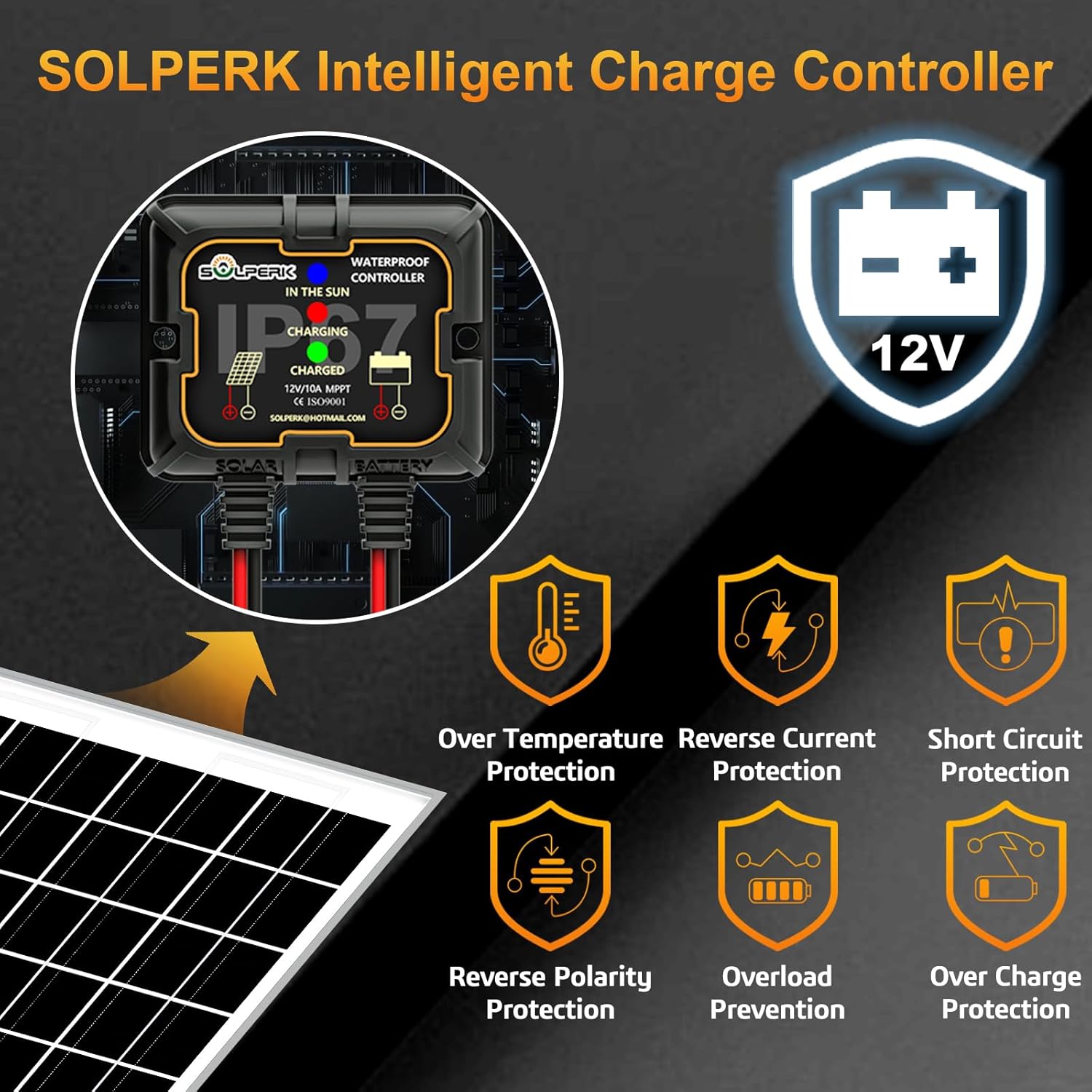
Image 5.2: The SOLPERK intelligent charge controller highlighting its multiple protection features, including over temperature, reverse current, short circuit, reverse polarity, overload, and over charge protection.
6. Maintenance
The SOLPERK Solar Panel Kit is designed for minimal maintenance due to its durable construction.
- Cleaning: Periodically clean the surface of the solar panel with a soft, damp cloth to remove dust, dirt, or debris that may reduce efficiency. Avoid abrasive cleaners or harsh chemicals.
- Connection Check: Regularly inspect all electrical connections to ensure they are tight and free from corrosion.
- Environmental Durability: The panel is built with low-iron tempered glass and a corrosion-resistant aluminum frame, making it 100% waterproof and rustproof. It is designed to withstand harsh weather conditions, including sandstorms, thunderstorms, blizzards, and hail, and can handle up to 2400Pa wind pressure and 5400Pa snow load.

Image 6.1: The SOLPERK solar panel demonstrating enhanced shatter resistance, indicating robust glass protection against cracks and distortion.

Image 6.2: The SOLPERK solar panel is designed to withstand all weather conditions, featuring snow load capacity of 102.4 lb/ft², hail impact resistance up to 1 inch in diameter, extreme weather tolerance from -40°F to 185°F, and wind load resistance up to 2400Pa (hurricane strength).
7. Troubleshooting
If you encounter issues with your SOLPERK Solar Panel Kit, refer to the following common problems and solutions:
- No Charging Indication (Blue light not on):
- Ensure the solar panel is exposed to direct sunlight.
- Check the connection between the solar panel and the controller.
- Battery Not Charging (Red light not on when blue is on):
- Verify that the controller is correctly connected to the battery terminals (positive to positive, negative to negative).
- Check the battery voltage. If the battery is fully charged, the green light will be on.
- Inspect for any loose or corroded connections.
- Ensure the battery is a 12V rechargeable type compatible with the charger.
- Low Charging Efficiency:
- Clean the solar panel surface to remove any dirt or obstructions.
- Adjust the solar panel angle to optimize sun exposure.
- Ensure there is no shading on the panel.
- Controller Overheating:
- Ensure the controller is in a well-ventilated area.
- Reduce the load on the battery if possible.
If the problem persists, please contact customer support for assistance.
8. Specifications
| Specification | Value |
|---|---|
| Brand | SOLPERK |
| Model Number | 10W |
| Maximum Power | 10 watts |
| Output Voltage | 12 volts DC |
| Number Of Cells | 36 |
| Material | Aluminum, Polycrystalline Silicon, Tempered Glass |
| Waterproof Rating | IP67 (Controller) |
| Wind Pressure Resistance | 2400Pa |
| Snow Load Capacity | 5400Pa |
| Operating Temperature | -40°F to 185°F |
9. Warranty and Support
SOLPERK stands behind the quality of its products.
- Warranty: This product comes with a one-year warranty from the date of purchase.
- Technical Support: We provide lifetime technical support for our products.
- Customer Service: Our 7x24 hours after-sales service ensures that your questions are answered promptly, typically within one day.
For warranty claims, technical assistance, or any other inquiries, please contact SOLPERK customer service through the retailer where you purchased the product or refer to the contact information provided in your product packaging.