
Introduction
Thank you for choosing the CECER Queen Murphy Bed with Storage. This innovative furniture piece is designed to maximize your living space, offering a comfortable queen-size bed that transforms into a stylish cabinet with integrated storage drawers. It features modern amenities such as RGB LED lighting to enhance your room's ambiance. This manual provides essential information for safe assembly, proper operation, and routine maintenance to ensure long-lasting enjoyment of your product.
Setup and Assembly
The CECER Queen Murphy Bed is delivered in three separate packages. Please ensure all packages have arrived before beginning assembly. If any accessories are missing, contact customer service immediately for assistance.
Preparation
- Clear a spacious area for assembly.
- Unpack all components and verify against the parts list provided in your separate assembly guide.
- Gather necessary tools (not included, typically screwdriver, hammer, etc.).
- Important: Assembly is recommended for two people to ensure safety and ease.
Assembly Steps Overview
- Attach the Bed Frame: Secure the bed frame components using the provided hardware.
- Wall Mounting: Secure the entire unit to the wall using the included wall mounting kit. This is a critical safety step to prevent tipping.
- Drawer Assembly: Assemble the storage drawers and install them at the bottom of the bed frame.
- LED Light Connection: Connect the RGB LED lights according to the wiring diagram in your assembly guide.

Figure 1: Assembly overview highlighting numbered parts, a detailed manual, and the recommendation for two-person assembly.
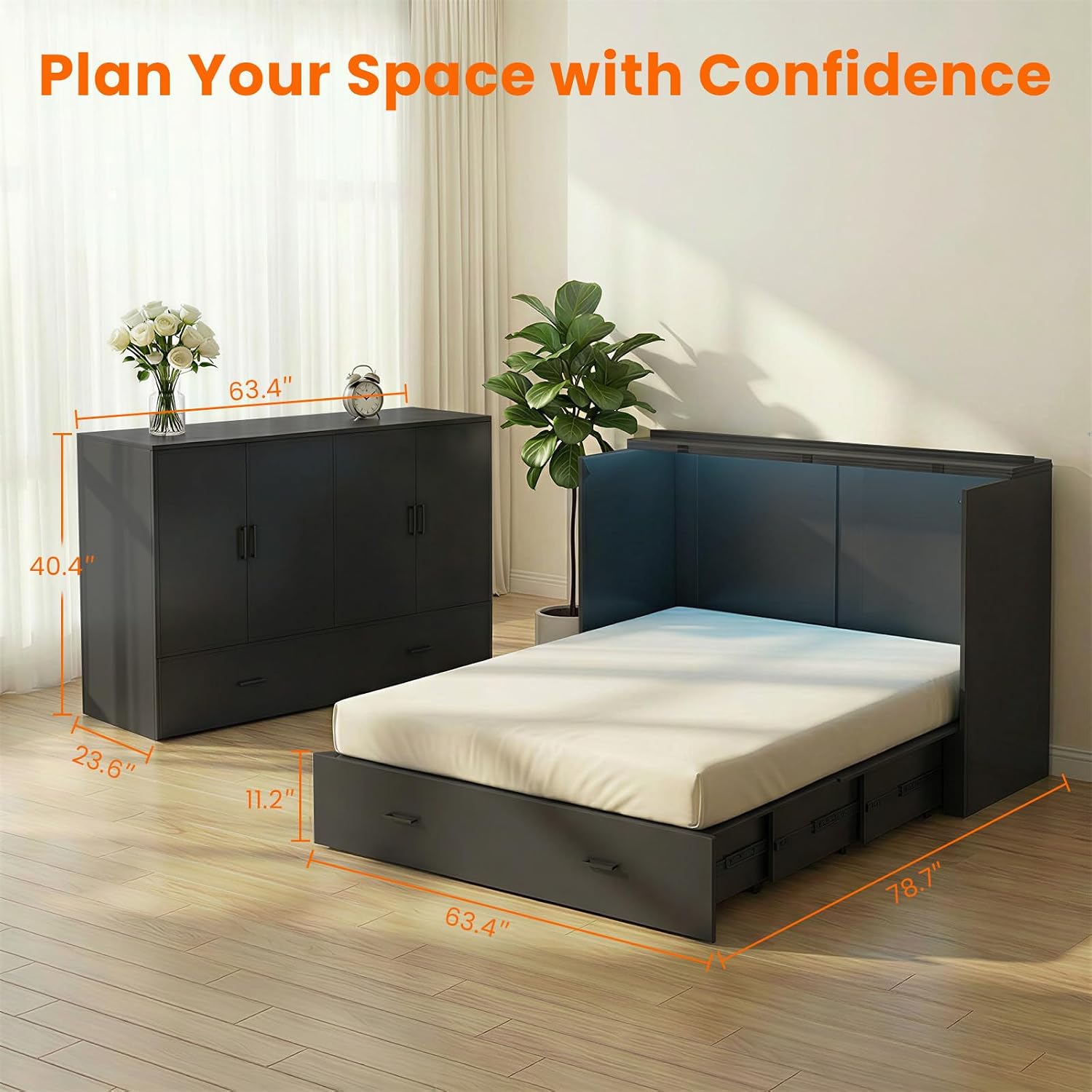
Figure 2: Dimensions of the CECER Queen Murphy Bed in both its cabinet and bed forms. Cabinet dimensions are approximately 63.4 inches wide, 40.4 inches high, and 23.6 inches deep. Bed dimensions are approximately 63.4 inches wide and 78.7 inches long.
Operating Instructions
Transforming from Cabinet to Bed
To convert the cabinet into a bed, ensure the area in front of the unit is clear of obstructions. Gently pull the bed frame outwards from the bottom of the cabinet. The mechanism is designed for smooth operation. Once fully extended, the bed will rest securely on its support legs.
Transforming from Bed to Cabinet
To fold the bed back into a cabinet, remove all bedding and pillows. Lift the bed frame from the foot end and push it upwards and inwards towards the wall unit until it locks securely into the cabinet position. Ensure the bed is fully retracted before using the storage drawers.

Figure 3: The CECER Murphy Bed transforming from a compact cabinet to a functional queen-size bed, demonstrating its dual-purpose design for space optimization.
RGB LED Lighting Control
The integrated RGB LED lighting system offers 16 vibrant colors and can be controlled via a dedicated remote control or a smartphone application. Refer to the separate LED lighting manual for detailed instructions on pairing the remote/app and customizing light settings, including the smart auto light-off timer function.

Figure 4: The CECER Murphy Bed with its RGB LED lighting feature, showcasing atmospheric lighting options controlled by smartphone app or remote.
Using the Storage Drawers
The large drawer located at the bottom of the unit provides ample storage space. It can be accessed whether the unit is in its cabinet or bed configuration. The drawers feature smooth and silent rails for easy opening and closing.

Figure 5: The CECER Murphy Bed cabinet with its integrated storage drawers, demonstrating the elegant modern design and high-gloss finish.
Maintenance
Regular maintenance helps prolong the life and appearance of your CECER Murphy Bed.
- Cleaning: Wipe surfaces with a soft, damp cloth. Avoid using abrasive cleaners, harsh chemicals, or excessive moisture, which can damage the engineered wood finish.
- Hardware Check: Periodically inspect all screws, bolts, and connectors to ensure they are tight. Retighten as necessary to maintain structural integrity and safety.
- Moving Parts: Keep the bed's folding mechanism and drawer rails free from dust and debris. If movement becomes stiff, a small amount of silicone-based lubricant can be applied to the moving parts (avoid oil-based lubricants).
- LED Lights: Ensure the LED strips are clean and free from dust. If the lights malfunction, check the power connection and remote control battery before contacting support.
Troubleshooting
If you encounter any issues with your CECER Queen Murphy Bed, refer to the following common problems and solutions:
| Problem | Possible Cause | Solution |
|---|---|---|
| Bed does not fold/unfold smoothly. | Obstruction in mechanism, loose hardware, lack of lubrication. | Check for any items blocking the movement. Ensure all assembly hardware is tight. Apply a small amount of silicone lubricant to moving parts if needed. |
| RGB LED lights are not working. | Power connection issue, remote battery dead, app not connected. | Verify the power adapter is securely plugged in. Replace the remote control battery. Re-pair the smartphone app if applicable. |
| Drawers are difficult to open or close. | Misalignment, debris in rails, damaged rails. | Check if the drawer is properly aligned on its rails. Clean any debris from the drawer slides. If rails are damaged, contact support for replacement parts. |
| Unit feels unstable or wobbly. | Loose wall mounting, uneven floor, loose assembly hardware. | Ensure the unit is securely anchored to the wall. Check and tighten all assembly hardware. Place shims under the unit if the floor is uneven. |
Product Specifications
- Brand: CECER
- Model: Queen Murphy Bed with Storage
- ASIN: B0GQH6GCB7
- Color: Black (for this variant)
- Material: Engineered Wood (MDF)
- Style: Modern
- Bed Size: Queen
- Weight Capacity: Up to 1000 pounds
- Number of Drawers: 1 large storage drawer
- Features: Space-saving design, RGB LED ambient lighting, Anti-Tip Safety Device, Reinforced Connectors, Smooth & Silent Drawer Rails, Stable Locking Wheels.
- Approximate Dimensions (Cabinet): 63.4" W x 40.4" H x 23.6" D
- Approximate Dimensions (Bed Extended): 63.4" W x 78.7" L
Warranty Information
Specific warranty details for the CECER Queen Murphy Bed are typically provided with your purchase documentation or can be obtained directly from the manufacturer or seller. Please retain your proof of purchase for any warranty claims. For information regarding protection plans, please refer to the options available at the time of purchase.
Customer Support
For any questions, missing parts, or assistance with assembly and operation, please contact CECER customer service. Our specialists are available to provide support and resolve issues within 24 hours.
- Contact Method: Refer to the contact information provided in your product packaging or the seller's storefront on Amazon.
- When contacting support, please provide: Your product model (B0GQH6GCB7), date of purchase, and a detailed description of your issue.