
Introduction
Welcome to the padom AI Smart Glasses UF-11 user manual. These smart glasses are designed to enhance communication and productivity through advanced AI-powered translation, noise reduction, and smart features. This manual provides essential information for setting up, operating, maintaining, and troubleshooting your device. Please read it carefully to ensure optimal performance and longevity of your smart glasses.
What's in the Box
Upon unboxing your padom AI Smart Glasses UF-11, please verify that all the following items are included:
- Bluetooth Glasses
- Charging Cable
- Eyeglasses cloth
- User Manual (this document)

Image: The packaging contents of the padom AI Smart Glasses UF-11, showing the smart glasses, a magnetic charging cable, a cleaning cloth, and the user manual.
Product Overview
The padom AI Smart Glasses UF-11 are designed for seamless integration into your daily life, offering a range of intelligent features:
- Multi-Mode Translation: Supports over 115 languages with simultaneous interpretation, face-to-face translation, and live recording.
- AI Noise Reduction: Filters background sounds for clear voice recognition and communication.
- Advanced AI Tools: Access features like AI Image Generation, AI Conversation, Voice Wake-up, and an AI Agent via the companion app.
- Durable Design: IP54 waterproof rating for resistance against sweat and rain.
- Adaptive Lenses: Photochromic lenses adjust from clear (blue light filtering) indoors to dark (UV400 protection) outdoors.
- Effortless Control: Intelligent touch design for managing calls, music, and voice assistant.
- Stable Connectivity: Bluetooth 5.3 for reliable pairing with multiple devices.

Image: The padom AI Smart Glasses UF-11 in use, highlighting key features such as Bluetooth 5.3, IP54 waterproofing, touch control, voice assistant, noise reduction, and hands-free calling.

Image: The padom AI Smart Glasses UF-11 demonstrating its capability to translate over 160 languages with high-definition sound quality and real-time translation.
Setup
1. Charging the Glasses
Before first use, fully charge your padom AI Smart Glasses UF-11.
- Connect the magnetic charging cable to the charging port on the glasses.
- Plug the other end of the charging cable into a USB power adapter (not included) or a computer's USB port.
- A full charge takes approximately 1.5 hours. The glasses provide 4–6 hours of active use and up to 7 days of standby time.
2. Pairing with Your Device (Bluetooth)
The glasses use Bluetooth 5.3 for stable connectivity with your smartphone or other compatible devices.
- Ensure your smart glasses are charged and powered on.
- Enable Bluetooth on your smartphone (compatible with Android and iOS devices).
- Search for available Bluetooth devices and select "padom UF-11" (or similar name) from the list.
- Confirm the pairing on your smartphone if prompted.
3. Installing the Companion App
To unlock the full range of AI features, download and install the dedicated companion app on your smartphone. Refer to the QR code provided in the packaging or search for "padom Smart Glasses App" in your device's app store.
- Download and install the app.
- Open the app and follow the on-screen instructions to connect your UF-11 glasses.
- Once paired, you can access features like AI Image Generation, AI Conversation, Voice Wake-up, and the AI Agent.
Operating Instructions
1. Basic Controls (Touch-Sensitive Arms)
The padom AI Smart Glasses UF-11 feature intelligent touch controls on the arms for easy management of various functions. Specific gestures (tap, swipe, hold) will be detailed within the companion app.
- Call Management: Answer, end, or reject calls.
- Music Playback: Play, pause, skip tracks.
- Voice Assistant: Activate your device's voice assistant (e.g., Siri, Google Assistant).
2. Translation Modes
Utilize the companion app to select and manage translation modes.
- Face-to-Face Mode: For direct conversations with individuals speaking different languages. The glasses provide real-time audio translation.
- Lecture Mode: Automatically transcribes meetings or speeches with timestamps, ideal for recording and reviewing multilingual content.
- Multi-Mode Translation Suite: Access simultaneous interpretation and live recording across 115+ languages.

Image: Demonstrating the Face-to-Face Communication feature of the padom AI Smart Glasses UF-11, providing real-time translation for seamless conversations.

Image: The padom AI Smart Glasses UF-11 providing highly accurate AI translation for clear communication in various settings.
3. AI Tools and Features
The companion app unlocks advanced AI functionalities:
- AI Image Generation: Transform verbal prompts into visuals.
- AI Conversation: Practice languages or brainstorm ideas through contextual AI dialogues.
- Voice Wake-up: Use hands-free commands to activate features.
- AI Agent: An intelligent assistant to manage schedules, suggest reminders, and prioritize tasks.

Image: The AI Chat feature of the padom AI Smart Glasses UF-11, allowing users to ask questions and receive answers silently.
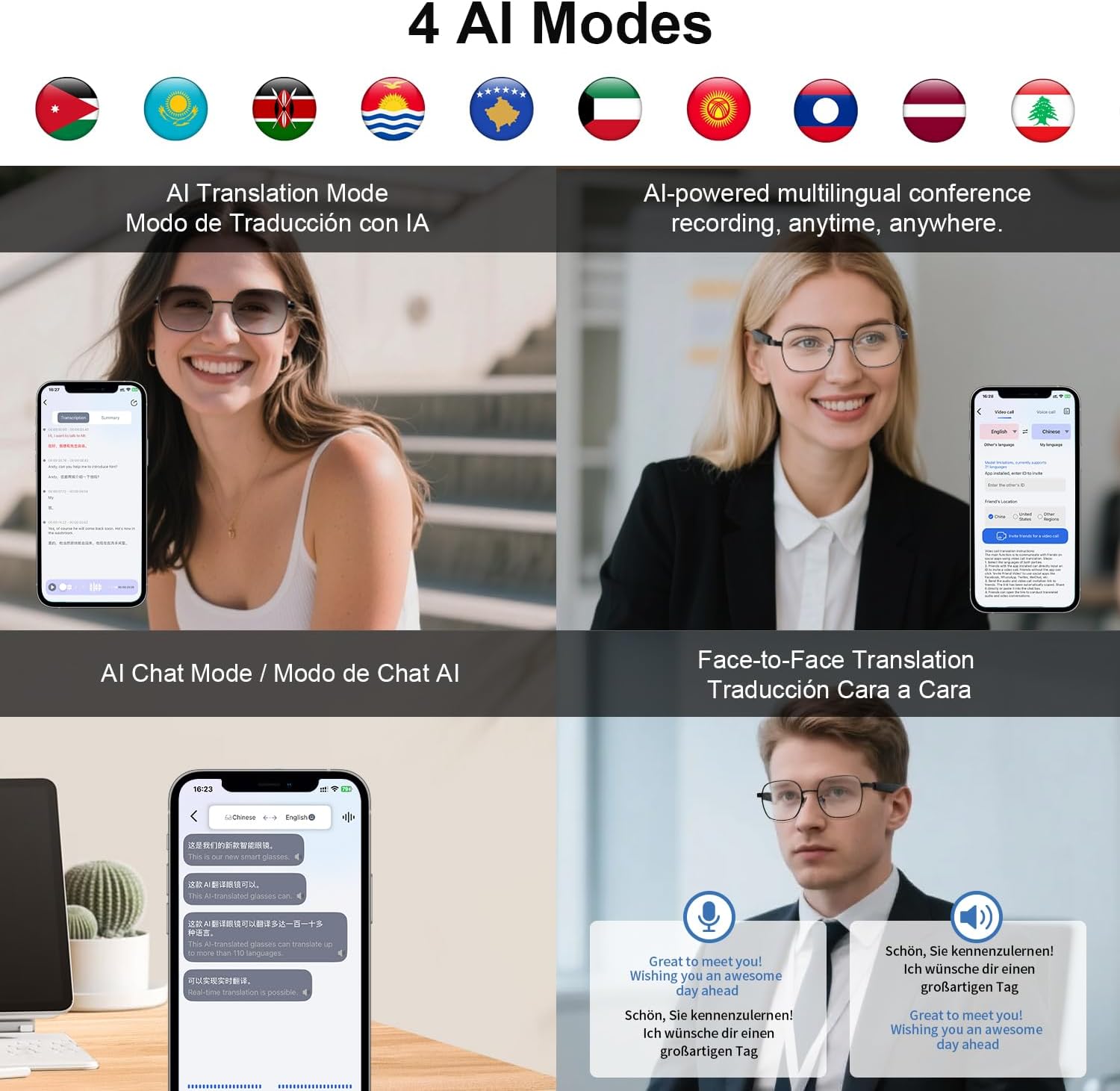
Image: An overview of the four primary AI modes available with the padom AI Smart Glasses UF-11, including translation, conference recording, AI chat, and face-to-face translation.
4. Photochromic Lenses
The lenses automatically adapt to light conditions:
- Indoors: Lenses remain clear, offering blue light filtering.
- Outdoors: Lenses darken to provide UV400 protection against sunlight.
Maintenance
1. Cleaning
To maintain the clarity of your lenses and the cleanliness of your glasses:
- Use the provided eyeglasses cloth to gently wipe the lenses and frame.
- For stubborn smudges, use a lens cleaning spray specifically designed for eyewear and a clean microfiber cloth.
- Avoid using abrasive materials or harsh chemicals, as these can damage the lenses and coatings.
2. Water Resistance
The padom AI Smart Glasses UF-11 have an IP54 waterproof rating, meaning they are resistant to splashes of water and dust.
- They can withstand sweat and light rain.
- Do not submerge the glasses in water or expose them to high-pressure water jets.
- If the glasses get wet, wipe them dry with a soft cloth before charging or prolonged use.
3. Storage
When not in use, store your glasses in the provided glasses case or eyeglasses storage bag to protect them from scratches and damage.
Troubleshooting
If you encounter issues with your padom AI Smart Glasses UF-11, try the following solutions:
- Glasses not powering on: Ensure the glasses are fully charged. Connect them to the charging cable and allow them to charge for at least 30 minutes.
- Cannot pair via Bluetooth:
- Ensure Bluetooth is enabled on your smartphone and the glasses are in pairing mode.
- Move the glasses closer to your smartphone.
- Turn off and on Bluetooth on your smartphone, then try pairing again.
- Restart both the glasses and your smartphone.
- Translation not working or inaccurate:
- Check your internet connection, as translation features often require online access.
- Ensure the companion app is open and properly connected to the glasses.
- Verify that the correct source and target languages are selected in the app.
- Speak clearly and at a moderate pace.
- Ensure the microphone on the glasses is not obstructed.
- Audio issues (no sound, distorted sound):
- Check the volume levels on both the glasses and your connected device.
- Ensure the glasses are properly connected via Bluetooth.
- If using for calls, ensure the glasses are selected as the audio output device on your phone.
- App not responding:
- Close and restart the companion app.
- Check for app updates in your device's app store.
- Ensure your smartphone's operating system is up to date.
If these steps do not resolve the issue, please refer to the support section for further assistance.
Specifications
| Model Name | UF-11 Smart Glasses |
| Brand | padom |
| Connectivity Technology | Bluetooth 5.3 |
| Operating System | Android Wear 1.0 (Internal) |
| Special Features | Lightweight, Music Player, Multi-Mode Translation, AI Noise Reduction, Photochromic Lenses, Touch Control, Voice Assistant |
| Water Resistance Level | IP54 (Waterproof) |
| Battery Type | Lithium Polymer |
| Battery Charge Time | 1.5 Hours |
| Battery Life (Active Use) | 4-6 Hours |
| Standby Time | 7 Days |
| Item Weight | 30 Grams |
| Compatible Devices | Laptop, Smartphone (Android, iOS) |
| Human Interface Input | Microphone, Touch |
| Supported Application | AI Image Generation, AI Conversation, Voice Wake-up, AI Agent |
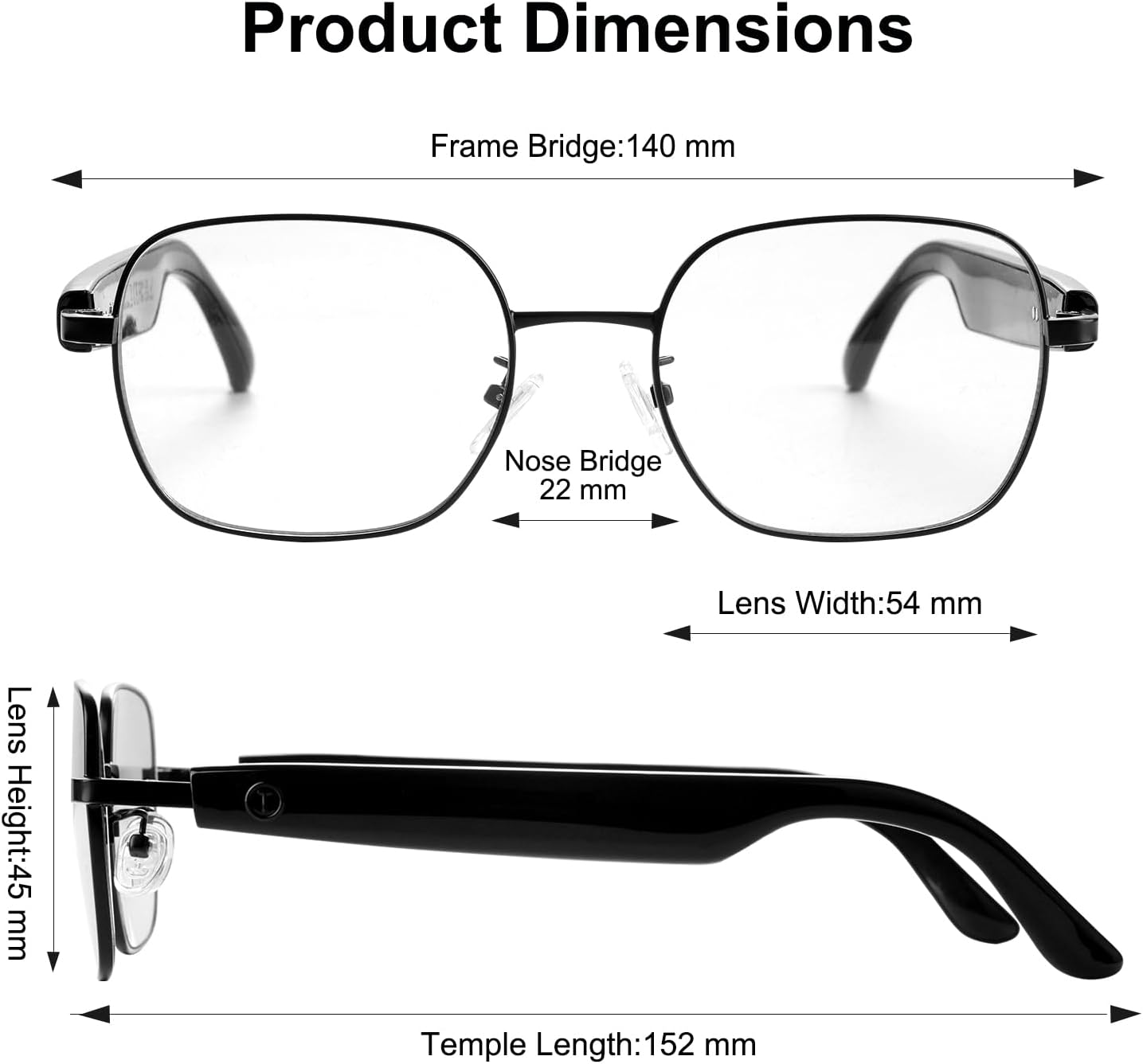
Image: Product dimensions of the padom AI Smart Glasses UF-11, including measurements for frame bridge (140 mm), nose bridge (22 mm), lens width (54 mm), lens height (45 mm), and temple length (152 mm).
Warranty and Support
Warranty Information
Your padom AI Smart Glasses UF-11 come with a 1-Year Manufacturer Warranty from the date of purchase. This warranty covers defects in materials and workmanship under normal use. It does not cover damage caused by misuse, accidents, unauthorized modifications, or normal wear and tear. Please retain your proof of purchase for warranty claims.
Customer Support
For technical assistance, troubleshooting beyond this manual, or warranty inquiries, please contact padom customer support.
- Online Support: Visit the official padom store on Amazon for FAQs and contact options: padom Amazon Store
- Email Support: Refer to the contact information provided in your product packaging or on the official padom website.