
Introduction
This manual provides essential information for the installation, operation, maintenance, and troubleshooting of your new Generic replacement carburetor, model Xtruoqart#27126-06991. This carburetor is designed as a replacement part for Craftsman 987799610 and 987.799610 Chipper Shredder models.
Before proceeding with installation, please carefully read all instructions. It is crucial to compare the physical appearance of this carburetor with your original part to ensure compatibility, even if the model numbers match.
Safety Information
Always prioritize safety when working with fuel systems and power equipment. Failure to follow safety precautions can result in serious injury or property damage.
- Ensure the engine is turned off and cooled down before beginning any work.
- Disconnect the spark plug wire to prevent accidental starting.
- Work in a well-ventilated area to avoid inhaling fuel fumes.
- Wear appropriate personal protective equipment (PPE), such as gloves and eye protection.
- Handle fuel with extreme care. Keep away from open flames, sparks, and heat sources.
- Dispose of old fuel and parts responsibly according to local regulations.
Package Contents
Your package should contain the following item:
- 1 x Generic Carburetor (Model Xtruoqart#27126-06991)
Note: Some package labels may display a part number instead of the model number.
Setup and Installation
This section outlines the general steps for replacing a carburetor. Specific procedures may vary slightly depending on your Craftsman chipper shredder model. Refer to your equipment's original service manual for detailed instructions.
- Preparation: Ensure the engine is off and cool. Disconnect the spark plug wire. Place a suitable container under the fuel line to catch any spilled fuel.
- Remove Air Filter Assembly: Carefully remove the air filter housing and air filter to gain access to the carburetor.
- Disconnect Fuel Line: Pinch off the fuel line or drain the fuel tank. Disconnect the fuel line from the old carburetor.
- Disconnect Linkages: Detach any throttle and choke linkages connected to the old carburetor. Note their positions for reassembly.
- Remove Old Carburetor: Unbolt the old carburetor from the engine manifold. Be mindful of any gaskets.
- Install New Carburetor: Place new gaskets (if supplied or required) and mount the new Generic carburetor (Model Xtruoqart#27126-06991) onto the engine manifold. Secure with bolts.
- Reconnect Linkages and Fuel Line: Reattach the throttle and choke linkages to their correct positions. Reconnect the fuel line.
- Reassemble Air Filter: Reinstall the air filter and air filter housing.
- Final Checks: Ensure all connections are secure and there are no fuel leaks. Reconnect the spark plug wire.
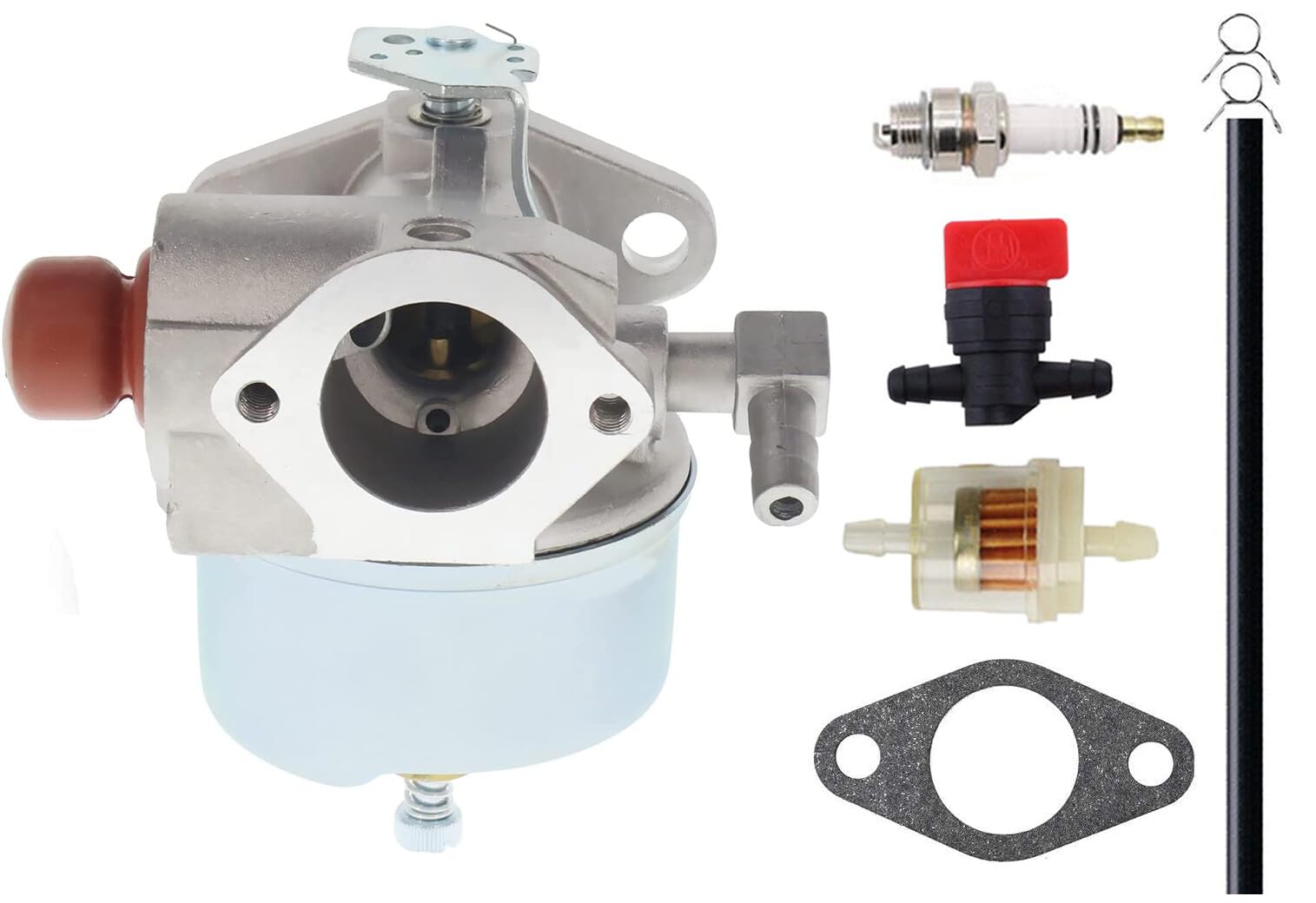
Image 1: The Generic replacement carburetor, showing its main components and mounting points. This image helps in identifying the part during installation.
Operating Principles
The carburetor is a vital component responsible for mixing air and fuel in the correct ratio for combustion in the engine. Once installed, it functions automatically to deliver the fuel-air mixture required for your chipper shredder's operation. No specific operational adjustments are typically required for a new replacement carburetor unless specified by the engine manufacturer.
Maintenance
Proper maintenance of your carburetor and fuel system will ensure optimal performance and longevity of your chipper shredder.
- Fuel Quality: Always use fresh, clean fuel. Stale or contaminated fuel is a primary cause of carburetor issues. Consider using a fuel stabilizer if the equipment will be stored for extended periods.
- Fuel Filter: Regularly inspect and replace the fuel filter to prevent debris from reaching the carburetor.
- Air Filter: Keep the air filter clean to ensure proper airflow to the carburetor. A clogged air filter can lead to a rich fuel mixture and poor engine performance.
- Cleaning: If performance issues arise, the carburetor may require cleaning. This typically involves disassembling the carburetor, cleaning jets and passages with carburetor cleaner, and replacing gaskets. This task is recommended for experienced users or professional technicians.
Troubleshooting
If your chipper shredder experiences issues after carburetor replacement, consider the following common problems and solutions:
| Problem | Possible Cause | Solution |
|---|---|---|
| Engine won't start | No fuel, clogged fuel line/filter, incorrect choke setting, spark plug issue. | Check fuel level, inspect fuel line/filter, ensure choke is set correctly, check spark plug. |
| Engine runs rough or stalls | Dirty carburetor jets, improper fuel-air mixture, air leak, old fuel. | Clean carburetor, check for air leaks around gaskets, use fresh fuel. |
| Lack of power | Clogged air filter, restricted exhaust, carburetor not delivering enough fuel. | Clean/replace air filter, check exhaust for blockages, inspect carburetor for clogs. |
| Fuel leaks | Loose connections, damaged gaskets, float bowl issue. | Tighten connections, replace gaskets, inspect float and needle valve. |
If troubleshooting steps do not resolve the issue, it is recommended to consult a qualified service technician.
Specifications
| Feature | Detail |
|---|---|
| Brand Name | Generic |
| Model Number | Xtruoqart#27126-06991 |
| Manufacturer | Xtruoqarts |
| ASIN | B0GP1TGZCS |
| Compatibility | Craftsman 987799610, 987.799610 Chipper Shredder |
Warranty Information
As this is a replacement part, warranty coverage may vary. Please refer to the specific warranty terms provided by the seller or manufacturer at the time of purchase. Retain your proof of purchase for any warranty claims.
Support
For technical assistance, installation guidance, or further inquiries regarding this Generic carburetor, please contact the seller or the manufacturer, Xtruoqarts, directly. Provide your product model number (Xtruoqart#27126-06991) and details of your chipper shredder for efficient support.


