
1. Introduction
This manual provides essential information for setting up, operating, and maintaining your Toshiba 65Z670R Mini-LED 4K UHD Smart Fire TV. This television combines advanced display technologies with smart features to deliver a comprehensive entertainment experience. Please read this manual thoroughly before using your TV and retain it for future reference.
2. What's in the Box
Verify that all components are present in the packaging:
- Toshiba 65Z670R Television
- Power Cable
- Remote Control (requires 2 AAA batteries, not included)
- TV Stand components
- Quick Start Guide (QSG)
3. Setup
3.1 Physical Installation
Before proceeding, ensure the TV is placed on a stable, level surface or securely mounted to a wall. For stand installation, attach the provided stand components according to the Quick Start Guide. For wall mounting, use a VESA compatible mount (400 x 400 mm) and follow the mount manufacturer's instructions.

Image: Front and side view of the Toshiba 65Z670R television, illustrating its dimensions (56.9 inches width, 32.9 inches height, 3.0 inches depth) and VESA wall mount size (400x400mm). Product weight with stand is 45.4 lbs, without stand is 44.1 lbs.

Image: Rear view of the Toshiba 65Z670R television, highlighting the various connectivity ports including HDMI, USB, and Ethernet.
3.2 Power Connection
Connect the power cable to the TV's power input and then to a standard electrical outlet (100-240 VAC, 50-60 Hz). The TV consumes 220 Watts during operation.
3.3 Initial Setup (Fire TV)
Upon first power-on, the TV will guide you through the initial Fire TV setup process. This includes connecting to your Wi-Fi network, logging into your Amazon account, and setting up Alexa voice control. Follow the on-screen instructions.
4. Operating the TV
4.1 Remote Control and Voice Commands
The included remote control allows navigation through the Fire TV interface. Press the microphone button and speak commands to use Alexa for finding content, launching apps, controlling playback, checking scores, setting timers, and more.

Image: Close-up view of the Toshiba Fire TV remote control, highlighting the Alexa voice command button for hands-free operation.
4.2 Fire TV Interface and Streaming
The Fire TV interface integrates your favorite streaming apps and live channels on the home screen. You can browse the Channel Guide in Live or access popular internet applications such as Disney Plus, Hulu, Netflix, Prime Video, and YouTube directly. Personalized profiles can be created for customized viewing recommendations.
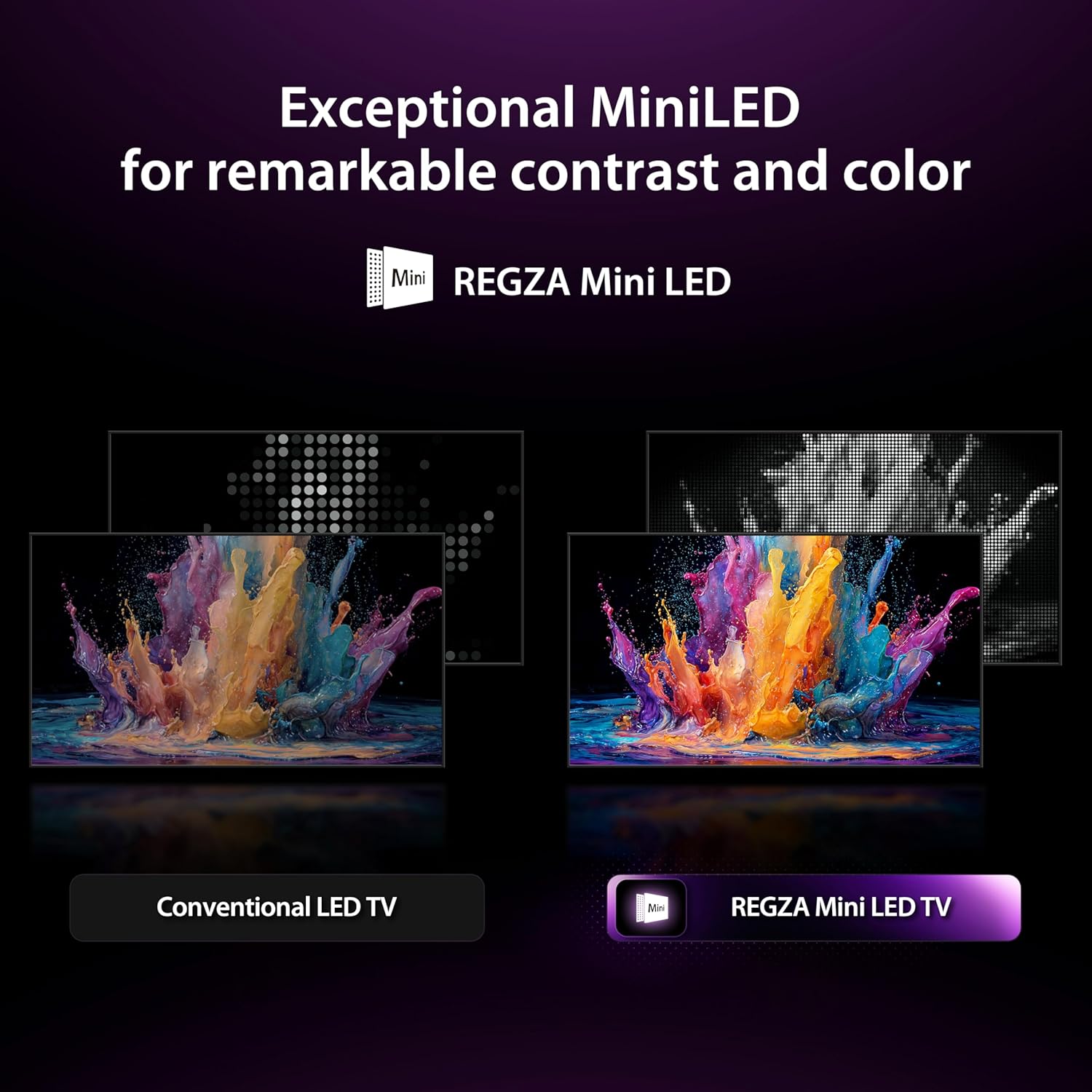
Image: The Toshiba Fire TV home screen, showcasing a selection of streaming applications and content recommendations.

Image: The Toshiba Fire TV interface displaying a wide array of streaming applications and recommended content, illustrating the all-in-one entertainment experience.
4.3 Gaming Features
The Toshiba 65Z670R is designed for gaming with a native 144Hz refresh rate for ultra-smooth motion. Game Mode Pro includes AMD FreeSync Premium, VRR (Variable Refresh Rate) 144Hz, and ALLM (Auto Low Latency Mode) to ensure responsive, tear-free gaming, ideal for next-generation consoles and PC gaming.

Image: Visual comparison demonstrating the difference between 60Hz and 144Hz refresh rates, highlighting the smoother motion provided by the Toshiba TV's native 144Hz panel.

Image: Graphic illustrating the key features of Game Mode Pro on the Toshiba TV, such as ALLM, VRR, 144Hz, Dolby Vision, HDR10+, and AMD FreeSync Premium, designed for enhanced gaming performance.
5. Picture and Sound Features
5.1 Mini LED with Full Array Local Dimming
The TV utilizes Mini LED technology with Full Array Local Dimming to precisely control individual lighting zones. This results in deeper blacks, brighter highlights, and accurate color reproduction, enhancing the overall contrast and detail of the 4K picture.

Image: A visual comparison between a conventional LED TV and a REGZA Mini LED TV, demonstrating the superior contrast and color accuracy of Mini LED technology.

Image: An illustration showing how Full Array Local Dimming works to create vivid contrast and highlights by controlling individual lighting zones on the screen.
5.2 REGZA Engine ZRi Gen3
The advanced AI-powered REGZA Engine ZRi Gen3 optimizes picture and sound performance. It analyzes content in real-time to enhance clarity, contrast, and audio, providing a more natural and immersive viewing experience.

Image: Diagram of the REGZA Engine ZRi Gen3 chip, highlighting its faster CPU, GPU, and NPU for advanced AI picture and sound processing.
5.3 QLED Color
QLED Technology delivers over a billion shades of realistic, vivid colors, creating an authentic and exciting visual experience with heightened detail and nuance.

Image: A visual representation comparing QLED Color display with a conventional display, illustrating the broader spectrum and vibrancy of colors achieved with QLED technology.
5.4 Total HDR Solution Pro
This TV supports multiple HDR formats including Dolby Vision IQ, HDR10+, HDR10+ Adaptive, and HLG. This ensures brighter highlights, richer contrast, and enhanced detail across various content sources.

Image: Comparison showing the benefits of Total HDR Solution Pro versus a non-HDR TV, highlighting improved brightness, black areas, and clearer details in scenes.
5.5 REGZA Power Audio Pro with Bass Woofer & Dolby Atmos
Experience powerful and clear audio with REGZA Power Audio Pro and the integrated Bass Woofer, delivering deep, resonant bass. Tuned amplifiers and dual clear direct speakers ensure vocal clarity. Dolby Atmos support provides an immersive, multi-dimensional sound experience.

Image: Illustration depicting the immersive sound experience provided by REGZA Power Audio Pro with Bass Woofer and Dolby Atmos, showing sound waves filling a room.
5.6 AI Light Sensor Pro
The AI Light Sensor Pro automatically adjusts the TV's brightness and color balance to match your room's ambient lighting conditions. This feature ensures a comfortable viewing experience and helps reduce eye strain.

Image: Visual demonstrating the AI Light Sensor Pro feature, showing how the TV adapts its brightness and color temperature to different room lighting conditions for optimal viewing comfort.
6. Connectivity
The Toshiba 65Z670R offers a variety of connectivity options:
- HDMI: 4 ports (HDMI 2.1 with eARC support) for connecting gaming consoles, Blu-ray players, and other devices.
- USB: 2 ports (1x USB 2.0, 1x USB 3.0) for media playback or connecting peripherals.
- Wi-Fi: Built-in Wi-Fi 5 for wireless internet access and streaming.
- Bluetooth: Bluetooth 5.0 for connecting wireless headphones, soundbars, or other compatible devices.
- Ethernet: For a stable wired internet connection.
- Audio Output: 2 audio out ports.
- Screen Mirroring: Supports AirPlay and Google Cast for casting content from mobile devices.

Image: Graphic illustrating the various connectivity options of the Toshiba TV, including HDMI, Bluetooth, and Wi-Fi, along with compatible devices like gaming consoles, laptops, and smartphones.
7. Specifications
| Feature | Detail |
|---|---|
| Screen Size | 65 Inches |
| Display Technology | Mini LED, QLED |
| Resolution | 4K UHD (3840 x 2160) |
| Refresh Rate | 144 Hz (Native) |
| HDR Support | Dolby Vision IQ, HDR10+, HDR10+ Adaptive, HLG |
| Processor | REGZA Engine ZRi Gen3 |
| Audio Output Mode | Surround, Dolby Atmos |
| Speaker Max Output Power | 40 Watts |
| Operating System | FireOS |
| Voice Assistant | Alexa Built-in |
| Connectivity | Bluetooth 5.0, Ethernet, 4x HDMI, 2x USB, Wi-Fi 5 |
| VESA Mount Standard | 400 x 400 mm |
| Product Dimensions (DxWxH) | 3"D x 56.9"W x 32.9"H |
| Item Weight (without stand) | 44.1 Pounds |
| Power Consumption | 220 Watts |
| Model Number | 65Z670R |
| UPC | 888143025070 |
8. Maintenance
8.1 Cleaning the Screen
To clean the screen, gently wipe it with a soft, dry, lint-free cloth. For stubborn marks, lightly dampen the cloth with water or a screen-specific cleaning solution. Avoid using harsh chemicals, abrasive materials, or direct spraying onto the screen.
8.2 Cleaning the TV Body
Wipe the TV's body and stand with a soft, dry cloth. Do not use liquid cleaners directly on the TV. Ensure all vents are clear of dust and debris to prevent overheating.
9. Troubleshooting
If you encounter issues with your TV, refer to the following common solutions:
- No Power: Ensure the power cable is securely connected to both the TV and the electrical outlet. Check if the outlet is functioning by plugging in another device.
- No Picture/Sound: Verify that the correct input source is selected. Check all cable connections (HDMI, etc.) for secure fit.
- Remote Control Not Working: Replace the AAA batteries in the remote control. Ensure there are no obstructions between the remote and the TV's IR sensor.
- Network Connection Issues: Restart your Wi-Fi router. Go to the TV's network settings to reconnect to your Wi-Fi or check the Ethernet cable connection.
- Picture Quality Issues: Adjust picture settings (brightness, contrast, color) in the TV menu. Ensure your content source is of high quality.
For further assistance, consult the full user manual or contact Toshiba customer support.
10. Warranty and Support
The Toshiba 65Z670R television comes with a 1-year manufacturer's warranty. Please retain your proof of purchase for warranty claims. For detailed warranty terms, technical support, or service inquiries, please refer to the official Toshiba website or contact their customer service department.
Online Support: Visit the official Toshiba support website for FAQs, troubleshooting guides, and software updates.
Contact Information: Refer to your Quick Start Guide or the Toshiba website for regional customer service contact details.