
Introduction
This manual provides comprehensive instructions for the setup, operation, and maintenance of your Toshiba Z670R Series Mini-LED 4K UHD Smart Fire TV. Please read this manual thoroughly before using your television to ensure proper functionality and safety.

Image: Toshiba Z670R Series Mini-LED 4K UHD Smart Fire TV, front view.
The Toshiba Z670R Series features advanced Mini LED technology, the AI-powered REGZA ZRi Engine, QLED Color, and Total HDR Solution Pro for an immersive viewing experience. It also includes cutting-edge gaming features such as a native 144Hz refresh rate, VRR, ALLM, and AMD FreeSync Premium. The television is designed in Japan with a minimalist, bezel-less aesthetic.

Image: Illustration of the TV's seamless edge-to-edge display and minimalist design, highlighting its Japanese aesthetic.
Setup
1. Unpacking and Contents
Carefully remove all components from the packaging. Ensure the following items are present:
- Toshiba Z670R Series TV
- Power Cable
- Remote Control
- TV Stand
- Quick Start Guide (QSG)
2. Physical Dimensions and Placement
Before installation, consider the TV's dimensions and weight to ensure proper placement and support.
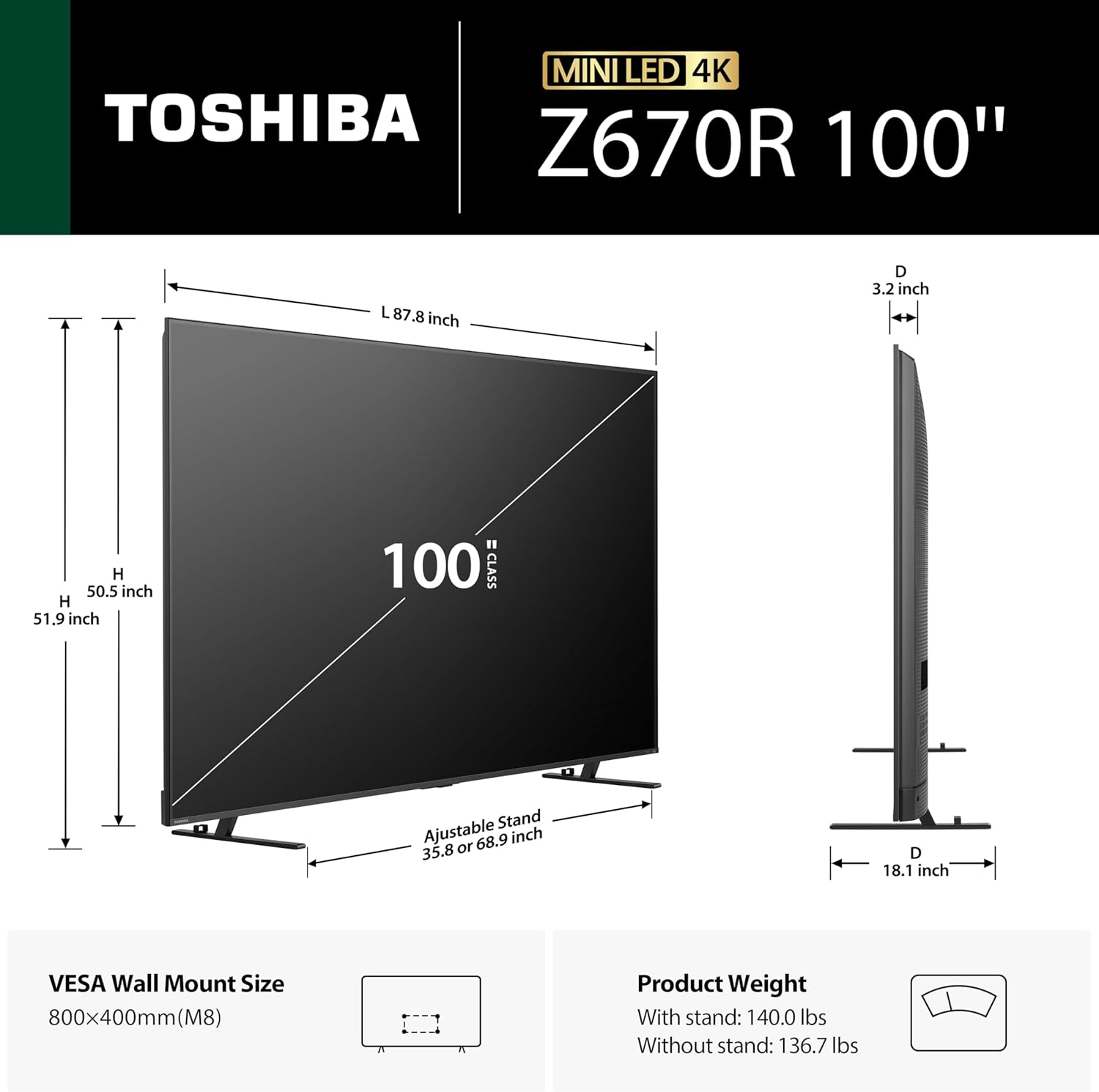
Image: Diagram showing the TV's dimensions (87.8"W x 50.5"H x 3.2"D) and weight (136.7 lbs without stand, 140.0 lbs with stand), along with VESA wall mount size (800x400mm).
- Product Dimensions: 3.2"D x 87.8"W x 50.5"H
- Item Weight: 136.7 Pounds (without stand)
- Mounting Type: Table Mount (stand included)
- VESA Mount Standard: 800 x 400 mm (for wall mounting, bracket sold separately)
3. Stand Installation (Table Mount)
Follow the instructions in the Quick Start Guide to securely attach the included TV stand. Ensure the TV is placed on a stable, level surface.
4. Connecting Peripherals
The TV offers various connectivity options for external devices.

Image: Visual representation of the TV's connectivity ports and wireless technologies, including HDMI, Bluetooth, and Wi-Fi.
- HDMI: 4 ports (HDMI 2.1 with eARC support for high-quality audio and 4K@144Hz). Connect gaming consoles, Blu-ray players, etc.
- USB: 2 ports (1x USB 2.0, 1x USB 3.0). For media playback or connecting USB devices.
- Ethernet: For wired internet connection.
- Bluetooth: Version 5.0 for wireless accessories like headphones or speakers.
- Wi-Fi: For wireless internet connection.
- Audio Input: HDMI
- Total Audio Out Ports: 2
- Number of Composite-Video Inputs: 2
5. Initial Power On
Connect the power cable to the TV and a power outlet. Press the power button on the remote control or the TV to turn it on. Follow the on-screen instructions for initial setup, including network connection and Fire TV account login.
Operating Instructions
1. Basic Controls and Alexa Integration
Use the included remote control to navigate the Fire TV interface. The remote features dedicated buttons for common functions and voice control via Alexa.

Image: Close-up of the TV remote control, highlighting the "Press & Ask Alexa" button for voice commands.
Press the Alexa button on your remote to use voice commands for finding content, launching apps, controlling playback, checking sports scores, setting timers, and more. The TV also supports smart home compatibility, allowing you to check smart home cameras by asking Alexa.

Image: The TV screen showing a smart home camera feed in a corner, demonstrating Alexa's smart home integration.
2. Smart TV Features (Fire TV)
Your Toshiba Z670R TV comes with Fire TV built-in, providing access to a wide range of streaming services and live TV options.

Image: The Fire TV home screen displaying popular streaming applications like Netflix, Prime Video, Disney+, and Hulu.
- Streaming Apps: Access popular services like Disney Plus, Hulu, Netflix, Prime Video, and YouTube.
- Live TV: Seamlessly integrate live channels and browse the Channel Guide.
- Personalized Profiles: Create user profiles for customized viewing experiences and recommendations.

Image: The Fire TV interface showing live TV channels and a channel guide.

Image: The Fire TV interface displaying options for creating and managing personalized user profiles.
3. Picture Settings and Enhancements
The Z670R Series incorporates several technologies to deliver superior picture quality.
- Mini LED with Full Array Local Dimming: Provides precise backlight control for deeper blacks and brighter highlights.
- REGZA Engine ZRi Gen3: An AI-powered engine that optimizes clarity, contrast, and audio performance in real-time.
- QLED Color: Delivers over a billion shades of realistic, vivid colors.
- Total HDR Solution Pro: Supports Dolby Vision IQ, HDR10+, HDR10+ Adaptive, and HLG for optimized HDR content.
- AI Light Sensor Pro: Automatically adjusts brightness and color balance based on room lighting to reduce eye strain.
- AI 4K Clarity & Upscaling: Enhances clarity, reduces noise, and intelligently upscales content to 4K quality.

Image: Side-by-side comparison illustrating the enhanced contrast and color accuracy of REGZA Mini LED technology versus conventional LED TVs.

Image: Visual explanation of Full Array Local Dimming, showing how individual zones of light are controlled for vivid contrast and highlights.

Image: Diagram of the REGZA Engine ZRi Gen3 AI processor, highlighting its faster CPU, GPU, and NPU for advanced picture and sound processing.

Image: Illustration demonstrating how QLED Color technology enhances the spectrum of colors displayed compared to conventional displays.

Image: Side-by-side comparison showing how Total HDR Solution Pro enhances dark scenes and highlights for greater detail compared to non-HDR TVs.

Image: Illustration of the AI Light Sensor Pro feature, showing the TV screen adapting its brightness and color temperature to match ambient room lighting conditions.

Image: Before-and-after comparison demonstrating the enhanced sharpness and detail achieved by AI 4K Clarity and Upscaling, transforming 2K content to 4K quality.
4. Sound Settings and Audio Features
Experience powerful and clear audio with the integrated sound system.
- REGZA Power Audio Pro with Bass Woofer: Delivers deep, resonant bass and clear vocals through meticulously tuned amplifiers and dual clear direct speakers.
- Dolby Atmos: Integrated surround sound format for an immersive audio experience.
- Speaker Maximum Output Power: 50 Watts
- Number of Audio Channels: 2.1

Image: Overhead view of a living room with the Toshiba TV, illustrating the immersive sound field created by REGZA Power Audio Pro, REGZA Bass Woofer, and Dolby Atmos.
5. Gaming Features
The Z670R Series is optimized for gaming with features designed for smooth and responsive gameplay.
- Native 144Hz Refresh Rate: Ensures ultra-smooth motion for fast-paced games.
- Game Mode Pro: Includes AMD FreeSync Premium, VRR 144Hz, and ALLM for responsive, tear-free gaming with minimal input lag.

Image: Comparison of 60Hz and 144Hz refresh rates, demonstrating the significantly smoother motion provided by the native 144Hz panel for gaming and action scenes.

Image: Graphic illustrating Game Mode Pro with icons for ALLM, VRR 144Hz, Dolby Vision, HDR10+, and AMD FreeSync Premium, set against a backdrop of a futuristic spaceship in space.

Image: A gaming scene on the Toshiba TV, featuring a character from a video game, with a game controller in the foreground, illustrating the enhanced gaming experience with Fire TV's ALLM and VRR.
6. Screen Mirroring
The TV supports screen mirroring technologies for casting content from your mobile devices.
- Screen Mirroring Technology: AirPlay, Google Cast
- Content Sharing Direction: Mobile to TV
Maintenance
1. Cleaning Your TV
To maintain the TV's appearance and performance:
- Always unplug the TV before cleaning.
- Use a soft, dry cloth to wipe the screen and cabinet.
- For stubborn marks, lightly dampen the cloth with water or a mild, non-abrasive screen cleaner.
- Avoid using harsh chemicals, alcohol, or abrasive materials, as these can damage the screen or finish.
2. Software Updates
Your Fire TV will periodically check for and install software updates automatically when connected to the internet. Ensure your TV remains connected to the internet to receive the latest features and security enhancements.

Image: Collage depicting various quality assurance tests, including performance tests, sampling tests, humidity tests, temperature tests, power on-off cycle tests, and drop tests, ensuring lasting performance and reliability.
Troubleshooting
If you encounter issues with your Toshiba Z670R TV, refer to the following common solutions:
| Problem | Possible Solution |
|---|---|
| No Power | Ensure the power cable is securely connected to both the TV and a working power outlet. Check if the outlet has power. |
| No Picture/Sound | Verify that the correct input source is selected. Check all cable connections (HDMI, etc.). Restart connected devices. |
| Remote Control Not Working | Replace the batteries (2 AAA batteries required). Ensure there are no obstructions between the remote and the TV. Re-pair the remote if necessary. |
| Poor Picture Quality | Check the source content quality. Adjust picture settings (brightness, contrast, color). Ensure the TV's software is up to date. |
| No Internet Connection | Check your Wi-Fi router and internet service. Reconnect to the Wi-Fi network in the TV settings. Try a wired Ethernet connection if available. |
Specifications
| Feature | Detail |
|---|---|
| Screen Size | 100 Inches |
| Display Technology | Mini LED, QLED |
| Resolution | 4K UHD |
| Refresh Rate | 144 Hz (Native) |
| HDR Support | Dolby Vision IQ, HDR10+, HDR10+ Adaptive, HLG |
| Processor | REGZA Engine ZRi Gen3 (AI) |
| Audio Output Power | 50 Watts (2.1 Channel) |
| Audio Encoding | Dolby Atmos |
| Operating System | FireOS |
| Connectivity | 4x HDMI (2.1), 2x USB (1x 2.0, 1x 3.0), Ethernet, Bluetooth 5.0, Wi-Fi |
| VESA Mount Standard | 800 x 400 mm |
| Power Consumption | 500 Watts |
| Model Number | 100Z670R |
| UPC | 888143025049 |
Warranty and Support
Your Toshiba Z670R Series TV comes with a 1 Year Manufacturer Warranty. For warranty claims or technical assistance, please contact Toshiba customer support.
For additional support and resources, visit the official Toshiba website or refer to the Quick Start Guide included with your TV.


