
Introduction
Thank you for choosing the Generic KD-780 TWS Wireless Bluetooth Earbuds. These earbuds offer a true wireless stereo audio experience with stable Bluetooth connectivity and intuitive touch controls. Designed for comfort and convenience, they are ideal for daily use, music listening, and hands-free calls. This manual provides detailed instructions to help you get the most out of your new earbuds.
Package Contents
Please check the package for the following items:
- KD-780 TWS Wireless Earbuds (Left and Right)
- Charging Case with LED Display
- USB Charging Cable
- User Manual (this document)
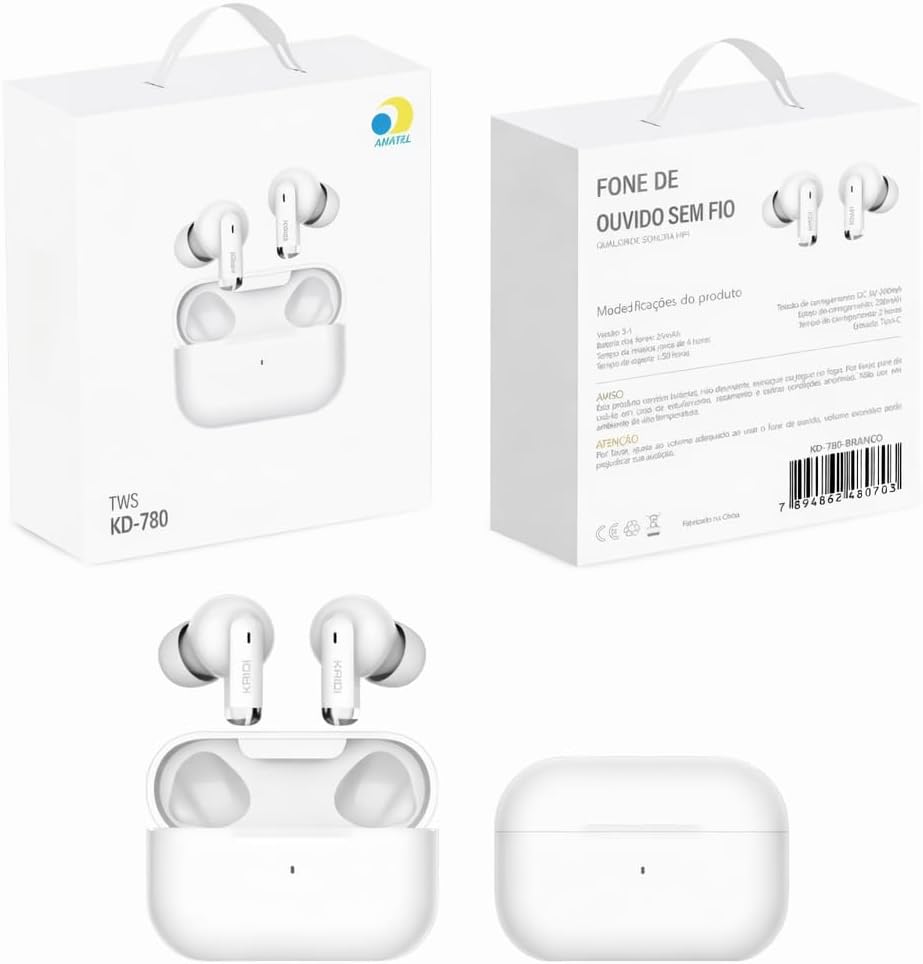
Image: The KD-780 TWS Wireless Earbuds, their charging case, and the product packaging.
Setup
1. Charging the Earbuds and Case
Before first use, fully charge the earbuds and the charging case. Place the earbuds into the charging case. Connect the USB charging cable to the charging case and a compatible USB power source (e.g., computer, wall adapter). The LED display on the charging case will indicate the charging status. A full charge takes approximately 2 hours.

Image: The white KD-780 TWS Wireless Earbuds securely placed inside their charging case.
2. Bluetooth Pairing
- Ensure the earbuds are charged.
- Open the charging case. The earbuds will automatically power on and enter pairing mode.
- On your smartphone or Bluetooth-enabled device, go to the Bluetooth settings.
- Search for available devices and select "KD-780" from the list.
- Once connected, you will hear a confirmation tone, and the earbuds will be ready for use.
- The earbuds will automatically reconnect to the last paired device when taken out of the case, if Bluetooth is enabled on the device.
Operating Instructions
Touch Controls
The KD-780 earbuds feature intuitive touch controls on each earbud for easy management of music and calls.
- Play/Pause Music: Single tap on either earbud.
- Next Track: Double tap on the right earbud.
- Previous Track: Double tap on the left earbud.
- Answer/End Call: Single tap on either earbud during an incoming call or active call.
- Reject Call: Press and hold either earbud for 2 seconds during an incoming call.
- Activate Voice Assistant: Triple tap on either earbud (if supported by your device).
- Volume Up: Press and hold the right earbud.
- Volume Down: Press and hold the left earbud.
Power On/Off
- Power On: The earbuds automatically power on when removed from the charging case.
- Power Off: The earbuds automatically power off when placed back into the charging case and the lid is closed.
Maintenance
Cleaning
To maintain optimal performance and hygiene, regularly clean your earbuds and charging case:
- Use a soft, dry, lint-free cloth to wipe the earbuds and charging case.
- For stubborn dirt, slightly dampen the cloth with water. Avoid using harsh chemicals or abrasive materials.
- Gently clean the ear tips and speaker mesh to remove earwax or debris.
Storage
When not in use, store the earbuds in their charging case to protect them from dust, damage, and to keep them charged.
Water Resistance
The KD-780 earbuds are water-resistant, making them suitable for sports and light exposure to moisture. However, they are not waterproof. Do not submerge them in water or expose them to heavy rain or sweat for extended periods. Ensure the earbuds are dry before placing them back in the charging case to prevent damage.
Troubleshooting
If you encounter any issues with your KD-780 earbuds, please refer to the following common solutions:
- Earbuds not pairing: Ensure both earbuds are charged. Place them back in the case, close the lid, then open it again to reset. Delete "KD-780" from your device's Bluetooth list and try pairing again.
- Only one earbud working: Ensure both earbuds are charged. Try placing both back in the case, closing the lid, and then reopening it. Re-pair if necessary.
- No sound: Check the volume level on both your device and the earbuds. Ensure the earbuds are properly connected to your device. Try playing audio from a different application or device.
- Charging issues: Ensure the USB cable is securely connected to both the case and the power source. Try a different USB cable or power adapter. Clean the charging contacts on the earbuds and inside the case.
- Poor sound quality: Ensure the earbuds are properly seated in your ears. Try cleaning the speaker mesh. Move closer to your connected device to avoid interference.
If the problem persists, please contact customer support for further assistance.
Specifications
| Model Name | KD-780 TWS Wireless Bluetooth Earbuds |
| Brand | Generic |
| Color | White |
| Ear Placement | In-ear |
| Connectivity Technology | Bluetooth |
| Bluetooth Version | 5.3 |
| Bluetooth Range | Up to 10 meters (33 feet) |
| Control Type | Touch Control |
| Charging Time | Approximately 2 hours |
| Noise Control | Passive Noise Cancellation |
| Frequency Response | 20 Hz (standard low end, specific high end not provided) |
| Sensitivity | 105 dB |
| Audio Latency | 60 Milliseconds |
| Audio Driver Size | 13 Millimeters |
| Water Resistance Level | Water Resistant |
| Compatible Devices | Smartphones and other Bluetooth-enabled devices |
| Included Components | Wireless Earbuds, Charging Case with LED Display, USB Charging Cable, User Manual |
Warranty and Support
Specific warranty details for this product are not provided in the product information. For any warranty claims or technical support, please contact the seller or retailer from whom you purchased the product. They will be able to provide you with the most accurate and up-to-date information regarding your product's warranty and support options.