
1. Introduction
This manual provides detailed instructions for the installation, operation, and maintenance of your Hodozzy Wireless Backup Camera System Kit. This system includes a 7-inch IPS monitor and four IP68 waterproof cameras, designed to enhance visibility and safety for various vehicles.

2. Packing List
Verify that all components are present in the package before proceeding with installation.
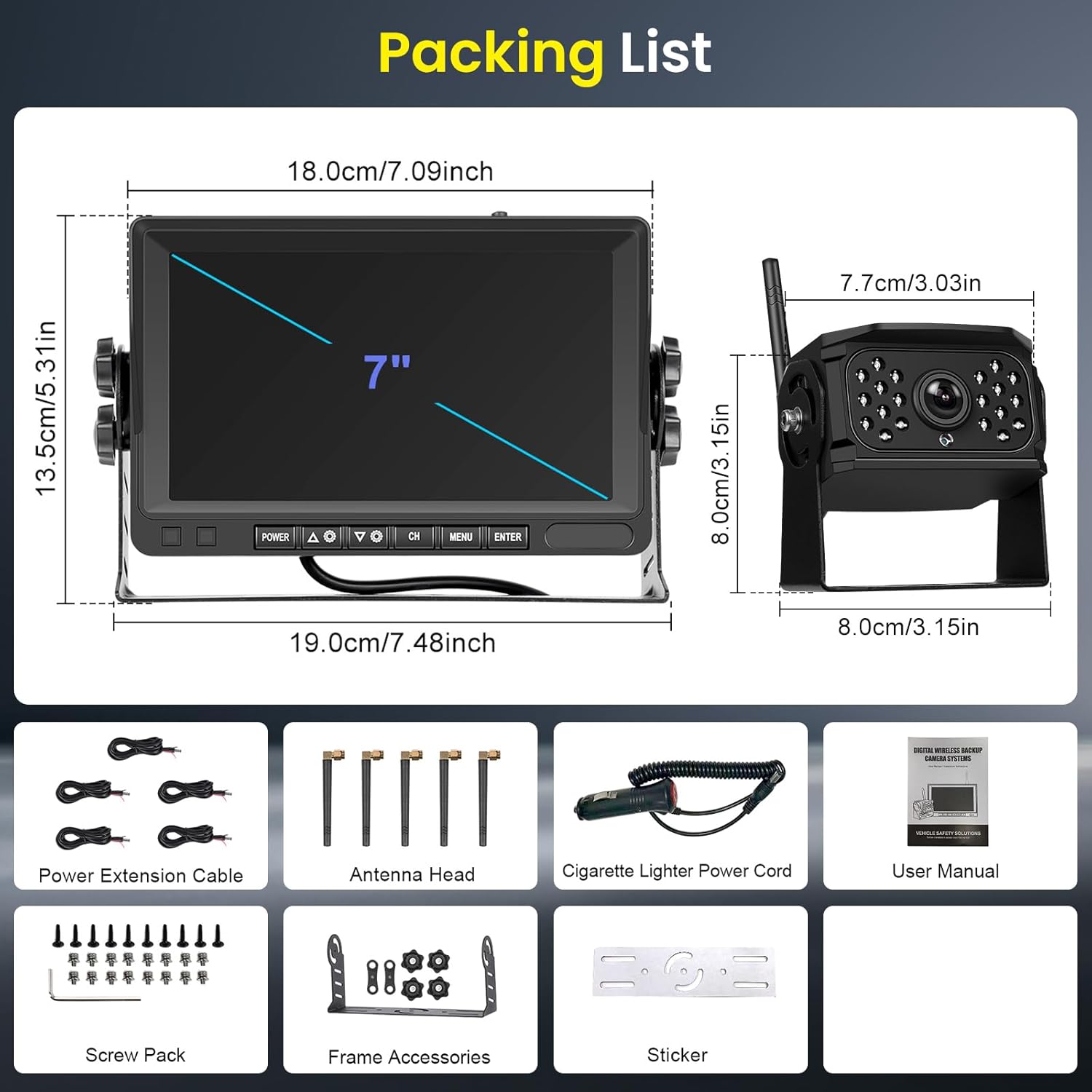
- 7-inch IPS Monitor
- Wireless Cameras (x4)
- Power Extension Cables
- Antenna Heads
- Cigarette Lighter Power Cord
- Screw Pack
- Frame Accessories
- Sticker
- User Manual
3. Setup and Installation
The system features a wireless signal transmission for simplified installation. No complex wiring between the monitor and cameras is required.
3.1 Power Connection
- Connect the 7-inch monitor to a 12-36V DC power source using the provided cigarette lighter power cord.
- Connect each camera to a 12-36V DC power source (e.g., vehicle's reverse light power, running lights, or a dedicated power supply). Ensure correct polarity (positive to positive, negative to negative).
3.2 Camera Mounting
Mount the cameras in desired locations, ensuring a clear line of sight for optimal wireless signal transmission. The IP68 waterproof rating allows for outdoor installation.
3.3 Antenna Installation
Attach the antenna heads to both the monitor and each camera to ensure stable digital wireless signal reception.

4. Operating Instructions
4.1 Powering On/Off
Press the POWER button on the monitor to turn the system on or off.
4.2 Digital Wireless Signal
The system automatically connects the cameras to the monitor via a stable digital wireless signal, providing clear and anti-interference video feeds.
4.3 Image Flip Function
The monitor supports image flipping, allowing you to adjust the camera view (up, down, left, right) to match your mounting orientation and preference.
4.4 Manual Zoom
Utilize the manual zoom function on the monitor to magnify specific areas of the camera feed, capturing more details as needed.

4.5 Quad Split Recording and 4-Way Monitoring
The 7-inch monitor supports simultaneous display of up to four camera feeds. You can switch between single, dual, triple, or quad split-screen views to monitor different areas around your vehicle. The system also supports loop recording to an SD card (up to 128GB, not included), overwriting older footage when the memory is full.


4.6 Night Vision
The cameras are equipped with night vision capabilities, providing clear and vivid images even in low-light or dark conditions.
4.7 IP68 Waterproof Cameras
The cameras are rated IP68 waterproof, ensuring reliable operation in various weather conditions, including rain, fog, and high humidity.

4.8 Wide Angle View
Each camera provides a 140° horizontal viewing angle, accommodating more scene information than standard cameras.

5. Applicable Models
This system is suitable for a wide range of vehicles, including:
- Small cars
- Small trucks
- RVs
- Campers
- Work vehicles
- Large trucks
- Trailers
- Vans

6. Specifications
| Feature | Specification |
|---|---|
| Brand | Hodozzy |
| Model Number | A3598 |
| Screen Size | 7 Inches |
| Product Dimensions (Monitor) | 7.48"L x 1.97"W x 5.31"H |
| Installation Type | Surface Mount |
| Optical Sensor Technology | CMOS |
| Lens Type | Wide Angle (Variable Zoom) |
| Real Angle of View | 90 Degrees (Horizontal 140°) |
| Video Capture Resolution | 1080p |
| Effective Still Resolution | 600 Pixels |
| Waterproof Rating (Cameras) | IP68 |
| Max Memory Card Support | 128GB (SD Card not included) |
7. Troubleshooting
Refer to the following solutions for common issues:
Problem: Monitor Won't Turn On
Solution:
- Check if the cigarette lighter has 12-36V DC output.
- Check the fuse in the cigarette socket adapter.
Problem: Camera and Monitor Won't Pair
Solution:
- Check if the camera is receiving power.
- Ensure to follow the instructions for the pairing process.
Problem: Weak Signal
Solution:
- Check if the camera and monitor antennas are properly installed.
- Reduce the distance between the camera and monitor if it's too great.
- If large, dense objects are obscuring the signal, try to move them if possible.
- Interference from overhead power lines may affect the signal.
- Try unpairing and re-pairing the devices.
Problem: Night Vision is Poor
Solution:
- The night sensor on the camera may be dirty or obstructed. Clean it carefully.
- Ensure the camera is installed at least 2 inches away from rear lights to avoid glare.
Problem: Dark Picture
Solution:
- Check whether brightness and contrast settings are adjusted correctly on the monitor.
8. Warranty and Support
Hodozzy offers a 12-month replacement warranty and lifetime technology support for this product. For any issues or inquiries, please contact Hodozzy customer service.