
1. Introduction
The XPR3SS 100Amp Smart WiFi 3-Phase Bi-Directional Energy Meter (Model 3P4W) is an advanced device designed for precise energy monitoring and management in solar net metering, industrial, commercial, and high-load residential applications. This meter accurately tracks both energy consumption and generation, providing real-time data and remote control capabilities through the Smart Life or Tuya App. It integrates seamlessly with smart home systems and offers comprehensive electrical protection features.
2. Safety Information
WARNING: Installation and maintenance should only be performed by qualified electricians in accordance with local electrical codes and regulations. Failure to follow these instructions may result in electric shock, fire, or serious injury.
- Ensure power is disconnected before installation or servicing.
- Do not operate the device if it appears damaged.
- Keep the device away from water and extreme temperatures.
- Use appropriate personal protective equipment (PPE) during installation.
3. Product Overview
The XPR3SS 3P4W Energy Meter provides detailed insights into your electrical system. It features an LCD screen for local readings and WiFi connectivity for remote monitoring and control.
Key Features:
- Bidirectional Energy Measurement: Tracks both import and export energy (kWh).
- 3-Phase Power Monitoring: Accurate measurement for industrial, commercial, and high-load residential installations.
- WiFi Smart Meter: Monitor voltage, current, power, and energy remotely via Smart Life/Tuya App.
- Voice Control Enabled: Compatible with Amazon Alexa and Google Assistant.
- High Accuracy Metering: Class 1 accuracy with 1000 imp/kWh.
- Advanced Electrical Protection: Over/under voltage, overcurrent, leakage detection, and phase imbalance protection.
- DIN Rail Mount: Compact design for easy installation.
Components:
- XPR3SS 3P4W Smart WiFi 3-Phase Bi-Directional Energy Meter
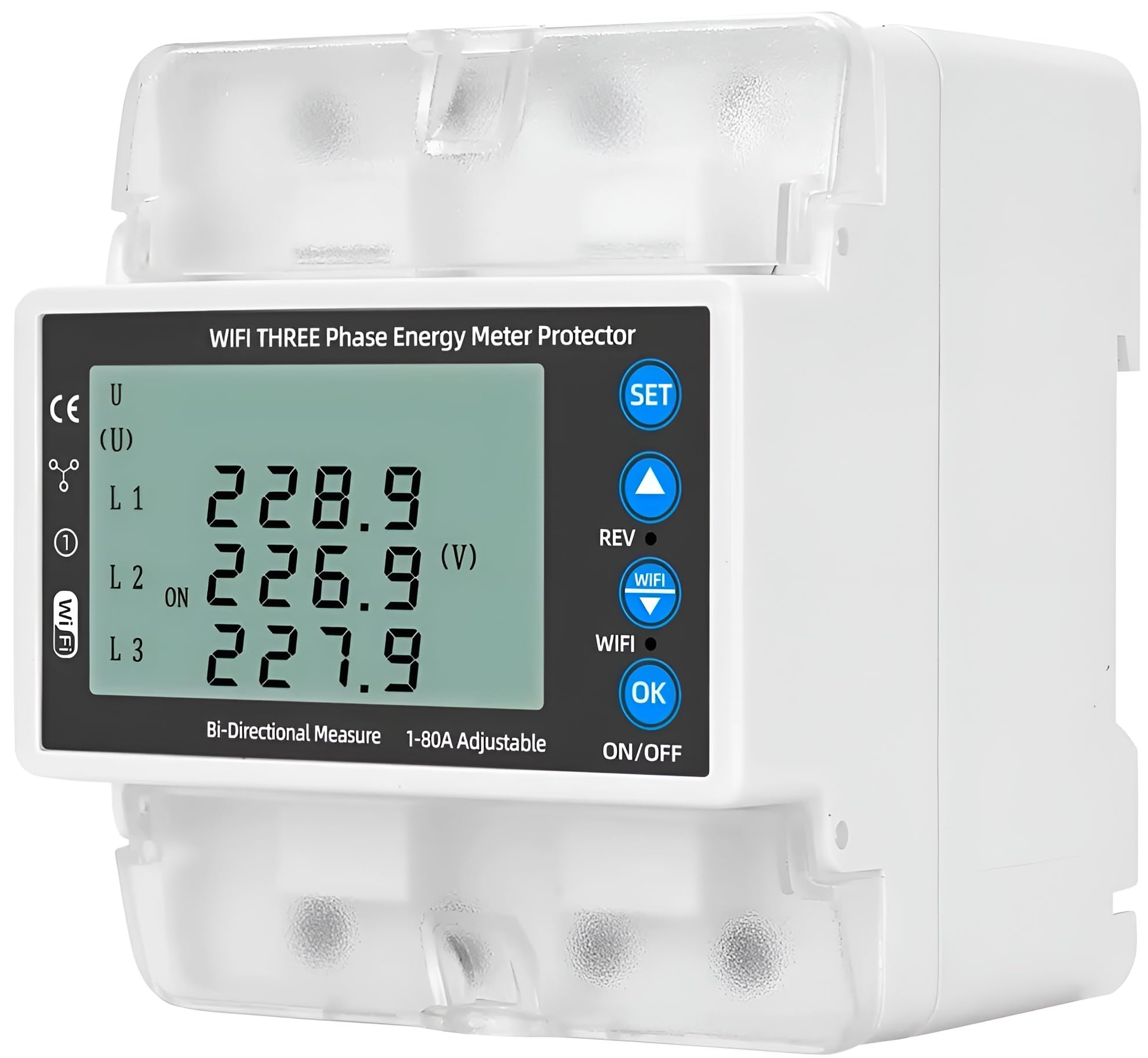
Figure 3.1: Front view of the XPR3SS 3P4W Smart WiFi 3-Phase Bi-Directional Energy Meter, showing the LCD display and control buttons.

Figure 3.2: Overview of the meter's key features, including remote control, voice control, timing schedule, electricity metering, and various protections.

Figure 3.3: Detailed view of the meter's display and integrated features such as backlight, thermometer, energymeter, circuit breaker, over voltage, and under voltage indicators.
4. Setup
4.1 Installation
The XPR3SS 3P4W Energy Meter is designed for DIN rail mounting. Ensure proper wiring for a 3-phase, 4-wire system (3P4W) and compatibility with 380V systems if applicable. Refer to the wiring diagram provided with the product packaging for specific connection details.
- Mount the meter securely on a standard DIN rail in an appropriate electrical enclosure.
- Connect the three phase lines (L1, L2, L3) and the neutral line (N) to the corresponding terminals.
- Ensure all connections are tight and secure to prevent loose contacts and potential hazards.
- Verify correct input and output connections for bidirectional measurement.
4.2 App Connection (Smart Life / Tuya App)
To enable smart features, connect the meter to your WiFi network using the Smart Life or Tuya App.
- Download the Smart Life or Tuya Smart app from your mobile device's app store.
- Register or log in to your account.
- Ensure your mobile device is connected to a 2.4GHz WiFi network.
- Power on the energy meter. The WiFi indicator on the meter should blink, indicating pairing mode. If not, refer to the product's quick start guide for manual pairing mode activation.
- In the app, tap '+' to add a device, then select 'Electrical Engineering' > 'Energy Meter (Wi-Fi)'.
- Follow the on-screen instructions to connect the meter to your WiFi network.
- Once connected, the WiFi indicator on the meter will become solid.
5. Operating Instructions
5.1 Local Display Monitoring
The LCD screen on the meter displays real-time data for voltage, current, active power, reactive power, frequency, and total energy (kWh) for each phase (L1, L2, L3) and overall.
- Use the 'UP' and 'DOWN' buttons on the meter to cycle through different display parameters.
- The 'SET' button allows access to configuration menus (refer to the detailed product manual for advanced settings).
5.2 Remote Control and Monitoring (Smart Life / Tuya App)
After successful app connection, you can access a wide range of functions remotely.
- Real-Time Data: View live voltage, current, power (kW), power factor, and frequency.
- Historical Data: Access daily, monthly, and yearly energy consumption and generation reports.
- Protection Settings: Adjust over/under voltage, overcurrent, and leakage protection thresholds.
- Alerts: Receive notifications for abnormal conditions or protection trips.
- Automation: Integrate with other smart home devices to create automated scenes based on energy usage.

Figure 5.1: Example of the mobile app interface showing real-time energy data and remote control options.
5.3 Voice Control
The meter supports voice commands through Amazon Alexa and Google Assistant when integrated with the Smart Life/Tuya App.
- Enable the Smart Life/Tuya skill in your Alexa or Google Home app.
- Discover devices.
- Use commands such as "Alexa, turn on/off [device name]" or "Hey Google, what is the power consumption of [device name]?" (Functionality may vary based on voice assistant capabilities).

Figure 5.2: Illustration of voice control functionality with smart assistants.
5.4 Timing Schedule
Set up timing schedules within the Smart Life/Tuya App to automate energy management tasks.
- Access the 'Timing Schedule' feature in the app for your energy meter.
- Create schedules to turn connected loads on or off at specific times, optimizing energy usage.

Figure 5.3: Example of setting up a timing schedule for environmental lighting control.
5.5 Adjustable Protections
The meter offers configurable protection settings to safeguard your electrical system.
- Over Voltage Protection: Adjustable from 120V to 300V.
- Under Voltage Protection: Adjustable from 80V to 210V.
- Overload Protection: Supports 1A to 100A current range.
- BCD Trip Curve: Supports B, C, and D curves for flexible circuit protection.
- Leakage Detection: Configurable leakage alarm threshold.
- High Temperature Alarm: Set a threshold for temperature alerts.
These settings can be configured via the Smart Life/Tuya App under the device settings or locally using the meter's 'SET' button and navigation keys.

Figure 5.4: Screenshot of the app's alarm setting interface for leakage, high temperature, over-current, over-voltage, and under-voltage protections.
6. Maintenance
The XPR3SS 3P4W Energy Meter requires minimal maintenance.
- Periodically inspect the device for any visible damage or loose connections.
- Clean the exterior with a soft, dry cloth. Do not use abrasive cleaners or solvents.
- Ensure the installation environment is free from excessive dust, moisture, and corrosive gases.
7. Troubleshooting
If you encounter issues with your XPR3SS 3P4W Energy Meter, refer to the following common troubleshooting steps:
- No Display/Power: Check the main power supply and wiring connections. Ensure the circuit breaker is not tripped.
- WiFi Disconnection: Verify your WiFi router is working and the meter is within range. Ensure your WiFi network is 2.4GHz. Try restarting the meter and your router. Re-pair the device with the app if necessary.
- Inaccurate Readings: Double-check all wiring connections, especially for current transformers (if applicable) and phase sequencing. Ensure the meter is correctly configured for your system type.
- Protection Trip: Identify the cause of the over/under voltage or overcurrent condition. Address the underlying electrical issue before resetting the protection.
- App Not Responding: Ensure your mobile device has an internet connection. Update the Smart Life/Tuya App to the latest version. Try restarting the app or your phone.
For persistent issues, contact customer support.
8. Specifications
| Parameter | Value |
|---|---|
| Model Number | 3P4W (Xpr3ss-energy-01) |
| Number of Phases | 3 Phase (3P) |
| Rated Voltage | 100–240V AC (Compatible with 380V systems) |
| Rated Current | Up to 100A |
| Rated Frequency | 50/60 Hz |
| Accuracy Class | 1000 imp/kWh (Class 1) |
| Connectivity | WiFi (2.4GHz) |
| Voice Control | Amazon Alexa, Google Assistant |
| App Compatibility | Smart Life, Tuya Smart |
| Over Voltage Protection | Adjustable 120V – 300V |
| Under Voltage Protection | Adjustable 80V – 210V |
| Overload Protection | Adjustable 1A – 100A |
| Dimensions (L x W x H) | 6.6 x 5.5 x 7.5 Centimeters |
| Item Weight | 450 Grams |
| Manufacturer | Yueqing Taixin Electric Co., Ltd. |
| Country of Origin | China |
9. Warranty Information
This XPR3SS product comes with a 6 Months Warranty against manufacturing defects only. Please retain your purchase receipt and the warranty card for any claims.
10. Support
For technical assistance, troubleshooting beyond this manual, or warranty claims, please contact XPR3SS customer support. Refer to the contact information provided in your warranty card or product packaging.