
NWOP Socket fan
NWOP 28 Inch Socket Fan Light with Remote Control User Manual
Model: Socket fan
Introduction
This manual provides detailed instructions for the safe and efficient use of your NWOP 28 Inch Socket Fan Light. Please read this manual thoroughly before installation and operation, and retain it for future reference.
Safety Information
- Ensure power is disconnected at the circuit breaker before installation or maintenance.
- This product is designed for indoor use.
- Do not attempt to repair or modify the unit yourself. Contact customer support for assistance.
- Keep the remote control away from water and extreme temperatures.
Package Contents
Verify that all components are present before beginning installation:
- NWOP 28 Inch Socket Fan Light unit
- Remote Control (batteries not included)
- Remote Control Holder
- Socket Extender (if applicable)
- Instruction Manual
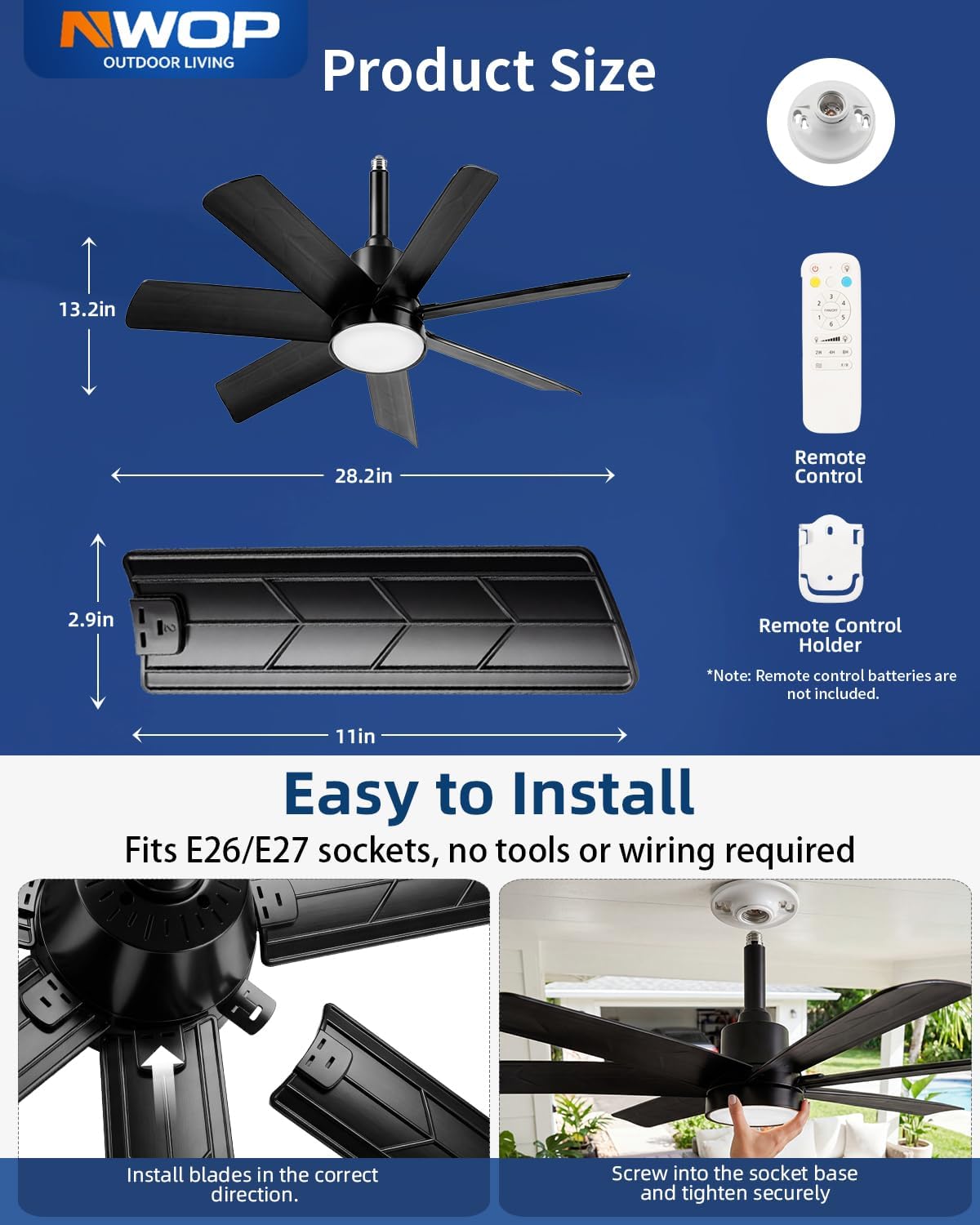
Image: Components of the NWOP 28 Inch Socket Fan Light, showing the fan unit, remote control, and remote control holder. Dimensions are also indicated.
Product Overview
The NWOP 28 Inch Socket Fan Light combines illumination and air circulation in a single, easy-to-install unit. Key features include:
- Fan and Light Combo: Provides both lighting and cooling.
- Longer Blades: 11-inch, 7-leaf blades for wider airflow.
- Adjustable Color Temperature: 3000K (Warm White), 4500K (Natural White), and 6500K (Cool White).
- Dimmable Brightness: Adjustable from 10% to 100%.
- 6 Fan Speeds: Choose from soft to powerful airflow.
- Memory Function: Remembers your last light and fan settings.
- Sleep Timer: Automatic shutdown after 2, 4, or 8 hours.
- Quiet Reversible DC Motor: Energy-efficient and quiet operation, with modes for summer (forward) and winter (reverse).

Image: Overview of the NWOP Ceiling Fan Light, highlighting its 2-in-1 LED light and fan functionality, 3 light color options, super quiet operation, and 2000 lumens brightness.
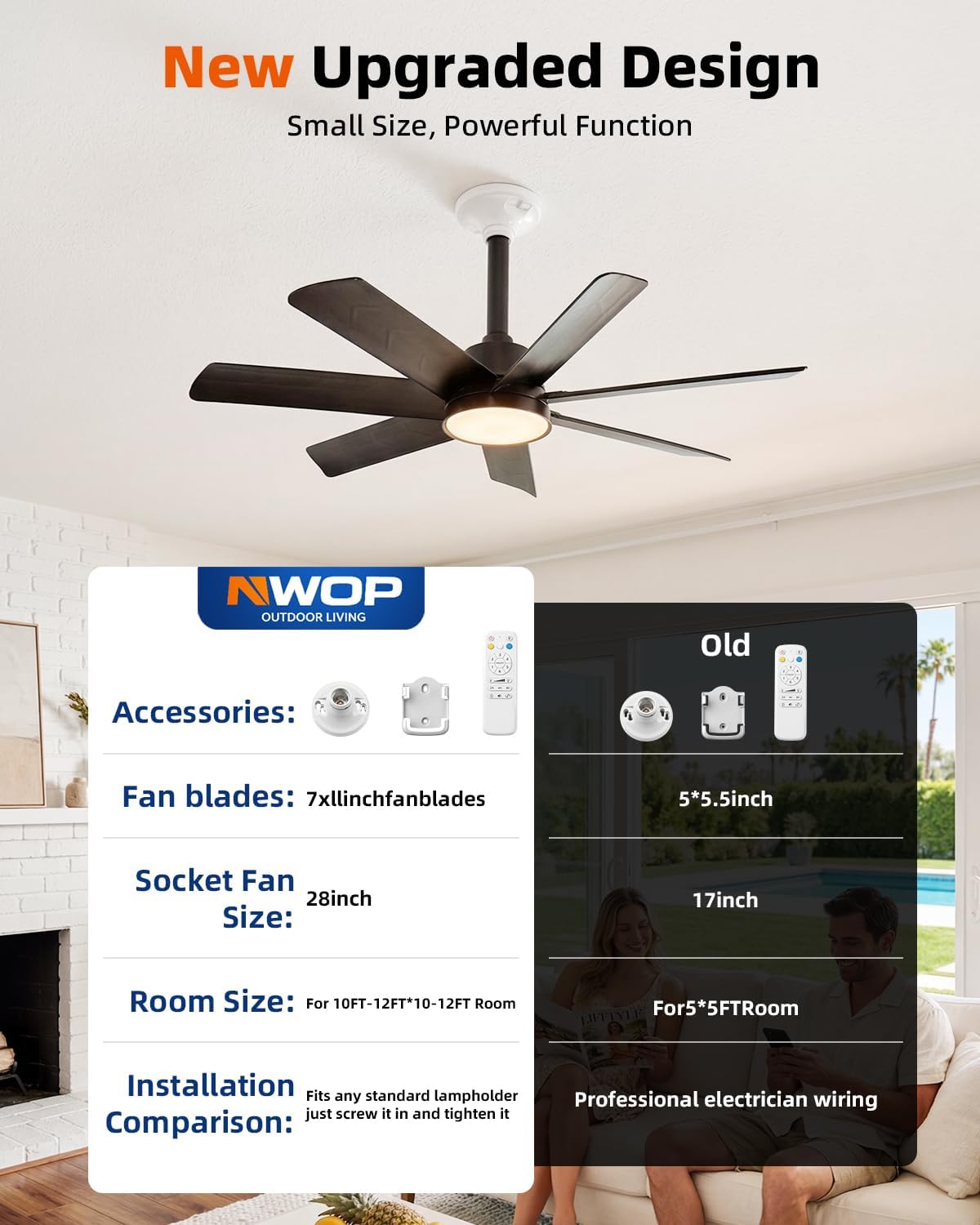
Image: Comparison illustrating the new upgraded design of the NWOP socket fan light, featuring larger dimensions, more fan blades, and simplified installation compared to older models.
Setup and Installation
The NWOP Socket Fan Light is designed for quick and easy installation into standard E26/E27 light bulb sockets without the need for special tools or wiring.
- Prepare the Socket: Ensure the power to the light fixture is turned off at the circuit breaker before beginning.
- Attach Blades: Carefully install the fan blades into the main unit. Ensure they are securely clicked into place.
- Screw into Socket: Screw the fan light unit into an E26/E27 light bulb socket. If your socket is deep, use the included socket extender for a proper fit. Tighten securely but do not overtighten.
- Restore Power: Turn the power back on at the circuit breaker.
Image: Installation guide for the NWOP Socket Fan Light, demonstrating the process of attaching blades and screwing the fan into a standard E26/E27 light socket.
Video: A short demonstration of the NWOP Socket Fan Light, showcasing its features and ease of use. This video is provided by the seller, NWOP.
Operating Instructions
Use the included remote control to operate your NWOP Socket Fan Light.

Image: Remote control diagram showing buttons for On/Off/Fan Pairing, Light Switch, Color Temperature Switch, Wind Speed Adjustment (1-6), Fan Off, Brightness Adjustment, Timer Setting (2H, 4H, 8H), Memory Function, Motor Rollover (Reversible Motor), and Mute Switch.
Remote Control Functions:
- On/Off/Fan Pairing: Powers the unit on or off. Press and hold for pairing if needed.
- Light Switch: Turns the LED light on or off.
- Color Temperature Switch: Cycles through 3000K (Warm White), 4500K (Natural White), and 6500K (Cool White).
- Wind Speed Adjustment (1-6): Adjusts fan speed from 1 (soft) to 6 (powerful).
- Fan Off: Turns the fan off.
- Brightness Adjustment: Increases or decreases light brightness (10%-100%).
- Timer Setting (2H, 4H, 8H): Sets the fan and light to automatically turn off after 2, 4, or 8 hours.
- Memory Function: The unit will recall the last used light and fan settings when turned back on.
- Motor Rollover (Reversible Motor): Changes the direction of fan rotation for summer (downward airflow) or winter (upward airflow).
- Mute Switch: Silences operational beeps.

Image: Visual representation of the 6-speed fan settings, showing different levels of airflow from soft to powerful, suitable for various activities.
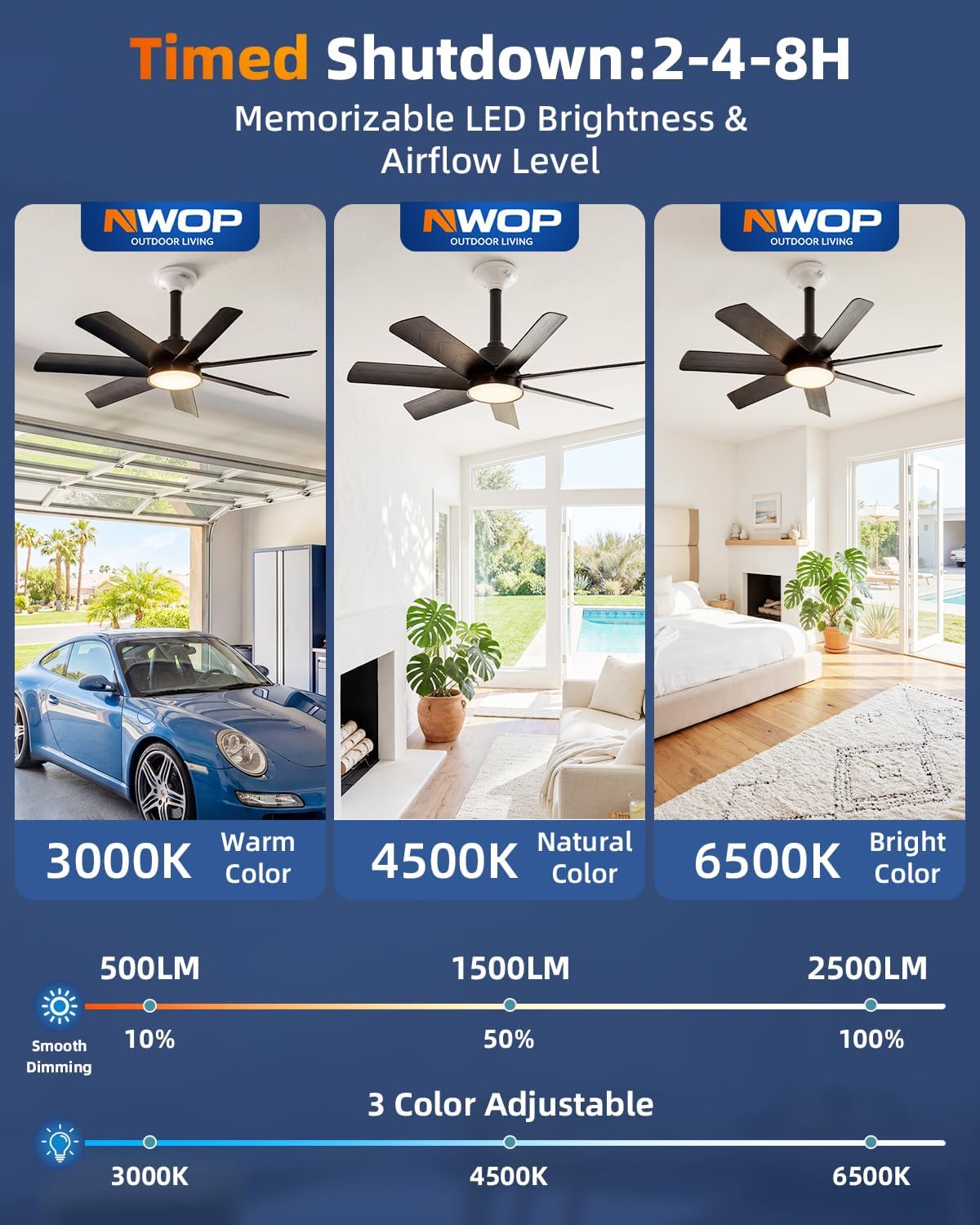
Image: Display of the timed shutdown feature (2, 4, or 8 hours) and the adjustable LED brightness (10%-100%) and color temperatures (3000K Warm, 4500K Natural, 6500K Bright).

Image: Explanation of the reversible DC motor, demonstrating how forward rotation provides a cooling breeze for summer and reverse rotation enhances air circulation for winter.
Maintenance
Regular maintenance ensures optimal performance and longevity of your fan light.
- Cleaning: Before cleaning, ensure the power is off. Wipe the fan blades and light cover with a soft, damp cloth. Do not use abrasive cleaners or solvents.
- Dusting: Periodically dust the unit to prevent accumulation that could affect performance.
- Blade Inspection: Check fan blades periodically for any damage or looseness.
Troubleshooting
| Problem | Possible Cause | Solution |
|---|---|---|
| Fan or Light does not turn on. | No power to the socket; remote control batteries are dead; unit not properly screwed in. | Check circuit breaker. Replace remote batteries. Ensure the fan light is securely screwed into the E26/E27 socket. |
| Remote control not working. | Batteries are dead; remote not paired with the unit. | Replace batteries. Refer to the "On/Off/Fan Pairing" section in Operating Instructions to re-pair the remote. |
| Fan makes unusual noise. | Loose blades; obstruction. | Ensure all blades are securely attached. Check for any objects obstructing the fan's rotation. |
| Light flickers or is dim. | Brightness setting is low; power fluctuation. | Adjust brightness using the remote. Ensure stable power supply. |
Specifications
| Feature | Detail |
|---|---|
| Brand | NWOP |
| Model Number | Socket fan |
| Color | Black |
| Material | Plastic |
| Light Fixture Form | Ceiling Fan Light |
| Room Type | Bedroom, Garage, Kitchen, Living Room |
| Indoor Outdoor Usage | Indoor |
| Power Source | AC |
| Control Method | Remote |
| Light Source | LED |
| Light Color | Adjustable (3000K, 4500K, 6500K) |
| Wattage | 100 watts |
| Bulb Base | E26/E27 |
| Brightness | 2000 Lumens (Max) |
| Item Dimensions (L x W x H) | 28"L x 28"W x 28"H |
| Number of Blades | 7 |
| Fan Blade Length | 11 inches |
| Required Assembly | No (easy blade attachment) |
Warranty and Support
NWOP is committed to providing quality products and customer satisfaction.
Warranty Information:
Specific warranty details may vary. Please refer to your purchase documentation or contact customer support for precise warranty terms.
Customer Support:
For technical assistance, troubleshooting, or warranty claims, please contact NWOP customer support. We offer 24-hour online technical support.
Contact information can typically be found on the product packaging or the official NWOP website.
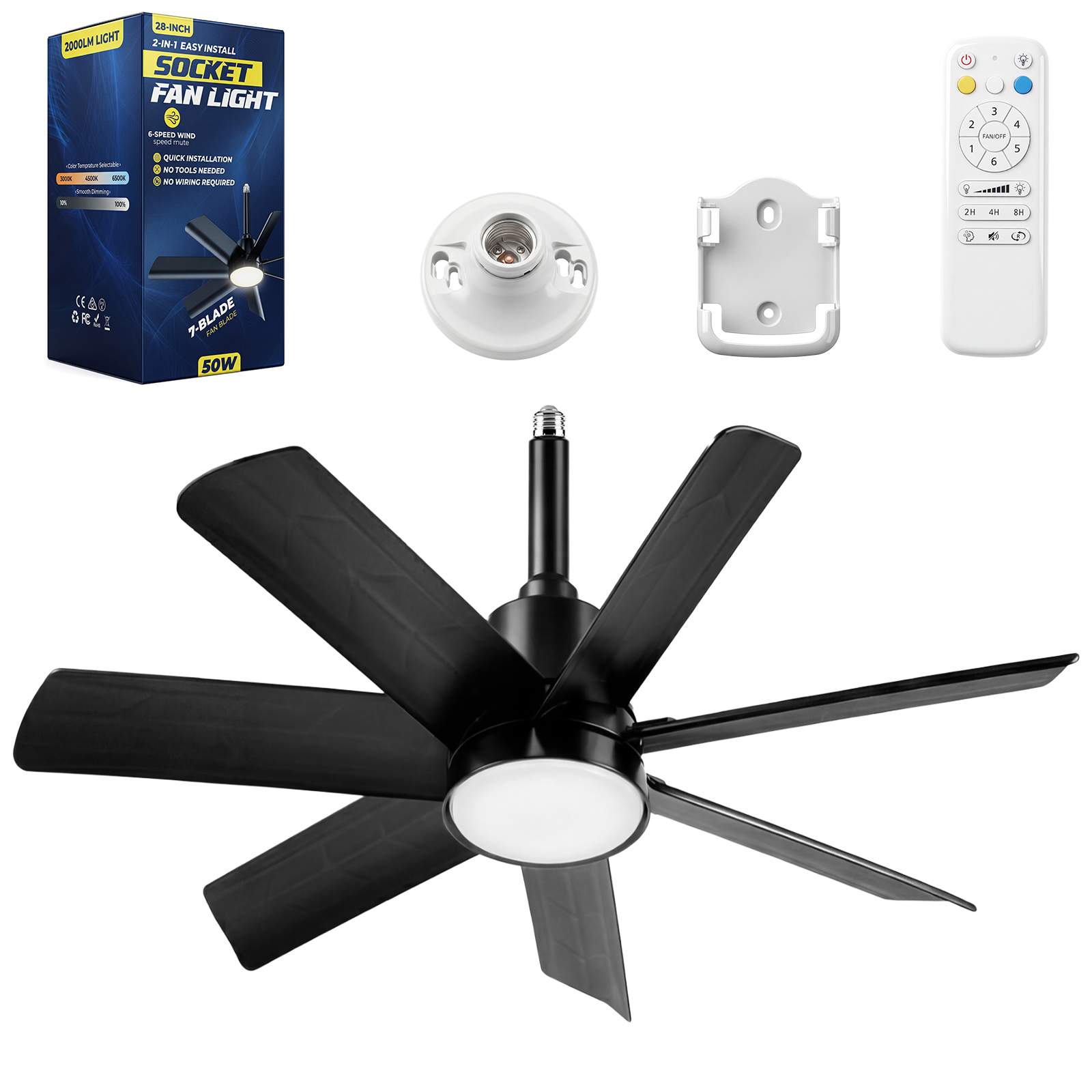
Image: NWOP's commitment to customer care, emphasizing fast after-sales service, superior product quality, and round-the-clock online technical support.
Ask a question about this manual
Ask about setup, troubleshooting, compatibility, parts, safety, or missing instructions. Manuals+ will review the question and use this page’s manual context to help answer it.