
1. Introduction
This manual provides comprehensive instructions for the Henkion RJ45 Network Cable Tester Remote Kits. These kits are designed to assist in testing network cables for continuity, fault location, and length measurement. Please read this manual thoroughly before using the product to ensure correct operation and to prevent damage.
2. Product Overview
The Henkion RJ45 Network Cable Tester Remote Kits are essential tools for network professionals. They are used in conjunction with a compatible main cable tester (sold separately) to identify and diagnose issues in RJ45 network cables, including Cat5, Cat6, 5E, and 6E types. The remote kits are available in various numbering options, including NO.1-10, NO.1-5, NO.6-10, and NO.255 (available as 2PCS).
These remote kits facilitate accurate and rapid testing by allowing the main tester to identify specific cables in a bundle or at different locations. Each remote kit is uniquely numbered, which is displayed on the host device, streamlining the identification process.

Figure 2.1: Overview of Remote Kit Numbers 1-10 in a typical testing scenario. The image illustrates how individual remote kits are used to identify specific network cables connected to a central tester.
3. Package Contents
- Selected RJ45 Network Cable Tester Remote Kits (e.g., NO.1-10, NO.1-5, NO.6-10, or NO.255 2PCS)
Note: The main cable tester unit is sold separately and is required for operation.
4. Setup
- Ensure you have a compatible Henkion cable tester (e.g., LT-600 series, IPC-9800 Plus series, OTDR RSO series).
- Connect one end of the network cable to be tested into the 'UTP/SCAN' port of your main cable tester.
- Connect the other end of the network cable to one of the Henkion RJ45 Network Cable Tester Remote Kits.
- Power on your main cable tester. The remote kit does not require separate power.
5. Operating Instructions
5.1 Basic Cable Testing
Once connected, the main cable tester will automatically detect the remote kit and begin displaying information about the network cable. This includes the connection status, cable type, wire sequence, and the serial number of the connected remote kit.
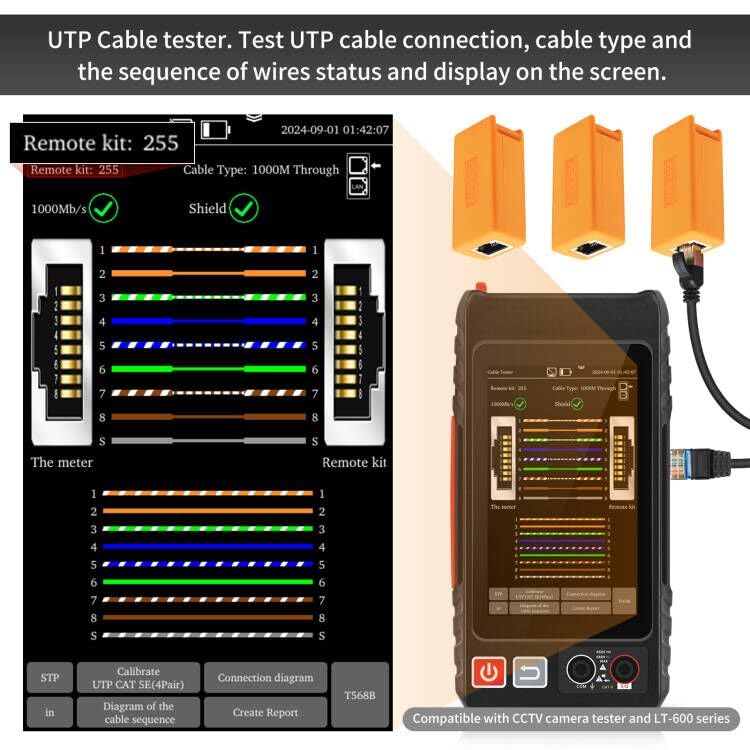
Figure 5.1: Example of a UTP cable test display. The screen shows the wire mapping and connection status between the main tester and the remote kit, indicating a successful 1000Mb/s connection with shield.
5.2 Fault Location and Short Circuit Test
The remote kits, in conjunction with the main tester, can identify various cable faults such as short circuits, open circuits, and incorrect wiring sequences. The main tester's display will indicate the nature and location of the fault.
- Short Circuit Test: The tester will identify if any two or more wires are short-circuited.
- Open Circuit/Break: The tester can detect breaks in the cable and, for some compatible testers, estimate the distance to the fault.
- Wire Sequence: Verifies the correct crimping of RJ45 connectors and the proper sequence of wires.
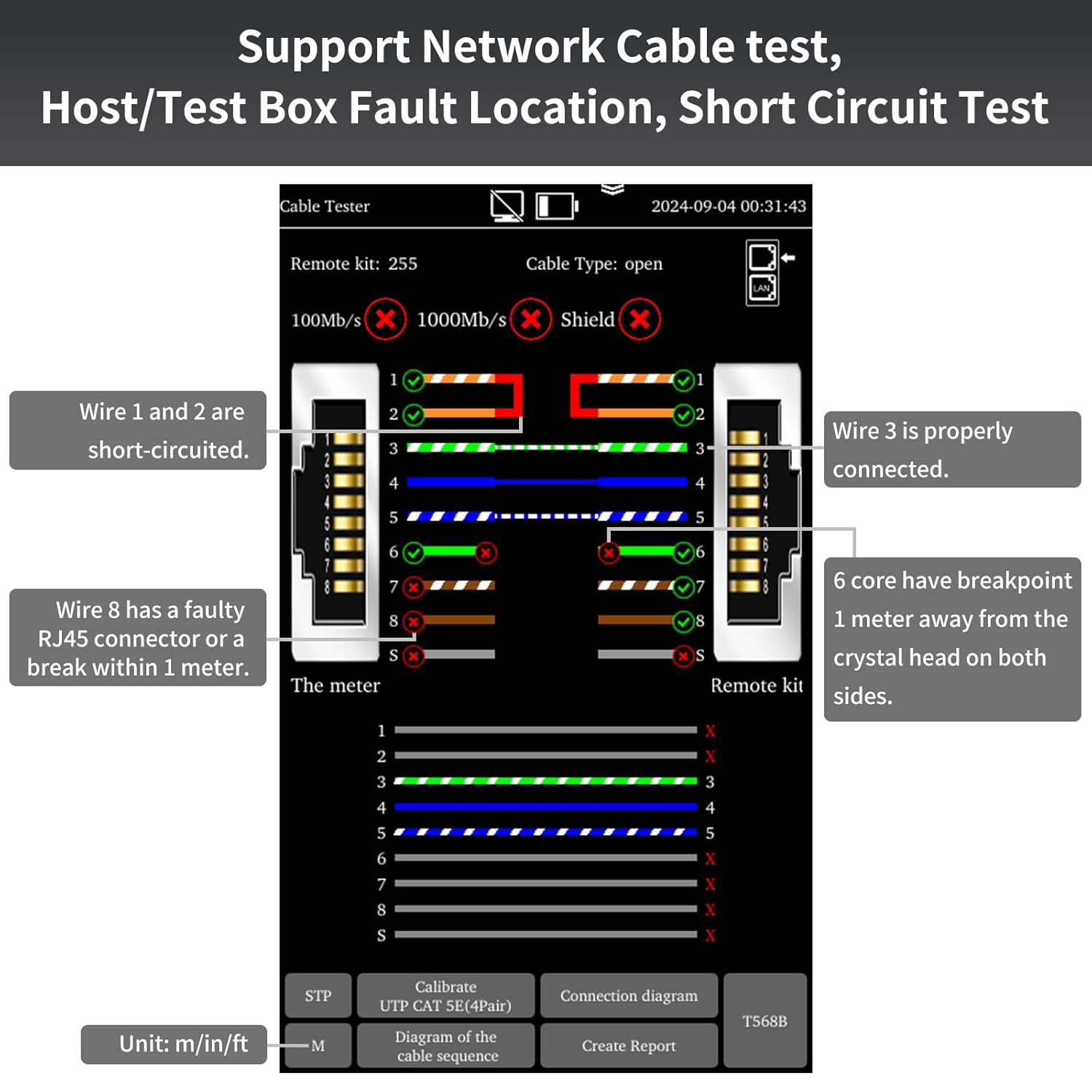
Figure 5.2: Fault detection display. This image demonstrates how the tester identifies and describes various cable faults, including short circuits and breaks, providing detailed diagnostic information.
5.3 Cable Length Measurement
For compatible main testers, the remote kits enable quick measurement of network cable length. Refer to your main tester's manual for specific instructions on activating this function.
5.4 Identifying Target Cables
When testing multiple cables, the remote kit identifies the target cable by displaying its unique number on the host device. This feature prevents incorrect port selection and enhances testing efficiency and accuracy.

Figure 5.3: Examples of cable issues. This image illustrates common line faults and port failures that the cable tester remote kits help diagnose.
6. Compatible Devices
The Henkion RJ45 Network Cable Tester Remote Kits are compatible with a wide range of Henkion CCTV camera testers and cable testers, including:
- Cable Tester Series: LT-600, LT-600S, LT-600M, LT-600T, LT-300S
- IPC Tester Series: IPC-9800 Plus, IPC-9800 Pro, IPC-5000 Plus, IPC-7600 Plus, X9, X7, IPC-1910, H12, H20, HD-3000, IPC-1800
- OTDR Series: RSO-6510, RSO-6800, RSO-50, RSO-5000, RSO-65, RSO-73, RSO-85, RSO-8810

Figure 6.1: Visual representation of applicable Henkion tester and OTDR series. This image shows the range of main testing units compatible with the remote kits.
7. Maintenance
- Keep the remote kits clean and free from dust and moisture.
- Store the kits in a dry, cool environment when not in use.
- Avoid dropping or subjecting the kits to strong impacts.
- Do not attempt to open or repair the remote kits yourself. Refer to qualified personnel for any service needs.
8. Troubleshooting
- No Display on Main Tester: Ensure the network cable is securely connected to both the main tester and the remote kit. Verify the main tester is powered on and functioning correctly.
- Incorrect Readings: Check for damaged network cables or faulty RJ45 connectors. Ensure the remote kit is properly seated.
- Remote Kit Not Identified: Confirm the remote kit is compatible with your main tester model. Try using a different network cable to rule out cable issues.
9. Specifications
| Brand | Henkion |
| Style | Cable Tester Remote Kits |
| Color | Orange |
| Compatible Devices | LT-600 series, LT-300S, IPC-9800 Plus series, IPC-9800 Pro series, IPC-5000 Plus series, IPC-7600 Plus series, X9 series, X7 series, IPC-1910 series, H12 series, H20 series, HD-3000 series, IPC-1800 series, OTDR RSO-6510 series, RSO-6800 series, RSO-50 series, RSO-5000 series, RSO-65 series, RSO-73 series, RSO-85 series, RSO-8810 series |
| Included Components | Remote Kits (e.g., NO.1-10, NO.1-5, NO.6-10, NO.255) |
10. Warranty Information
Henkion products are manufactured to high-quality standards. For specific warranty details, please refer to the warranty card included with your main cable tester or visit the official Henkion website. This remote kit is covered under the warranty terms of the compatible main tester.
11. Support
For technical assistance, troubleshooting, or product inquiries, please contact Henkion customer support through the contact information provided with your main cable tester or on the official Henkion website. Please have your product model and purchase information ready when contacting support.