
1. Product Overview
The Txmodyn Variable Frequency Drive (VFD) is engineered for precise speed control of 3-phase motors. This model, ZQ280AS-0D7-P3, accepts a 3-phase 208-240V input and provides a 3-phase 208-240V output, with an adjustable frequency range of 0-400Hz. It is rated for 0.75kW (1HP) with a maximum current of 4A. This manual provides essential information for safe installation, operation, and maintenance of your VFD.
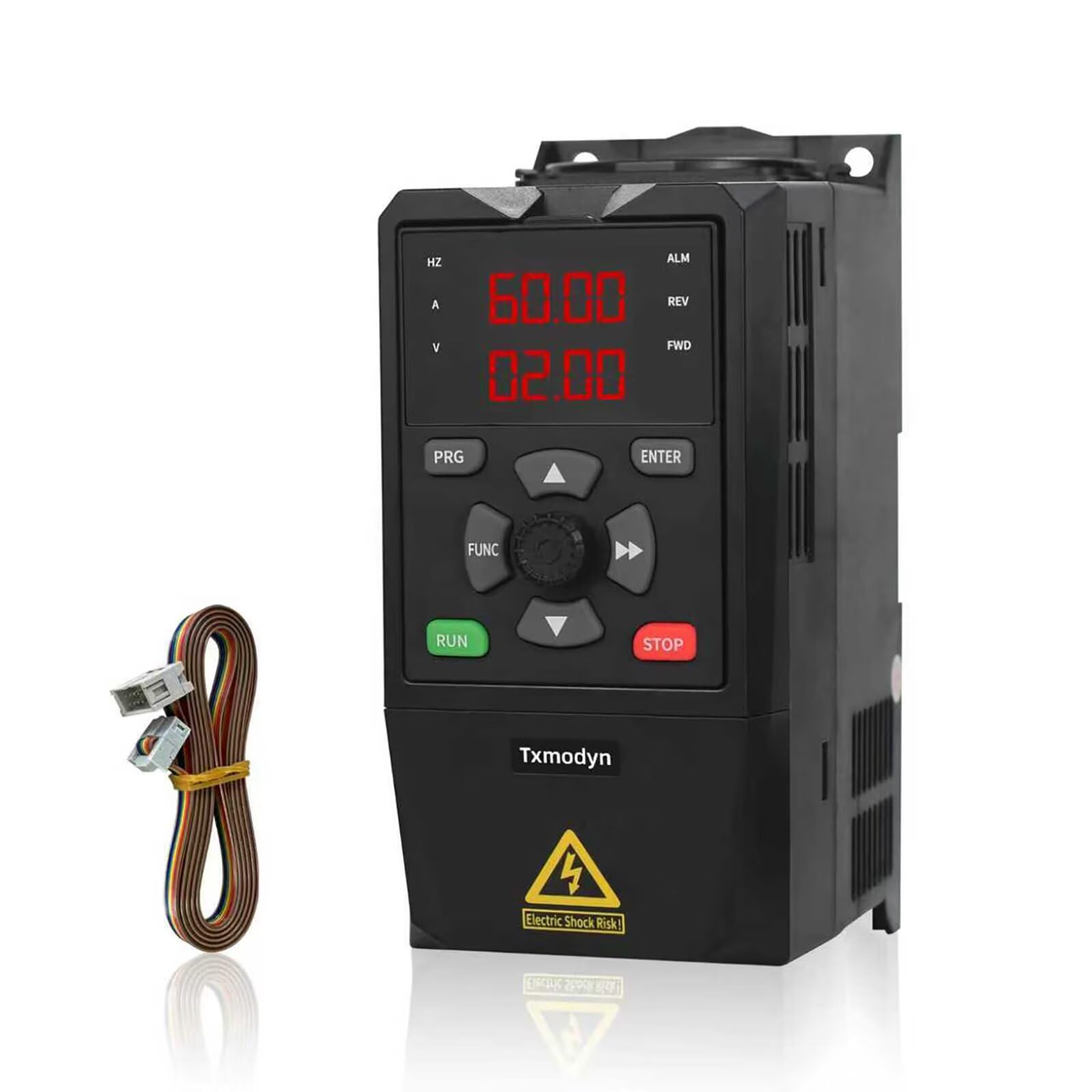
Image 1.1: Txmodyn VFD 1HP 0.75kW 4A Variable Frequency Drive unit.
2. Important Safety Instructions
Read all instructions carefully before installation and operation. Failure to follow these instructions may result in serious injury or equipment damage. Only qualified personnel should install, operate, and maintain this equipment.
- Electrical Hazard: Always disconnect all power sources before performing any work on the VFD or connected motor. Wait for the VFD's indicator lights to extinguish completely before touching any components.
- Proper Grounding: Ensure the VFD and motor are properly grounded according to local and national electrical codes.
- Overcurrent Protection: Install appropriate overcurrent protection devices (fuses or circuit breakers) on the input power supply.
- Environmental Conditions: Do not operate the VFD in environments with excessive dust, moisture, corrosive gases, or direct sunlight.
- Motor Compatibility: Ensure the motor's voltage, current, and power ratings are compatible with the VFD's specifications.
- Built-in Protections: The VFD includes built-in protections for overload, fuse protection, over/under voltage, restart, stall, short circuit, and overheat. However, these do not replace safe operating practices.
3. Product Features
- Basic Parameters: This VFD supports 3-phase input and 3-phase output. Input voltage range is 200-240V, with an output voltage of 208-240V. Input frequency is 50/60Hz, and output frequency is adjustable from 0-400Hz. Rated power is 0.75kW (1HP) with a rated current of 4A. It also supports DC voltage input via dedicated DC bus terminals.
- Safety and Durability: Designed for low-noise operation and minimal electromagnetic interference. Features robust internal copper coils and a flame-retardant housing. A multi-grid ventilation design ensures efficient heat dissipation, contributing to long-term reliability.
- Removable Dual-Display Keypad: The VFD includes a removable keypad with a 2-meter extension cable, allowing for flexible mounting and remote operation. The dual-display feature enables simultaneous monitoring of two parameters, such as frequency and current, or speed and voltage, for enhanced operational insight. Parameter setting is designed to be intuitive and user-friendly.
- RS485 MODBUS and Control I/O: Equipped with rich digital and analog control terminals for versatile control options. An integrated RS485 communication port supports the standard international MODBUS protocol, facilitating seamless integration with PLC and other automation systems.
- Wide Application: Suitable for a broad range of applications including spindle motors/CNC machines, drill presses, HVAC systems, lathes, milling machines, pumps, conveyors, fans, cooling systems, compressors, and general 3-phase motor speed control. The unit also supports an external braking resistor (not included) for applications requiring rapid deceleration.
4. Technical Specifications
| Parameter | Specification |
|---|---|
| Brand | Txmodyn |
| Model Name | ZQ280AS-0D7-P3 |
| Input Voltage | 3 Phase 208-240V (200-240V range) |
| Output Voltage | 3 Phase 208-240V |
| Input Frequency | 50/60Hz |
| Output Frequency | 0-400Hz |
| Rated Power | 0.75kW (1HP) |
| Rated Current | 4A |
| Dimensions (L×W×H) | 6.69 x 3.9 x 5 inches |
| Weight | 2.55 lb |
| Communication | RS485 MODBUS |
| Protections | Overload, Fuse, Over/Under Voltage, Restart, Stall, Short Circuit, Overheat |
5. Setup and Installation
5.1 Mounting
The VFD unit is designed for easy installation and features a detachable DIN rail mount. Ensure the VFD is mounted in a vertical position to facilitate proper airflow. Allow sufficient clearance around the unit (at least 10 cm on all sides) for adequate ventilation and heat dissipation. Avoid mounting near heat sources or in enclosed spaces without forced air circulation.
5.2 Wiring
All wiring should be performed by a qualified electrician in accordance with local and national electrical codes. Ensure all power is disconnected before wiring.
- Input Power: Connect the 3-phase 208-240V AC input power supply to the designated input terminals (typically labeled R, S, T or L1, L2, L3).
- Motor Connection: Connect the 3-phase motor to the VFD's output terminals (typically labeled U, V, W).
- Grounding: Connect the VFD's ground terminal to a reliable earth ground. The motor frame should also be properly grounded.
- Control Wiring: Utilize the digital and analog control terminals for external control signals (e.g., start/stop, speed reference, fault indication). Refer to the detailed wiring diagram in the included physical manual for specific terminal connections and functions.
- RS485 Communication: If integrating with a PLC or automation system, connect the RS485 communication lines to the appropriate terminals, adhering to the MODBUS protocol.
- Braking Resistor: If an external braking resistor is required for applications with high inertia or rapid deceleration, connect it to the designated braking terminals (resistor not included).
5.3 Keypad and Extension
The removable keypad can be detached from the VFD unit and mounted remotely using the provided 2-meter extension cable. This offers flexibility for monitoring and parameter adjustment in various installation scenarios.
6. Operating Instructions
6.1 Initial Power-Up
After ensuring all wiring is secure and correct, apply power to the VFD. The dual-display on the keypad will illuminate, indicating the unit is powered on.
6.2 Parameter Setting
The VFD allows for easy and intuitive parameter setting via the removable keypad. It is crucial to configure the VFD parameters to match your specific motor and application requirements. Key parameters to set include:
- Motor Nameplate Data: Input the motor's rated voltage, current, frequency, and power (HP/kW) as found on its nameplate.
- Base Frequency: Set the motor's base frequency (typically 50Hz or 60Hz).
- Acceleration/Deceleration Times: Adjust these parameters to control how quickly the motor speeds up or slows down.
- Control Mode: Select the desired control mode (e.g., V/F control, sensorless vector control).
The dual-display feature allows you to monitor two parameters simultaneously, such as the output frequency and motor current, or motor speed and output voltage, providing real-time operational feedback.
6.3 Speed Control
Motor speed is controlled by adjusting the VFD's output frequency. This can be done via the keypad, an external potentiometer connected to an analog input, or through digital commands via the RS485 interface. The VFD provides smooth and precise speed regulation across its 0-400Hz output frequency range.
7. Maintenance and Care
Regular maintenance ensures optimal performance and extends the lifespan of your VFD.
- Cleaning: Periodically inspect the VFD for dust and debris accumulation, especially on the cooling fins and ventilation openings. Use compressed air to gently clean these areas. Ensure power is disconnected before cleaning.
- Connection Checks: Regularly verify that all wiring connections (power, motor, control) are secure and free from corrosion. Loose connections can lead to poor performance or damage.
- Environmental Conditions: Maintain the VFD in a clean, dry, and well-ventilated environment. Ensure ambient temperature remains within the specified operating range. Do not obstruct the multi-grid ventilation design.
- Inspection: Visually inspect the VFD for any signs of physical damage, discoloration, or unusual odors.
8. Troubleshooting Guide
This section provides solutions to common issues you might encounter with your VFD. For problems not listed here, or if solutions do not resolve the issue, please contact technical support.
| Problem | Possible Cause | Solution |
|---|---|---|
| VFD does not power on | No input power; Blown fuse | Check power supply and connections. Inspect and replace input fuses if necessary (ensure power is off). |
| Motor does not run | Incorrect parameter settings; Motor wiring error; Control signal issue | Verify motor nameplate parameters are correctly set in the VFD. Check motor wiring (U, V, W). Ensure start/stop commands are correctly applied. |
| Overload error (OC) | Motor drawing excessive current; VFD undersized for load; Acceleration time too short | Check motor load for mechanical issues. Ensure VFD is correctly sized for the motor and application. Increase acceleration time parameter. |
| Overheat error (OH) | Insufficient cooling; High ambient temperature; Blocked ventilation | Ensure proper ventilation around the VFD. Clean VFD cooling fins and ensure no obstructions. Reduce ambient temperature if possible. |
| Overvoltage error (OV) | Input voltage too high; Deceleration time too short (regenerative braking) | Check input voltage. Increase deceleration time. Consider adding an external braking resistor if rapid deceleration is required. |
| GFCI tripping | High-frequency leakage current inherent to VFDs | Some VFDs may cause nuisance tripping of standard GFCI outlets due to high-frequency leakage currents. Consult a qualified electrician for solutions, which may include using a VFD-compatible GFCI or alternative wiring methods. |
9. Warranty and Technical Support
The Txmodyn VFD model ZQ280AS-0D7-P3 is covered by an 18-month warranty from the date of purchase, covering manufacturing defects and material faults under normal operating conditions.
Txmodyn is committed to providing lifetime technical support for this product. If you encounter any issues during installation, operation, or maintenance, or require assistance with product selection for heavy load applications, please do not hesitate to contact Txmodyn customer service. Our technical team is available to provide guidance and solutions.
For warranty claims or technical assistance, please refer to the contact information provided with your purchase or visit the official Txmodyn website.