
YUPENG B0GLQ3V37T
YUPENG 2026 AI Smartwatch User Manual
Model: B0GLQ3V37T
Product Overview
The YUPENG 2026 AI Smartwatch is a versatile wearable device designed to integrate smart functionalities with health and fitness tracking. It features a 1.53-inch display, Bluetooth 5.3 connectivity, and an AI voice assistant with ChatGPT integration. This smartwatch supports call functionality, real-time notifications, and comprehensive health monitoring including temperature and heart rate. It is compatible with both Android and iOS devices.
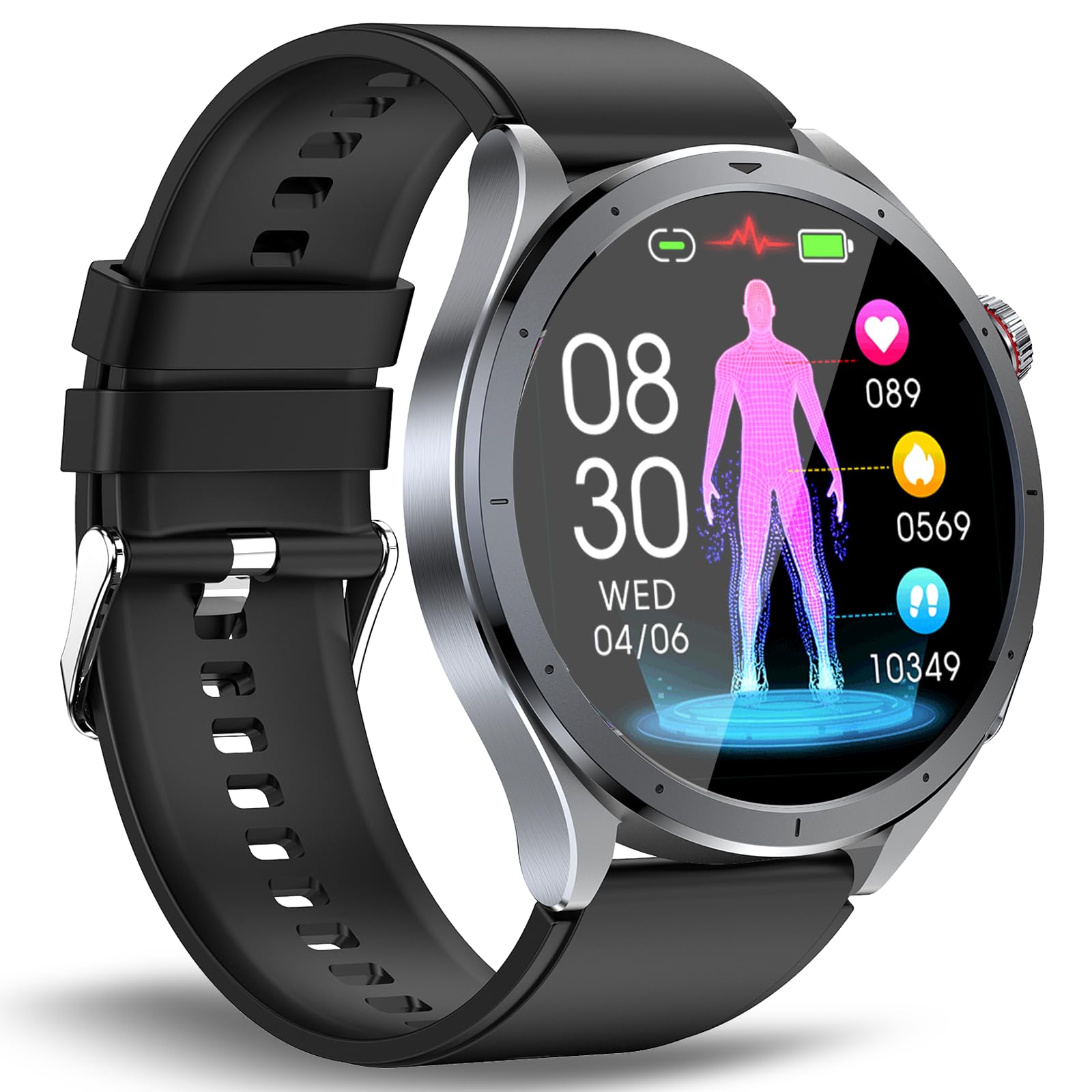
Figure 1: YUPENG 2026 AI Smartwatch. This image displays the smartwatch with its round face and black silicone strap, showcasing its sleek design.
Package Contents
- YUPENG 2026 AI Smartwatch (Model B0GLQ3V37T)
- Charging Cable (USB-A)
- User Manual
- Screen Protector (may be included)
Setup Guide
1. Charging the Smartwatch
Before initial use, fully charge the smartwatch. Connect the magnetic charging cable to the charging contacts on the back of the watch and plug the USB-A end into a 5V 2A power adapter (not included). A full charge typically takes 2-3 hours. Ensure the charging contacts are dry before connecting the charger.
2. Installing the Companion App
- Power on the smartwatch. A QR code will appear on the screen.
- Scan the QR code with your smartphone to download the "G Band" application. Alternatively, search for "G Band" in your smartphone's app store (Google Play Store for Android, Apple App Store for iOS).
- Install the "G Band" app on your smartphone.
3. Pairing with Your Smartphone
- Ensure Bluetooth is enabled on your smartphone.
- Open the "G Band" app. Follow the on-screen instructions to add a new device.
- The app will search for available devices. Select "ET472" or "YUPENG Smartwatch" from the list to initiate pairing.
- Confirm the pairing request on both your smartphone and the smartwatch.
- Grant necessary permissions to the app for notifications, health data access, and other features.
Operating Instructions
Basic Navigation
- Touchscreen: Swipe left/right, up/down to navigate through menus and functions. Tap to select.
- Rotary Button: Rotate to scroll through lists or adjust settings. Press to return to the home screen or confirm selections.
- Side Button: Located below the rotary button, this button is typically used for specific functions like ECG measurement or as a shortcut.
- Flashlight: A small LED on the side of the watch can be activated as a flashlight. Refer to the watch's menu for activation.
Call Functionality
Once paired via Bluetooth, the smartwatch supports Bluetooth calls. You can answer incoming calls directly from your wrist, dial numbers, or access frequently used contacts synchronized from your phone.
Notifications
Receive real-time notifications for calls, text messages, and various social media applications (WhatsApp, Facebook, Instagram, etc.). Ensure notification permissions are granted in the "G Band" app.
Health Monitoring
The smartwatch monitors various health metrics. These measurements are for reference only and should not be used for medical diagnosis.
- Heart Rate: Continuous 24-hour heart rate monitoring.
- Body Temperature: 24-hour body temperature monitoring.
- Blood Pressure: Provides indicative blood pressure readings.
- Blood Oxygen (SpO2): Measures blood oxygen saturation levels.
- Sleep Tracking: Monitors sleep patterns and quality.
- ECG: Electrocardiogram function for heart activity measurement.
AI Voice Assistant (ChatGPT Integration)
The smartwatch features an AI voice assistant, integrated with ChatGPT, for intelligent Q&A. This function allows for efficient responses to queries and can also generate custom watch faces. Ensure the smartwatch is connected to the "G Band" app for full AI functionality.
Sports Modes
Track various sports activities including indoor running, mountaineering, cycling, football, dance, and more. The app records daily activity data such as steps, calories burned, and distance.
Other Functions
- Alarm Clock
- Stopwatch
- Music Control (for smartphone)
- Calculator
- SOS Function
- Customizable Watch Faces (via G Band app)
Maintenance
- Cleaning: Wipe the smartwatch and strap regularly with a soft, dry cloth. If necessary, use a slightly damp cloth and dry thoroughly.
- Water Resistance: The device is water-repellent, meaning it can withstand splashes and light rain. Do not immerse the smartwatch in water, wear it while swimming, or during hot showers. Avoid charging the device if it has water stains.
- Charging: Use only the provided charging cable. Ensure the charging contacts are clean and dry before charging.
- Storage: Store the smartwatch in a cool, dry place away from direct sunlight and extreme temperatures.
- Strap Replacement: The strap uses a 22mm quick-release mechanism, allowing for easy replacement with compatible straps.
Troubleshooting
| Problem | Solution |
|---|---|
| Smartwatch does not turn on. | Ensure the device is fully charged. Connect to the charger and wait a few minutes before attempting to power on again. |
| Cannot pair with smartphone. |
|
| Notifications are not received. |
|
| Health data appears inaccurate. | Health monitoring data is for reference only and not for medical use. Ensure the smartwatch is worn snugly on the wrist, not too loose or too tight. Clean the sensors regularly. |
| AI voice assistant not responding. | Ensure the smartwatch is properly connected to the "G Band" app and has an active internet connection via your smartphone. Check microphone permissions. |
Specifications
- Model: B0GLQ3V37T (Internal model: ET472)
- Brand: YUPENG
- Display: 1.53-inch Digital (AMOLED, 360*360 pixels, according to review)
- Connectivity: Bluetooth 5.3
- Memory Capacity: 128 MB
- Battery: Lithium-ion (3.7V 380mAh, according to review)
- Charging Time: Approximately 2-3 hours
- Battery Life: Up to 7 days with normal use (according to review)
- Water Resistance Level: Water-repellent (splashes, light rain)
- Case Material: Metal
- Band Material: Rubber (22mm quick-release)
- Compatible Devices: Smartphones (Android 8.0+ / iOS 13.0+)
- Special Features: AI Voice Assistant with ChatGPT, 24H Heart Rate/Temperature Monitor, SOS, Flashlight, Bluetooth Calls
- GPS: Via smartphone
Warranty and Support
The YUPENG 2026 AI Smartwatch comes with a limited warranty. For specific warranty terms and conditions, please refer to the documentation provided with your purchase or contact YUPENG customer support. For technical assistance or further inquiries, please visit the official YUPENG website or contact their customer service department.
Important Note: Health monitoring data provided by this device is for general wellness and fitness purposes only and should not be used as a substitute for professional medical advice, diagnosis, or treatment.
Ask a question about this manual
Ask about setup, troubleshooting, compatibility, parts, safety, or missing instructions. Manuals+ will review the question and use this page’s manual context to help answer it.