
1. Introduction
Thank you for choosing the NEWBULIG Pedestal Fan AC-DSV21XH-45WT. This fan is designed to provide powerful and quiet air circulation for your home or office. Featuring a 24V brushless DC motor and five optimized blades, it delivers up to 1050 CFM of airflow. With 15 speed settings, 5 wind modes, and adjustable oscillation, this fan offers personalized comfort. Please read this manual thoroughly before use to ensure proper operation and maintenance.
2. Important Safety Instructions
Always follow basic safety precautions when using electrical appliances to reduce the risk of fire, electric shock, and injury.
- Read all instructions before using this fan.
- Ensure the power supply voltage matches the rating label on the fan.
- Do not operate any fan with a damaged cord or plug. Discard the fan or return to an authorized service facility for examination and/or repair.
- Do not run cord under carpeting. Do not cover cord with throw rugs, runners, or similar coverings. Arrange cord away from traffic area and where it will not be tripped over.
- Always unplug the fan before moving, cleaning, or performing maintenance.
- Do not insert fingers or foreign objects into any openings of the fan.
- Do not use this fan near water or in damp locations.
- This appliance is not intended for use by persons (including children) with reduced physical, sensory or mental capabilities, or lack of experience and knowledge, unless they have been given supervision or instruction concerning use of the appliance by a person responsible for their safety.
- Children should be supervised to ensure that they do not play with the appliance.
3. Package Contents
Please check the package contents upon opening. If any parts are missing or damaged, contact customer support.
- Fan Head Assembly (Front Grille, Fan Blades, Rear Grille, Motor Unit)
- Pedestal Pole (Adjustable Height)
- Base
- Remote Control
- Power Cord
- User Manual (this document)
4. Assembly and Setup
Follow these steps to assemble your NEWBULIG Pedestal Fan:
- Attach the Base: Place the pedestal pole onto the base. Secure it firmly using the provided screw or locking mechanism, typically found underneath the base.
- Connect the Fan Head: Carefully align the fan head assembly with the top of the pedestal pole. Ensure the connecting wires are properly routed and secure the fan head to the pole according to the instructions.
- Adjust Height: Loosen the height adjustment knob on the pedestal pole, extend or retract the pole to your desired height (37 to 45 inches), and then tighten the knob securely.
- Position the Fan: Place the assembled fan on a stable, flat surface. Ensure there is adequate space around the fan for proper airflow and oscillation.
- Connect Power: Plug the power cord into a suitable electrical outlet.
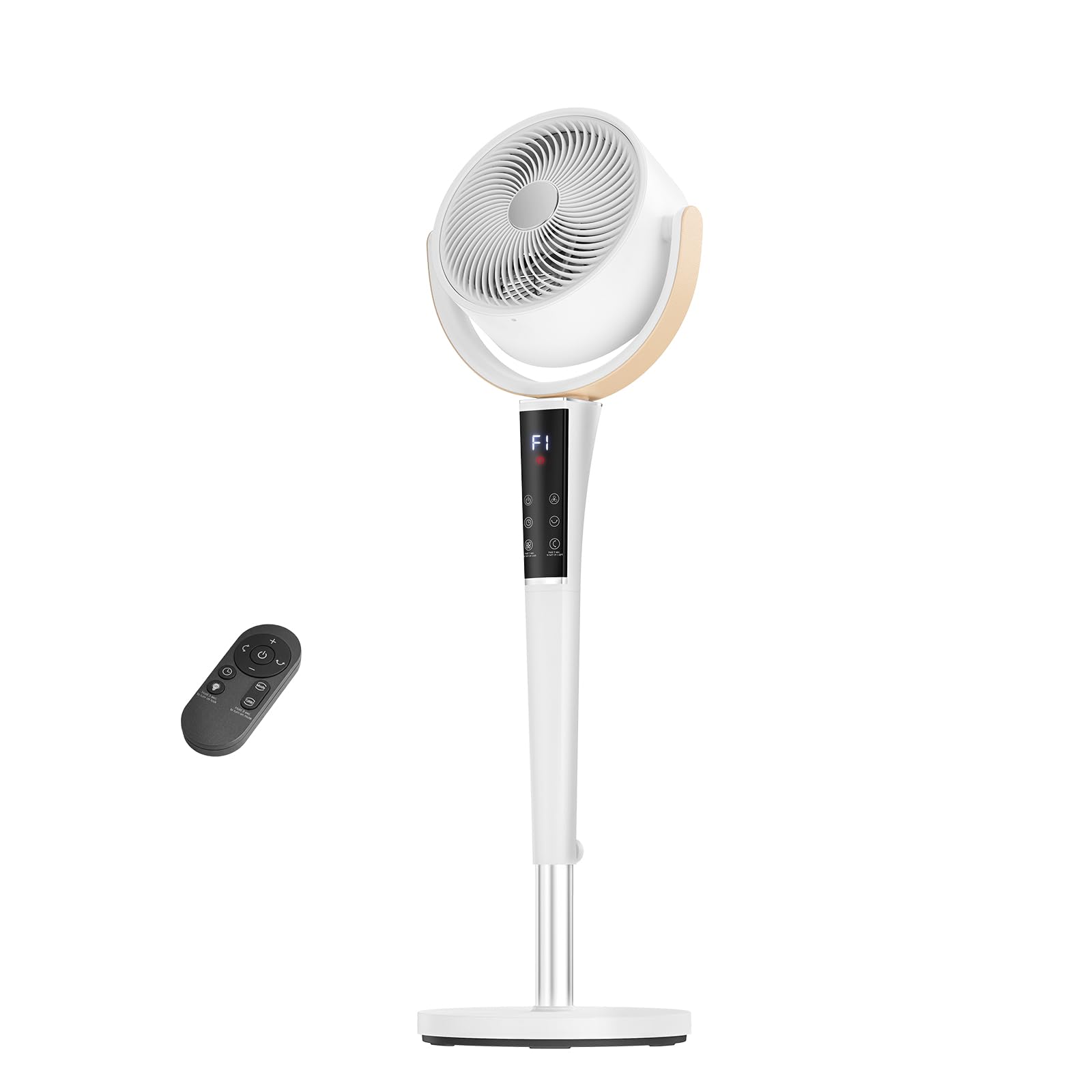
Figure 1: NEWBULIG Pedestal Fan, front view, white color. This image shows the NEWBULIG Pedestal Fan in its assembled state, featuring a white finish, a circular fan head, an adjustable height pole, and a stable round base. The digital display is visible on the fan head.
5. Operating Instructions
Your NEWBULIG Pedestal Fan can be operated using the touch panel on the fan head or the included remote control.
5.1 Control Panel & Remote Control
The fan features a digital display and touch panel for direct control. The remote control offers convenient operation from a distance.
- Power Button: Press to turn the fan ON or OFF.
- Speed Adjustment: Use the '+' and '-' buttons to cycle through 15 speed settings.
- Mode Button: Press to select from 5 wind modes: Normal, Natural, Sleep, Auto, and Turbo.
- Oscillation Button: Activates or deactivates horizontal oscillation (60°, 90°, or 120°). The fan also supports vertical airflow adjustment manually.
- Timer Button: Set the automatic shut-off timer from 1 to 12 hours. Each press increases the timer by one hour.
- LED Light Button: Toggles the soft, built-in LED center light ON or OFF. This can serve as a subtle nightlight.
- Child Lock Button: Activates or deactivates the child lock function, preventing accidental changes to settings.
5.2 Wind Modes Explained
- Normal Mode: Provides a constant airflow at the selected speed.
- Natural Mode: Simulates natural breezes by varying fan speed intermittently.
- Sleep Mode: Operates at a whisper-quiet level (20-23 dB on low settings) and gradually reduces fan speed over time to ensure undisturbed rest.
- Auto Mode: The fan automatically adjusts its speed based on the ambient room temperature.
- Turbo Mode: Delivers maximum airflow for rapid cooling.
6. Maintenance and Cleaning
Regular cleaning ensures optimal performance and extends the life of your fan.
- Unplug Before Cleaning: Always ensure the fan is unplugged from the power outlet before cleaning.
- Disassemble for Cleaning: The fan is designed for easy cleaning with fully detachable blades and a front grille. Carefully remove the front grille and fan blades according to the assembly instructions in reverse.
- Clean Grille and Blades: The front grille and fan blades are safe to rinse with water. Use a soft cloth and mild detergent if necessary. Ensure they are completely dry before reassembling.
- Clean Fan Body: Wipe the exterior surfaces of the fan body and pedestal pole with a soft, damp cloth. Do not use abrasive cleaners or allow water to drip into the motor housing.
- Reassemble: Once all parts are clean and dry, reassemble the fan. Ensure all components are securely fastened.
7. Troubleshooting
If you encounter issues with your fan, refer to the following common problems and solutions:
- Fan does not turn on:
- Check if the power cord is securely plugged into a working electrical outlet.
- Ensure the power button on the fan or remote has been pressed.
- Verify if there is a power outage or a tripped circuit breaker.
- Weak or no airflow:
- Increase the fan speed setting.
- Check if the fan blades or grilles are obstructed or dirty. Clean as per maintenance instructions.
- Ensure the fan is not placed too far from the area requiring cooling.
- Fan is making unusual noise:
- Ensure the fan is placed on a stable, flat surface.
- Check for any loose parts or foreign objects caught in the fan blades or grilles.
- If the noise persists, contact customer support.
- Remote control not working:
- Replace the batteries in the remote control.
- Ensure there are no obstructions between the remote and the fan's receiver.
- Make sure you are within the effective range of the remote control.
If the problem persists after trying these solutions, please contact NEWBULIG customer support.
8. Specifications
| Feature | Specification |
|---|---|
| Brand | NEWBULIG |
| Model Number | AC-DSV21XH-45WT |
| Colour | Pure White |
| Electric Fan Design | Floor Fan |
| Power Source | DC |
| Style | Modern |
| Product Dimensions (D x W x H) | 68.6D x 20.3W x 40.6H Centimetres |
| Adjustable Height | 37 to 45 inches |
| Special Features | Adjustable Height, LED Light, Oscillating, Remote Controlled, Timer, Child Lock |
| Controller Type | Touchpad Control, Remote Control |
| Number of Speeds | 15 |
| Wind Modes | Normal, Natural, Sleep, Auto, Turbo |
| Noise Level (low settings) | 20-23 dB |
| Wattage | 50 watts |
| Number of Blades | 5 |
| Air Flow Capacity | 1050 Cubic Feet Per Minute (CFM) |
| Voltage | 120 Volts |
| Timer | 1-12 hours |
| Oscillation | 60°/90°/120° Horizontal |
| Material Type | ABS Plastic, Polypropylene, Polycarbonate |
| Item Weight | 4.5 kg |
9. Warranty and Customer Support
NEWBULIG products are manufactured to high-quality standards. For information regarding warranty coverage, please refer to the warranty card included with your purchase or visit the official NEWBULIG website.
If you have any questions, require technical assistance, or need to report a problem with your fan, please contact NEWBULIG customer support. Contact details can typically be found on the product packaging, the official website, or your purchase documentation.