
1. Introduction
This manual provides detailed instructions for the installation, operation, and maintenance of your MirthWorld 13.1-inch Android 13 Car Radio Stereo. This head unit is custom-designed for Ford Explorer models manufactured between 2011 and 2019, offering a seamless upgrade to your vehicle's infotainment system.
The system features an 8-Core CPU, 6GB RAM, and 128GB ROM, ensuring fast performance. It includes a 13.1-inch 2K QLED touchscreen, wired and wireless CarPlay and Android Auto, 4G LTE, 5GHz WiFi, Bluetooth 5.0, and supports an AHD 1080P backup camera.
2. Setup and Installation
The MirthWorld car radio stereo is designed for plug-and-play installation in compatible Ford Explorer 2011-2019 models. This ensures that original vehicle settings and steering wheel controls are retained.
2.1 Compatibility Check
Before installation, verify compatibility with your specific Ford Explorer model year. If you are uncertain, contact customer service for assistance.
2.2 Installation Overview
Installation typically involves removing the existing factory infotainment system and connecting the new head unit using the provided wiring harness. No modifications to the vehicle's wiring are usually required for basic functionality.
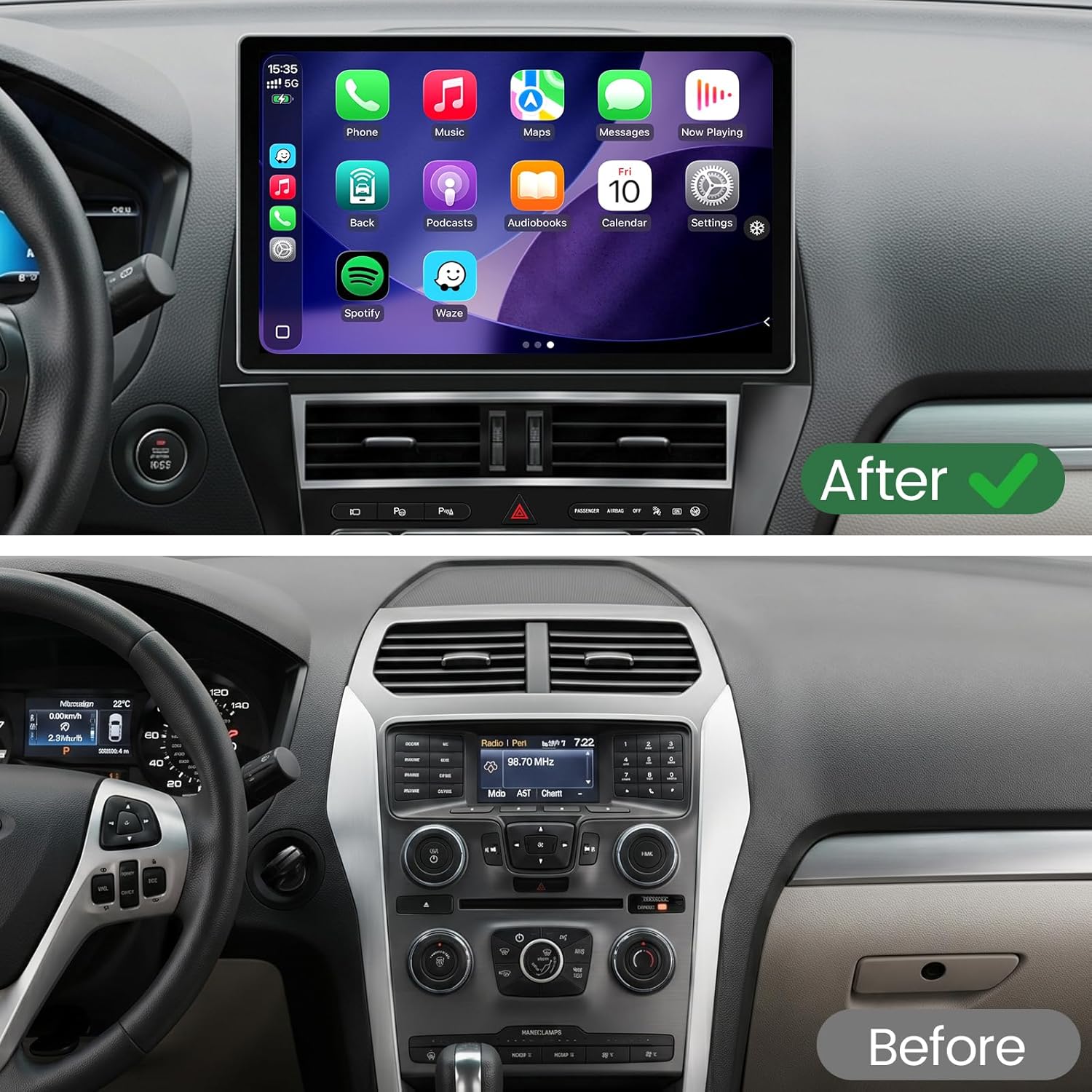
Image: Comparison of the dashboard before and after installing the 13.1-inch head unit.

Image: Illustration of the plug-and-play wiring harness for simplified connection.
2.3 Connecting Steering Wheel Controls
The system is designed to integrate with your vehicle's existing steering wheel controls. Ensure all connections are secure to retain this functionality.

Image: Close-up of a steering wheel with integrated controls for the head unit.
3. Operating Instructions
Your MirthWorld car radio stereo runs on Android 13.0, providing a versatile and user-friendly interface.
Video: An overview of the 13.1-inch 8 Core 6+128GB Head Unit's features and interface.
3.1 System Interface and Performance
The head unit is equipped with an 8-Core CPU, 6GB RAM, and 128GB ROM for fast boot times and smooth multitasking. The Android 13.0 system supports various applications like Spotify, Waze, YouTube, Netflix, and TikTok.

Image: Key features of the head unit including processor, memory, operating system, and connectivity.
3.2 2K QLED Touchscreen Display
The 13.1-inch QLED display offers a 1920x1080 (2K) resolution with anti-glare technology for clear visibility even in direct sunlight.

Image: The 13.1-inch 2K QLED display showcasing its visual quality.
3.3 CarPlay & Android Auto
Connect your smartphone via wired or wireless CarPlay and Android Auto for seamless access to navigation, calls, messages, and music. Use voice commands with Siri or Google Assistant for hands-free operation.

Image: Demonstrates the user interface for both Apple CarPlay and Android Auto.
3.4 Connectivity: 4G LTE, 5GHz WiFi & Bluetooth 5.0
The unit supports high-speed internet via 4G LTE and 5GHz WiFi, or through a mobile hotspot. Bluetooth 5.0 enables hands-free calling and music streaming.

Image: Features of 4G LTE and 5GHz WiFi connectivity, including support for a Micro-SIM card and 4G antenna.

Image: Bluetooth 5.0 functionality for hands-free calls and audio playback.
3.5 GPS Navigation
Utilize the built-in GPS navigation for real-time route planning and multiple route options, enhancing driving safety and convenience.

Image: GPS navigation screen displaying route information and map applications.
3.6 AHD 1080P Backup Camera
The included waterproof AHD rear camera provides a 170° wide-angle view. When shifting into reverse, the stereo automatically displays a clear image to assist with parking.

Image: The 1080P AHD backup camera view, highlighting wide angles and night vision capabilities.
3.7 Audio Features: FM/AM Radio & DSP
The system supports FM/AM radio and AUX input. It integrates with your original speakers and supports external amplifiers, including Digital Sound Processing (DSP) for superior sound quality.

Image: Built-in EQ and DSP settings for customizing the audio experience.

Image: FM/AM radio interface with RDS display.
4. Maintenance
4.1 Screen Cleaning
To clean the touchscreen, power off the unit and gently wipe the screen with a soft, lint-free cloth. For stubborn smudges, use a screen cleaner specifically designed for electronic displays. Avoid abrasive materials or harsh chemicals.
4.2 Software Updates
Periodically check for available software updates to ensure optimal performance and access to the latest features. Updates can typically be found through the system settings or the manufacturer's website.
4.3 General Care
Avoid exposing the unit to extreme temperatures, direct sunlight for prolonged periods, or excessive moisture. Ensure all connections remain secure to prevent intermittent issues.
5. Troubleshooting
This section addresses common issues you might encounter with your car radio stereo.
5.1 No Power
- Check all power connections to ensure they are securely plugged in.
- Verify the vehicle's fuse related to the stereo system.
- If the unit was recently installed, re-check the wiring harness connections.
5.2 No Sound
- Ensure the volume is not muted or set to a very low level.
- Check speaker connections.
- Verify audio settings in the system, including EQ and DSP.
- If using CarPlay/Android Auto, ensure audio output is directed to the car stereo.
5.3 CarPlay/Android Auto Not Connecting
- For wired connections, try a different USB cable.
- For wireless connections, ensure Bluetooth and Wi-Fi are enabled on both the phone and the head unit.
- Restart both your phone and the head unit.
- Check phone settings for CarPlay/Android Auto permissions.
5.4 GPS Signal Issues
- Ensure the GPS antenna is properly installed and has a clear view of the sky.
- Move the vehicle to an open area away from tall buildings or dense foliage.
- Check GPS settings within the system.
5.5 Touchscreen Unresponsive
- Restart the head unit.
- Ensure the screen is clean and free of debris.
- If the issue persists, contact support.
6. Specifications
| Feature | Detail |
|---|---|
| Brand | MirthWorld |
| Model Number | 8Core, 6+128GB (CG011-0225) |
| Operating System | Android 13.0 |
| CPU | 8-Core |
| RAM | 6GB |
| ROM | 128GB |
| Display Size | 13.1-inch |
| Display Resolution | 1920x1080 (2K) QLED |
| Connectivity | 4G LTE, 5GHz WiFi, Bluetooth 5.0 |
| Smartphone Integration | Wired & Wireless CarPlay, Android Auto |
| Navigation | Built-in GPS |
| Backup Camera Support | AHD 1080P (170° wide-angle) |
| Audio Output Mode | Stereo, supports DSP |
| Radio Tuner | FM/AM Radio |
| Compatible Devices | Smartphone, iPhone |
| Item Weight | 5.1 Pounds |
| UPC | 744339731739 |
7. Warranty Information
This MirthWorld car radio stereo comes with a 1-Year Manufacturer Warranty. Please retain your proof of purchase for any warranty claims. The warranty covers defects in materials and workmanship under normal use.
8. Expert Support
MirthWorld provides professional engineer support for setup, installation, and usage of your car radio stereo. If you have any questions or require assistance, please contact our product support team. To facilitate a quick response, include pictures or videos when describing your inquiry.
For support, please refer to the contact information provided with your product packaging or visit the official MirthWorld website.
