
Introduction
Thank you for choosing the Sweetcrispy 40-Inch Computer Desk. This manual provides detailed instructions for assembly, operation, and maintenance to ensure safe and efficient use of your new desk. Please read this manual thoroughly before beginning assembly and retain it for future reference.
Safety Information
- Ensure all parts are present and undamaged before assembly. Do not use if any parts are missing or broken.
- Assemble the desk on a soft, clean surface to prevent scratches.
- Do not overtighten screws during assembly to avoid damaging the material.
- Keep small parts away from children to prevent choking hazards.
- Do not stand or sit on the desk. The maximum weight recommendation is 200 pounds.
- Regularly check all fasteners to ensure they remain tight.
- Use the desk on a level surface to prevent wobbling and instability.
Package Contents
Please verify that all components listed below are included in your package:
- Desk Top (Wood)
- Metal Frame Components (Legs, X-shaped reinforcement bars)
- Fabric Drawers (2 units)
- Side Hook
- Assembly Hardware (Screws, Allen Wrench)
- Instruction Manual
Note: The exact number and type of small parts may vary slightly. Refer to the included parts diagram for precise quantities.

Setup and Assembly
Follow these steps to assemble your Sweetcrispy Computer Desk. An assembly video is also available for visual guidance.
Assembly Video Guide
Video 1: Step-by-step assembly instructions for the Sweetcrispy Computer Desk with Drawers.
Step-by-Step Instructions:
- Prepare the Desk Top: Lay the wooden desk top pieces on a soft, clean surface. Align them and secure them together using the provided screws.

Figure 2: Joining the two sections of the desk top. - Assemble the Main Frame: Attach the metal frame components to form the main desk structure. Ensure all screws are tightened securely.
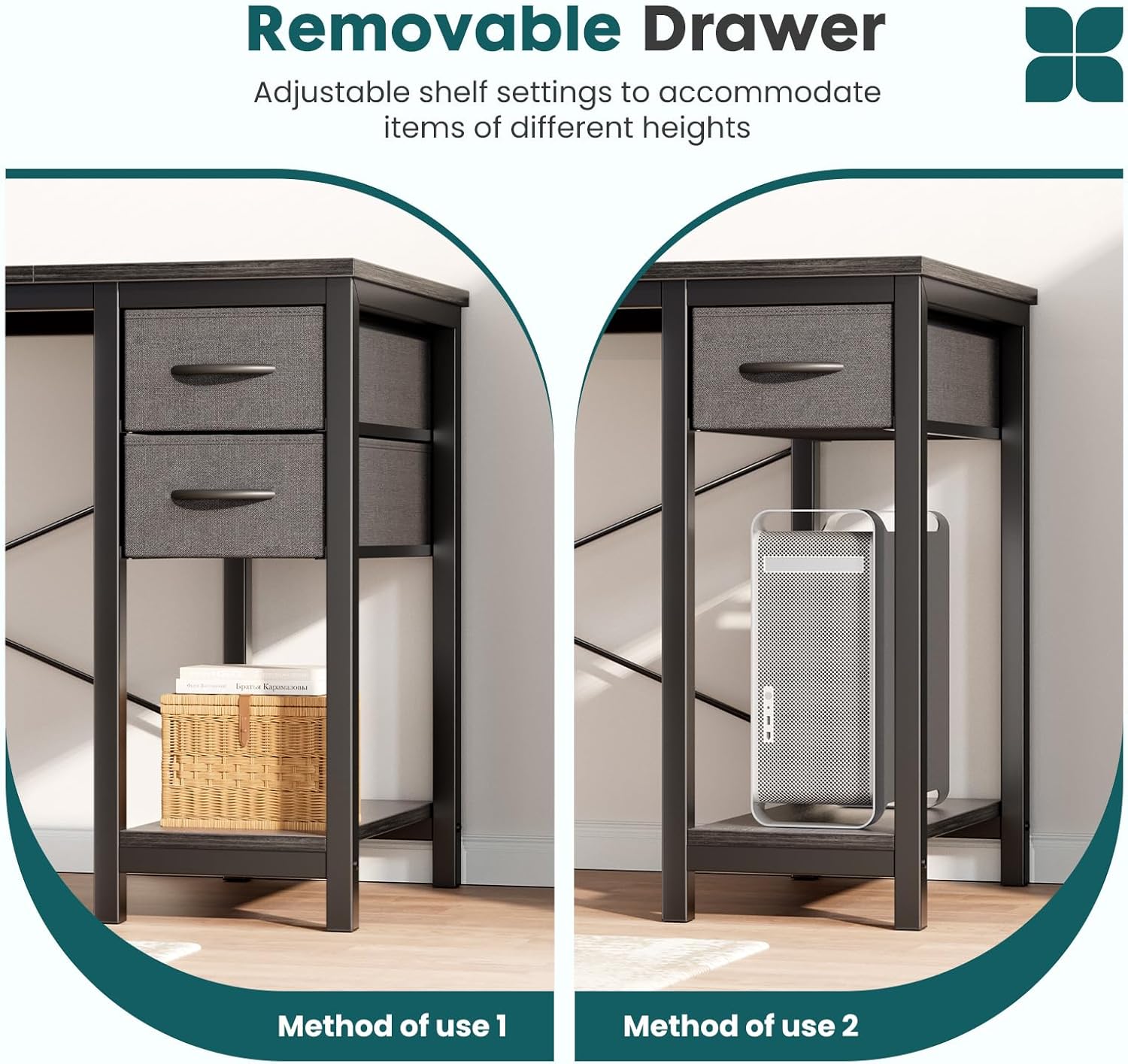
Figure 3: Attaching the metal frame pieces. - Attach X-Shaped Reinforcement: Secure the X-shaped reinforcement bars to the back of the desk frame. This provides additional stability.

Figure 4: Securing the X-shaped reinforcement for enhanced stability. - Install Side Hook: Attach the side hook to either the left or right side of the desk frame, according to your preference.

Figure 5: Attaching the convenient side hook. - Assemble Fabric Drawers: Fold and assemble the fabric drawers. Insert the bottom panel to create a sturdy box.

Figure 6: Folding and assembling the fabric drawers. - Insert Drawers: Slide the assembled fabric drawers into the designated slots on the desk frame. The drawer setup is flexible and can be positioned on either the left or right side, or removed entirely for extra workspace.

Figure 7: Inserting the fabric drawers. They can be placed on either side.
Operating Instructions
- Using the Drawers: The two fabric drawers are designed for lightweight storage of office supplies, notebooks, or personal items. They can be easily pulled out and pushed in.
- Flexible Drawer Placement: The drawers can be installed on either the left or right side of the desk. They can also be removed to create an open shelf space, suitable for a small CPU tower or additional storage.
- Side Hook Functionality: The integrated side hook is ideal for hanging headphones, bags, or other accessories, keeping your workspace tidy and organized.
- Weight Capacity: The desk is designed to support up to 200 lbs. Avoid placing excessive weight on any single point or exceeding the overall weight limit.

Maintenance
- Cleaning: Wipe the desk surfaces with a soft, damp cloth. Avoid using harsh chemicals or abrasive cleaners, which can damage the finish.
- Spills: Clean up spills immediately to prevent staining or damage to the wood surface.
- Fasteners: Periodically check all screws and bolts to ensure they are tight. Retighten if necessary to maintain stability.
- Avoid Direct Sunlight: Prolonged exposure to direct sunlight can cause fading or warping of the desk surface.
- Heat Protection: Use coasters or protective pads under hot items to prevent heat damage.
Troubleshooting
| Problem | Possible Cause | Solution |
|---|---|---|
| Desk is wobbly. | Loose fasteners; uneven floor. | Ensure all screws are tightened. Adjust the desk's position or use shims under the legs if the floor is uneven. |
| Drawers do not slide smoothly. | Improper assembly; obstruction. | Check that the drawer frame is assembled correctly and that there are no obstructions in the drawer slots. |
| Missing parts. | Packaging error. | Contact Sweetcrispy customer support with your purchase details for replacement parts. |
Specifications
- Brand: Sweetcrispy
- Model Number: GDZ-2BC40-SWBKWD
- Product Dimensions: 39.37"D x 19.69"W x 29.57"H
- Color: Black
- Style: Modern
- Base Material: Metal
- Top Material Type: Wood (MDF)
- Finish Type: Painted
- Special Feature: Scratch Resistant
- Maximum Weight Recommendation: 200 Pounds
- Assembly Required: Yes
- Included Components: Desk, 2 Fabric Drawers, Side Hook, Assembly Tools
Warranty and Support
For warranty information, replacement parts, or technical support, please contact Sweetcrispy customer service through the retailer where the product was purchased. Please have your model number (GDZ-2BC40-SWBKWD) and purchase date available when contacting support.
You can also visit the official Sweetcrispy store for more information: Sweetcrispy Store


