
1. Product Overview
The TCBWORTH 51.2V 314Ah LiFePO4 Lithium Battery is a high-capacity energy storage solution designed for various applications including home backup, off-grid systems, and solar energy integration. This battery features Grade-A lithium iron phosphate cells, a 200A Bluetooth-enabled Battery Management System (BMS), a 7-inch LCD display, and multiple communication interfaces (RS485/CAN/RS232). Each unit provides 16.1kWh of energy storage and supports parallel connection for increased capacity.
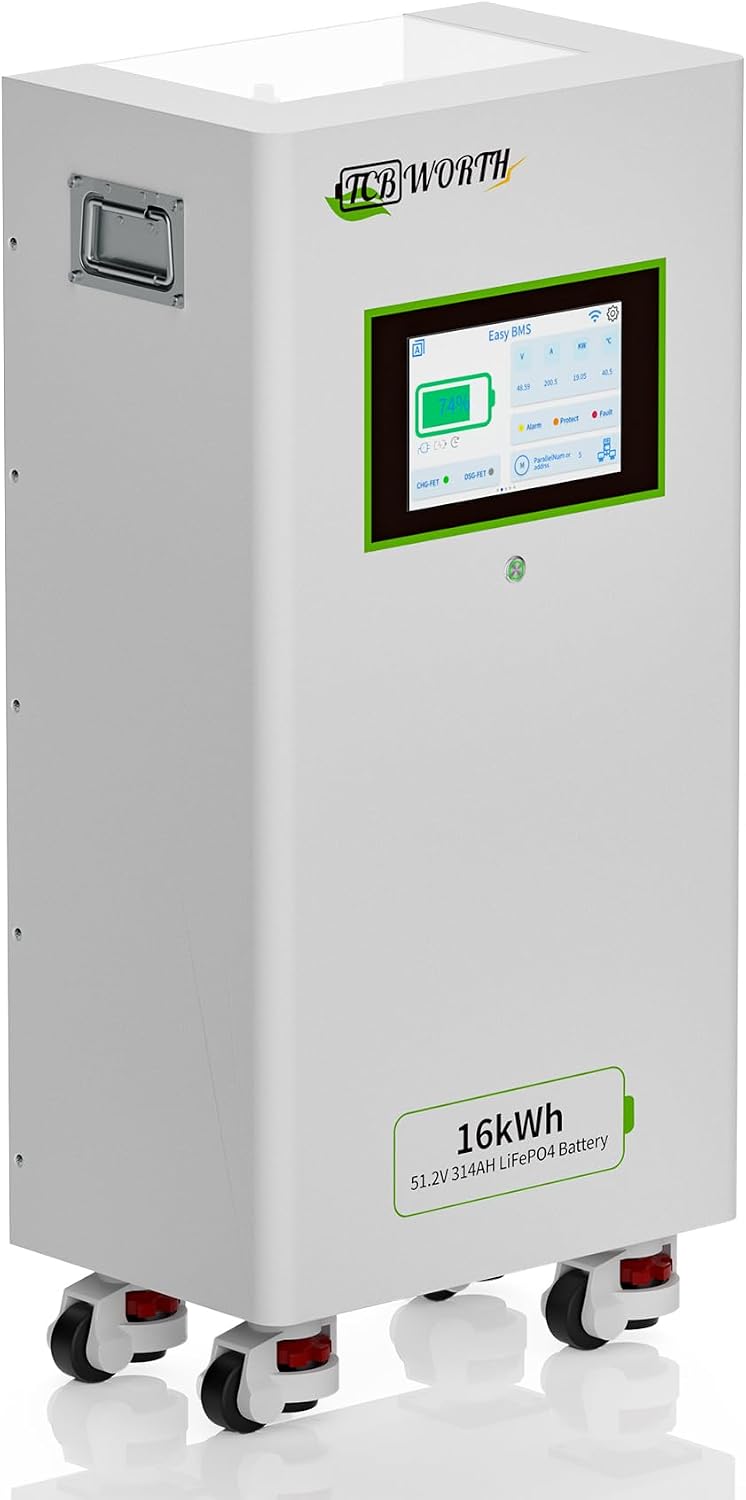
Figure 1: TCBWORTH 51.2V 314Ah LiFePO4 Lithium Battery with key dimensions.
2. Safety Instructions
Read all instructions carefully before installation and operation. Failure to follow these instructions may result in electric shock, fire, serious injury, or death.
- Qualified Personnel: Installation and maintenance must be performed by qualified personnel with knowledge of electrical systems and battery safety.
- Personal Protective Equipment (PPE): Always wear appropriate PPE, including insulated gloves, eye protection, and protective clothing, when working with batteries.
- Electrical Safety: Ensure all power sources are disconnected before making any electrical connections. Verify correct polarity before connecting the battery.
- Ventilation: Install the battery in a well-ventilated area to prevent heat buildup.
- Environment: Avoid exposure to direct sunlight, high temperatures, moisture, and corrosive substances.
- Handling: The battery is heavy (273 lbs). Use appropriate lifting equipment and techniques to prevent injury.
- No Disassembly: Do not attempt to open, disassemble, or modify the battery pack or BMS. This will void the warranty and can cause serious hazards.
- Fire Safety: Keep flammable materials away from the battery. In case of fire, use a Class D fire extinguisher (for metal fires) or a CO2 extinguisher. Do not use water.
- Emergency Procedures: In case of battery damage, leakage, or unusual odor, immediately evacuate the area and contact emergency services.
3. Installation and Setup
3.1 Delivery and Inspection
Due to the size and weight of the battery, it is shipped via truck pallet delivery. Ensure your delivery address is accessible for truck unloading. Upon delivery, carefully inspect the packaging and the battery for any signs of damage. Report any damage to the carrier and supplier immediately.

Figure 2: Truck pallet delivery process for the battery unit.
3.2 Unpacking and Packing List
Carefully unpack the battery and verify all components are present according to the packing list.
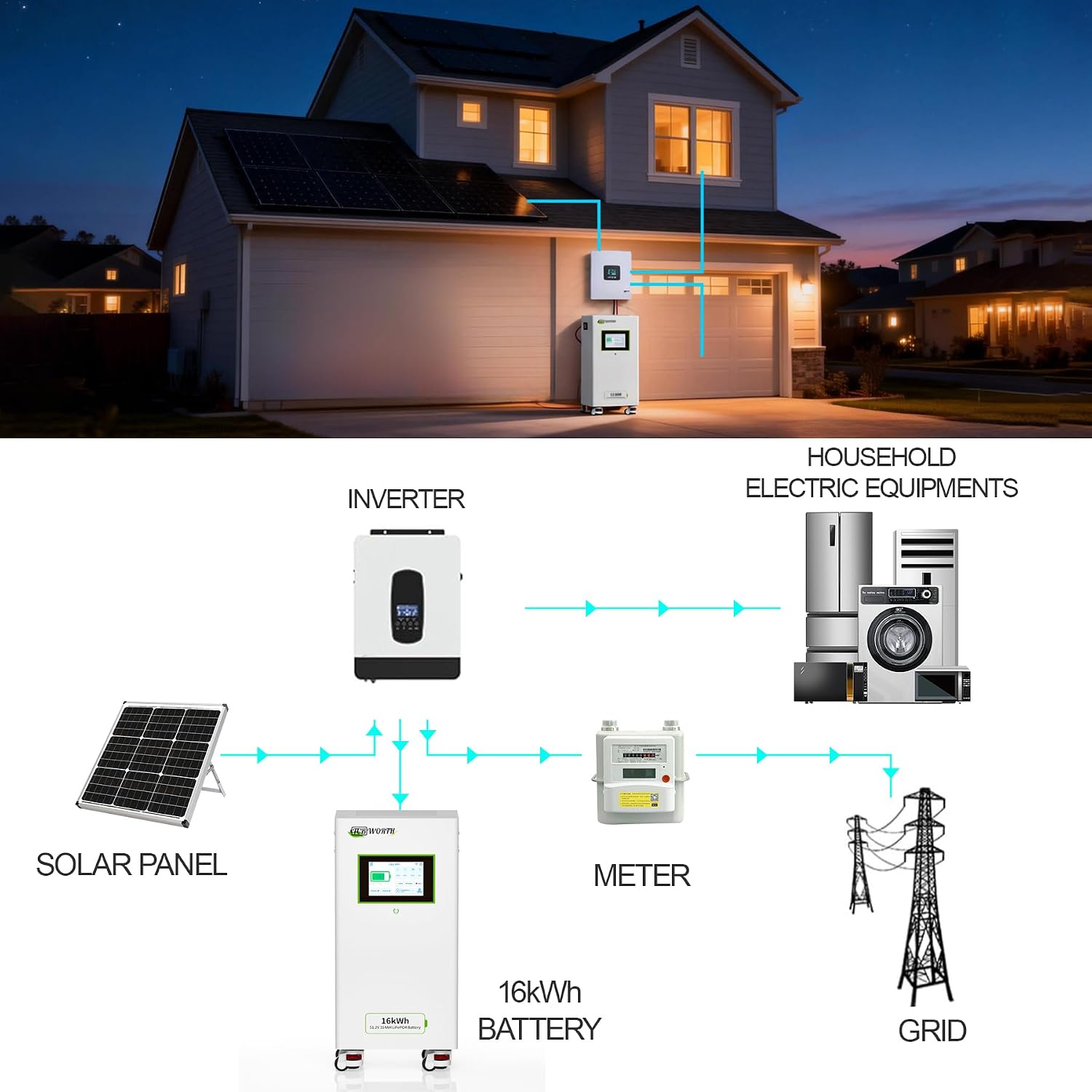
Figure 3: Contents of the TCBWORTH battery package.
The package typically includes:
- TCBWORTH Home Energy Storage Battery
- Battery Power Cables (Red/Black)
- Communication Parallel Cable (Ethernet type)
- Ground Cable (Yellow/Green)
- Product Manual
3.3 Mounting and Placement
Place the battery on a flat, stable, and non-combustible surface. Ensure adequate clearance around the battery for ventilation and maintenance. The battery is equipped with wheels for easier positioning.
3.4 Electrical Connections
Before making any connections, ensure all power sources are OFF.
- Grounding: Connect the provided ground cable to the battery's grounding terminal and to a reliable earth ground.
- Power Cables: Connect the positive (+) and negative (-) battery power cables to the corresponding terminals on the battery and your inverter/system. Ensure correct polarity.
- Communication Cables: For systems requiring communication with an inverter or for parallel battery configurations, connect the CAN/RS485/RS232 communication cables as required by your system setup. The battery supports seamless integration with mainstream inverters (e.g., Growatt, Victron, SMA, PylonTech, Lux Power Tek).

Figure 4: Typical system connection diagram for solar applications.
3.5 Parallel Connection (Optional)
The TCBWORTH battery supports parallel connection of up to 15 units to expand total energy storage capacity, reaching up to 240kWh. When connecting multiple batteries in parallel, ensure all batteries are of the same model and have similar states of charge before connecting. Use the provided communication parallel cables to link the batteries for synchronized operation.

Figure 5: Example of multiple battery units connected in parallel for increased capacity.
4. Operation
4.1 Initial Power-Up
After all connections are securely made and verified, switch on the battery's main power switch. The 7-inch LCD display will power on, showing real-time battery status.
4.2 LCD Display and Monitoring
The integrated 7-inch full-color LCD provides real-time monitoring of key battery parameters, including:
- State of Charge (SOC)
- Voltage
- Current
- Temperature
- BMS status and fault indicators

Figure 6: Real-time battery monitoring via the 7-inch LCD display and smart communication features.
4.3 Bluetooth and Communication Interfaces
The battery features a Bluetooth BMS for wireless monitoring via a dedicated mobile application. Additionally, dual CAN/RS485 and RS232 interfaces allow for wired communication with inverters, charge controllers, and other system components for advanced control and data logging. Refer to your inverter's manual for specific communication setup instructions.
4.4 Battery Management System (BMS)
The integrated 200A high-performance BMS provides comprehensive safety protection and intelligent management:
- Overcharging Protection
- Over-discharging Protection
- Overcurrent Protection
- Overheating Protection
- Cell Balancing
- Real-time Data Recording
- Flexible Adjustment of Core Parameters (via communication interface)
5. Maintenance
The TCBWORTH LiFePO4 battery requires minimal maintenance. Follow these guidelines to ensure optimal performance and longevity:
- Regular Inspection: Periodically inspect the battery for any physical damage, loose connections, or corrosion on terminals. Clean terminals if necessary, ensuring power is off.
- Environmental Conditions: Ensure the battery operates within its specified temperature range. Avoid extreme heat or cold.
- Charging: For optimal lifespan, avoid consistently deep discharging the battery. Aim to keep the State of Charge (SOC) above 20% when possible.
- Storage: If storing the battery for an extended period, charge it to approximately 50-60% SOC and store it in a cool, dry place. Recharge every 3-6 months to prevent self-discharge.
- Software Updates: Check the manufacturer's website for any available firmware updates for the BMS, which may improve performance or add features.
6. Troubleshooting
This section provides solutions to common issues. For problems not listed here, contact TCBWORTH customer support.
| Problem | Possible Cause | Solution |
|---|---|---|
| Battery not powering on | Main switch off, loose connections, deeply discharged battery, internal fault. | Ensure main switch is ON. Check all power cable connections. If deeply discharged, connect to a compatible charger. If problem persists, contact support. |
| Battery not charging | Inverter/charger fault, incorrect settings, BMS protection activated (over-voltage, over-temperature). | Verify inverter/charger operation and settings. Check battery LCD for fault codes. Ensure ambient temperature is within operating range. |
| Low capacity/short runtime | Aging battery, excessive load, incomplete charging. | Ensure battery is fully charged. Reduce load if possible. If battery is old, capacity degradation is normal over time. |
| Communication error with inverter | Loose communication cable, incorrect protocol settings, incompatible inverter firmware. | Check communication cable connections. Verify inverter and battery communication settings (CAN/RS485). Consult inverter manual. |
| Unusual noise or smell | Internal fault, overheating. | Immediately disconnect power. Evacuate the area. Do NOT attempt to fix. Contact emergency services and TCBWORTH support. |
7. Specifications
Key technical specifications for the TCBWORTH 51.2V 314Ah LiFePO4 Lithium Battery:
| Feature | Detail |
|---|---|
| Model | 51.2V 314Ah |
| Battery Type | LiFePO4 (Lithium Iron Phosphate), Grade-A Cells |
| Nominal Voltage | 51.2V |
| Nominal Capacity | 314Ah |
| Energy Capacity | 16.1 kWh (approx.) |
| BMS | Integrated 200A Bluetooth BMS |
| Display | 7-inch Full Color LCD (800x480 Resolution) |
| Communication Interfaces | Dual CAN, RS485, RS232 |
| Cycle Life | 3,000 to 10,000 cycles (at 0.5C charge/discharge, ≥80% DOD) |
| Parallel Connection | Up to 15 units (max 240kWh) |
| Product Dimensions (L x W x H) | 15.73 x 10.23 x 33.46 inches (40 x 26 x 85 cm) |
| Item Weight | 273 pounds (123.8 kg) |
| Manufacturer | TCBWORTH |

Figure 7: Internal structure highlighting Grade A battery cells and BMS.
8. Warranty and Support
TCBWORTH provides service support for this product. For warranty claims, technical assistance, or any questions regarding your battery, please contact TCBWORTH customer support.
- Customer Support: Refer to the contact information provided with your purchase or visit the official TCBWORTH website.
- Service Support: The product includes 5-year service support.
- Returns: A 30-day easy return policy is typically available.