
Grenebo SGS02Z
Grenebo 3-in-1 Soil Moisture Meter Instruction Manual
Model: SGS02Z
1. Product Overview
The Grenebo 3-in-1 Soil Moisture Meter is designed to provide essential data for plant care. It measures soil moisture, ambient temperature, and sunlight intensity, offering a comprehensive view of your plant's environment.

Image: The meter displays soil moisture percentage, air temperature, and light intensity levels on its LCD screen.
Key Features:
- 3-in-1 Monitoring: Provides real-time readings for soil moisture, ambient temperature, and sunlight intensity.
- Large LCD Screen: Offers clear and intuitive digital readings for easy data interpretation.
- Instant & Automatic Updates: Press the button for immediate updates or rely on automatic updates every minute in low-power mode.
- Versatile Use: Suitable for various environments including indoor plants, outdoor garden beds, lawns, and greenhouses.
- Durable Probe: Features a 3.5-inch graduated probe for accurate depth insertion.
Video: An overview of the Grenebo 3-in-1 Soil Moisture Meter's features and ease of use.
2. Setup
Before using your Grenebo 3-in-1 Soil Moisture Meter, you will need to install batteries.
Battery Installation:
- Locate the battery compartment on the back of the device.
- Open the battery compartment cover.
- Insert two (2) AAA batteries, ensuring correct polarity (+/-). (Batteries are not included)
- Close the battery compartment cover securely.
The device is now ready for use.
3. Operating Instructions
Follow these steps to obtain accurate readings from your soil moisture meter:

Image: Visual guide on operating the soil moisture meter.
- Power On: Press and hold the button located on the front of the device for a few seconds until the LCD screen illuminates.
- Insert Probe: Gently insert the probe into the soil at least 2.7 inches (7 cm) deep. Ensure the probe is fully submerged in the soil for accurate moisture readings. Avoid forcing the probe into hard soil to prevent damage.
- Read Data: The LCD screen will display the soil moisture percentage, ambient temperature, and light intensity.
- Soil Moisture: Displayed as a percentage (0-100%).
- Temperature: Displayed in Celsius (°C) or Fahrenheit (°F).
- Light Intensity: Displayed as a level (Low-, Low, Nor-, Nor, Hgh-, Hgh, Hgh+).
- Refresh Readings: For an instant update, briefly press the button. The device also updates automatically every minute in low-power mode.
- Switch Temperature Units: Briefly press the button to toggle between Celsius (°C) and Fahrenheit (°F) display for temperature.
- Power Off: Press and hold the button for a few seconds to turn off the device.
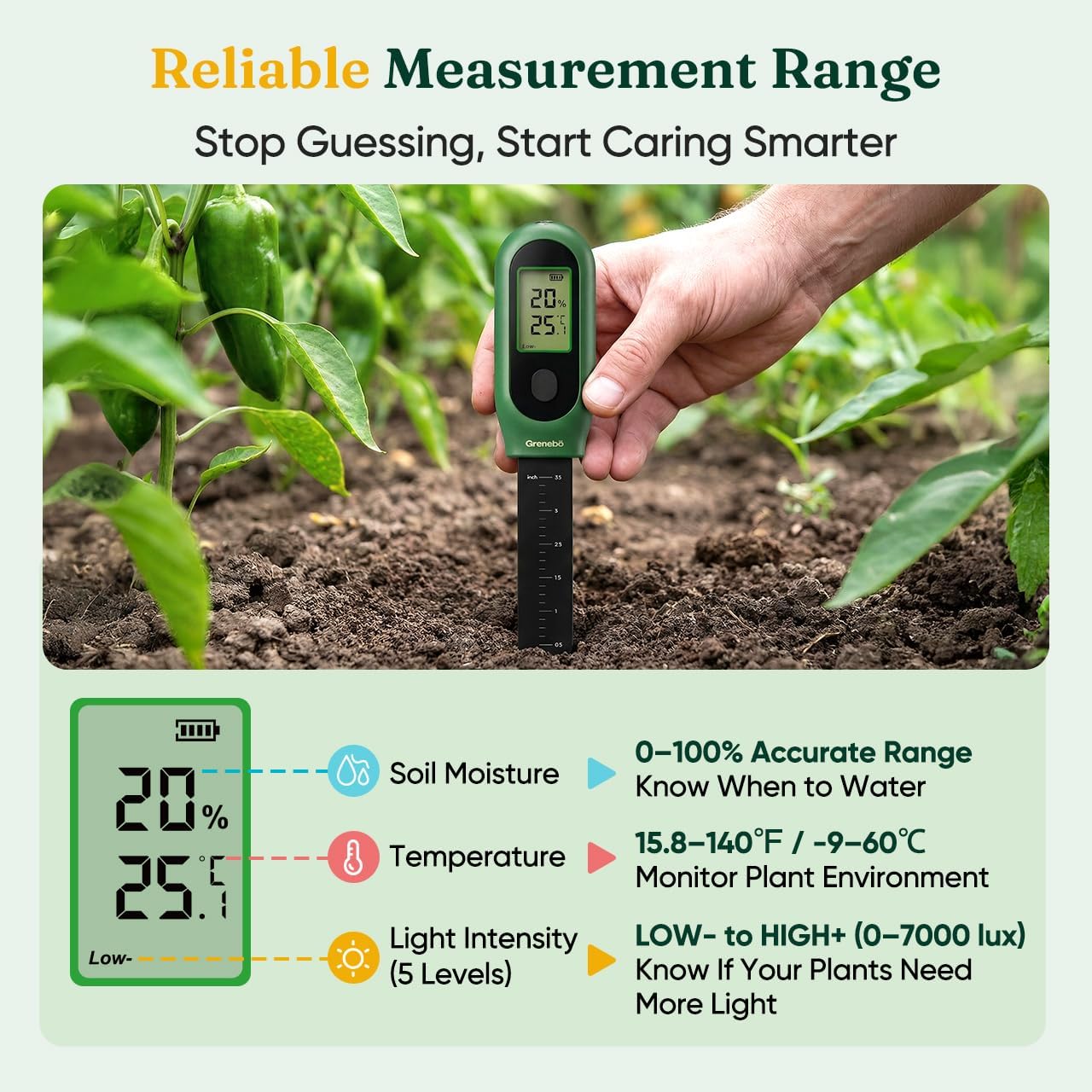
Image: The meter's reliable measurement ranges for soil moisture, temperature, and light intensity.
4. Maintenance
Proper care and maintenance will ensure the longevity and accuracy of your Grenebo Soil Moisture Meter.

Image: Guidelines for proper use and care to maintain accuracy.
- Clean After Each Use: After taking readings, wipe the probe clean and dry with a soft cloth. This prevents residue buildup and extends the product's service life.
- Storage: Do not leave the meter in soil for extended periods (over 5 minutes). Store it in a clean, dry place when not in use.
- Avoid Liquids: This device is designed for soil use only. Do not test water or other liquids.
- Handle with Care: Avoid inserting the probe into overly hard or rocky soil, as this can cause damage to the probe.
5. Troubleshooting
If you encounter issues with your Grenebo Soil Moisture Meter, refer to the following common solutions:
| Problem | Possible Cause | Solution |
|---|---|---|
| No display or weak display | Low or depleted batteries; incorrect battery installation. | Replace with fresh AAA batteries, ensuring correct polarity. |
| Inaccurate moisture readings | Probe not inserted deep enough; probe not clean; soil too sandy or loose; probe damaged. | Ensure probe is inserted at least 2.7 inches deep. Clean the probe thoroughly. Note that readings may be inaccurate in very sandy or loose growing media. Avoid hard soil to prevent probe damage. |
| Temperature unit not switching | Button not pressed correctly. | Briefly press the button to toggle between °C and °F. Avoid long presses which may power off the device. |
6. Specifications
| Feature | Detail |
|---|---|
| Model Number | SGS02Z |
| Product Dimensions | 7.28 x 1.38 x 3.07 inches |
| Item Weight | 3.52 ounces |
| Power Source | 2 x AAA Batteries (not included) |
| Measurement Functions | Soil Moisture, Ambient Temperature, Sunlight Intensity |
| Moisture Range | 0-100% |
| Temperature Range | 15.8-140°F / -9-60°C |
| Probe Length | Approximately 3.5 inches (9 cm) |
7. Warranty and Support
Grenebo stands by the quality of its products.
- 1-Year Replacement: The product includes a 1-year replacement policy for manufacturing defects.
- Customer Support: For any questions or concerns, 24/7 customer support is available. Please refer to the product packaging or manufacturer's website for contact details.
Related Documents - SGS02Z
 |
Grenebo 3-in-1 Soil Tester SGSO2Z User Manual - Moisture, Temperature, Light Comprehensive user manual for the Grenebo 3-in-1 Soil Tester (Model SGSO2Z). Learn how to measure soil moisture, temperature, and light intensity for optimal plant growth. Includes setup, operation, FAQs, and maintenance. |
 |
Grenebo Gardening Tool Set - Your Essential Garden Companion Discover the Grenebo Gardening Tool Set, featuring a comprehensive collection of nine essential tools for planting, cultivating, and maintaining your garden. Includes trowel, transplanter, rake, cultivator, weeder, shears, gloves, and watering can. |
Ask a question about this manual
Ask about setup, troubleshooting, compatibility, parts, safety, or missing instructions. Manuals+ will review the question and use this page’s manual context to help answer it.