
1. Introduction
This manual provides essential information for the safe and efficient operation of your Toshiba MW3-AC26SFI(BK) 6-in-1 Combined Microwave Oven. Please read it thoroughly before using the appliance and retain it for future reference.
The Toshiba MW3-AC26SFI(BK) is a versatile kitchen appliance combining microwave, air fryer, grill, convection, steam, and combination cooking functions. It features a 26-liter capacity, 900W microwave power, 1000W grill power, Chef Defrost, and various automatic menus.
2. Safety Instructions
Always follow basic safety precautions when using electrical appliances to reduce the risk of fire, electric shock, injury to persons, or exposure to excessive microwave energy.
- Read all instructions before use.
- Do not attempt to operate this oven with the door open as this can result in harmful exposure to microwave energy.
- Do not heat liquids or other foods in sealed containers as they are liable to explode.
- Do not use corrosive chemicals or vapors in this appliance.
- Ensure the appliance is properly grounded.
- Supervise children closely when the appliance is in use. The child safety lock feature is available.
- Do not operate the oven if it is damaged or malfunctioning. Contact qualified service personnel.
- Only use utensils suitable for microwave ovens.
- Do not overcook food.
- Clean the oven regularly and remove any food deposits.
3. Product Components
Your Toshiba MW3-AC26SFI(BK) microwave oven includes the following main components:
- Microwave Oven Unit
- Glass Turntable
- Roller Ring
- Grill Rack
- User Manual
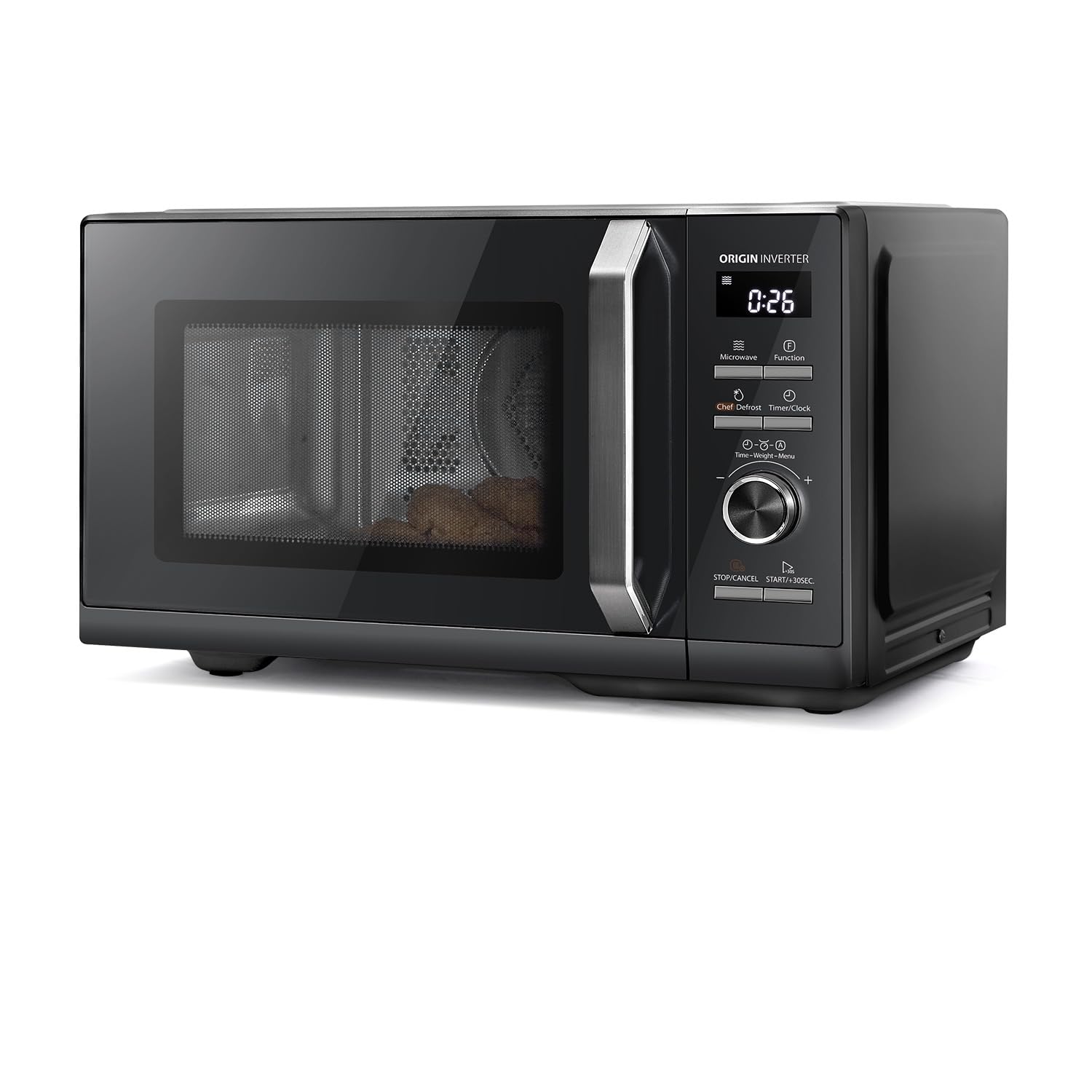
Image: Front view of the Toshiba MW3-AC26SFI(BK) 6-in-1 Combined Microwave Oven, showcasing its sleek black design and control panel.
4. Setup and Installation
- Unpacking: Carefully remove the oven and all materials from the carton. Check for any damage such as dents or a broken door. Do not install if damaged.
- Placement: Place the oven on a flat, stable surface that can support its weight and the heaviest food likely to be cooked in it. Ensure adequate ventilation space: at least 20 cm (8 inches) of space above the oven, 10 cm (4 inches) at the rear, and 5 cm (2 inches) on both sides.
- Power Connection: Plug the oven into a properly grounded 240V AC electrical outlet. Do not use extension cords.
- Turntable Assembly:
- Place the roller ring in the depression on the oven floor.
- Place the glass turntable on top of the roller ring, ensuring it sits securely.

Image: The Toshiba combined microwave oven placed on a kitchen counter, illustrating a typical installation setup.
5. Operating Instructions
The Toshiba MW3-AC26SFI(BK) offers multiple cooking modes and features. The intuitive touch controls and clear display facilitate ease of use.
5.1 Control Panel Overview
The control panel features touch buttons for various functions and a central dial for time/weight adjustments and menu selection.

Image: Close-up of the digital control panel, showing function buttons and the dial, with examples of automatic air fryer menus.
5.2 Basic Microwave Cooking
- Place food in a microwave-safe container on the turntable.
- Close the oven door.
- Press the "Microwave" button.
- Rotate the dial to select the desired cooking time.
- Press "Start/+30S" to begin cooking.
Quick Start: Press "Start/+30S" to immediately start cooking for 30 seconds at full power. Each subsequent press adds 30 seconds.
5.3 Grill Function
Use the grill function for browning and crisping food.
- Place food on the grill rack (if applicable) or a heat-resistant dish.
- Press the "Grill" button.
- Rotate the dial to select the desired grilling time.
- Press "Start/+30S" to begin.
5.4 Convection Cooking
The convection function uses hot air circulation for even baking and roasting.
- Place food in a heat-resistant dish.
- Press the "Convection" button.
- Rotate the dial to select the desired temperature.
- Press "Start/+30S" to preheat (optional).
- Once preheated, place food inside and set cooking time.
- Press "Start/+30S" to begin.
5.5 Air Fry Function
The Air Fry function uses powerful hot air circulation to cook food with less oil, achieving crispy results.
- Place food on the air fry basket or a suitable tray.
- Press the "Air Fry" button.
- Select from 10 preset menus or manually set time and temperature.
- Press "Start/+30S" to begin.

Image: Interior view of the microwave oven demonstrating the air fryer function, with a whole chicken being cooked by circulating hot air.
5.6 Steam Cooking
For healthy steam cooking, use the provided steam accessory (if included) or a suitable steam-safe container.
- Add water to the designated reservoir or bottom of the steam container.
- Place food on the steaming tray.
- Press the "Steam" button.
- Rotate the dial to select the desired steaming time.
- Press "Start/+30S" to begin.
5.7 Combination Cooking
Combine microwave power with grill or convection for faster cooking and browning.
- Place food in a suitable dish.
- Press the "Combi" button repeatedly to cycle through available combinations (e.g., Microwave + Grill, Microwave + Convection).
- Rotate the dial to set cooking time.
- Press "Start/+30S" to begin.
5.8 Chef Defrost
The Chef Defrost function intelligently adjusts power levels for uniform defrosting based on food consistency, reducing defrosting time by up to 40%.
- Place frozen food on a microwave-safe plate.
- Press the "Chef Defrost" button.
- Rotate the dial to select the food type or weight.
- Press "Start/+30S" to begin.

Image: A graph illustrating the intelligent power adjustment of the Chef Defrost function for thawing meat, showing temperature changes over time.
5.9 Automatic Menus
The oven includes 10 automatic menus for common dishes, simplifying cooking by pre-setting optimal times and power levels.
- Place food in the oven.
- Press the "Auto Menu" button (or cycle through functions until "Menu" appears).
- Rotate the dial to select the desired automatic menu (e.g., Frozen French Fries, Chicken Nuggets, Vegetables).
- Press "Start/+30S" to begin.

Image: A family gathered around a kitchen table with various dishes, including a roasted chicken, suggesting the capacity of the 26L microwave for family meals.
5.10 Child Safety Lock
To activate the child lock, press and hold the "Stop/Cancel" button for 3 seconds. The lock indicator will appear on the display. To deactivate, repeat the process.
5.11 Origin Inverter Technology
The Origin Inverter technology provides intelligent control for uniform heating, defrosting, and cooking. This prevents external overheating and ensures food is cooked thoroughly and evenly, preserving tenderness. The inverter operates quietly, maintaining a low noise level of approximately 57dB.

Image: A visual comparison demonstrating the uniform heat distribution achieved with Toshiba's Origin Inverter technology versus a non-inverter model, ensuring even cooking and tenderness.
6. Maintenance and Cleaning
Regular cleaning and maintenance ensure optimal performance and extend the lifespan of your appliance.
- Interior: Clean the oven cavity after each use with a damp cloth and mild detergent. Do not use abrasive cleaners or harsh chemicals.
- Exterior: Wipe the exterior with a soft, damp cloth. Avoid getting water into the ventilation openings.
- Turntable and Roller Ring: These can be removed and washed in warm soapy water or a dishwasher. Ensure they are dry before placing them back in the oven.
- Odor Removal: To remove odors, combine a cup of water with the juice and peel of one lemon in a microwave-safe bowl. Microwave on high for 5 minutes, then let it sit in the oven for another 5 minutes before opening the door.
- Grill Element: For grill and convection functions, ensure the interior is clean of food debris to prevent smoke or odors.
7. Troubleshooting
Refer to the table below for common issues and their solutions. If the problem persists, contact customer support.
| Problem | Possible Cause | Solution |
|---|---|---|
| Oven does not start | Door not closed properly; Power cord unplugged; Fuse blown or circuit breaker tripped. | Ensure door is firmly closed; Check power connection; Check household fuse/circuit breaker. |
| Food not cooking evenly | Food not stirred/rotated; Incorrect power level/time; Turntable not rotating. | Stir or rotate food during cooking; Adjust power/time; Check turntable assembly. |
| Sparking inside oven | Metal in oven; Food residue. | Remove any metal objects; Clean oven interior thoroughly. |
| Oven light not working | Bulb needs replacement. | Contact service for bulb replacement. |
| Display shows "Child Lock" | Child lock activated. | Press and hold "Stop/Cancel" for 3 seconds to deactivate. |
8. Specifications
| Feature | Detail |
|---|---|
| Model Number | MW3-AC26SFI(BK) |
| Brand | Toshiba |
| Capacity | 26 Liters |
| Microwave Power | 900 Watts |
| Grill Power | 1000 Watts |
| Dimensions (D x W x H) | 44.5 cm x 49.5 cm x 29 cm |
| Material | Stainless Steel (Interior) |
| Color | Black |
| Voltage | 240 Volts |
| Control Type | Button, Touch, Dial |
| Heating Method | Convection |
| Special Features | Chef Defrost, Child Safety Lock, Automatic Cooking, Grill Function, Quick Selection Keys, Origin Inverter |
| Included Components | Grill, Roller Ring |
| Turntable Diameter | 288 mm |
9. Warranty and Support
Your Toshiba MW3-AC26SFI(BK) microwave oven comes with a 1-year manufacturer's warranty from the date of purchase. This warranty covers defects in materials and workmanship under normal use.
For warranty claims, technical support, or service inquiries, please contact Toshiba customer service. Keep your proof of purchase for warranty validation.
For further assistance, you may visit the official Toshiba website or refer to the contact information provided in your product packaging.
EU Spare Parts Availability: 7 Years
Additional Resources: For a downloadable PDF version of this manual, please refer to the official product page or click here.