
Introduction
Thank you for choosing the LIKIMIO Twin Bed Frame. This manual provides detailed instructions for the assembly, operation, maintenance, and troubleshooting of your new bed frame. Please read this manual thoroughly before assembly and retain it for future reference.
Safety Information
- Exercise caution around all edges during assembly and use to prevent injury.
- Ensure all screws and bolts are securely tightened before use. Periodically check and re-tighten as necessary.
- Do not exceed the recommended weight capacity of the bed frame.
- Keep small parts away from children during assembly.
- Only use the bed frame on a flat, stable surface.
Package Contents
Before beginning assembly, verify that all components are present and undamaged. If any parts are missing or damaged, please contact customer support.
- Headboard with Sherpa fabric and integrated LED lights
- Headboard storage shelf with built-in charging station (2 AC outlets, 1 USB port, 1 Type-C port)
- Metal bed frame components (side rails, support legs, slats)
- Assembly hardware (screws, bolts, washers, Allen wrench)
- LED light remote control
- Instruction manual
Setup and Assembly Instructions
Assembly is designed to be straightforward with clear step-by-step guidance. It is recommended to have two people for easier and quicker assembly.
- Unpack Components: Carefully remove all parts from the packaging and lay them out on a clean, soft surface to prevent scratches. Identify each part using the provided parts list.
- Assemble Headboard: Attach the headboard frame components. Ensure the Sherpa fabric panel and the storage shelf with the charging station are correctly oriented.
- Attach Side Rails: Connect the side rails to the assembled headboard and footboard (if applicable). Secure with the provided hardware.
- Install Support Legs: Attach any central support legs to the bed frame for added stability.
- Place Slats: Lay the metal slats across the bed frame. The integrated memory foam strip on the slats helps eliminate noise. Ensure all slats are evenly spaced and securely fastened.
- Connect LED Lights and Charging Station: Plug in the LED light strip and the charging station power cord. Route cables safely to avoid tripping hazards.
- Final Check: Verify all connections are tight and the bed frame is stable.

Image: Diagram illustrating the dimensions of the LIKIMIO Twin Bed Frame. This image provides a visual guide to the overall size and key measurements of the assembled bed frame, including length, width, and height, which is crucial for planning room placement and understanding component sizes during assembly.
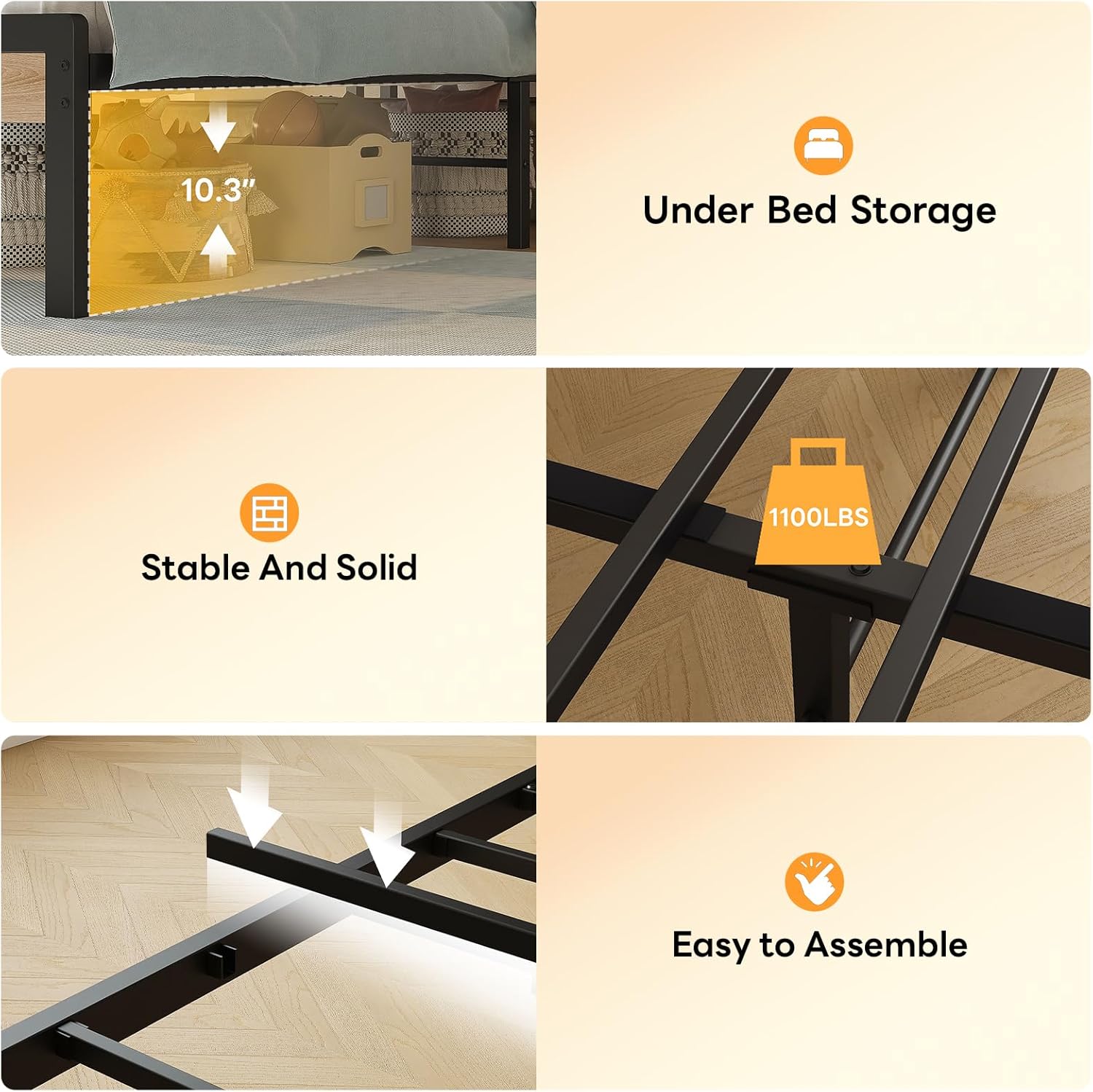
Image: A composite image highlighting key features of the bed frame. It shows the ample under-bed storage space (9.8 inches clearance), the stable and solid construction with a weight capacity of 1100 lbs, and a visual representation of the easy assembly process with interlocking metal slats. This image emphasizes the practical benefits and structural integrity of the bed frame.
Operating Instructions
LED Lights Operation
The integrated RGB LED lights can be controlled via the included remote or a mobile application.
- Power On/Off: Use the power button on the remote or app to turn the lights on or off.
- Color Selection: Choose from over 60,000 colors to customize your ambiance.
- Brightness Adjustment: Increase or decrease the light intensity to your preference.
- Mode Selection: Select various dynamic modes, including music sync, microphone mode, and customizable patterns.
- Timer Function: Set a timer for the lights to automatically turn off.

Image: A bedroom scene featuring the LIKIMIO bed frame with its LED lights illuminated and changing colors, illustrating the 'Sync Lights to Music Beats' feature. Icons for multiple colors, adjustable brightness, microphone mode, music mode, timer function, and customizable mode are displayed, along with images of the remote and mobile app for control. This image demonstrates the various functionalities of the LED lighting system.
Charging Station Usage
The headboard features a convenient charging station to power your devices.
- AC Outlets: Two 110V/12A AC outlets are available for standard electrical devices.
- USB Ports: One 5V/2A USB port is provided for charging compatible USB devices.
- Type-C Port: One 5V/2A Type-C port is available for modern devices.
- Ensure the bed frame is plugged into a wall outlet for the charging station to function.

Image: A detailed view of the bed frame's headboard, highlighting the storage shelf and the integrated charging station. The image clearly shows the two AC outlets, one USB port, and one Type-C port, with a tablet and other items placed on the shelf. This visual confirms the functionality and convenience of the charging station and storage.
Maintenance
- Cleaning: Wipe the metal frame with a damp cloth and mild detergent. For the Sherpa fabric, spot clean with a gentle fabric cleaner as needed. Avoid harsh chemicals.
- Hardware Check: Periodically inspect all screws and bolts to ensure they remain tight. Re-tighten if any looseness is detected.
- Electrical Components: Ensure the LED light strip and charging station connections are secure and free from damage.
Troubleshooting
| Problem | Possible Cause | Solution |
|---|---|---|
| Bed frame squeaks | Loose hardware; metal-on-metal contact | Tighten all screws and bolts. Ensure the memory foam strip on the slats is properly positioned to prevent metal contact. |
| LED lights not working | Power connection loose; remote battery dead; light strip damaged | Check power connection to the wall outlet and the light strip. Replace remote battery. If still not working, contact customer support. Ensure the Velcro attachment for the lights is secure. |
| Charging station not working | Bed frame not plugged in; device not compatible; charging station damaged | Ensure the bed frame's main power cord is securely plugged into a functional wall outlet. Test with a different device or cable. If issues persist, contact customer support. |
| Bed feels unstable | Loose connections; uneven floor | Re-tighten all assembly hardware. Ensure the bed is placed on a level surface. |
Specifications
- Model Number: HK-TBF-55
- Size: Twin
- Product Dimensions (L x W x H): 81.8" x 41.1" x 40.5"
- Material: Engineered Wood, Metal, Sherpa Fabric
- Color: Natural and Cream
- Item Weight: Approximately 45 lbs
- Special Features: Integrated RGB LED Lights, Storage Headboard, Charging Station (2 AC, 1 USB, 1 Type-C), Noise-Free Design, Under-Bed Storage (9.8 inches clearance)
- Compatible Mattress Size: Twin size (No box spring needed)

Image: A visual representation demonstrating that no box spring is needed for this bed frame. It shows different mattress depths (6", 10", 12") and how they fit on the platform, indicating compatibility with mattresses ranging from 8" to 12" in depth. This clarifies the bed frame's design for direct mattress placement.
Warranty Information
For specific warranty details, please refer to the warranty card included with your product or contact LIKIMIO customer support directly. Typically, warranties cover manufacturing defects under normal use conditions.
Customer Support
If you have any questions, require assistance with assembly, or need to report missing/damaged parts, please contact LIKIMIO customer support through the retailer where the product was purchased or visit the official LIKIMIO website for contact information.