
Introduction
The BETAFPV Meteor75 Pro P1 is a 1S brushless whoop quadcopter designed for cinematic and freestyle FPV flying. It features a 1080P HD VTX system and utilizes the ArtLynk protocol for low-latency, long-range communication. This manual provides essential information for setting up, operating, maintaining, and troubleshooting your Meteor75 Pro P1.

Image: The Meteor75 Pro P1 Brushless Whoop Quadcopter, showcasing its compact design.
Key Features:
- P1 Air Unit HD VTX: Delivers reliable HD video with 200mW output and over 5km range. Features a 1/2.9” CMOS sensor and 170° field of view for 1080p live footage. Optimized PID tuning for smooth, low-latency flight (~60ms).
- Matrix 1S 3IN1 HD FC: A compact and lightweight Flight Controller (FC) with integrated ESC and ELRS 2.4G RX, designed for 1S HD whoops. Ensures stable digital image transmission.
- Propulsion System: Equipped with 1102 22000KV motors and GF 45mm 3-Blade propellers, supported by a 12A ESC. Recommended with LAVA II 1S 580mAh/680mAh batteries for approximately 5:30 minutes flight time.
- Micro HD Canopy: Injection-molded for durability, impact resistance, and heat tolerance. Features an adjustable camera angle (0°–45°).
- ArtLynk Protocol: A low-latency, long-range communication protocol for drones, offering superior stability and range. Supports real-time HD video at about 60ms latency.
Setup
Package Contents:
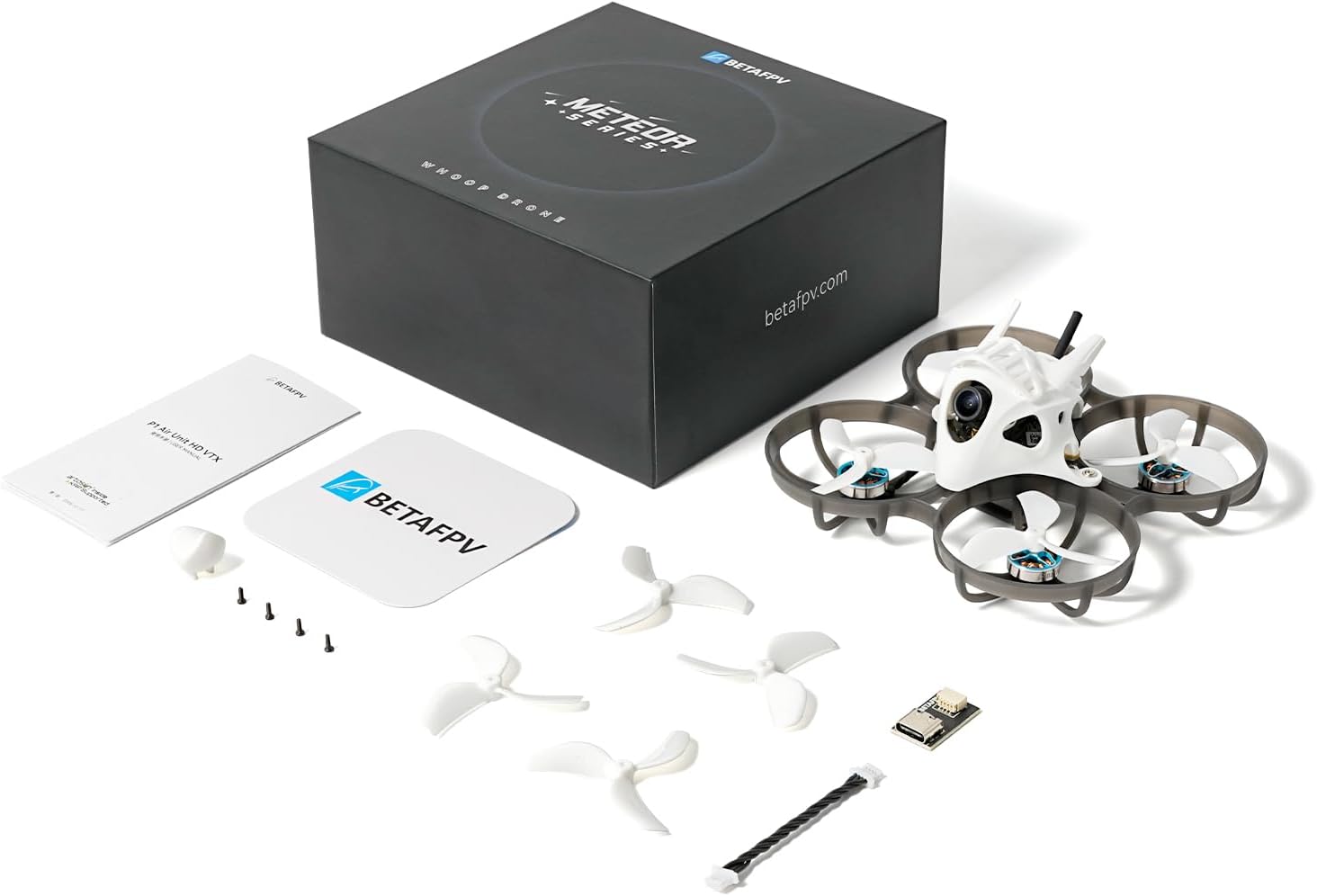
Image: All components included in the Meteor75 Pro P1 package.
- 1 * Meteor75 Pro P1 Brushless Whoop Quadcopter
- 4 * GF 45mm 3-Blade Propellers
- 1 * Type-C to SH1.0 Adapter
- 1 * SH1.0-4Pin Adapter Cable
- 4 * M1.4*4 Phillips Flat Head Screws
- 3 * Decorative Parts
- 1 * User Manual for P1 Air Unit (refer to this for detailed air unit instructions)
Firmware Compatibility and Update:
For seamless compatibility with third-party ArtLynk protocol equipment, ensure your BETAFPV devices are updated to firmware version V2.0.5 or later. The air unit requires updating via the ground station. Both the ground station and air unit must be on the same firmware version before proceeding with the air unit update. Firmware V2.0.5 is not compatible with any V1 versions (V1.0.36 / V1.0.44).

Image: Firmware update guide for ArtLynk ground station and air unit compatibility.
| Ground Station | Air Unit | Guide |
|---|---|---|
| V1 | V1 | Update to V2 Directly |
| V1 | V2 | Update the ground station to V2 |
| V2 | V1 | Reflash the V1 firmware for the ground station via SD card first, and then update both the ground station and the air unit to V2 |
| V2 | V2 | Connect Directly |
Operating Instructions
First Flight Preparation:
- Ensure all components are securely attached, including propellers and decorative parts.
- Charge the recommended LAVA II 1S 580mAh/680mAh battery fully.
- Power on your remote controller and FPV goggles (e.g., BETAFPV VR04 HD goggles).
- Connect the battery to the Meteor75 Pro P1.
- Verify video feed and control link are established.
Flight Control and Experience:
The Meteor75 Pro P1 is designed for smooth, low-latency flight, suitable for both cinematic recording and freestyle maneuvers. The ArtLynk protocol provides a stable and responsive connection.

Image: Details of the ArtLynk System and P1 HD VTX, highlighting low latency and transmission range.
- Camera Angle Adjustment: The micro canopy allows for an adjustable camera angle from 0° to 45°. Adjust this based on your flying style (lower angles for cinematic, higher for aggressive freestyle).
- Flight Time: Expect approximately 5:30 minutes of flight time with recommended LAVA II 1S 580mAh/680mAh batteries.
- HD Video Transmission: The P1 Air Unit provides crisp 1080p live footage with a 170° field of view.
Maintenance
Regular maintenance ensures the longevity and optimal performance of your Meteor75 Pro P1.
- Propeller Inspection: Regularly check propellers for any damage (bends, cracks, chips). Replace damaged propellers immediately to maintain flight stability and efficiency.
- Frame and Canopy: Inspect the frame and micro HD canopy for cracks or damage after crashes. The injection-molded canopy is designed for durability, but severe impacts can cause wear.
- Motor Cleaning: Keep motors free from dirt, dust, and debris. Use compressed air or a soft brush to gently clean them.
- Battery Care: Store batteries in a cool, dry place at storage voltage. Do not overcharge or over-discharge batteries.
- Firmware Updates: Periodically check the BETAFPV official website for new firmware updates for the flight controller and P1 Air Unit to ensure optimal performance and compatibility.
Troubleshooting
This section addresses common issues you might encounter with your Meteor75 Pro P1.
- No Video Feed / Poor Video Quality:
- Ensure the P1 Air Unit firmware is updated and compatible with your ground station (refer to Firmware Compatibility section).
- Check all connections between the camera, VTX, and flight controller.
- Verify your FPV goggles are on the correct channel and frequency.
- Ensure no obstructions are blocking the VTX antenna.
- Loss of Control / Unstable Flight:
- Inspect propellers for damage and replace if necessary.
- Check for loose motor wires or damaged motors.
- Ensure your remote controller is properly bound and calibrated.
- Verify the flight controller settings (PID tuning) are appropriate.
- Drone Not Powering On:
- Check battery charge level.
- Inspect battery connector and drone's power input for damage.
- Ensure the battery is connected with correct polarity.
- Firmware Update Issues:
- Double-check the firmware version compatibility between your ground station and air unit.
- Follow the specific update procedures outlined by BETAFPV for the P1 Air Unit and Matrix 1S 3IN1 HD FC.
- Ensure a stable USB connection during the update process.
Specifications
| Feature | Detail |
|---|---|
| Model Name | Meteor75 Pro P1 |
| Brand | BETAFPV |
| Wheelbase | 80.8mm |
| Motors | 1102 22000KV Motor |
| Flight Controller (FC) | Matrix 1S 3IN1 HD FC |
| Camera | P1 Camera |
| Receiver | Onboard Serial ELRS 2.4G |
| Video Transmitter (VTX) | P1 Air Unit |
| Flight Time | Approximately 5:30 minutes (with recommended LAVA II 1S 580mAh/680mAh battery) |
| Weight | 37.5g |
| Video Capture Resolution | 1080p |
| Connectivity Technology | ArtLynk protocol |
| Maximum Range | 5 km |
| Material | Nylon, Plastic |
| Item Dimensions (L x W x H) | 5.1"L x 5.1"W x 2.5"H |

Image: The Meteor75 Pro P1 quadcopter on a digital scale, indicating its weight of 37.5g.
Support and Warranty
Technical Support:
For an electronic version of this manual, additional technical support, or any inquiries, please contact BETAFPV via the Amazon mail system. You can also visit the official BETAFPV store for more resources and product information: BETAFPV Store.
Warranty Information:
No specific warranty information is provided within this manual. Please refer to the product packaging or contact BETAFPV customer support for details regarding warranty coverage and terms.