
1. Introduction
This manual provides essential information for the safe and efficient use of your GREENOE 36V 100Ah LiFePO4 Lithium Golf Cart Battery. Please read these instructions carefully before installation and operation to ensure optimal performance and longevity of your battery.
The GREENOE 36V 100Ah LiFePO4 battery is designed for various applications including golf carts, off-grid systems, RVs, and trolling motors. It features a built-in 200A Smart Battery Management System (BMS), an LCD display, and Bluetooth app connectivity for real-time monitoring.
2. What's Included
Upon unpacking, verify that all items listed below are present and undamaged:
- 1x GREENOE 36V 100Ah LiFePO4 Battery
- 1x 43.8V 20A Charger
- 1x LCD Screen (for real-time battery information)
- 2x Fixed Straps
- 2x M8 Terminals

Image: Components included in the GREENOE 36V 100Ah LiFePO4 Battery kit, showing the battery, charger, LCD screen, straps, and terminals.
3. Setup & Installation
The GREENOE 36V 100Ah LiFePO4 battery is designed for easy installation. Follow these steps for proper setup, especially for golf cart applications.
3.1 Physical Installation
- Prepare the Installation Area: Ensure the battery compartment is clean, dry, and free from debris. The battery dimensions are 20.6"x10.6"x8.7".
- Position the Battery: Carefully place the GREENOE LiFePO4 battery into the designated compartment. Its lighter weight (63.93 lbs) compared to lead-acid batteries simplifies this step.
- Secure the Battery: Use the provided fixed straps to secure the battery firmly in place, preventing movement during operation.

Image: A person installing the GREENOE 36V 100Ah LiFePO4 battery into a golf cart's battery compartment, highlighting its compact size and ease of placement.
3.2 Electrical Connection
Important: Ensure the golf cart's power is off before making any electrical connections. Wear appropriate safety gear, including gloves and eye protection.
- Connect Negative Terminal: Attach the negative cable from your golf cart to the negative (black) terminal of the GREENOE battery using the provided M8 terminals. Tighten securely.
- Connect Positive Terminal: Attach the positive cable from your golf cart to the positive (red) terminal of the GREENOE battery using the provided M8 terminals. Tighten securely.
Video: This video demonstrates the process of connecting the GREENOE 36V 100Ah LiFePO4 battery to a golf cart, showing the secure attachment of both negative and positive terminals.
Note: This GREENOE 36V Lithium Battery does not support series connection. It can be connected in parallel for increased capacity if needed, but always consult a qualified technician for complex parallel configurations.
4. Operating Instructions
The GREENOE 36V 100Ah LiFePO4 battery offers advanced monitoring features for optimal usage.
4.1 Real-Time Battery Monitoring
You can monitor your battery's status in two ways:
- Bluetooth APP: Download the GREENOE app on your smartphone to track battery percentage, voltage, current, capacity, and other vital information. The app also allows for remote discharge control and firmware upgrades.
- Bluetooth LCD Screen: The included LCD screen provides a direct display of real-time battery data, offering a convenient way to check status without a smartphone.
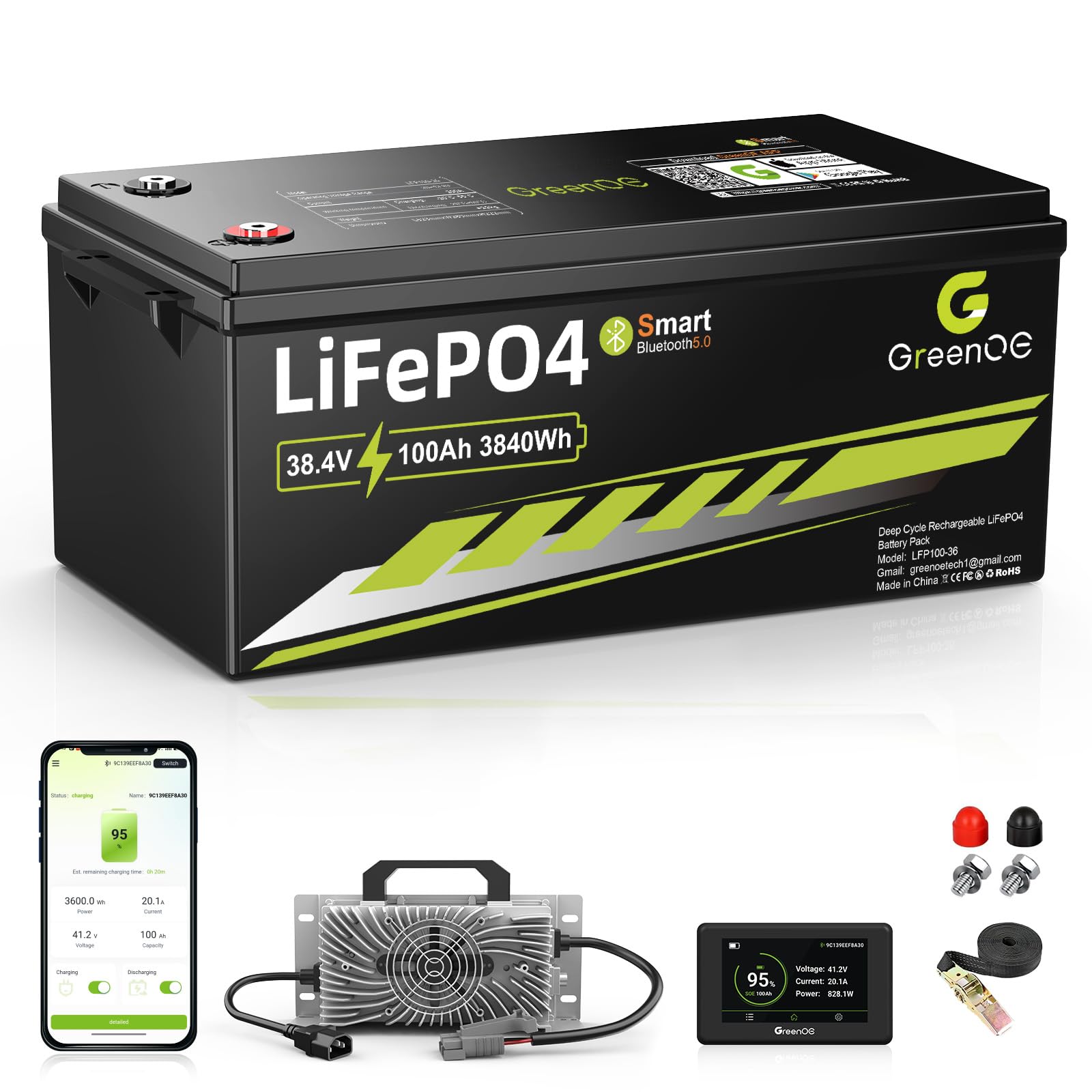
Image: The GREENOE 36V 100Ah LiFePO4 battery showcasing its Bluetooth 5.0 capabilities, allowing users to control discharge remotely, check status in real-time, and upgrade firmware via a smartphone app.

Image: Illustration of two methods for monitoring the GREENOE 36V 100Ah LiFePO4 battery: a smartphone app displaying battery data and a dedicated LCD screen showing similar information.
4.2 Battery Management System (BMS)
The built-in 200A Smart BMS provides comprehensive protection for your battery, including:
- Overcharge Protection
- Over-discharge Protection
- Overload Protection
- Overvoltage Protection
- Overcurrent Protection
- Overheating Protection
- Short Circuit Protection
- Low-temperature Cut-off Protection
These protections ensure the safety and extend the lifespan of your battery, even in challenging conditions.
5. Charging
Use the provided 43.8V 20A charger for optimal and safe charging of your GREENOE LiFePO4 battery.
- Connect the Charger: Plug the charger into a standard AC outlet.
- Connect to Battery: Connect the charger's output cable to the charging port on the GREENOE battery.
- Monitor Charging: The charger will indicate when charging is in progress and when the battery is fully charged. A full charge typically takes 5-6 hours.

Image: The GREENOE 43.8V 20A charger connected to the battery, illustrating the fast charging process which fully charges the battery in 5-6 hours.
Note: The BMS includes low-temperature cut-off protection, which stops charging if the battery temperature drops below -4°F (-20°C) to prevent damage.
6. Maintenance
The GREENOE LiFePO4 battery is designed for zero maintenance. However, following these guidelines will help ensure its long-term performance:
- Regular Inspection: Periodically check the battery terminals for cleanliness and tightness. Ensure there are no signs of corrosion or damage.
- Storage: If storing the battery for an extended period, ensure it is charged to approximately 50-70% capacity and stored in a cool, dry place within the recommended operating temperature range.
- Cleaning: Keep the battery surface clean and free from dust and debris. Use a dry cloth for cleaning. Do not use harsh chemicals or abrasive materials.
- Temperature Range: The battery's operating temperature range is -4°F (-20°C) to 140°F (60°C). Avoid operating or storing the battery outside this range.

Image: A golf cart in a snowy environment, illustrating the low-temperature cut-off protection of the GREENOE 36V 100Ah LiFePO4 battery, with temperature ranges for discharging, charging, and working.
7. Troubleshooting
This section addresses common issues you might encounter with your GREENOE LiFePO4 battery. For problems not listed here, please contact customer support.
| Problem | Possible Cause | Solution |
|---|---|---|
| Battery not charging |
|
|
| Battery not providing power |
|
|
| Reduced range or performance |
|
|
8. Specifications
Key technical specifications for the GREENOE 36V 100Ah LiFePO4 Battery (Model LFP100-36):
| Feature | Detail |
|---|---|
| Model Number | LFP100-36 |
| Nominal Voltage | 36V (38.4V) |
| Battery Capacity | 100 Amp Hours |
| Battery Cell Composition | Lithium Iron Phosphate (LiFePO4) |
| Built-in BMS | 200A Smart BMS |
| Continuous Discharge Current | 200A |
| Peak Current (35s) | 600A |
| Peak Current (1-3s) | 1000A |
| Maximum Power Output | 7.68kW |
| Cycle Life | 5000+ Deep Cycles |
| Charging Voltage | 43.8V (with included 20A charger) |
| Charging Time | 5-6 hours (with included charger) |
| Operating Temperature Range | -4°F (-20°C) to 140°F (60°C) |
| Low-Temperature Cut-off (Discharge/Charge) | -4°F (-20°C) |
| Dimensions (LxWxH) | 20.6" x 10.6" x 8.7" |
| Weight | 63.93 lbs |
| Terminals | Standard M8 |
| Connectivity | Bluetooth APP & LCD Screen |
| Parallel Connection | Supported |
| Series Connection | Not Supported |
| Recommended Uses | Golf Cart, Off Grid, RV, Trolling Motors, Solar Systems, Marine |
9. Warranty & Support
9.1 Warranty Information
The GREENOE 36V 100Ah LiFePO4 Battery comes with a 3-Year Warranty. This warranty covers defects in materials and workmanship under normal use and service. Please retain your proof of purchase for warranty claims.
The warranty does not cover damage caused by improper installation, misuse, abuse, neglect, accidents, unauthorized modifications, or natural disasters. For full warranty terms and conditions, please refer to the official GREENOE website or contact customer support.
9.2 Customer Support
If you have any questions, require technical assistance, or need to make a warranty claim, please contact GREENOE customer support through the following channels:
- Website: Visit the official GREENOE website for FAQs, support resources, and contact forms.
- Email: [Insert GREENOE Support Email Address Here]
- Phone: [Insert GREENOE Support Phone Number Here]
Please have your product model number (LFP100-36) and purchase date ready when contacting support.