
1. Introduction
This manual provides essential information for the safe and efficient use of your CiPmJn GM5208-12 Brushless Motor with Encoder. This motor is designed for high-performance applications such as Unmanned Aerial Vehicles (UAVs) and camera gimbals, offering precise control and reliable operation. Please read this manual thoroughly before installation and operation to ensure optimal performance and longevity of the product.
2. Safety Information
- Always disconnect power before performing any installation, maintenance, or inspection.
- Ensure all wiring connections are secure and correctly polarized to prevent damage to the motor or connected components.
- Avoid operating the motor beyond its specified voltage and current limits.
- Keep the motor free from dust, moisture, and extreme temperatures.
- Do not attempt to disassemble the motor or encoder, as this may void the warranty and cause irreparable damage.
- Handle the motor with care to avoid physical impact, which can affect its internal components and balance.
3. Product Overview
The CiPmJn GM5208-12 Brushless Motor with Encoder is engineered for dynamic power delivery and responsive thrust, suitable for various flight styles from racing to long-range cruising. Its lightweight design and universal mounting pattern ensure compatibility and enhanced aircraft performance.
Key Features:
- Dynamic Power Range: Supports diverse flight styles with multiple KV options.
- Responsive Thrust Delivery: Provides strong and immediate power for agile maneuvers and stable flight control.
- Lightweight Efficiency: Designed to minimize weight while maintaining durability, enhancing aircraft performance and flight time.
- Universal Mounting: Standard bolt pattern allows for easy installation on various large-scale FPV and X-Class frames.
- Integrated Encoder: The GM5208-12 variant includes an AS5048A Encoder with an aluminum case for precise position feedback.
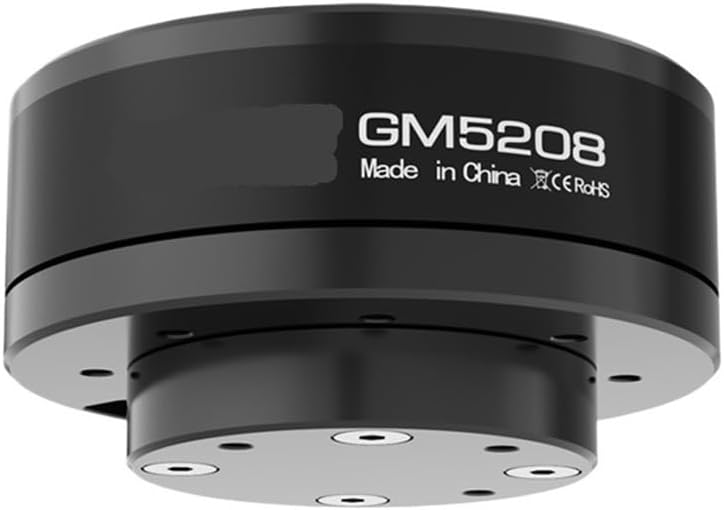
Figure 1: Front view of the CiPmJn GM5208-12 Brushless Motor with Encoder, showing the main body and shaft.

Figure 2: Rear view of the CiPmJn GM5208-12 Brushless Motor, illustrating the mounting holes and wiring exit point.
4. Setup and Installation
Proper installation is crucial for the performance and safety of your motor. Follow these steps carefully:
4.1 Mounting the Motor
- Identify the appropriate mounting points on your UAV frame or gimbal structure. The GM5208-12 features a standard bolt pattern for universal compatibility.
- Secure the motor using suitable screws (not included) that match the motor's mounting holes. Ensure the screws are not too long, as they could damage the internal windings.
- Verify that the motor is firmly attached and there is no wobble or excessive play.
4.2 Wiring Connections
The motor comes with a 610mm wire length and a 2.5mm connector. The GM5208-12 with Encoder includes an AS5048A Encoder. Connect the motor and encoder to your Electronic Speed Controller (ESC) and flight controller/gimbal controller as follows:
- Motor Wires: Connect the three motor wires to the corresponding output terminals of your brushless ESC. The order of connection may affect the motor's rotation direction; this can typically be adjusted in the ESC's settings or by swapping any two motor wires.
- Encoder Wires: Connect the AS5048A Encoder to your flight controller or gimbal controller according to its specific wiring diagram. The encoder provides precise positional feedback, which is essential for advanced stabilization and control systems. Refer to your controller's manual for detailed encoder connection instructions.
- Power Supply: Ensure your power supply (battery) is within the recommended working current range of 3-5S (3-5 cell LiPo battery).
5. Operating Instructions
Once the motor is correctly installed and wired, you can proceed with operation. Always perform initial tests in a controlled environment.
- Initial Power-Up: Connect the battery to your ESC/controller system. Listen for the ESC's initialization tones.
- Controller Calibration: If applicable, calibrate your ESC and flight/gimbal controller according to their respective manuals. This ensures proper communication and motor response.
- Test Rotation: Slowly increase the throttle or control input to observe the motor's rotation. Ensure it spins smoothly without unusual noises or vibrations. If the direction is incorrect, adjust the ESC settings or motor wire connections as described in Section 4.2.
- Encoder Functionality: Verify that the encoder is providing accurate feedback to your controller. This is typically done through the controller's software interface, where you can monitor motor position.
- Load Testing: For gimbal applications, attach the camera or payload and test the stabilization. For UAVs, perform a hover test in a safe area. Monitor motor temperature during operation.
6. Maintenance
Regular maintenance helps prolong the life and performance of your CiPmJn GM5208-12 motor.
- Cleaning: Periodically clean the motor's exterior to remove dust, dirt, and debris. Use a soft, dry brush or compressed air. Avoid using liquids or solvents.
- Inspection: Regularly inspect the motor for any signs of physical damage, loose wires, or worn bearings. Check mounting screws for tightness.
- Bearing Care: The motor bearings are sealed and generally maintenance-free. If you notice excessive noise or resistance, the bearings may need replacement by a qualified technician.
- Storage: When not in use, store the motor in a dry, cool place away from direct sunlight and corrosive materials.
7. Troubleshooting
This section addresses common issues you might encounter with your GM5208-12 motor.
| Problem | Possible Cause | Solution |
|---|---|---|
| Motor does not spin or stutters | Incorrect wiring; ESC not calibrated; faulty ESC; motor damage. | Check all motor and ESC connections. Recalibrate ESC. Test with a different ESC if possible. Inspect motor for physical damage. |
| Motor spins in the wrong direction | Incorrect motor wire sequence. | Swap any two of the three motor wires connected to the ESC, or adjust direction in ESC programming. |
| Excessive vibration or noise | Unbalanced propeller/payload; loose mounting; damaged bearings; bent shaft. | Balance propeller/payload. Tighten mounting screws. Inspect bearings and shaft for damage. |
| Motor gets excessively hot | Overloading; incorrect timing settings on ESC; insufficient cooling. | Reduce load. Check ESC timing settings. Ensure adequate airflow around the motor. Verify battery voltage is within limits. |
| Encoder not providing feedback | Incorrect encoder wiring; faulty encoder; controller not configured for encoder. | Verify encoder wiring against controller manual. Check controller settings for encoder input. |
8. Specifications
Detailed technical specifications for the CiPmJn GM5208-12 Brushless Motor with Encoder.
| Feature | Specification (GM5208-12) |
|---|---|
| Model | GM5208-12 |
| Motor Outer Diameter | 63 ± 0.05 mm |
| Motor Height | 22.7 ± 0.2 mm |
| Hollow Shaft (Outer Diameter) | 15 -0.008/-0.012 mm |
| Hollow Shaft (Inner Diameter) | 12 +0.05/0 mm |
| Wire Length | 610 ± 3 mm |
| Cable AWG | #24 |
| Motor Weight | 195 ± 0.5 g |
| Wire Connector | 2.5mm connector |
| No-load Voltage | 20V |
| No-load Current | 0.09 ± 0.1 A |
| No-load RPM | 456 ~ 504 RPM |
| Load Voltage | 20V |
| Load Current | 1A |
| Load Torque | 1800-2500 g |
| Maximum Power | 40W |
| Working Voltage Range | 3-5S (LiPo) |
| Encoder Type | AS5048A (with aluminum case) |
9. Warranty and Support
For warranty information and technical support, please refer to the seller's policies or contact CiPmJn customer service through the platform where the product was purchased. Keep your purchase receipt as proof of purchase.


