
Introduction
Thank you for choosing the kpasafe Biometric Safe SH-JA. This safe is designed to provide secure storage for your valuables, documents, and personal items. It features multiple access methods including biometric fingerprint recognition, a digital keypad, and emergency keys. Please read this manual thoroughly before operating the safe to ensure proper use and to maximize its security features.
Safety Information
- Always keep the emergency keys in a secure location away from the safe. Do not store them inside the safe.
- Ensure the safe is placed on a stable, level surface. For enhanced security, consider mounting the safe as described in the setup section.
- Do not expose the safe to extreme temperatures or high humidity.
- Avoid using abrasive cleaners or solvents on the safe's surface.
- Replace batteries promptly when the low battery indicator appears to prevent being locked out.
Package Contents
Please check the package to ensure all components are present:
- Fingerprint Safe Box x 1
- Emergency Key x 2
- Expansion Bolts x 4
- Clamping Screws x 4
- Data line (USB Type-C) x 1
- User Manual x 1
- Removable Shelf x 1
- Fireproof Document Bag x 1 (Included with some models)
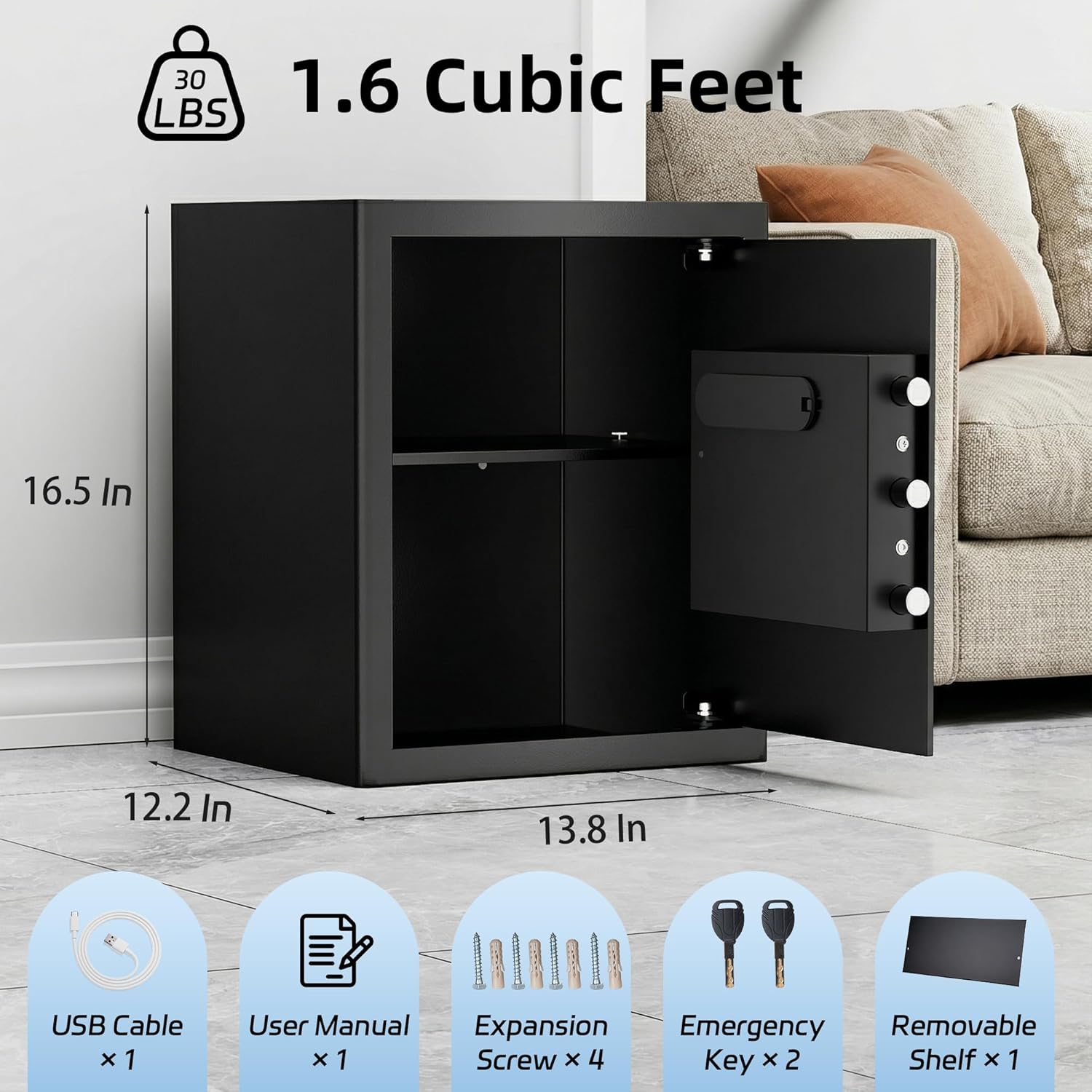
Figure 1: Safe dimensions and included accessories.
Setup
1. Initial Opening and Battery Installation
- Locate the emergency keyhole, usually hidden behind a cover on the keypad panel.
- Insert one of the emergency keys and turn it clockwise while simultaneously turning the handle to open the safe door.
- Inside the safe, locate the battery compartment on the back of the door.
- Insert 4 AA batteries (not included) into the compartment, ensuring correct polarity (+/-).
- Close the battery compartment cover.

Figure 2: Key components including the battery slot and keyhole.
2. Setting a User Code
- With the safe door open, press the internal RESET button (usually a red button or a small button labeled "SET" inside the safe door, near the battery compartment). The keypad will beep, and the indicator light will flash.
- Enter a 3-8 digit code on the keypad, then press #.
- Re-enter the same 3-8 digit code, then press # again to confirm.
- If successful, the safe will beep twice. If an error occurs, the safe will beep three times, and you will need to repeat the process.
- Test the new code with the door open before closing it.
3. Registering Fingerprints
The safe can store up to 25 unique fingerprints.
- With the safe door open, press the internal RESET button. The keypad will beep, and the indicator light will flash.
- Place your finger on the fingerprint scanner. The safe will beep and the light will flash.
- Lift your finger and place it again on the scanner from a slightly different angle. Repeat this process 4-5 times until the safe beeps twice, indicating successful registration.
- To register additional fingerprints, repeat steps 1-3 for each finger.
- Test registered fingerprints with the door open before closing it.

Figure 3: Biometric fingerprint scanner and digital keypad.
4. Mounting the Safe (Optional)
For added security, the safe can be mounted to a floor or wall using the provided expansion bolts and clamping screws.
- Choose a suitable location for mounting.
- Mark the drilling points through the pre-drilled holes at the back or bottom of the safe.
- Drill pilot holes in the marked locations.
- Align the safe with the drilled holes and secure it using the expansion bolts (for concrete/masonry) or clamping screws (for wood).
Operating Instructions
1. Opening with Fingerprint
- Place a registered finger firmly on the fingerprint scanner.
- If the fingerprint is recognized, the safe will beep once, and the door will unlock.
- Turn the handle clockwise to open the door.
2. Opening with Digital Keypad Code
- Enter your 3-8 digit user code.
- Press #.
- If the code is correct, the safe will beep once, and the door will unlock.
- Turn the handle clockwise to open the door.
3. Opening with Emergency Key
This method is used for initial opening, battery depletion, or forgotten codes/fingerprints.
- Locate the emergency keyhole cover on the keypad panel and remove it.
- Insert an emergency key and turn it clockwise.
- While holding the key turned, rotate the handle clockwise to open the safe door.
4. Type-C Backup Power
If the batteries are completely depleted and you cannot open the safe with the emergency key, you can use a Type-C USB cable to provide temporary power.
- Connect a Type-C USB cable to the port on the keypad panel and to a power source (e.g., power bank, USB adapter).
- Once powered, you can use your registered fingerprint or digital keypad code to open the safe.
- After opening, replace the internal batteries immediately.
5. Silent Mode and Alarm Protection
- Silent Mode: To mute keypad sounds for discreet access, consult your specific safe model's instructions for activation. Typically, this involves a specific key combination or a setting accessed while the door is open.
- Alarm Protection: The safe is equipped with an alarm system. If an incorrect fingerprint or digital code is entered multiple times (usually 3-5 times), the safe will enter a lockout period and emit warning beeps to deter unauthorized access. The alarm will typically sound for a set duration (e.g., 60 seconds) and the keypad will be temporarily disabled.

Figure 4: Safe protection features.
Maintenance
- Battery Replacement: Replace all 4 AA batteries when the low battery indicator light illuminates or if the keypad becomes unresponsive. Always use new, high-quality alkaline batteries.
- Cleaning: Wipe the safe's exterior with a soft, damp cloth. Do not use harsh chemicals or abrasive materials. Keep the fingerprint scanner clean and dry for optimal performance.
- Internal Shelf: The removable shelf can be adjusted or removed to accommodate larger items.

Figure 5: Removable shelf and fireproof document bag.
Troubleshooting
| Problem | Possible Cause | Solution |
|---|---|---|
| Safe does not open with fingerprint. | Finger not registered, improper placement, dirty sensor, low batteries. | Ensure finger is registered. Place finger firmly and completely on the sensor. Clean the sensor. Replace batteries. Try emergency key or keypad. |
| Safe does not open with keypad code. | Incorrect code, low batteries, keypad malfunction. | Verify the code. Replace batteries. Use emergency key. If issue persists, reset code (door open). |
| Safe is completely unresponsive. | Dead batteries. | Use emergency key to open. Replace batteries. If unable to open with key, use Type-C backup power. |
| Alarm sounds frequently. | Repeated incorrect entries. | Ensure correct code/fingerprint is used. Wait for lockout period to end. |
| Door does not close properly. | Obstruction, misaligned bolts. | Check for any items blocking the door. Ensure locking bolts retract fully when open. |
Specifications
- Brand: kpasafe
- Model Number: SH-JA
- Product Dimensions (D x W x H): 12.2" x 13.8" x 16.5"
- Capacity: 1.6 cubic feet
- Material: Alloy Steel
- Lock Type: Biometric, Electronic Combination Lock, Key
- Color: Black
- Special Features: Alarm System, Anti-Theft, Biometric Fingerprint, Combination Lock
- Mounting Type: Floor Mount
- Power: 4 x AA Batteries (not included), Type-C USB for emergency power
Warranty and Support
For warranty information and technical support, please refer to the documentation provided with your purchase or contact kpasafe customer service through the retailer where the product was purchased. Please have your model number (SH-JA) and purchase date available when contacting support.